UpKeep
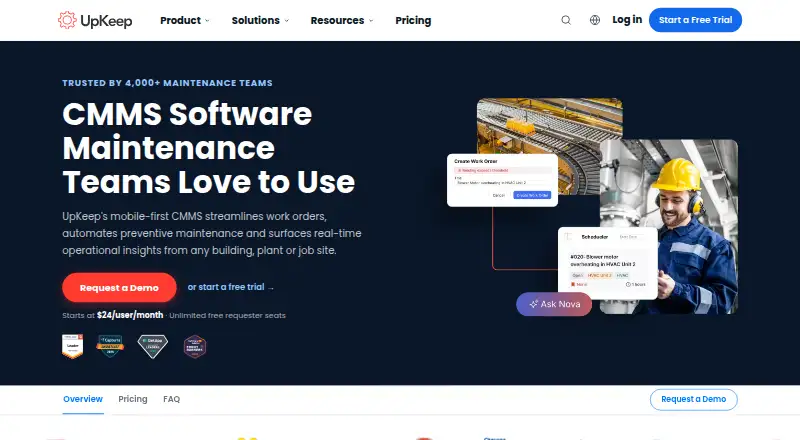
UpKeep is a mobile-first CMMS for work orders, preventive maintenance, asset management, parts inventory and operational insights.
What UpKeep is
UpKeep is a mobile-first CMMS for work orders, preventive maintenance, asset management, parts inventory and operational insights. Teams can create, assign and complete work orders from anywhere, with mobile push notifications when jobs are assigned. Nova analyzes asset history and sensor data to optimize preventive maintenance schedules. Asset records can include lifecycle tracking, maintenance history, warranties, depreciation and real-time condition monitoring. The system tracks parts quantities, reorder points and purchase orders. UpKeep says its mobile CMMS works offline and syncs automatically, and lists Android, iOS, web and API access. Integrations include SAP, Oracle, NetSuite and Microsoft Dynamics connections, plus Zapier, a public REST API and webhooks. The company says its applications are hosted on AWS in the United States, with customer data stored and processed exclusively there. The Essential plan lists unlimited work orders, unlimited locations and Nova AI. Professional and Enterprise pricing is custom.
Good
- Mobile CMMS works offline and syncs automatically.
- Tracks asset lifecycle, warranties and maintenance history.
- Inventory tools track quantities and reorder points.
- Lists ERP integrations and REST API access.
- Includes a 7-day trial.
Watch out
- No free plan is listed.
- Professional and Enterprise pricing is custom.
- Premium analytics history is limited to 30 days.
Who it suits
UpKeep suits organizations that own and operate assets and have an in-house maintenance team. Its mobile access, inventory tracking and work-order tools are relevant to teams coordinating maintenance activity.
Verdict
UpKeep combines work orders, preventive maintenance, asset records and inventory tools with mobile access. Consider its per-user starting price and custom-priced higher plans when assessing it.
Plans and prices
From UpKeep's own pricing page, checked 4 Oct 2026.
| Plan | Price | What it gives you |
|---|---|---|
| Essential | $24 a month | Unlimited work orders · Unlimited locations · Nova AI · $24/user/mo |
| Premium | $55 a month | Nova Apps · PM scheduling · Custom checklists · Parts and inventory with costing · Time and labor tracking · 30-day analytics history · $55/user/mo |
| Enterprise | Priced on request | Multi-site module support · Workflow automation · Reliability and downtime tracking · PO management · API and custom integrations · SSO and custom roles · Custom dashboards · Custom |
| Professional | Priced on request | Mobile offline mode · External request portal · Full analytics history · Asset lifecycle tracking · Signature capture for compliance · Custom |
The facts
Each one read from UpKeep's own pages, with the date it was checked.
What it does
- Asset tracking
- Asset management includes lifecycle tracking, maintenance history, warranties, depreciation, and real-time condition monitoring.checked 4 Oct 2026
- Compliance
- The Trust Center lists CCPA, GDPR, and SOC 2 Type 2 in its compliance section.checked 4 Oct 2026
- Integrations
- UpKeep lists first-party ERP connections including SAP, Oracle, NetSuite, and Microsoft Dynamics, plus Zapier, a public REST API, and webhooks.checked 4 Oct 2026
- Intended users
- UpKeep says its product is built for organizations that own and operate assets and have an in-house maintenance team.checked 4 Oct 2026
- Mobile access
- UpKeep says its mobile CMMS works offline and syncs automatically.checked 4 Oct 2026
- Parts and inventory
- The CMMS tracks parts quantities, reorder points, and purchase orders to help manage inventory.checked 4 Oct 2026
- Preventive maintenance
- Nova analyzes asset history and sensor data to optimize preventive maintenance schedules.checked 4 Oct 2026
- Product
- UpKeep describes its CMMS as a mobile-first platform for work orders, preventive maintenance, asset management, parts inventory, and operational insights.checked 4 Oct 2026
- Security
- The Trust Center says UpKeep is SOC 2 Type II examined and tested, and hosts applications on AWS in the United States with customer data stored and processed exclusively in the United States.checked 4 Oct 2026
- Support
- UpKeep links to a support center for help and tutorials and offers free courses through its website.checked 4 Oct 2026
- Work orders
- The product supports creating, assigning, and completing work orders from anywhere, with mobile push notifications when a job is assigned.checked 4 Oct 2026
The company
- Company history
- UpKeep says CEO Ryan Chan brought the company to life in 2015 after identifying maintenance work-order problems at a manufacturing plant.checked 4 Oct 2026
- Headquarters
- Los Angeles, California, United Stateschecked 23 Sep 2026
Money
- Plan limits
- Premium includes 30-day analytics history, while Professional lists full analytics history and Enterprise lists API and custom integrations and SSO.checked 4 Oct 2026
The full review of UpKeep
Overview
UpKeep is a mobile-first computerized maintenance management system for teams that manage work orders, preventive maintenance, assets and parts inventory. It is best suited to organizations with assets and an in-house maintenance team. Its breadth—from work orders to asset records and inventory—makes it a credible maintenance hub, but the per-user starting price and custom-priced upper tiers make plan fit important.
Key features
Work orders can be created, assigned and completed from anywhere, with push notifications when a job is assigned. That supports technicians who need to respond while away from a desk; the value depends on whether the rest of the team can keep assignments and records current.
Nova analyzes asset history and sensor data to help optimize preventive maintenance schedules. Asset records cover lifecycle, maintenance history, warranties, depreciation and real-time condition monitoring, giving maintenance teams a wider view than a work-order queue alone. Parts tracking includes quantities, reorder points and purchase orders, which can help teams connect maintenance activity to stock management.
UpKeep says its mobile CMMS works offline and syncs automatically. That is a practical advantage for technicians working without a reliable connection, although offline mode is a Professional-tier feature. Integrations include first-party connections to SAP, Oracle, NetSuite and Microsoft Dynamics, as well as Zapier, a public REST API and webhooks. Professional includes API and custom integrations at custom pricing; Enterprise lists API and custom integrations among its features.
The Trust Center says UpKeep is SOC 2 Type II examined and tested, and that its applications run on AWS in the United States, with customer data stored and processed exclusively there. Its compliance section lists CCPA, GDPR and SOC 2 Type 2. A support center offers help and tutorials, and the company provides free courses through its website.
Pricing
UpKeep has no free plan and offers a 7-day trial. Its entry point is $24/user/mo; because the price is per user, the cost rises with the team rather than staying fixed as seats are added.
- Essential — $24/user/mo: Includes unlimited work orders, unlimited locations and Nova AI. It is the lowest-cost route for teams that need core work-order and location coverage, but it does not include the PM scheduling, parts and inventory costing, or time and labor tracking included in Premium.
- Premium — $55/user/mo: Adds Nova Apps, PM scheduling, custom checklists, parts and inventory with costing, and time and labor tracking. Analytics history is limited to 30 days, so teams that need a longer view should compare the custom-priced tiers.
- Professional — custom pricing: Includes mobile offline mode, an external request portal, full analytics history, asset lifecycle tracking and signature capture for compliance. It suits teams that need those operational controls, but its custom price makes it harder to compare costs upfront.
- Enterprise — custom pricing: Adds multi-site module support, workflow automation, reliability and downtime tracking, PO management, API and custom integrations, SSO and custom roles, and custom dashboards. It is aimed at organizations with more complex site, workflow or integration needs; teams without those requirements may not need to step up from lower tiers.
Platforms
UpKeep supports Android, iOS and web, and provides an API. That combination covers mobile technicians, desktop-based coordination and integrations; offline mobile access is reserved for Professional.
Who it's for
UpKeep is most appropriate for organizations that own and operate assets and have an in-house maintenance team. Its combination of maintenance scheduling, asset history, inventory controls and work orders is especially relevant when those jobs need to sit in one system. A small team seeking a free starting point should look elsewhere, as UpKeep has no free plan.
Pros and cons
- Pro: Work orders, preventive maintenance, asset records and parts tracking share one CMMS, reducing the need to manage those maintenance workflows separately.
- Pro: Mobile work-order access and offline capability support field work, though offline mode requires Professional.
- Pro: Connections to major ERP systems, Zapier, a public REST API and webhooks give teams several routes to integrate UpKeep with other systems.
- Con: The 7-day trial is brief for a team evaluating a maintenance system, and there is no free plan to continue with after it.
- Con: Premium analytics history stops at 30 days; full history sits in the custom-priced Professional tier.
- Con: Professional and Enterprise use custom pricing, leaving teams that need their advanced capabilities without a published price to compare against the per-user tiers.
Alternatives
Choose SRVO instead if you want a free, bounded starting plan: Maintain covers one site, 15 assets and two users, with work orders, PM, assets, a public request page, reports and CSV export, plus an installable mobile app. That cap makes it a different fit from UpKeep’s paid, per-user entry tier.
Cove Building Operations is another paid option, with custom pricing tailored to a portfolio and white-glove onboarding included. Consider it if that onboarding and portfolio-tailored approach better matches your needs.
For other options, compare PropExcel, Property Meld, TaskEstate, ROCC Core, Fentrica and FMX.
Browse the category pages for CMMS Software, Work Order Management Software, Facilities Management Software, Property Maintenance Management Software, Property Maintenance Software and Church Facility Management Software.
Verdict
Choose UpKeep if your organization has an in-house maintenance team and wants work orders, preventive maintenance, asset history and inventory in one mobile-first system. Its breadth and integration options are the main reasons to choose it; the per-user cost, 7-day trial and custom-priced tiers are reasons to look elsewhere if you need a free option or predictable pricing for advanced capabilities.
Alternatives to UpKeep
- 1

Oracle Primavera Cloud
AndroidiOSWebAPI7.6 - 2

FMX
AndroidiOSWebAPI6.6 - 3
Anaplan
AndroidiOSWebAPI6.5 - 4
CBRE CostLab
Web6.5 - 5
Siemens Origin
AndroidiOSWebAPI6.4 - 6
Aurigo Masterworks
AndroidiOSWeb6.3