Terma
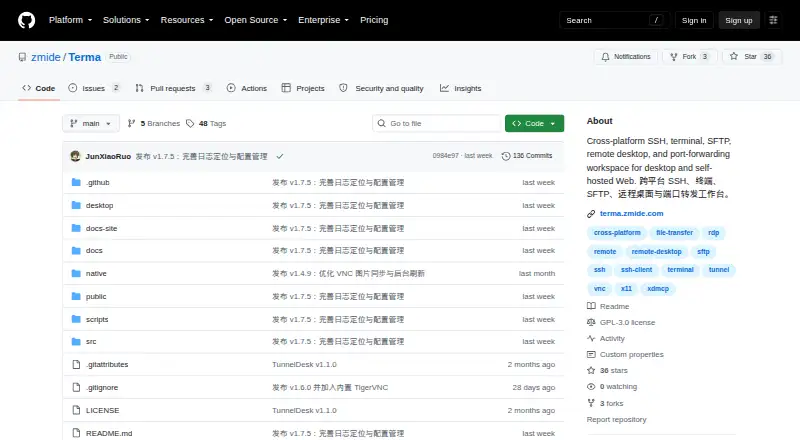
Terma is a remote connection workspace for desktop and self-hosted Web environments.
What Terma is
Terma is a remote connection workspace for desktop and self-hosted Web environments. It brings SSH, terminals, SFTP, remote desktops, port forwarding, and batch commands together, with support for RDP, VNC, XDMCP, FTP/FTPS, Telnet, and serial connections as well as SSH. SSH authentication supports passwords, private keys, and SSH Agent; a wizard can generate Ed25519 keys and deploy public keys. Terminal tools include multi-session workspaces, synchronized input across selected terminals, command snippets, and logs. SFTP supports browsing, editing, transfers, permissions, compression, and synchronization between local and remote directories. Terma stores connections, forwarding rules, settings, and task state in SQLite, with database backup and restore. It is free under the GNU General Public License v3.0, with desktop builds for Windows, macOS, and Linux and Web mode for Linux servers and Termux. The maker describes mobile Web access. Terma listens on loopback by default; for LAN access, the README recommends a Web password and warns against exposing it directly to the public Internet. XDMCP is unencrypted and intended only for a trusted LAN. The v1.7.5 macOS packages are not code-signed or notarized, and Gatekeeper may report that the app is damaged or cannot be opened.
Good
- Supports SSH and several other connection protocols.
- Provides SFTP browsing, editing, transfers, and synchronization.
- Includes local, remote, and SOCKS5 dynamic SSH forwarding.
- Free and licensed under GPL v3.0.
- Supports Windows, macOS, Linux, and Web mode.
Watch out
- Maker warns against direct public Internet exposure.
- XDMCP is unencrypted and intended for trusted LANs.
- v1.7.5 macOS packages are not code-signed or notarized.
- Gatekeeper may block opening macOS packages.
Who it suits
Terma suits people managing remote systems who want terminal, file transfer, remote desktop, and forwarding tools in one workspace. It supports desktop use and self-hosted Web deployment.
Verdict
Terma combines a broad set of remote connection, terminal, and file tools in a free workspace. Pay attention to its network security guidance and the macOS release limitation before deploying it.
Plans and prices
From Terma's own pricing page, checked 11 Oct 2026.
| Plan | Price | What it gives you |
|---|---|---|
| Terma | Free | GPL-3.0 licensed · desktop and self-hosted Web |
The facts
Each one read from Terma's own pages, with the date it was checked.
What it does
- Configuration security
- The README describes configuration encryption, protected runtime data, and access-token or Web-password authentication.checked 11 Oct 2026
- Connection protocols
- It supports RDP, VNC, XDMCP, FTP/FTPS, Telnet, and serial connections in addition to SSH.checked 4 Oct 2026
- Credential protection
- Terma supports configuration encryption and states that sensitive runtime data should be protected.checked 4 Oct 2026
- Data storage
- Terma stores connections, forwarding rules, settings, and task state in SQLite and supports database backup and restore.checked 4 Oct 2026
- File management
- SFTP supports file browsing, editing, transfers, permissions, compression, and synchronization between local and remote directories.checked 4 Oct 2026
- File transfer
- Its SFTP tools support browsing, editing, transfers, directory synchronization, and file operations such as compression and permission changes.checked 11 Oct 2026
- Integrations
- The README names VS Code and custom editors for remote-file editing, and Tailscale, ZeroTier, or WireGuard as private-network options.checked 11 Oct 2026
- License
- The repository states that Terma is released under the GNU General Public License v3.0.checked 11 Oct 2026
- Network security
- The README advises against exposing Terma directly to the public Internet and says XDMCP is unencrypted and intended only for a trusted LAN.checked 11 Oct 2026
- Port forwarding
- It supports local, remote, and SOCKS5 dynamic SSH forwarding, with templates and automatic reconnection options.checked 11 Oct 2026
- Product
- Terma combines SSH, terminals, SFTP, remote desktops, port forwarding, and batch commands in one workspace.checked 4 Oct 2026
- Protocols
- The project lists RDP, VNC, XDMCP, FTP/FTPS, Telnet, and serial connections alongside SSH.checked 11 Oct 2026
- Purpose
- Terma combines SSH, terminals, SFTP, remote desktops, port forwarding, and batch commands in one workspace.checked 11 Oct 2026
- Release
- The latest release page opened is v1.6.4, dated September 7, 2026, and describes maintenance fixes and an updated SFTP transfer library.checked 11 Oct 2026
- Security
- The service listens on loopback by default; the maker advises setting a Web password for LAN access and warns against exposing Terma directly to the public Internet.checked 4 Oct 2026
- SSH
- It supports password, private-key, and SSH Agent authentication, plus host fingerprint confirmation and warnings when trusted host keys change.checked 11 Oct 2026
- SSH authentication
- SSH authentication supports passwords, private keys, and SSH Agent, and includes an Ed25519 key-generation and public-key deployment wizard.checked 4 Oct 2026
- Terminal features
- Terminals support multi-session workspaces, synchronized input across selected terminals, command snippets, and terminal logs.checked 4 Oct 2026
- Use case
- The maker describes Terma as a remote connection workspace for desktop and self-hosted Web environments.checked 4 Oct 2026
- Web access
- The service listens on loopback by default, and the README recommends setting a Web password for LAN access.checked 11 Oct 2026
Where it runs
- Desktop platforms
- Desktop builds are available for Windows, macOS, and Linux.checked 4 Oct 2026
- macOS release limitation
- The v1.7.5 release page says macOS packages are not code-signed or notarized and Gatekeeper may report that Terma is damaged or cannot be opened.checked 4 Oct 2026
- Platforms
- Desktop builds are available for Windows, macOS, and Linux; Web mode is supported on Linux servers and Termux.checked 11 Oct 2026
The company
- Maker
- The maker’s GitHub organization says it was founded in 2017 and describes its work as network services and software development.checked 4 Oct 2026
The full review of Terma
Terma is a free, open-source workspace for remote connections, terminal sessions, and file management. It suits administrators and technical users who move between several systems and connection types. Its breadth is useful, though Web access calls for careful network setup.
Overview
Terma brings SSH, SFTP, remote desktops, port forwarding, and batch commands together in a desktop app or self-hosted Web environment. That makes it a practical fit for people who handle command-line work alongside file transfers or graphical remote access. The trade-off is a broad toolset that requires care: synchronized terminal input can affect several machines, and the project explicitly warns against exposing its Web service directly to the public Internet.
Key features
Connections and terminal work
SSH supports password, private-key, and SSH Agent authentication. An Ed25519 wizard helps generate keys and deploy public keys, while host-fingerprint confirmation and warnings about changed trusted keys help users notice unexpected host identity changes. RDP, VNC, XDMCP, FTP/FTPS, Telnet, and serial connections extend the workspace beyond SSH, which is useful in mixed environments. XDMCP is unencrypted and belongs only on a trusted LAN.
Multi-session workspaces, synchronized input across selected terminals, command snippets, and terminal logs support repeated work across connections. Synchronized input can save time when applying a command to several sessions, but it also magnifies mistakes: one command may affect every selected machine.
Files and forwarding
SFTP supports browsing and editing remote files, transfers, permission changes, compression, and synchronization between local and remote directories. That range makes Terma more useful than a terminal-only client when routine file work is part of the same remote session. VS Code and custom editors can be used for remote-file editing.
SSH forwarding covers local and remote tunnels as well as SOCKS5 dynamic forwarding. Templates and automatic reconnection options help with recurring setups. Terma also keeps connections, forwarding rules, settings, and task state in SQLite, with database backup and restore for preserving that configuration.
Security and Web access
Terma supports configuration encryption and says sensitive runtime data should be protected. Web mode listens on loopback by default; for LAN access, the maker recommends setting a Web password. The project advises against exposing Terma directly to the public Internet and names Tailscale, ZeroTier, and WireGuard as private-network options. This is a sensible fit for users prepared to manage access deliberately, not for someone seeking an Internet-facing service with little setup.
Pricing
Terma has one plan: Terma costs free. It is GPL-3.0 licensed and includes desktop and self-hosted Web use. There is no paid tier or trial to weigh against it; the main cost is the user's own setup and security management, particularly for Web deployment.
Platforms
Desktop builds are available for Windows, macOS, and Linux. Web mode runs on Linux servers and Termux, and the maker describes mobile Web access. The project therefore covers desktop use and self-hosted access, though the Web deployment requires attention to authentication and network exposure.
On macOS, the v1.7.5 release page warns that packages are not code-signed or notarized, so Gatekeeper may report that Terma is damaged or cannot be opened. That friction makes it a less convenient choice for Mac users who expect a standard signed installation.
Who it's for
Terma is best for system administrators and technical users who need SSH, terminal sessions, file transfers, forwarding, and other remote protocols in one workspace. It is especially relevant when self-hosting is acceptable and the user can keep Web access on a trusted network with appropriate authentication. Someone who needs a polished, publicly exposed remote-access service, or a straightforward signed macOS install, should look elsewhere.
Pros and cons
- Broad remote access: SSH, RDP, VNC, XDMCP, FTP/FTPS, Telnet, and serial support can cover varied systems in one workspace.
- Useful terminal and file tools: Multi-session work, snippets, logs, SFTP editing, synchronization, and file operations suit users combining command-line and file tasks.
- Flexible forwarding: Local, remote, and SOCKS5 tunnels, templates, and reconnection options help with recurring connections.
- Free and open source: The GPL-3.0 license and free desktop and self-hosted Web plan avoid subscription costs.
- Web access needs deliberate security: The project warns against direct public Internet exposure and recommends a Web password for LAN access.
- macOS installation may be awkward: Unsigned and unnotarized packages can trigger Gatekeeper warnings.
- Some protocols need care: XDMCP is unencrypted, while synchronized input can send commands to multiple selected sessions.
Alternatives
For a directory of photo watermarking tools, see Photo Watermarking Software. Those tools address a different job from Terma's remote administration workspace.
Watermarkly, eZy Watermark, DoWatermark, PictStamp, Watermark.ws, Folio, and Overlay Studio are also listed as photo watermarking options; choose among them for image watermarking rather than remote connections.
wmk is the closest fit for users who want a free, MIT-licensed Python command-line tool for adding watermarks on Linux, macOS, or Windows, rather than Terma's remote access and file-management workspace.
Verdict
Choose Terma if you manage remote systems across several protocols and want terminals, SFTP, forwarding, and desktop connections in a free, self-hosted workspace. Its breadth and lack of subscription cost are compelling for technically confident users. Look elsewhere if you need direct public Internet access without careful network controls or a signed macOS package.
Getting started
- Open the Terma GitHub repository
- Install the desktop build for Windows, macOS, or Linux
- Run Web mode on a Linux server or Termux
- Configure an SSH, RDP, VNC, FTP/FTPS, Telnet, or serial connection
- Set a Web password before allowing LAN access
- Use the backup and restore options for the SQLite database
Limits worth knowing
The v1.7.5 macOS packages are not code-signed or notarized, so Gatekeeper may report that Terma is damaged or cannot be opened. The maker says XDMCP is unencrypted and should be used only on a trusted LAN.
Questions
Is Terma free and open source?
Yes. Terma is free and released under the GNU General Public License v3.0.
Which platforms are supported?
Desktop builds support Windows, macOS, and Linux. Web mode supports Linux servers and Termux.
Which connection protocols are available?
Terma supports SSH, RDP, VNC, XDMCP, FTP/FTPS, Telnet, and serial connections.
How does SSH authentication work?
It accepts passwords, private keys, and SSH Agent. An Ed25519 wizard can generate keys and deploy public keys.
Can Terma transfer and edit files?
Yes. Its SFTP tools support browsing, editing, transfers, permissions, compression, and synchronization between local and remote directories.
Is Terma safe to expose publicly?
The service listens on loopback by default. The maker recommends a Web password for LAN access and warns against direct public Internet exposure.
Alternatives to Terma
- 1

Watermark.ws
Free planAndroidiOSWebAPI7.9From $4 a month - 2
DoWatermark
Free planAndroidiOSWeb7.8$4.99 one-time - 3
eZy Watermark
Free planAndroidiOSWebmacOS7.3From $1.99 a month - 4
Watermarkly
Free planAndroidiOSWebLinux7.3From $19.95 a year - 5
Watermark Maker
Free planAndroidiOS6.9$24.99 one-time - 6
Visual Watermark
AndroidiOSWebLinux6.8From $19.95 a year