
Overlay Studio
Overlay Studio is a browser-based image editor for adding overlays and watermarks, then exporting the results.
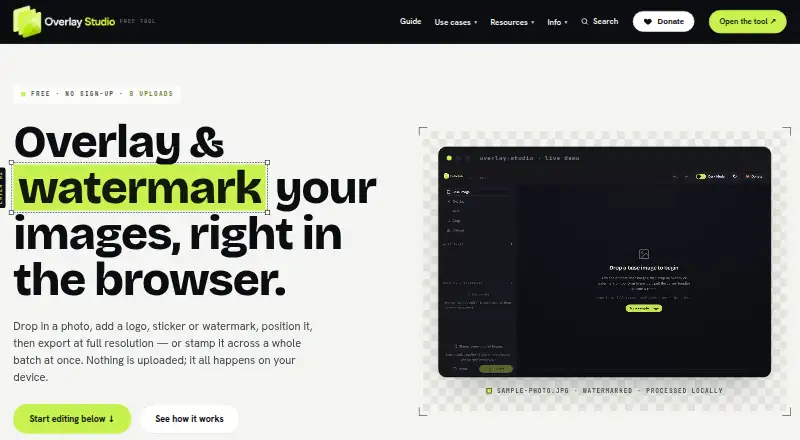
What Overlay Studio is
Overlay Studio is a browser-based image editor for adding overlays and watermarks, then exporting the results. Its layer tools let users add and reorder elements and adjust position, scale, rotation, blend mode, and opacity. Watermark mode can repeat a mark across an image with adjustable spacing, rotation, and opacity. Batch processing applies a watermark to multiple images at the same relative size and position, then downloads them together as a ZIP; the free batch limit is 25 images at once. Exports are PNG, JPG, or WEBP at full source resolution, with crop, resize, and quality controls. Image processing and export happen locally in the browser, and the site says images are not uploaded to its servers. The editor can work offline after it has loaded. It is free for everyone, with no paywall to export or forced watermark, and works in desktop and mobile browsers as well as Android and iOS. Optional background removal downloads a model and code, while processing the image on-device.
Good
- Processes and exports images locally in the browser.
- Offers layer controls and tiled watermarks.
- Batch watermarking downloads images as a ZIP.
- Exports PNG, JPG, and WEBP.
- Free exports have no paywall or forced watermark.
Watch out
- Free batch limit is 25 images at once.
- Offline use requires the editor to load first.
- Background removal downloads a model and code.
Who it suits
Overlay Studio suits small businesses, creators, sellers, and developers who want to brand or protect images in a browser. It can also suit people who need batch watermarking, provided the 25-image limit is sufficient.
Verdict
Overlay Studio covers layered edits, watermarking, batch output, and common image export formats without charging for exports. Its local processing and browser-based workflow may fit users who do not need batches larger than 25 images.
Plans and prices
From Overlay Studio's own pricing page, checked 4 Oct 2026.
| Plan | Price | What it gives you |
|---|---|---|
| Free | Free | Batch limit: 25 images at once; supporter code raises the limit · No paywall to export · No forced watermark · Free for everyone; supported by voluntary donations. |
The facts
Each one read from Overlay Studio's own pages, with the date it was checked.
What it does
- Batch processing
- Users can apply a watermark to multiple loaded images at the same relative size and position and download the batch as a ZIP.checked 4 Oct 2026
- Export
- The editor exports PNG, JPG and WEBP at full source resolution, with crop, resize and quality controls.checked 4 Oct 2026
- Layer editing
- Users can add and reorder layers, then adjust each layer’s position, scale, rotation, blend mode and opacity.checked 4 Oct 2026
- Notable limit
- The free batch limit is 25 images at once; an honour-system supporter code raises it for contributors.checked 4 Oct 2026
- Offline use
- The editor can work offline after it has loaded in the browser.checked 4 Oct 2026
- Optional background removal
- Using the background-removal button downloads an AI model and code from public package CDNs; the site says the image is processed on the device and is not sent anywhere.checked 4 Oct 2026
- Privacy
- Image processing and export happen locally in the browser, and the site says images are never uploaded to its servers.checked 4 Oct 2026
- Support
- Users can send questions, bug reports or feature ideas through the contact form for a reply.checked 4 Oct 2026
- Third-party services
- The privacy policy names Cloudflare Turnstile for bot blocking, Plausible Analytics for cookieless visit counting, and PayPal for donations.checked 4 Oct 2026
- Tiled watermarks
- Watermark mode can repeat a mark across an image with adjustable spacing, rotation and opacity.checked 4 Oct 2026
- What it does
- Overlay Studio edits images in the browser to add overlays and watermarks, then export them.checked 4 Oct 2026
- Who it is for
- The maker describes it for small businesses, creators, sellers and developers who need to brand or protect images without desktop software.checked 4 Oct 2026
The company
- Headquarters
- Australiachecked 28 Sep 2026
Alternatives to Overlay Studio
- 1

Watermark.ws
Free planAndroidiOSWebAPI7.9From $4 a month - 2

DoWatermark
Free planAndroidiOSWeb7.8$4.99 one-time - 3
eZy Watermark
Free planAndroidiOSWebmacOS7.3From $1.99 a month - 4
Watermarkly
Free planAndroidiOSWebLinux7.3From $19.95 a year - 5
Watermark Maker
Free planAndroidiOS6.9$24.99 one-time - 6
Terma
Free planWebLinuxmacOSSelf-hosted6.8Free plan