
DoWatermark
DoWatermark adds text or logo watermarks to batches of photos in a web browser.
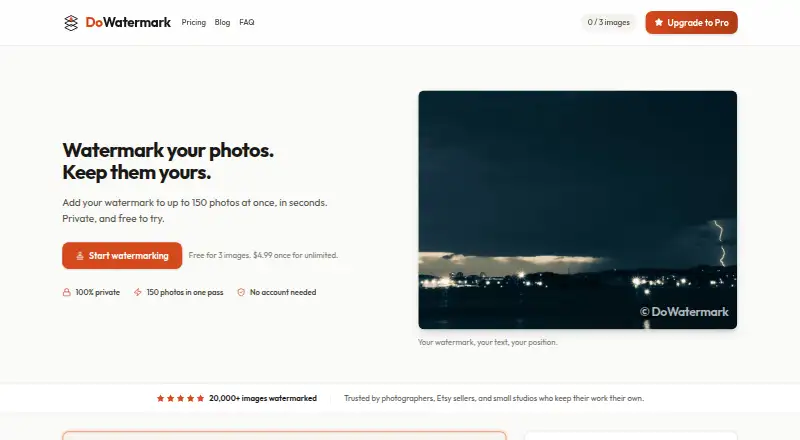
What DoWatermark is
DoWatermark adds text or logo watermarks to batches of photos in a web browser. It accepts JPG, PNG and GIF files, including mixed formats in one session, and lets users adjust watermark size, opacity and position. Processed images can be downloaded together in a ZIP file, retaining their original format and quality. The service says processing uses HTML5 Canvas on the device and that images never leave it. It works offline after the initial page load and requires no account, email signup, installation or browser extension. The free plan allows three images per batch. Pro costs $4.99 USD as a one-time payment and permits up to 150 images in a batch, with unlimited batches. Mobile batch limits are lower: up to 50 images, or up to 30 on iOS and iPad. A Pro license can be activated on up to two devices and covers personal and commercial use. DoWatermark states that it does not collect images, image metadata, watermark content or usage metrics. Its terms provide a 14-day money-back guarantee for Pro purchases.
Good
- Supports JPG, PNG and GIF files together.
- Downloads results in original format and quality.
- Works offline after the initial page load.
- No account or installation required.
- Pro permits batches of up to 150 images.
Watch out
- Free batches are limited to three images.
- Mobile batches are limited to 50 images.
- iOS and iPad batches are limited to 30 images.
- Pro costs $4.99 USD as a one-time payment.
Who it suits
DoWatermark suits people who need to apply text or logo marks to photo batches in a browser without uploading images. Pro may suit users who need larger batches or personal and commercial use.
Verdict
DoWatermark offers batch watermarking with browser-based processing and ZIP export. Check the free and mobile batch caps against your workload before choosing a plan.
Plans and prices
From DoWatermark's own pricing page, checked 15 Oct 2026.
| Plan | Price | What it gives you |
|---|---|---|
| Free | Free | 3 images per batch · text and logo watermarks · browser-based · no uploads · saved presets |
| Pro | $4.99, paid once | Up to 150 images per batch · unlimited batches · text and logo watermarks · saved presets · no uploads · ZIP download · lifetime updates · up to 2 devices · one-time payment · lifetime access |
The facts
Each one read from DoWatermark's own pages, with the date it was checked.
What it does
- Account requirement
- No account, email signup, software installation, or browser extension is required.checked 1 Oct 2026
- Analytics
- Website analytics use Google Analytics with anonymized IP information and browser, page, referral, session and geographic data.checked 15 Oct 2026
- API and SDKs
- The reviewed official product, pricing, FAQ, privacy and terms pages describe browser use but mention no public API, SDK or developer integration.checked 15 Oct 2026
- Batch capacity
- Pro users can process up to 150 images per batch.checked 1 Oct 2026
- Batch processing
- The Pro plan processes up to 150 images per batch.checked 15 Oct 2026
- Closed source indication
- The terms prohibit reverse engineering, decompiling, disassembling and derivative works, indicating proprietary software.checked 15 Oct 2026
- Commercial use
- The terms allow both personal and commercial projects.checked 15 Oct 2026
- Customization
- Users can adjust watermark size, opacity, position, and use text or logo watermarks.checked 1 Oct 2026
- Data not collected
- The privacy policy says images, EXIF metadata, watermark content and watermarking usage metrics are not collected.checked 15 Oct 2026
- Documentation
- Documentation consists of pricing FAQs, product FAQs, privacy terms and refund instructions rather than developer documentation.checked 15 Oct 2026
- Export
- Watermarked images can be downloaded in a ZIP file in their original format and quality.checked 1 Oct 2026
- Formats
- The service supports JPG, PNG, and GIF images, including mixed formats in one session.checked 1 Oct 2026
- Independent directory description
- EZToolset describes DoWatermark as a browser tool supporting JPG, PNG and GIF batches, ZIP export, local processing and offline use after the first page load.checked 15 Oct 2026
- Independent directory score
- EZToolset lists DoWatermark with an editorial score of 7.7 out of 10 and ranks it second in its photo-watermarking category; a review count is not stated.checked 15 Oct 2026
- Independent limit: mobile
- EZToolset warns that mobile and iOS or iPad batch limits are lower than the desktop Pro maximum.checked 15 Oct 2026
- Independent praise: pricing
- EZToolset characterizes the one-time $4.99 Pro price as attractive compared with subscription watermarking tools.checked 15 Oct 2026
- Independent praise: privacy
- EZToolset presents on-device processing with no image upload as a main reason to choose DoWatermark.checked 15 Oct 2026
- Licence type
- The terms grant a limited, non-exclusive, non-transferable license rather than transferring ownership of the software.checked 15 Oct 2026
- License scope
- A Pro license may be activated on two devices simultaneously.checked 15 Oct 2026
- License terms
- A Pro license can be activated on up to two devices and allows personal and commercial use.checked 1 Oct 2026
The company
- Company legal identity
- The service identifies its operator as Raphael Berrebi doing business as DoWatermark.checked 15 Oct 2026
- Company location
- The privacy policy lists the data controller location as Israel.checked 15 Oct 2026
- Headquarters
- Israelchecked 28 Sep 2026
Money
- Independent limit: free plan
- EZToolset flags the three-image free batch cap as a meaningful limitation for larger jobs.checked 15 Oct 2026
The full review of DoWatermark
Overview
DoWatermark is a browser-based tool for adding text or logo marks to groups of photos. It is best for people who want local processing and a straightforward way to watermark repeated batches. Pro’s one-time price is appealing for ongoing use, but the free batch cap is restrictive.
Key features
You can adjust a watermark’s size, opacity, and position, and choose text or a logo. Saved presets help keep repeat jobs consistent. JPG, PNG, and GIF images can be mixed in one session; finished images download together in a ZIP while retaining their original format and quality. That combination suits recurring photo workflows, although the three-image free cap limits its usefulness for larger jobs.
Processing uses HTML5 Canvas in the browser, and images stay on the device. DoWatermark says it complies with GDPR and does not collect images, metadata, watermark content, or usage metrics. Website traffic uses HTTPS/TLS, while payments go through Paddle, which is PCI DSS Level 1 certified. The tool can work offline after its initial page load, so it can handle later sessions without a connection but is not a solution if that first load has not happened.
No account, email signup, installation, or browser extension is required. Pro can be activated on up to two devices for personal or commercial use. Purchases carry a 14-day money-back guarantee, and support is available by email at [email protected].
Pricing
Free costs nothing and allows three images per batch, with text and logo watermarks, browser processing, and saved presets. It is suitable for occasional small jobs, but repeated or larger batches will quickly run into the cap.
Pro costs $4.99, paid once, billed as a one-time payment for lifetime access. It raises capacity to 150 images per batch and adds unlimited batches, instant ZIP downloads, saved presets, text and logo marks, and lifetime updates. This is the practical choice for frequent or commercial use: the low single payment removes the free tier’s tight limit, though a license covers only two devices. Mobile batch ceilings are lower than Pro’s general maximum: up to 50 images on mobile and 30 on iOS/iPad.
Platforms
DoWatermark runs in web browsers on desktop, tablet, and phone, and supports Android and iOS devices. This broad browser access avoids a software installation, but mobile users face smaller batch limits than Pro users processing up to 150 images per batch.
Who it's for
DoWatermark fits photographers, small businesses, and other users who need repeatable text or logo marks without uploading images or managing an installed application. The Free plan makes sense for occasional three-image jobs; Pro is better for larger recurring batches or commercial work. Look elsewhere if you need more than two licensed devices or regularly process large batches on a phone or iPad.
Pros and cons
- Pros: Images stay on the device during browser processing, a useful privacy advantage for sensitive photos.
- Pros: Pro combines a 150-image batch limit, unlimited batches, and lifetime access for a one-time 4.99 USD payment.
- Pros: Mixed JPG, PNG, and GIF input and ZIP export preserve original formats and quality, reducing friction in varied photo workflows.
- Cons: Free processing stops at three images per batch, too little for most substantial jobs.
- Cons: Mobile limits fall to 50 images, or 30 on iOS/iPad, so the headline Pro batch capacity is not available on those devices.
- Cons: Pro activation is limited to two devices, which may not suit users working across a larger device set.
Alternatives
Photo Watermarking Software is the category directory for comparing tools. Consider Watermarkly if you need support across desktop operating systems as well as mobile and web; its free plan adds a Watermarkly logo, and its 1-Year Access plan costs $19.95 a year.
eZy Watermark is another freemium option for readers considering a different watermarking app. Watermark.ws is another freemium alternative. Overlay Studio is a free option with a 25-image batch limit, with a supporter code raising that limit and no paywall to export. PictStamp is a free alternative for iOS and macOS. Folio is a web-based freemium alternative. Watermark Maker is a freemium option for Android and iOS. Batchmark is a web-based freemium alternative.
Verdict
Choose DoWatermark if you want private, browser-based batch watermarking and expect to use Pro repeatedly: lifetime access for a one-time 4.99 USD payment makes the upgrade straightforward. Its three-image free cap, smaller mobile limits, and two-device license are the main reasons to choose another tool.
Getting started
- Open DoWatermark in a desktop, tablet, or phone browser
- Choose the Free plan or the Pro one-time purchase
- Load JPG, PNG, or GIF images
- Set the text or logo watermark size, opacity, and position
- Download the watermarked images as a ZIP file
Limits worth knowing
Free processing is limited to three images per batch. Mobile users can process up to 50 images per batch, and iOS or iPad users up to 30; Pro raises the batch limit to 150 images.
Questions
How much does DoWatermark cost?
The Free plan costs nothing. Pro costs $4.99, paid once as a one-time payment with lifetime access.
Which devices and platforms are supported?
It runs in web browsers on desktop, tablet, and phone devices, including Android and iOS.
Do images leave the device?
The service says images are processed in the browser and never leave the device.
Is an account or installation required?
No account, email signup, software installation, or browser extension is required.
Can Pro be used commercially?
Yes. A Pro license allows personal and commercial use and can be activated on up to two devices.
Alternatives to DoWatermark
- 1

Watermark.ws
Free planAndroidiOSWebAPI7.9From $4 a month - 2
eZy Watermark
Free planAndroidiOSWebmacOS7.3From $1.99 a month - 3
Watermarkly
Free planAndroidiOSWebLinux7.3From $19.95 a year - 4
Watermark Maker
Free planAndroidiOS6.9$24.99 one-time - 5
Terma
Free planWebLinuxmacOSSelf-hosted6.8Free plan - 6
Visual Watermark
AndroidiOSWebLinux6.8From $19.95 a year