PictStamp
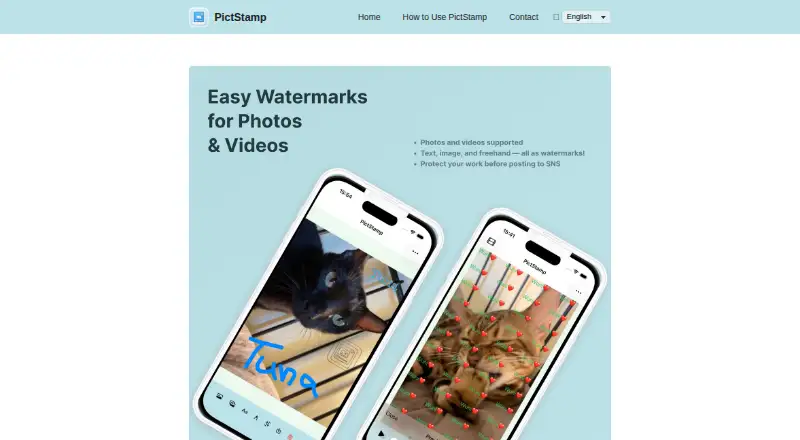
PictStamp is a free app for iPhone and iPad that adds image, text, and freehand watermarks to photos, images, and videos.
What PictStamp is
PictStamp is a free app for iPhone and iPad that adds image, text, and freehand watermarks to photos, images, and videos. Users can layer watermark images, change their size and opacity, and repeat text across a photo using Tile Mode. Finger drawing can create signatures or illustrations, while crop, rotate, blur, and mosaic tools are available for editing the underlying image or video. The app handles PNG, JPG, HEIC, and GIF images; GIFs can be built from multiple images or blank pages. Video support covers MP4 and MOV files up to 120 seconds, with longer clips trimmable during import. Users can bring in up to five still images for batch watermark editing; the guide allows up to three watermark images and five watermark text items on screen. Edited images can be saved as PNG, JPG, HEIC, or GIF, while videos export as MP4. Media can be saved to the photo library or shared with other apps and social platforms. The App Store listing requires iOS 18 or later and iPadOS 18 or later.
Good
- Supports image, text, and freehand marks
- Batch edits up to five still images
- Accepts PNG, JPG, HEIC, and GIF images
- Saves edited images in four listed formats
- No price is listed beyond free
Watch out
- Requires iOS 18 or later on iPhone
- Requires iPadOS 18 or later on iPad
- Video input is limited to 120 seconds
- App Store privacy disclosure is unverified by Apple
Who it suits
PictStamp suits iPhone and iPad users who want to watermark photos or videos, create signature marks, or edit several still images together. It is also relevant for people needing GIF or short MP4 and MOV handling.
Verdict
PictStamp offers several watermark methods plus basic image and video editing, with batch editing for up to five still images. Check the listed operating-system requirements and 120-second video limit before choosing it.
Plans and prices
From PictStamp's own pricing page, checked 4 Oct 2026.
| Plan | Price | What it gives you |
|---|---|---|
| Free | Free | No price shown on the official site |
The facts
Each one read from PictStamp's own pages, with the date it was checked.
What it does
- Availability
- The App Store listing identifies iPhone and iPad as supported devices and requires iOS 18.0 or later and iPadOS 18.0 or later.checked 3 Oct 2026
- Batch editing
- The guide says users can import up to five still images at once and edit watermarks on them together.checked 4 Oct 2026
- Export formats
- Edited images can be saved as PNG, JPG, HEIC, or GIF, and videos as MP4.checked 4 Oct 2026
- Image editing
- Users can rotate and crop photos before adding watermarks.checked 4 Oct 2026
- Image formats
- Supported image formats include PNG, JPG, HEIC, and GIF; GIFs can be made from multiple images or blank pages.checked 3 Oct 2026
- Image watermarks
- Users can overlay multiple watermark images and adjust their opacity and size.checked 4 Oct 2026
- Privacy
- Apple’s listing says the developer reports that the app collects no data; Apple notes that this privacy information has not been verified by Apple.checked 4 Oct 2026
- Privacy disclosure
- Apple’s App Store listing reports that the developer says the app does not collect data; Apple says this information has not been verified by Apple.checked 3 Oct 2026
- Purpose
- PictStamp adds image, text, and freehand watermarks to photos, images, and videos.checked 4 Oct 2026
- Save and share
- Edited images and videos can be saved to the photo library or shared to social media and other apps.checked 3 Oct 2026
- Sharing
- Edited media can be saved to the photo library or shared with social media and other apps.checked 4 Oct 2026
- Text watermarks
- Text watermarks support Tile Mode, which repeats text across the photo.checked 4 Oct 2026
- Video limit
- Videos up to 120 seconds are supported in MP4 and MOV formats, and longer videos can be trimmed on import.checked 4 Oct 2026
- Video support
- PictStamp supports MP4 and MOV videos up to 120 seconds, and longer videos can be trimmed during import.checked 3 Oct 2026
- Watermark limits
- The guide allows up to three watermark images on screen and up to five watermark texts.checked 4 Oct 2026
Money
- Freehand drawing
- Users can draw lines and text by fingertip to create signatures or illustrations.checked 4 Oct 2026
- Price
- The App Store lists PictStamp as Free.checked 3 Oct 2026
Where it runs
- Platform availability
- The official App Store listing offers the app for iPhone and iPad and requires iOS 18 or later and iPadOS 18 or later, respectively.checked 4 Oct 2026
The full review of PictStamp
PictStamp is a free watermarking and light-editing app for iPhone and iPad. It suits photographers, creators, and social-media users who need layered logos, text, or signatures on small sets of images. The main qualification is scale: its batch tool handles only five still images, and video work stops at two minutes.
Overview
PictStamp brings watermark creation and basic image or video adjustments into one workflow. You can crop and rotate media, obscure areas with blur or mosaic, then save the result to your photo library or send it to social and other apps. That combination is practical for quick publishing tasks where a full desktop editor would be excessive. It is less suitable for long-form video production or high-volume asset processing.
Key features
Layered watermarking
The app allows up to three watermark images and up to five text watermarks on the screen at once. Image marks can be resized and made more or less transparent, giving you control over how strongly a logo appears. Tile Mode repeats text across a photo, which is useful when a single corner mark could be removed by cropping, though repeated text can dominate an otherwise clean composition.
Signatures and presets
Finger-drawn lines and text support handwritten signatures, annotations, and simple illustrations. Presets make recurring branding quicker to apply, while freehand input is better for personal marks that should not look like a standard logo.
Editing, formats, and batch work
PictStamp accepts PNG, JPG, HEIC, and GIF images. GIFs can be assembled from multiple images or blank pages, and edited stills can be exported as PNG, JPG, HEIC, or GIF. You can import up to five still images together and edit their watermarks as a group. That is a meaningful time saver for a handful of photos, but the cap rules out larger catalog or campaign runs.
Video import supports MP4 and MOV clips up to 120 seconds. Longer footage can be trimmed during import, but it cannot pass through intact, so users working with full presentations, interviews, or extended demonstrations should choose another tool. Video exports are MP4.
Pricing
PictStamp is free, with a Free plan listed as free. The plan includes the watermarking, editing, batch, export, and sharing capabilities described above, with no paid tier or subscription terms attached. That makes it straightforward for occasional users and removes the recurring-cost concern found in subscription editors. In return, the practical limits are the five-image batch size and 120-second video ceiling.
Platforms
PictStamp supports iPhone and iPad. The App Store requires iOS 18.0 or later on iPhone and iPadOS 18.0 or later on iPad, so older devices and operating-system versions are excluded. Apple’s listing says the developer reports collecting no data; Apple notes that this privacy statement has not been verified by Apple.
Who it's for
Choose PictStamp if you need free watermark presets, logo overlays, tiled text, or a handwritten signature while preparing a small number of photos. It also fits users who want quick crop, rotation, blur, or mosaic adjustments before sharing. Look elsewhere if your workflow involves more than five stills at a time, videos longer than two minutes, or devices outside Apple’s current operating-system requirements.
Pros and cons
- Pro: Multiple mark types. Image, text, tiled text, and freehand marks cover both branded and personal watermarking.
- Pro: Useful small-batch editing. Five still images can receive watermark changes together instead of one by one.
- Pro: Broad still-image handling. PNG, JPG, HEIC, and GIF import and export support common photo workflows.
- Con: Small batch ceiling. Five images is helpful for a short queue but inadequate for large collections.
- Con: Short video limit. MP4 and MOV support ends at 120 seconds, with trimming required for longer clips.
- Con: Apple-only availability. iPhone and iPad support, tied to iOS 18 and iPadOS 18, excludes Android, desktop, and older Apple systems.
Alternatives
For a wider device mix and browser access, Watermarkly offers Android, iOS, Linux, macOS, web, and Windows support; its free batch processing adds a Watermarkly logo, while 1-Year Access costs $19.95 a year and does not renew.
eZy Watermark is a better fit when Android, web, or macOS availability matters and you want watermark templates and 300-plus fonts on its free plan; Premium is $1.99 a month.
Choose Terma for a free tool spanning Linux, macOS, Windows, web, and self-hosting.
DoWatermark suits browser-based jobs needing no uploads, saved presets, and batches of three images; its Pro plan is a one-time 4.99 USD.
Watermark.ws is an option for cloud storage and web-oriented workflows, while wmk is aimed at users wanting a free MIT-licensed Python command-line tool.
Folio fits portfolio hosting with galleries and watermark presets, and Overlay Studio is worth considering for free batch overlays of up to 25 images at once.
See the Photo Watermarking Software list for more options.
Verdict
PictStamp is a strong pick for Apple users who want free, flexible watermarking with signatures, tiled text, basic edits, and small-batch processing in one app. Its narrow platform coverage, five-image batch limit, and two-minute video cap are the decisive reasons to choose a broader or more scalable alternative.
Alternatives to PictStamp
- 1

Watermark.ws
Free planAndroidiOSWebAPI7.9From $4 a month - 2

DoWatermark
Free planAndroidiOSWeb7.8$4.99 one-time - 3
eZy Watermark
Free planAndroidiOSWebmacOS7.3From $1.99 a month - 4
Watermarkly
Free planAndroidiOSWebLinux7.3From $19.95 a year - 5
Watermark Maker
Free planAndroidiOS6.9$24.99 one-time - 6
Terma
Free planWebLinuxmacOSSelf-hosted6.8Free plan