Tempo Portfolio Manager
Tempo Portfolio Manager is a web-based project management platform for teams coordinating complex projects, shared resources, dependencies, and changing prio…
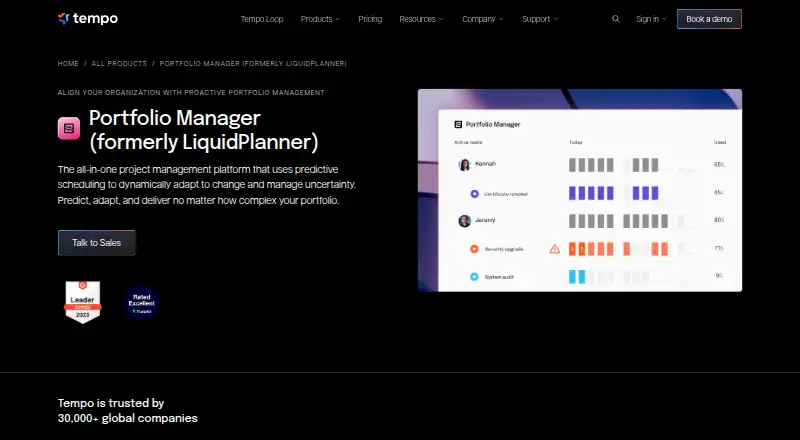
What Tempo Portfolio Manager is
Tempo Portfolio Manager is a web-based project management platform for teams coordinating complex projects, shared resources, dependencies, and changing priorities. Its predictive scheduling simulations forecast project outcomes and finish dates with a 90% confidence level. Resource tools include automatic leveling, workload predictions, and views covering 30-, 60-, 90-, and 180-day periods. Scenario modeling updates plans as conditions change. Teams can assign tasks, share files, add real-time comments, and view portfolio activity. The product integrates with Jira and Slack; Jira projects can be brought into a Scheduled Collection for prioritization, forecasting, and scenario modeling. The Free plan is listed with 10 members, three projects, and 300 tasks, but limits an organization to three licenses and does not include file storage. Essentials is $15 a month, Professional is $25 a month, and Ultimate is $35 a month. SAML 2.0 single sign-on and the Open API are available on Ultimate. Eligible organizations can start a seven-day Premium Trial.
Good
- Forecasts project outcomes with a stated 90% confidence level.
- Automatic resource leveling and workload predictions.
- Scenario modeling updates plans when conditions change.
- Integrates with Jira and Slack.
- Free plan includes 10 members, three projects, and 300 tasks.
Watch out
- Free plan is limited to three organizational licenses.
- Free plan does not include file storage.
- SAML SSO and the Open API require Ultimate.
Who it suits
Portfolio Manager is aimed at teams managing multiple complex projects with dependencies, shared resources, and shifting priorities. It may suit teams that want workload views and scenario modeling alongside project planning.
Verdict
Tempo Portfolio Manager brings forecasting, resource planning, and scenario modeling into one project management platform. Review the Free plan's license and storage limits, or the listed paid tiers, to see whether they fit your team.
Plans and prices
From Tempo Portfolio Manager's own pricing page, checked 30 Sep 2026.
| Plan | Price | What it gives you |
|---|---|---|
| Free | Free | 10 Members · 3 Projects · 300 Tasks |
| Essentials | $15 a month | 50 Projects · 5,000 Tasks · Insights enabled by Planning Intelligence · 1 user(s) / month |
| Professional | $25 a month | Planning Intelligence · Dynamic Scheduling Engine · 500 Projects · 50,000 Tasks · 1 user(s) / month |
| Ultimate | $35 a month | All add-ons · Custom Limits · Professional Services · Unlimited Projects & Tasks · 1 user(s) / month |
The facts
Each one read from Tempo Portfolio Manager's own pages, with the date it was checked.
What it does
- API
- The Open API is included for organizations with a paid Ultimate plan and supports filtering, downloading and updating plan data.checked 30 Sep 2026
- Audience
- The product is designed for teams managing concurrent complex projects with multiple tasks, dependencies, shared resources and changing priorities.checked 30 Sep 2026
- Collaboration
- Portfolio Manager includes task assignments, file sharing, real-time comments and real-time portfolio visibility.checked 30 Sep 2026
- Integrations
- Official integrations include Jira and Slack, with Jira projects pulled into the Scheduled Collection for prioritization, forecasting and scenario modeling.checked 30 Sep 2026
- Predictive scheduling
- Its simulations generate realistic project finish dates and forecast outcomes with a 90% confidence level.checked 30 Sep 2026
- Purpose
- Portfolio Manager is an all-in-one project management platform using predictive scheduling to adapt to change and manage uncertainty.checked 30 Sep 2026
- Scenario modeling
- Strategic prioritization uses real-time scenario modeling that updates plans when conditions change.checked 30 Sep 2026
- Security compliance
- Tempo's Trust Center lists SOC 2 Type 2, ISO/IEC 27001, ISO/IEC 27701, GDPR, CCPA, HIPAA, SOC 1, PCI DSS and CSA STAR Level 1.checked 30 Sep 2026
- Single sign-on
- SAML 2.0 SSO is available on the Ultimate plan with OneLogin, Okta and Azure listed as supported providers.checked 30 Sep 2026
- Support
- Portfolio Manager provides Academy lessons, Support & Feedback and product release notes through its Help & Support menu.checked 30 Sep 2026
- Workload management
- The product provides automatic resource leveling, workload predictions and workload views covering 30-, 60-, 90- and 180-day increments.checked 30 Sep 2026
The company
- Founded
- 2009checked 28 Sep 2026
- Headquarters
- Boston, Massachusetts, United Stateschecked 28 Sep 2026
Money
- Free-plan limits
- The Free plan limits an organization to 3 licenses, and file storage is not offered on the Free plan.checked 30 Sep 2026
- Premium trial
- Organizations on Free, Essentials or Professional can start a Premium Trial providing premium features for 7 days.checked 30 Sep 2026
The full review of Tempo Portfolio Manager
Tempo Portfolio Manager is a web-based planning platform for teams coordinating complex, interdependent projects. It is strongest when managers need to balance shared resources and shifting priorities; teams looking only to track a few simple projects are unlikely to need its forecasting depth.
Overview
Predictive scheduling simulations estimate finish dates and forecast outcomes at a 90% confidence level, giving portfolio managers a way to plan against uncertainty rather than rely on a single fixed schedule. That focus is valuable when multiple projects compete for people and priorities can change, but less compelling for teams without that kind of portfolio complexity.
Project intake, prioritization and cross-project dependency tracking connect strategic choices with delivery plans. Portfolio visibility, assignments, file sharing and real-time comments help teams coordinate the work. The platform’s usefulness depends on having enough concurrent work to make portfolio-level planning worthwhile.
Key features
Forecasting and capacity
Automatic resource leveling, workload predictions and views spanning 30, 60, 90 and 180 days help managers identify pressure on shared capacity. Weekly planning granularity and resource requests support ongoing allocation, while skills matching can inform who is suited to particular work. These tools are most relevant to teams sharing people across several projects; they offer less advantage when work is isolated or schedules rarely change.
Scenario planning and prioritization
Real-time scenario modeling updates plans when conditions change, and prioritization frameworks help teams compare competing initiatives. Multiple roadmap views and executive reporting extend that planning to stakeholders. This breadth can support decisions across a portfolio, though it is more machinery than a small team with stable priorities may need.
Integrations and controls
Official Jira and Slack integrations support connected workflows. Jira projects can be brought into the Scheduled Collection for prioritization, forecasting and scenario modeling, making the integration particularly useful to teams already managing delivery work in Jira. SAML 2.0 single sign-on is available on Ultimate with OneLogin, Okta and Azure; the Open API, for filtering, downloading and updating plan data, is also limited to paid Ultimate organizations. Tempo’s Trust Center lists SOC 2 Type 2, ISO/IEC 27001, ISO/IEC 27701, GDPR, CCPA, HIPAA, SOC 1, PCI DSS and CSA STAR Level 1. Academy lessons, Support & Feedback and release notes provide support and product guidance.
Pricing
The Free plan costs nothing and includes 10 members, 3 projects and 300 tasks. Its organization limit of 3 licenses is the more restrictive practical cap for a team, and file storage is not offered, so this tier is best for a small evaluation rather than a growing group that shares project files. Organizations on Free, Essentials or Professional can start a Premium Trial for 7 days.
Essentials costs $15 a month, billed for 1 user per month, and allows 50 projects and 5,000 tasks with Insights enabled by Planning Intelligence. It is a step up for teams whose portfolio exceeds Free’s project or task limits, but it does not include the Planning Intelligence, Dynamic Scheduling Engine or larger limits specified for Professional.
Professional costs $25 a month, billed for 1 user per month. It includes Planning Intelligence, the Dynamic Scheduling Engine, 500 projects and 50,000 tasks, making it the more suitable tier for teams that need the core predictive scheduling approach across a larger portfolio.
Ultimate costs $35 a month, billed for 1 user per month. It adds all add-ons, custom limits and professional services, as well as unlimited projects and tasks. It is the tier to consider when scale, services, SAML SSO or Open API access matter; smaller teams may not benefit enough from those additions to justify moving beyond Professional. The per-user billing basis makes total cost rise with team size.
Platforms
Portfolio Manager runs on the web. It is a practical fit for teams planning from a browser, but not for readers who require a dedicated mobile app.
Who it's for
Choose Tempo when your organization manages concurrent, complex projects with dependencies, shared resources and changing priorities, and needs forecasts and scenarios to guide portfolio decisions. It is a weaker fit for lightweight task tracking, a very small team constrained by the Free plan’s license and storage limits, or organizations that require mobile apps.
Pros and cons
- Pros: Forecasts finish dates and outcomes at a 90% confidence level, giving portfolio decisions a defined uncertainty measure.
- Pros: Resource leveling and workload views across four planning horizons help teams reason about shared capacity.
- Pros: Jira projects can feed portfolio prioritization, forecasting and scenario modeling rather than remain separate from planning.
- Cons: Free is capped at 3 organizational licenses and offers no file storage, limiting its usefulness for team collaboration.
- Cons: SAML SSO and the Open API require Ultimate, so organizations needing those controls must choose the top tier.
- Cons: The web-only platform does not suit teams seeking native mobile apps.
Alternatives
For broader product-roadmap options, compare Product Roadmap Software, Resource Management Software, Product Management Software and Project Portfolio Management Software.
Featurebase is worth considering if a freemium option across Android, iOS, web and API matters; its Free plan has one seat, unlimited conversations and feedback, but no AI support.
Roadmapr may suit a reader seeking a free web roadmap for one project, with 50 features, a public roadmap and basic analytics.
Sleekplan is an alternative for collecting unlimited feedback and subscribers on a free plan, though its Indie tier has no team seats.
Canny offers a free plan for 25 tracked users with unlimited feedback; consider it when that feedback allowance fits better than Tempo’s portfolio-planning emphasis.
Product Roadmap may be a better fit for a free roadmap with unlimited posts and users, three admin roles, two feedback boards and a changelog.
Productboard is an alternative with a free plan that includes 50 AI credits per month, 500 feedback notes, 25 contributors, one teamspace and one product portal.
Productfolio may suit a small web-based roadmap workspace: its free Starter plan includes one workspace, one editor, 10 read-only portal guests, 200 features and 200 backlog requirements.
airfocus is an alternative for organizations seeking unlimited free contributors and workspaces, a three-level custom product hierarchy, and objectives and OKRs with SAML SSO available as a feature.
Verdict
Tempo Portfolio Manager is a strong choice for organizations coordinating complex portfolios where shared capacity, dependencies and shifting priorities make predictive scheduling valuable. Its defining advantage is the combination of forecasts, resource planning and scenario modeling; its main drawbacks are the Free tier’s tight team and storage limits, per-user paid costs, and Ultimate-only access to SSO and the API. Choose it when portfolio-level planning is central to delivery, and look elsewhere for simple task tracking or native mobile apps.
Getting started
- Open the Portfolio Manager website.
- Choose the Free plan or a paid plan: Essentials, Professional or Ultimate.
- Create an organization and add members within the plan limits.
- If on Free, Essentials or Professional, start the 7-day Premium Trial to access premium features.
Limits worth knowing
The Free plan lists 10 members, 3 projects and 300 tasks, while limiting an organization to 3 licenses and excluding file storage. The 7-day Premium Trial is available to organizations on Free, Essentials or Professional.
Questions
How much does Tempo Portfolio Manager cost?
The Free plan is free. Essentials is $15 a month, Professional is $25 a month and Ultimate is $35 a month; each paid plan is billed for 1 user per month.
Is there a free plan?
Yes. Free lists 10 members, 3 projects and 300 tasks, but an organization is limited to 3 licenses and the plan excludes file storage.
Which platforms does it support?
Portfolio Manager is available on the web.
What integrations are available?
Official integrations include Jira and Slack. Jira projects can be pulled into a Scheduled Collection for prioritization, forecasting and scenario modeling.
Which plan includes single sign-on and the Open API?
SAML 2.0 SSO and the Open API are included for organizations on the paid Ultimate plan. Supported SSO providers listed are OneLogin, Okta and Azure.
Alternatives to Tempo Portfolio Manager
- 1

Planforge
Free planAndroidiOSWebAPI8.2From €4,500 a month - 2

Nimble
Free planAndroidiOSWebAPI7.9From $8.99 a month - 3
Rillsoft Project
AndroidWebAPILinux7.7 - 4

Oracle Primavera Cloud
AndroidiOSWebAPI7.6 - 5

OnePlan
AndroidiOSWeb7.5From $120 a year - 6

Celoxis
AndroidiOSWebAPI7.2From $10 a month