
OnePlan
OnePlan is a cloud platform that connects strategy, resources, financials, and execution for portfolio planning.
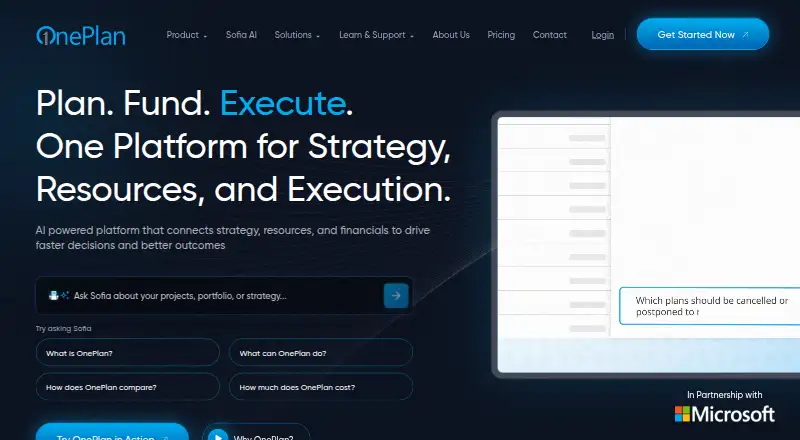
What OnePlan is
OnePlan is a cloud platform that connects strategy, resources, financials, and execution for portfolio planning. It helps organizations prioritize work, avoid duplication, and make business decisions. Financial planning provides visibility into planned and actual spending and supports CapEx and OpEx management. Teams can plan capacity, balance workloads, allocate people, and compare scenarios against goals, budgets, and available staff. It supports agile, waterfall, and hybrid work methods. The Sofia GPT assistant can help create plans, summarize reports, answer portfolio questions, and automate tasks. Integrations include Microsoft 365, Dynamics 365, Azure DevOps, Aha!, Asana, Jira, Microsoft Planner, and Microsoft Project. Android and iOS apps provide access to tasks, timesheets, conversations, and insights. Basic costs $10 a month billed annually, with a three-user minimum; Professional is $30 a month billed annually, also with a three-user minimum. A trial typically lasts seven days and may be extended through a OnePlan representative.
Good
- Compares scenarios against goals, budgets, and staffing
- Supports agile, waterfall, and hybrid planning
- Sofia GPT helps with plans, reports, and tasks
- Integrates with Microsoft 365, Jira, and others
- Android and iOS apps include task access
Watch out
- No free plan
- Basic requires at least three users
- Trial typically lasts seven days
Who it suits
OnePlan suits organizations coordinating portfolios, budgets, capacity, and execution across different work methods. It may also suit teams using its listed integrations or mobile apps for task and timesheet access.
Verdict
OnePlan brings portfolio, financial, and resource planning together, with scenario modeling and an AI assistant. Check the annual billing and three-user minimum for Basic or Professional before choosing a plan.
Plans and prices
From OnePlan's own pricing page, checked 22 Sep 2026.
| Plan | Price | What it gives you |
|---|---|---|
| Professional | $30 a month | 3+ users · billed annually |
| Basic | $120 a year | 5+ users · $120.00 per user per year (= $10.00 per user/month, billed annually) |
| Innovation Portal | Priced on request | contact sales · per platform |
| Enterprise | Priced on request | 5+ users · contact us for a quote |
The facts
Each one read from OnePlan's own pages, with the date it was checked.
What it does
- Accounting integrations
- Yeschecked 22 Sep 2026
- Actual vs budget
- Yeschecked 22 Sep 2026
- AI assistant
- Sofia GPT helps create plans, summarize reports, answer portfolio questions and automate tasks.checked 28 Sep 2026
- Deployment
- cloudchecked 22 Sep 2026
- Hosting
- OnePlan is hosted in Microsoft Azure, with availability in regions including the USA, Canada, Australia and Amsterdam.checked 28 Sep 2026
- Integrations
- OnePlan integrates with Microsoft 365, Dynamics 365, Azure DevOps, Aha!, Asana, Jira, Microsoft Planner and Microsoft Project.checked 28 Sep 2026
- Monitoring and compliance
- OnePlan says its services are monitored 24/7/365 and Azure compliance includes ISO 27001, HIPAA, FedRAMP, SOC 1 and SOC 2.checked 28 Sep 2026
- Paid from
- 10checked 22 Sep 2026
- Portfolio management
- OnePlan brings portfolios together so organizations can prioritize work, avoid duplication and make business decisions.checked 28 Sep 2026
- Purpose
- OnePlan is an AI-powered platform connecting strategy, resources, financials and execution.checked 28 Sep 2026
- Resource management
- OnePlan helps teams plan capacity, balance workloads and allocate people to work.checked 28 Sep 2026
- Scenario modeling
- OnePlan compares portfolio scenarios based on goals, budget and available people.checked 28 Sep 2026
- Security
- OnePlan states that data is encrypted in transit with TLS 1.2, stored credentials are encrypted with Azure Key Vault, and API keys or token methods are used where supported.checked 28 Sep 2026
- Work methods
- OnePlan supports agile, waterfall and hybrid work planning.checked 28 Sep 2026
Where it runs
- Approval workflows
- Yeschecked 22 Sep 2026
- Mobile app
- The OnePlan mobile app supports Android and Apple iOS and includes task, timesheet, conversation and insights access.checked 28 Sep 2026
The company
- Company
- OnePlan says it was founded in 2016, is headquartered in the United States and serves over 500 customers across 18 countries.checked 28 Sep 2026
- Founded
- 2016checked 28 Sep 2026
- Headquarters
- United Stateschecked 28 Sep 2026
Money
- Financial planning
- OnePlan provides real-time visibility into planned versus actual spending and supports CapEx and OpEx management.checked 28 Sep 2026
- Free plan
- Nochecked 22 Sep 2026
- Scenario planning
- Yeschecked 22 Sep 2026
- Trial
- OnePlan trials typically run for 7 days and can be extended through a OnePlan representative.checked 28 Sep 2026
The full review of OnePlan
Overview
OnePlan is a cloud planning platform for organizations coordinating portfolios, budgets, staffing and delivery across multiple initiatives. It suits teams that need to weigh work against financial and people constraints; its breadth is useful, but the three-user minimum and annual billing make it a poor fit for casual or single-user planning.
Founded in 2016 and headquartered in the United States, OnePlan serves organizations across 18 countries. Its portfolio focus makes it more relevant to cross-team planning than to straightforward task tracking.
Key features
Portfolio management helps organizations prioritize work and avoid duplication. Scenario modeling compares portfolios against goals, budgets and available people, making trade-offs visible before teams commit resources. This is a meaningful advantage for planning across initiatives, but unnecessary overhead for teams that only need to manage a single project.
Financial planning tracks planned and actual spending, including CapEx and OpEx. Actual-versus-budget visibility, accounting integrations and approval workflows support financial oversight alongside delivery planning. Resource management adds capacity, workload and allocation planning, so teams can test whether they have people to carry out proposed work as well as funding for it.
OnePlan accommodates agile, waterfall and hybrid methods, which can help organizations coordinate work that does not follow one delivery style. Its Sofia GPT assistant can create plans, summarize reports, answer portfolio questions and automate tasks. Integrations include Microsoft 365, Dynamics 365, Azure DevOps, Aha!, Asana, Jira, Microsoft Planner and Microsoft Project.
The Android and iOS mobile app provides access to tasks, timesheets, conversations and insights. The cloud service is hosted on Microsoft Azure, with availability in regions including the USA, Canada, Australia and Amsterdam. OnePlan says data is encrypted in transit with TLS 1.2, stored credentials are protected with Azure Key Vault, and API keys or token methods are used where supported. It also says services are monitored 24/7/365; Azure compliance includes ISO 27001, HIPAA, FedRAMP, SOC 1 and SOC 2.
Pricing
OnePlan is paid software with no free plan, but it offers a trial that typically lasts 7 days and may be extended through a OnePlan representative. All listed plans require at least three users, a substantial constraint for small teams and individuals.
| Plan | Price | What it means |
|---|---|---|
| Basic | $10 a month (billed annually; 3+ users) | The lowest-cost entry point for organizations that want OnePlan without moving to the higher-priced Professional tier. |
| Professional | $30 a month (billed annually; 3+ users) | A higher-priced option for buyers who need the Professional plan rather than Basic; the listed plan information does not distinguish their features. |
| Enterprise | Custom pricing (3+ users) | For organizations considering the Enterprise plan; price is not published. |
| Innovation Portal | from $3,000 (priced on request) (billed per platform; contact sales) | A separate platform-priced option, not a per-user monthly plan. |
Basic and Professional are both annual commitments, so the monthly figures should not be mistaken for month-to-month billing. The three-seat floor raises the practical entry cost above the per-user price, and there is no free tier for continuing use after the trial.
Platforms
OnePlan is available on Android, iOS and the web. Its mobile app covers tasks, timesheets, conversations and insights, while the cloud deployment keeps the platform accessible across supported devices.
Who it's for
OnePlan is best suited to organizations managing portfolios of work where funding, staffing and delivery choices need to be considered together. It is a stronger match for teams working across multiple methods and initiatives than for a small team seeking a low-cost task manager, a single user, or a tool focused only on budgeting.
Pros and cons
- Pros: Portfolio, financial and resource planning sit together, so decision-makers can compare proposed work with budgets and available people.
- Pros: Agile, waterfall and hybrid planning, plus integrations with Microsoft and popular project tools, suit organizations with varied workflows.
- Pros: Mobile access includes timesheets and insights as well as tasks and conversations.
- Cons: Every listed plan has a three-user minimum, ruling out individual buyers and increasing the entry commitment for small teams.
- Cons: Basic and Professional require annual billing, and there is no free plan for ongoing use.
- Cons: The 7-day typical trial is short for evaluating a platform used across portfolios, budgets and resource planning.
Alternatives
For organizations focused on adaptive financial planning, Workday Adaptive Planning offers a 30-day trial and access across Android, iOS, web, macOS, Windows and API platforms; its paid-plan price is not published.
For a free web-based budgeting option, Bajet offers a free plan, but no trial.
Buckets is another alternative, with a one-time $64 USD payment for a v1 license and support for Android, iOS, Linux, macOS and Windows.
For personal budgeting, YNAB charges $9.08 a month billed annually ($109 USD paid annually), or $14.99 a month billed monthly.
Other options to compare include OpenGov Accounts Payable, Cube, Euna Budget and OpenGov Budgeting & Performance.
Compare category roundups for Budgeting Software, Financial Forecasting Software, Project Portfolio Management Software and IT Project Management Software.
Verdict
Choose OnePlan if your organization needs to plan portfolios by weighing strategy, spending, staffing and execution in one place. Its main strength is connecting those decisions with scenario modeling and support for varied work methods. Look elsewhere if you need a free or monthly option, have fewer than three users, or only need simple project tracking.
Alternatives to OnePlan
- 1

IBM Planning Analytics
iOSWebAPIExtension7.9 - 2

LivePlan
AndroidiOSWebmacOS7.6From $15 a month - 3
ProjectionHub
Free planWebmacOSWindows7.6$150 one-time - 4
Workday Adaptive Planning
AndroidiOSWebAPI7.5 - 5

Intuit Enterprise Suite for Nonprofits
AndroidiOSWebAPI7.3From $7,800 a year - 6

OneStream
AndroidiOSWebAPI7.0