Buckets
Buckets is personal-finance software for budgeting, tracking bills, syncing accounts, and exporting reports across desktop and mobile devices.
What Buckets is
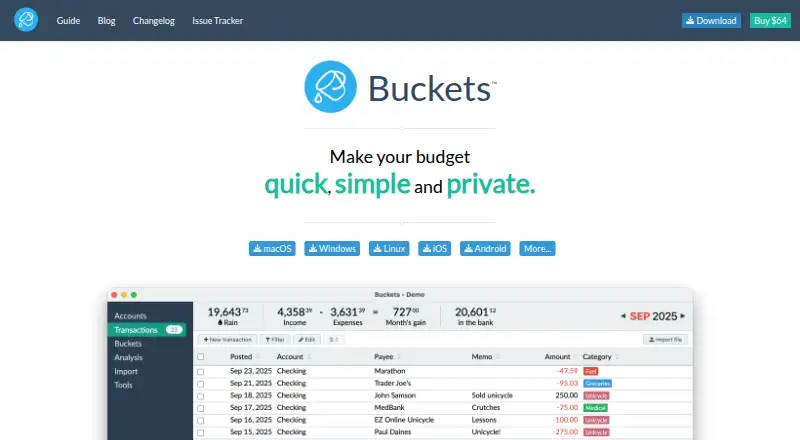
Buckets is personal-finance software for budgeting, tracking bills, syncing accounts, and exporting reports across desktop and mobile devices. It is available for macOS, Windows, Linux, iOS, and Android. Finances stay on the user's computer, and users control their data. Bank syncing can use free sync methods, private macros, file imports, or SimpleFIN Bridge. The software costs $64 as a single payment, with no monthly subscription fee; an untimed free trial is available for as long as needed to decide whether it works. The one-time purchase is not refundable. One license covers the purchaser and immediate family members living in the same home, and it can be used on any number of eligible computers. Support is available through a chat bubble, and the software includes videos about budgeting. It is published by One Part Rain, LLC, which is testing Buckets by the Loaf for some countries if $64 is too much.
Good
- No monthly subscription fee.
- Untimed free trial is available.
- Finances stay on the user's computer.
- One license covers the purchaser's household family.
- Available on desktop and mobile platforms.
Watch out
- The $64 purchase is not refundable.
- No free plan is listed.
Who it suits
Buckets suits people who want budgeting and bill tracking while keeping financial data on their own computer. Its family license may suit a purchaser whose immediate family members live in the same home.
Verdict
Buckets offers budgeting, bill tracking, account syncing, and report export for a single $64 payment. Its local data storage and family license are useful considerations, but the purchase is not refundable.
Plans and prices
From Buckets's own pricing page, checked 20 Sep 2026.
| Plan | Price | What it gives you |
|---|---|---|
| Buckets v1 License | $64 a month | License for Buckets v1 · May be used on computers belonging to the purchaser and immediate family members · one-time $64 USD payment |
| Free trial | Free | Untimed trial available for as long as needed to decide if it works for you. |
The facts
Each one read from Buckets's own pages, with the date it was checked.
What it does
- Account sync
- bothchecked 20 Sep 2026
- Alternative Pricing
- The company is testing Buckets by the Loaf for some countries if $64 is too much.checked 28 Sep 2026
- Bank Sync
- Offers free sync methods, private macros, file imports, and SimpleFIN Bridge.checked 28 Sep 2026
- Bill tracking
- Yeschecked 20 Sep 2026
- Budgeting tools
- Yeschecked 20 Sep 2026
- Computer Coverage
- The license can be used on any number of eligible computers.checked 28 Sep 2026
- Data Control
- Users control their data.checked 28 Sep 2026
- Family License
- One license covers the buyer and family members living in the same home.checked 28 Sep 2026
- No Monthly Fee
- Buckets has no monthly subscription fee.checked 28 Sep 2026
- Private Storage
- Finances stay on the user's computer.checked 28 Sep 2026
- Publisher
- The software is published by One Part Rain, LLC.checked 28 Sep 2026
- Refund Policy
- Refunds are not offered for the one-time purchase.checked 28 Sep 2026
- Report export
- Yeschecked 20 Sep 2026
- Support Channel
- Support is available through the chat bubble.checked 28 Sep 2026
Money
- Free plan
- Nochecked 20 Sep 2026
- Free Trial
- The trial is untimed and lasts as long as needed.checked 28 Sep 2026
- One-Time Price
- The software costs $64 as a single payment.checked 28 Sep 2026
Where it runs
- Help Videos
- Includes videos teaching users how to budget.checked 28 Sep 2026
- Mobile apps
- bothchecked 20 Sep 2026
- Supported Platforms
- Available on macOS, Windows, Linux, iOS, and Android.checked 28 Sep 2026
The full review of Buckets
Overview
Buckets combines budgeting, bill tracking and account syncing in desktop and mobile apps, with finances kept on the user’s computer. It is best suited to individuals and households who value local data control and are comfortable choosing how to sync accounts. A single $64 payment buys the v1 license, but it is non-refundable.
Key features
Budgeting tools and bill tracking bring spending plans and upcoming bills together, while report export gives users a way to take reports beyond the app. Keeping finances on the user’s computer is a meaningful distinction for people who want control over where their data lives; it also makes Buckets a less natural fit for anyone seeking a cloud-first setup.
Account syncing has several routes: free sync methods, private macros, file imports and SimpleFIN Bridge. That flexibility accommodates different preferences, but means users choose their own approach rather than relying on a single sync method. Budgeting videos can help users learn the process, and support is available through a chat bubble.
The license works on any number of eligible computers and covers the buyer’s immediate family members who live in the same home. That makes the one-time purchase more useful across a household, but it does not extend the family license to people outside that home.
Pricing
Buckets v1 License: $64 USD as a one-time payment. It includes use on the purchaser’s and qualifying immediate family members’ computers, with no monthly fee. The license is not refundable, so buyers should make good use of the untimed free trial before committing.
Free trial: Untimed access for as long as needed to decide whether Buckets works for you. There is no free plan, so continued use requires the paid license. Buckets by the Loaf is being tested in some countries for people who find $64 too expensive; it is not presented as a general alternative plan.
Platforms
Buckets has desktop and mobile applications for macOS, Windows, Linux, iOS and Android. That spread suits users who want to work across computer and phone, while the data remains on the user’s computer.
Who it's for
Buckets is a strong match for individuals and families who want budgeting and bill tracking without a recurring subscription, value local storage, and can accept the no-refund purchase terms. People who need a free ongoing tier, a refundable purchase, or a family license that reaches beyond one home should look elsewhere.
Pros and cons
- Pros: A $64 one-time license avoids monthly fees; local storage and user data control suit privacy-conscious users; one license covers qualifying family members and any number of eligible computers.
- Cons: The purchase is non-refundable; there is no free plan after the untimed trial; account syncing involves choosing among several methods.
Alternatives
For budgeting and personal finance options, browse Budgeting Software and Personal Finance Software.
- YNAB is worth considering if you prefer a recurring subscription: its annual plan is $9.08 a month billed annually ($109 USD paid annually), or its monthly plan is $14.99 a month.
- CalendarBudget may suit users who want to plan money up to 10 years ahead; its membership costs $11.99 a month under the stated savings offer.
- Workday Adaptive Planning is another paid option with a 30-day free trial and apps for mobile, desktop and web.
- OnePlan offers Basic and Professional plans, each requiring at least 3 users and billed annually.
- OpenGov Accounts Payable is another paid option, with API and web platforms.
- Cube is a paid API and web option with Bronze and Silver plans.
- Euna Budget is a paid web option with Professional and Enterprise plans.
- Lucanet is a paid web option.
Verdict
Choose Buckets if you want household-friendly budgeting, bill tracking and flexible account syncing in a locally stored app, and would rather pay once than subscribe. The untimed trial lets you decide before buying, but the $64 price is final; readers who need an ongoing free option or are uneasy with non-refundable software should choose another product.
Getting started
- Visit https://www.budgetwithbuckets.com/.
- Start with the untimed free trial if you want to decide before purchasing.
- Purchase the Buckets v1 License for $64 USD as a one-time payment when ready.
- Use the desktop or mobile application on a supported platform.
- Choose an available account-sync method, file import, or SimpleFIN Bridge if you want to bring in account data.
Limits worth knowing
The free trial is untimed. The paid Buckets v1 License costs $64 USD once and is not refundable; no monthly fee applies.
Questions
How much does Buckets cost?
The Buckets v1 License costs $64 USD as a one-time payment, with no monthly subscription fee.
Is there a free plan or trial?
There is no free plan. An untimed free trial is available for as long as needed to decide whether the software works for you.
Which platforms does Buckets support?
It is available on macOS, Windows, Linux, iOS, and Android.
Where is financial data stored?
Finances stay on the user's computer, and users control their data.
What account-sync options are available?
Buckets offers free sync methods, private macros, file imports, and SimpleFIN Bridge.
Who publishes Buckets?
Buckets is published by One Part Rain, LLC.
Alternatives to Buckets
- 1
SoFi
Free planAndroidiOSWebmacOS9.0Free plan - 2

PocketSmith
Free planAndroidiOSWebAPI9.0From $119.88 a year - 3

GnuCash
Free planOpen sourceAndroidiOSAPILinux8.9Free plan - 4

YNAB
AndroidiOSWebAPI8.5From $109 a year - 5
Talvo
Free planAndroidiOSWeb8.2From €5 a month - 6
Wallet by BudgetBakers
Free planAndroidiOSWeb8.1Free plan