TapScanner
TapScanner is a document scanning and PDF service for Android, iOS, and the web.
What TapScanner is
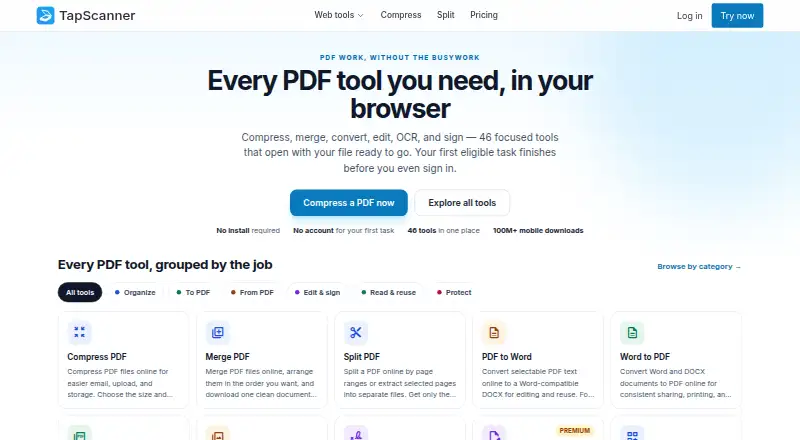
TapScanner is a document scanning and PDF service for Android, iOS, and the web. Its mobile apps capture and arrange paper documents into PDFs for export or sharing, with automatic capture, OCR, searchable output, and multipage PDF support. In a browser, its workspace offers 46 PDF tools for jobs such as compressing, merging, splitting, converting, editing, signing, recognizing text, and protecting files. The first eligible web task can be completed before sign-in, and the site says its web tools require no installation. The Free plan costs nothing and allows three completed tasks per day after sign-in, with up to 25 files, 100 MB, and 500 pages per task. Premium costs $39.99 a year, billed once yearly, with a 7-day trial for eligible accounts; it includes more per-task capacity and AI tools such as Ask PDF, summaries, question generation, and PDF translation. Web Premium does not include mobile app Premium, which is sold separately. Business terms are quoted up front.
Good
- Mobile apps support automatic capture and OCR.
- Searchable, multipage PDFs are supported.
- Web workspace provides 46 PDF tools.
- First eligible web task can be done before sign-in.
Watch out
- Free plan allows three tasks daily after sign-in.
- Premium costs $39.99 a year.
- Web Premium does not include mobile app Premium.
- Public PDF API is not self-serve.
Who it suits
TapScanner suits people who want to capture paper documents and work with PDFs on mobile or in a browser. Its plan distinctions matter to users who need Premium on both web and mobile or want business terms arranged in advance.
Verdict
TapScanner offers scanning and a broad set of browser PDF tools, with a free tier and paid Premium option. Check its task allowances and separate mobile Premium plan if you need more capacity across devices.
Plans and prices
From TapScanner's own pricing page, checked 4 Oct 2026.
| Plan | Price | What it gives you |
|---|---|---|
| Free | Free | 3 completed tasks/day after sign-in · up to 25 files, 100 MB, and 500 pages per task · essential merge, split, compress, convert, organize, and sign tools · free forever |
| Premium | $39.99 a year | 7-day trial for eligible accounts · up to 100 files and 1 GB per task · no plan page cap or daily job cap, subject to fair-use protection · OCR, text editing, repair, compare, forms, and automation · $3.33 per month; $39.99 billed once a year |
| Business | Priced on request | Everything in Premium as the starting point · volume, invoicing, and support terms agreed up front · Quoted after scoping; price agreed before anything is signed |
The facts
Each one read from TapScanner's own pages, with the date it was checked.
What it does
- Analytics boundary
- The web application data layer rejects filenames and document contents, while published analytics destinations require separate configuration verification.checked 4 Oct 2026
- API availability
- TapScanner says its public PDF API is not self-serve, with no public API key, endpoint SLA, or production integration currently available.checked 4 Oct 2026
- Auto capture
- Yeschecked 23 Sep 2026
- Business support
- Business customers agree scope, invoicing, and support terms up front and receive a written proposal before capabilities are enabled.checked 4 Oct 2026
- Deletion limit
- Immediate deletion is available only on result screens that explicitly offer it, not across every web tool.checked 4 Oct 2026
- File processing
- Web tools may send files to TapScanner-hosted processing, and customers cannot select a processing region.checked 4 Oct 2026
- First task
- The first eligible task can be completed before sign-in, and the site says no installation is required for its web tools.checked 4 Oct 2026
- Mobile scanning
- The mobile app captures and arranges paper documents into PDFs for export or sharing, and is listed for iPhone, iPad, and Android.checked 4 Oct 2026
- Multipage PDF
- Yeschecked 23 Sep 2026
- OCR included
- Yeschecked 23 Sep 2026
- PDF workspace
- The browser workspace offers 46 focused PDF tools for tasks including compressing, merging, splitting, converting, editing, signing, OCR, and protecting PDFs.checked 4 Oct 2026
- Premium AI tools
- Premium includes Ask PDF, summaries, question generation, and an AI PDF translation assistant alongside OCR and other advanced tools.checked 4 Oct 2026
- Searchable PDF
- Yeschecked 23 Sep 2026
- Security evidence
- The trust page says it does not currently claim verified storage encryption coverage, AI-training policy, DPA availability, or independent security certifications.checked 4 Oct 2026
- Temporary files
- The trust page says the normal download path removes output when its stream closes and scheduled cleanup handles stale temporary files; production runtime observation is still pending.checked 4 Oct 2026
Where it runs
- Android app
- Yeschecked 23 Sep 2026
- iOS app
- Yeschecked 23 Sep 2026
The company
- Company
- The privacy policy identifies Smart media internet marketing ltd. as the service controller and gives an address in Beer Sheva, Israel.checked 4 Oct 2026
Money
- Free plan
- Yeschecked 23 Sep 2026
- Mobile and web plans
- Web Premium checkout does not include mobile app Premium, which is available separately.checked 4 Oct 2026
The full review of TapScanner
TapScanner is a document-scanning app paired with a browser-based PDF toolkit. It suits people who scan paper on a phone and then need to work with PDFs; its breadth is a strong draw, but web and mobile Premium are separate purchases.
For occasional jobs, the free web tools offer a low-commitment starting point. Regular users should weigh the task limits against Premium’s annual charge and check which device they need to use.
Overview
The mobile app captures and arranges paper documents into PDFs for sharing or export, while the browser workspace handles PDF tasks without an installation. A first eligible web task can be completed before sign-in, a useful convenience for a one-off job. TapScanner’s range is more compelling for people who scan and then edit, convert, or protect documents than for someone seeking only a basic scanner.
Key features
Scanning and PDF work
Automatic capture, multipage PDFs, OCR, and searchable PDF support cover the core path from paper to usable digital document. Searchable output can be more useful than a scan that remains only an image, especially when finding text later matters. The browser workspace adds 46 tools for compressing, merging, splitting, converting, editing, signing, recognizing text, and protecting PDFs. That breadth is a practical advantage for mixed document chores, though it does not erase the separation between the web service and the mobile app.
Premium AI tools
Premium includes Ask PDF, summaries, question generation, and an AI translation assistant, alongside OCR and other advanced tools. These features make the plan more relevant to people who need to query or summarize document content; they matter less to readers who only scan and export paperwork.
Privacy and business considerations
Web tools may send files to TapScanner-hosted processing, and customers cannot choose a processing region. The normal download path removes output when its stream closes, with scheduled cleanup for stale temporary files, but immediate deletion is offered only on some result screens. The web application data layer rejects filenames and document contents, while published analytics destinations require separate configuration verification. TapScanner does not claim verified storage-encryption coverage, an AI-training policy, DPA availability, or independent security certifications. Those limits make it harder to assess suitability for sensitive or regulated documents.
TapScanner says its public PDF API is not self-serve: there is no public API key, endpoint SLA, or production integration currently available. Business customers agree scope, invoicing, and support terms up front and receive a written proposal before capabilities are enabled. That may suit a buyer seeking a scoped arrangement, but it is not a ready-made route to production API integration.
Pricing
Free
The Free plan costs nothing, billed free forever. After sign-in, it allows 3 completed tasks a day, with up to 25 files, 100 MB, and 500 pages per task. Essential merge, split, compress, convert, organize, and sign tools are included. The daily task ceiling makes this best for light or intermittent use, not a dependable high-volume workflow. The first eligible task can be completed before sign-in.
Premium
Premium costs $39.99 a year, billed $3.33 per month, with $39.99 billed once a year. Eligible accounts get a 7-day trial. The plan raises the allowance to 100 files and 1 GB per task, with no plan page cap or daily job cap, subject to fair-use protection; it adds OCR, text editing, repair, compare, forms, and automation. This is the stronger fit for frequent web PDF work, but the annual billing and separate mobile Premium plan matter: buying web Premium does not include Premium in the mobile app.
Business
Business has custom pricing, with volume, invoicing, and support terms quoted up front. It is aimed at customers who need agreed scope and support terms rather than a self-serve subscription.
Platforms
TapScanner is available on Android, iOS, and the web. The mobile scanning app is listed for iPhone, iPad, and Android; browser PDF tools require no installation for the first eligible task. Web Premium and mobile app Premium are separate.
Who it's for
TapScanner is a good fit for individuals who want phone scanning plus a broad set of browser-based PDF operations, especially if they can stay within the free allowance or benefit from Premium’s larger task capacity. It is less suitable for users who need one paid plan to cover both mobile and web, organizations requiring established security assurances, or teams expecting a public self-serve API.
Pros and cons
Pros
- Scanning and document work in one service: mobile capture, multipage PDFs, OCR, and searchable PDFs pair with 46 browser tools for common PDF tasks.
- A usable free tier: it is free forever and includes essential tools, with a first eligible web task possible before sign-in.
- Room for heavier web use: Premium allows larger tasks and removes the plan page cap and daily job cap, subject to fair use.
Cons
- Free use is capped: 3 completed tasks per day, with per-task limits of 25 files, 100 MB, and 500 pages, can constrain frequent work.
- Premium is split by platform: web checkout does not unlock mobile app Premium, so users needing both should account for separate plans.
- Security assurances are limited: processing may be hosted without a selectable region, and verified encryption coverage, AI-training policy, DPA availability, and independent certifications are not claimed.
- API access is not self-serve: there is no public key, endpoint SLA, or production integration currently available.
Alternatives
Browse mobile scanning apps for more options across the category.
- Smallpdf is another freemium choice with Android, iOS, web, and Windows support; its free plan offers 30+ tools and 2 Sign.com documents per listed period.
- Genius Scan is worth considering if unlimited scans and high-resolution scans in a free mobile scanner are the priority.
- Docutain is an option for Android or iOS users seeking unlimited scans, OCR text recognition, and cloud synchronization in its free plan.
- DocuWare is a paid alternative with cloud plans described for 4 users and 20 GB storage or 15 users and 50 GB storage.
- Easy Scanner is a mobile alternative for Android and iOS, with a Premium plan at $4.49 a month and a 3-day free trial.
- Adobe Scan is a free-to-download mobile alternative for Android and iOS.
- Prizmo is a freemium option for iOS and macOS, with a Premium Pack described as including unlimited on-device OCR and watermark-free exports.
- LumenScan is another freemium Android and iOS alternative with a free trial.
Verdict
Choose TapScanner if you want phone scanning and a substantial browser PDF toolkit, and its free daily allowance or web Premium capacity matches your workload. Its strongest reason to choose is the combination of capture, OCR, and 46 focused PDF tools; the clearest reason to look elsewhere is the separate mobile Premium plan, compounded for some buyers by limited security assurances and non-self-serve API access.
Alternatives to TapScanner
- 1

Smallpdf
Free planAndroidiOSWebWindows8.9From $10 a month - 2

DocuWare
AndroidiOSWebAPI8.6From £1,060 a month - 3

Docutain
Free planAndroidiOSWindows8.4From €2.08 a month - 4

CamScanner
Free planAndroidiOSWebmacOS8.3From $59.99 a year - 5

Google Photos
Free planAndroidiOSWebAPI8.3Free plan - 6
Easy Scanner
Free planAndroidiOS8.1From $4.49 a month