Taggg
Taggg connects calendars to find times that work for groups and schedule meetings without polling.
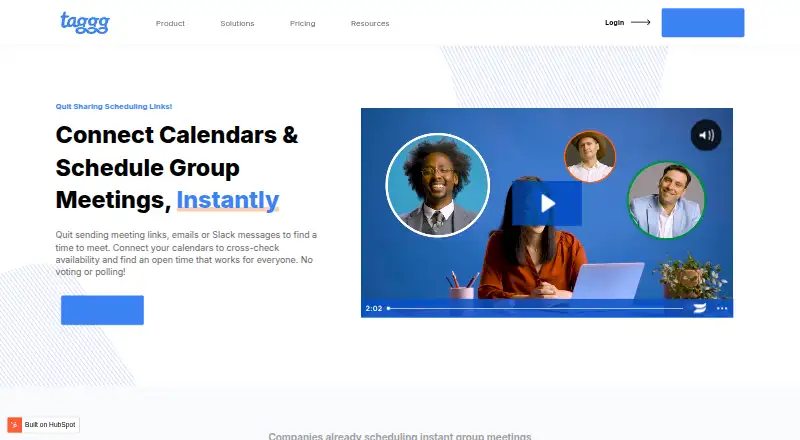
What Taggg is
Taggg connects calendars to find times that work for groups and schedule meetings without polling. Users add participants, select an open time that suits everyone, and confirm a meeting that is added to participants’ calendars. For meetings with three or more people, paid plans can find the earliest possible time automatically. Personal and group scheduling links can be shared or embedded, with group options for shared availability, round robin, or first available. Taggg connects with Google and Microsoft calendars, with contact-specific availability controls. Listed integrations include Google Calendar, Microsoft Outlook, Zoom, Zapier, Google Meet, and Ring4; Zapier can trigger actions when a meeting is scheduled or cancelled. The free Basic plan includes one calendar, unlimited meetings, instant scheduling, booking links, video conferencing integrations, Zapier integration, and a desktop app. Pro costs $6 a month and adds multiple calendars and automated group meetings. Team costs $8 a month plus $4 a month per teammate and includes a company admin portal and company-wide billing management. Desktop downloads are listed for Mac, Windows, and Linux, and Taggg is also available on the web. The site presents it for roles and organizations including management, assistants, agencies, sales, customer success, marketing, startups, and investment funds.
Good
- Free Basic plan includes unlimited meetings.
- Automates earliest-time scheduling for groups of three or more on paid plans.
- Offers shared, round-robin, and first-available group links.
- Integrates with Google Calendar, Outlook, Zoom, and Zapier.
- Available on web, Windows, macOS, and Linux.
Watch out
- Basic includes a single calendar.
- Automated group meetings are on paid plans.
- Pro costs $6 a month.
- Team adds $4 a month per teammate.
Who it suits
Taggg suits teams and professionals who schedule group meetings, including management, assistants, agencies, sales, and customer success. Its Team plan adds company administration and billing management.
Verdict
Taggg offers instant scheduling on its free plan and automated group scheduling on paid plans. Compare calendar needs and team billing requirements when choosing between Basic, Pro, and Team.
Plans and prices
From Taggg's own pricing page, checked 15 Oct 2026.
| Plan | Price | What it gives you |
|---|---|---|
| Basic | Free | Unlimited connections · single calendar · unlimited meetings · instant scheduling · reusable and one-off bookable links · video-conferencing integrations · Zapier · desktop app |
| Pro | $6 a month | Multiple calendar connections and Pro features · $6/mo |
| Team | $8 a month | Multiple calendar connections and Team features · $8/mo + $4/mo/teammate |
| Pro | $60 a year | Unlimited connections · multiple calendars · unlimited meetings · instant scheduling · bookable links · video-conferencing integrations · Zapier · desktop app · automated group meetings · removes “Meetings by Taggg” · $60/yr |
| Team | $80 a year | Unlimited connections · multiple calendars · unlimited meetings · instant scheduling · bookable links · video-conferencing integrations · Zapier · desktop app · automated group meetings · removes “Meetings by Taggg” · company admin portal · company billing management · $80/yr + $40/yr/teammate |
The facts
Each one read from Taggg's own pages, with the date it was checked.
What it does
- API access
- The Zapier connection uses an API key found in Taggg Settings under Integrations.checked 15 Oct 2026
- Automated group meetings
- Automated group meetings support three or more participants and find the earliest possible time.checked 15 Oct 2026
- Availability controls
- Working hours, calendar events, notice periods, and buffer times can be overridden for individual meetings.checked 15 Oct 2026
- Bookable links
- Personal and group booking links can be sent to others or embedded on a website.checked 15 Oct 2026
- Calendar connections
- Taggg supports calendar connections with Google and Microsoft, with contact-specific availability controls.checked 9 Oct 2026
- Calendar support
- The product supports cross-platform scheduling between Google Calendar and Microsoft calendars.checked 15 Oct 2026
- Connections
- Users can connect contacts and share selected calendar availability with them.checked 15 Oct 2026
- Desktop downloads
- Official downloads are provided for Mac, Apple Silicon Mac, Windows, and Linux.checked 15 Oct 2026
- Founders
- The Product Angle identifies Nichole Elizabeth DeMeré, Trevor Hatfield, and Aaron Krall as Taggg co-founders.checked 15 Oct 2026
- Google Calendar integration
- Google Calendar can determine availability and receive newly booked meetings.checked 15 Oct 2026
- Google Meet integration
- Google Meet is available automatically for users who sign up with Google.checked 15 Oct 2026
- Group link modes
- Group links offer shared availability, round-robin, and first-available scheduling modes.checked 15 Oct 2026
- Independent product description
- Vidico describes Taggg as overlaying calendars to find group availability without voting or polling.checked 15 Oct 2026
- Instant scheduling
- Connected contacts can be scheduled immediately by selecting an open time and confirming it.checked 15 Oct 2026
- Integrations
- The integrations page lists Google Calendar, Microsoft Outlook, Zoom, Zapier, Google Meet, and Ring4.checked 9 Oct 2026
- Intended users
- The site presents Taggg for management, assistants, agencies, sales, customer success, marketing, startups, and investment funds.checked 9 Oct 2026
- Launch traction
- Vidico says Taggg’s launch video helped the product obtain its first 250 users.checked 15 Oct 2026
- Limit: adoption
- A G2 reviewer reported that collaborators often still need to create accounts before they can participate.checked 15 Oct 2026
- Limit: feature depth
- A Software Advice reviewer requested more advanced calendar features.checked 15 Oct 2026
- Limit: integration permissions
- A G2 reviewer said an administrator had not allowed them to add the Zoom integration.checked 15 Oct 2026
- Limit: settings discoverability
- A G2 reviewer said the newer interface made some settings difficult to find.checked 15 Oct 2026
- Microsoft Outlook integration
- Microsoft Outlook integration is automatically applied for Microsoft sign-ups or added calendars.checked 15 Oct 2026
Where it runs
- Desktop apps
- Downloads are listed for Mac, Mac with Apple silicon, Windows, and Linux.checked 9 Oct 2026
The company
- Founder and ownership context
- The Product Angle describes Trevor Hatfield as Taggg founder and owner of Inturact, a B2B SaaS growth agency.checked 15 Oct 2026
The full review of Taggg
Taggg brings calendar availability and group booking links into one scheduling tool. It fits professionals and teams that regularly coordinate shared meetings, especially when polling is slowing them down. The free plan covers instant scheduling and one calendar; automated group scheduling and multiple calendars require a paid plan.
Overview
Taggg connects Google and Microsoft calendars so participants can find a common opening and confirm a meeting directly to their calendars. That makes it a practical alternative to back-and-forth messages for groups that need to settle on a time. For groups of three or more, Pro and Team can identify the earliest possible slot automatically, saving coordination work when speed matters.
Personal and group booking links can be shared or embedded, with options for shared availability, round robin, or first available. Availability controls can also be set by contact. The trade-off is that calendar scheduling involves sharing connected-account credentials, calendar data, and contacts data with Taggg. Its privacy policy says it does not rent or sell user information and describes physical, electronic, and managerial safeguards.
Key features
Instant and automated group scheduling
Instant scheduling lets a user add participants, select a time everyone can attend, and confirm the meeting without sending a poll. Basic includes this feature, so occasional group coordination does not require a subscription. Automated selection of the earliest possible time for meetings of three or more is reserved for Pro and Team. That is a meaningful upgrade for teams that coordinate larger meetings often, but less compelling for users who are comfortable choosing from the available times themselves.
Booking links and integrations
Bookable links support personal and group scheduling, and the group options cover shared availability, round robin, and first available. That range suits both direct meeting coordination and routing incoming bookings. Google Calendar and Microsoft Outlook are among the integrations, alongside Zoom, Google Meet, Ring4, and Zapier. Zapier can trigger an action when a meeting is scheduled or cancelled, giving teams a way to connect those events to other workflows.
Pricing
Basic is free and includes unlimited connections, one calendar, unlimited meetings, instant scheduling, bookable links, video conferencing integrations, Zapier integration, and a desktop app. It is a capable starting point for an individual or light user, but the single-calendar limit and lack of automated group meetings set clear boundaries for busier scheduling.
Pro costs $6 a month, billed $6/mo. It adds multiple calendars and automated group meetings while retaining unlimited connections and meetings, booking links, conferencing integrations, Zapier, and the desktop app. It also removes “Meetings by Taggg.” Pro is the more suitable choice for individuals who need multiple calendars or want automatic time selection, though its per-user price can add up across a team.
Team costs $8 a month, billed $8/mo + $4/mo/teammate. It includes Pro’s scheduling features plus a company admin portal and billing management for the entire company. Those controls make it the natural tier for organizations managing team access and billing centrally; smaller groups that do not need them can use Pro.
Platforms
Taggg is available on the web, macOS, Windows, and Linux. Desktop downloads are offered for Mac, Mac with Apple silicon, Windows, and Linux, giving desktop users a native app option alongside browser access.
Who it's for
Taggg is aimed at management, assistants, agencies, sales, customer success, marketing, startups, and investment funds. Its instant scheduling and booking links suit people who arrange meetings with multiple participants or accept appointments. Pro is the better fit when automated group scheduling or multiple calendars matter; Team makes more sense when company-wide billing administration is also needed. Users who only need a single calendar and manual time selection can stay on Basic.
Pros and cons
- Pros: Basic includes unlimited meetings and instant scheduling at no cost, making it useful for regular but manually coordinated group meetings.
- Pros: Pro adds multiple calendars and automatic earliest-time selection for groups of three or more, addressing two concrete scheduling bottlenecks.
- Pros: Group links offer shared availability, round robin, and first available options, while Zapier can respond to scheduled or cancelled meetings.
- Cons: Basic is limited to one calendar and omits automated group meetings, so users with several calendars or frequent larger meetings need a paid tier.
- Cons: Team adds $4/mo/teammate on top of its $8/mo base, which raises the cost as a company adds users.
- Cons: The service collects account credentials, calendar data, and contacts data, which may not suit users seeking to minimize the information shared with a scheduling service.
Alternatives
For a broader comparison, see Meeting Scheduling Software.
- Cal.com is a fit for users who want unlimited event types and calendars on its free plan, or need its listed 100+ app integrations.
- Calendar.com is another free-plan option for individuals who want a service described as free forever.
- FreeBusy suits individuals looking for appointment bookings, meeting polls, and calendar integrations on a free plan.
- MeetScheduling is worth considering for teams that need round-robin and collective events, with its Startup plan covering three team members.
- Tymeslot may suit users seeking a self-hosted option with unlimited bookings and meeting types.
- Zoho Bookings is an alternative with a free plan for one user and a 15-day premium trial.
- Koalendar fits users who prioritize unlimited bookings and booking pages, calendar sync, embeds, and video conferencing on a free plan.
- neatCal is another free-plan option for users whose scheduling needs fit its stated caps of 150 appointments and one event type.
Verdict
Choose Taggg if your work regularly involves coordinating groups and you want to replace polling with direct availability matching or shareable booking links. Basic is a useful no-cost starting point, while Pro is the strongest fit for multi-calendar users and teams that want automatic time selection. Look elsewhere if your priority is avoiding the account, calendar, and contact data Taggg collects, or if Team’s added per-teammate charge is difficult to justify for centralized billing.
Getting started
- Open the Taggg website
- Choose the web app or download the Mac, Windows, or Linux desktop app
- Create a free Basic account or select Pro or Team
- Connect Google or Microsoft calendars
- Add participants or create a personal or group booking link
- Connect video conferencing or Zapier integrations as needed
Limits worth knowing
The free Basic plan permits one calendar, although it includes unlimited meetings. Automated group meetings and multiple calendars begin with Pro, while Team adds company administration and billing management.
Questions
Is Taggg free?
Yes. The Basic plan is free and includes one calendar, unlimited meetings, instant scheduling, booking links, integrations, Zapier, and a desktop app.
How much do paid plans cost?
Pro costs $6 a month. Team costs $8 a month plus $4 a month per teammate.
Which platforms are supported?
Taggg is available on the web, macOS, Windows, and Linux, with listed desktop downloads for each computer platform.
Which calendars can it connect?
Taggg supports connections with Google and Microsoft calendars, including contact-specific availability controls.
Does it integrate with video tools?
Listed integrations include Zoom, Google Meet, Google Calendar, Microsoft Outlook, Zapier, and Ring4.
Alternatives to Taggg
- 1

Cal.com
Free planAndroidiOSWebAPI8.3Free plan - 2

Calendar.com
Free planAndroidiOSWebAPI8.1From $20 a month - 3

FreeBusy
Free planAndroidiOSWebAPI8.0From $5 a month - 4

Zoho Bookings
Free planAndroidiOS7.8From $8 a month - 5
TimeRex
Free planWebAPI7.4From ¥750 a month - 6

Calendly
Free planExtension7.3From $10 a month