
MeetScheduling
MeetScheduling lets brands publish booking pages, manage availability, and allow clients to schedule meetings.
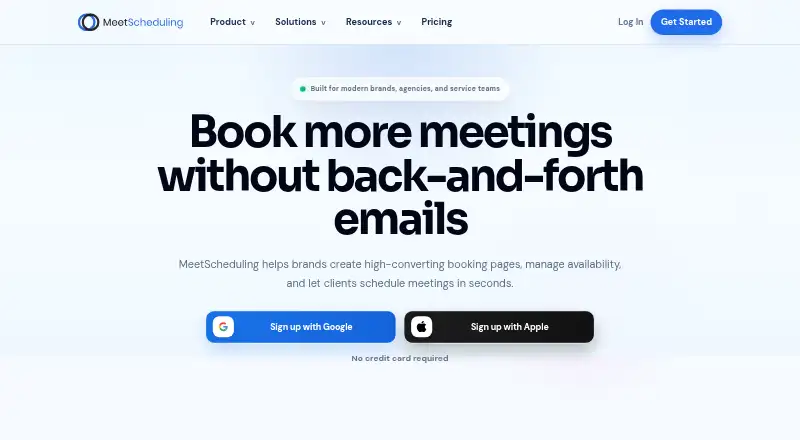
What MeetScheduling is
MeetScheduling lets brands publish booking pages, manage availability, and allow clients to schedule meetings. It supports one-on-one, group, round-robin, and custom event flows, and can route incoming meetings by team, region, or qualification. Workflow automations can send reminders and confirmations, then handle post-meeting actions. Google Calendar, Outlook, and iCloud connections update availability across connected calendars; the service can generate meeting links for Zoom, Microsoft Teams, Google Meet, and Webex. The free plan includes one event type, unlimited bookings, and Google Calendar sync. Startup costs $12/mo and includes 10 event types and three team members; Business Pro costs $29/mo and includes unlimited event types and team members, all calendar integrations, white-label branding, and priority support. Enterprise pricing is custom. Its listed features include a dedicated database, AI phone agents, SOC2, HIPAA, ISO 27001, and a 99.9% uptime SLA. Stripe and PayPal payments, webhooks, API delivery, and Salesforce and Marketo sync also appear in the pricing comparison, with some integrations on paid tiers. MeetScheduling is available on Android, iOS, web, through an API, and as an extension.
Good
- Supports one-on-one, group, and custom events.
- Routes meetings by team, region, or qualification.
- Automates reminders, confirmations, and post-meeting actions.
- Free plan includes unlimited bookings.
- Generates links for four named video services.
Watch out
- Free plan allows one event type.
- Startup costs $12/mo.
- Business Pro costs $29/mo.
- Enterprise pricing is custom.
Who it suits
It suits brands and teams that need client booking pages, availability management, or meeting routing. The listed plans target solo operators and growing teams, agencies, and organizations seeking dedicated infrastructure, compliance, and SLAs.
Verdict
MeetScheduling combines booking pages with calendar connections, routing, and workflow automation. The free plan covers one event type, while paid tiers add more event and team capacity; Enterprise pricing is custom.
Plans and prices
From MeetScheduling's own pricing page, checked 9 Oct 2026.
| Plan | Price | What it gives you |
|---|---|---|
| Startup | $12 a month | 10 event types · 3 team members · Round-robin scheduling · Collective events · Routing forms · $12 /month |
| Business Pro | $29 a month | Unlimited event types · Unlimited team members · All calendar integrations · White-label branding · Priority support · $29 /month |
| Enterprise | Priced on request | Everything in Business Pro · Dedicated database · AI phone agents · SOC2, HIPAA, ISO 27001 · 99.9% uptime SLA · Custom |
| Free | — | 1 event type · Unlimited bookings · Google Calendar sync · $0 /month |
The facts
Each one read from MeetScheduling's own pages, with the date it was checked.
What it does
- Automations
- Workflow automations can send reminders, confirmations, and post-meeting actions.checked 9 Oct 2026
- Calendar integrations
- The site names Google Calendar, Outlook, and iCloud calendar connections, with availability updated across connected calendars.checked 9 Oct 2026
- Enterprise support
- Enterprise includes dedicated onboarding support and 24/7 real-time Slack Connect.checked 9 Oct 2026
- Lead routing
- Routing can direct inbound meetings by team, region, or qualification.checked 9 Oct 2026
- Limits
- The free plan includes one event type, unlimited bookings, and Google Calendar sync; the Startup plan includes 10 event types and three team members.checked 9 Oct 2026
- Other integrations
- The pricing comparison lists Stripe and PayPal payments, webhooks and API delivery, and Salesforce and Marketo sync on paid tiers.checked 9 Oct 2026
- Scheduling
- The service supports one-on-one, group, round-robin, and custom event flows.checked 9 Oct 2026
- Security
- The pricing page lists SAML SSO on Business Pro and Enterprise, and SOC2, HIPAA, and ISO 27001 for Enterprise.checked 9 Oct 2026
- Video integrations
- The site says it can generate meeting links for Zoom, Microsoft Teams, Google Meet, and Webex.checked 9 Oct 2026
- What it does
- MeetScheduling lets brands create booking pages, manage availability, and let clients schedule meetings.checked 9 Oct 2026
- Who it is for
- The pricing page describes Startup as for growing teams and solo operators, Business Pro for agencies and serious operators, and Enterprise for dedicated infrastructure, compliance, and SLAs.checked 9 Oct 2026
Where it runs
- Platforms
- The site lists a mobile app and browser extension, and its footer links to the App Store, Google Play, Chrome, Edge, and Firefox.checked 9 Oct 2026
The full review of MeetScheduling
MeetScheduling is a booking platform for solo operators and teams that need clients to schedule across multiple calendars. It suits organizations that must route incoming meetings and automate follow-up, while the free tier is best for a single recurring booking flow. Choose it for team-aware scheduling; look elsewhere if you need several event types without paying.
Overview
MeetScheduling combines public booking pages with availability management and one-on-one, group, round-robin, and custom event flows. Routing can send inbound meetings to a team, region, or qualification path, which is more useful than a basic personal booking link when responsibility changes by lead. Workflow automations can issue reminders and confirmations, then trigger post-meeting actions. The result is a scheduling layer that can support both individual appointments and distributed sales or service teams.
Key features
Scheduling and routing
Round-robin scheduling, collective events, team booking pages, and routing forms let several people share demand without manually assigning every request. This is a practical fit for growing teams, agencies, and operators qualifying leads before a call. The free plan’s single event type is restrictive for users who need separate links for consultations, demos, and follow-ups.
Calendars, video, and payments
Google Calendar, Outlook, and iCloud connections keep availability aligned across calendars. MeetScheduling can generate links for Zoom, Microsoft Teams, Google Meet, and Webex, so invitees can receive a meeting location as part of the booking flow. Paid tiers add Stripe and PayPal collection, webhooks and API delivery, plus Salesforce and Marketo synchronization, making the platform more suitable for revenue and operations workflows than the free tier.
Branding and access
A custom booking domain supports a branded customer experience, while Business Pro adds white-label branding. SAML SSO appears on Business Pro and Enterprise, and Enterprise adds SOC2, HIPAA, and ISO 27001 coverage. Those controls matter to organizations with formal identity and compliance requirements, but they are not part of the lower-cost plans.
Pricing
| Plan | Price | What you get |
|---|---|---|
| Free | $0 /month | 1 event type, unlimited bookings, Google Calendar sync |
| Startup | $12 a month | 10 event types, 3 team members, round-robin scheduling, collective events, routing forms |
| Business Pro | $29 a month | Unlimited event types and team members, all calendar integrations, white-label branding, priority support |
| Enterprise | Custom pricing | Everything in Business Pro, dedicated database, AI phone agents, SOC2, HIPAA, ISO 27001, 99.9% uptime SLA |
Free is viable for one booking purpose and unlimited volume, but its event-type cap quickly becomes a workflow constraint. Startup is the sensible step for solo operators or growing teams needing several flows and up to three members. Business Pro removes both caps and adds complete calendar connectivity, branding, and priority support for agencies and serious operators. Enterprise is for organizations that require dedicated infrastructure, compliance commitments, and an SLA; its price is custom. Paid-tier integrations and team capacity mean the lower plans trade breadth for a lower monthly bill.
Platforms
MeetScheduling supports Android, iOS, web, browser extension, and API access. That combination covers mobile users, browser-based booking, and organizations that need programmatic delivery.
Who it's for
Solo operators with one main meeting type can use the free plan effectively. Growing teams benefit from Startup’s three-member limit, routing forms, round-robin, and collective events. Agencies and larger operating teams get a better fit from Business Pro’s unlimited event types and members, white-label presentation, and priority support. Enterprise is aimed at organizations needing dedicated databases, regulated-data controls, uptime commitments, and dedicated onboarding with 24/7 real-time Slack Connect.
Pros and cons
- Pros: Routing by team, region, or qualification supports structured lead distribution.
- Pros: One-on-one, group, round-robin, collective, and custom flows cover varied meeting models.
- Pros: Calendar and video connections reduce conflicts and manual link creation.
- Cons: The free plan permits only one event type, limiting users with multiple booking purposes.
- Cons: Salesforce, Marketo, payment, webhook, and API capabilities are paid-tier features.
- Cons: Unlimited team capacity and broad calendar integration require Business Pro, while compliance features require Enterprise.
Alternatives
Compare it with Meeting Scheduling Software if you want a wider category view. Pick Cal.com instead when a free user needs unlimited event types, unlimited calendars, and 100+ app integrations. Calendar.com is another freemium option with Android, iOS, web, API, and extension support. Choose Taggg for a free plan centered on unlimited connections and meetings across desktop platforms. FreeBusy suits individual appointment bookings and meeting polls, with a free Personal plan. Tymeslot is the alternative to consider for self-hosting with unlimited bookings and meeting types. Zoho Bookings offers Android and iOS apps and a 15-day premium trial. Koalendar provides a free-forever plan with unlimited bookings and booking pages. neatCal is a web-only option with a tightly capped free plan.
Verdict
MeetScheduling is a strong choice for teams that need routing, shared scheduling, and automated meeting follow-up in one service. Startup offers the clearest entry point for small teams, while Business Pro is the practical tier for agencies requiring unlimited capacity and branding. Choose another tool if your priority is multiple event types on a free plan or a simpler, individual-only scheduler.
Alternatives to MeetScheduling
- 1

Cal.com
Free planAndroidiOSWebAPI8.3Free plan - 2

Calendar.com
Free planAndroidiOSWebAPI8.1From $20 a month - 3

FreeBusy
Free planAndroidiOSWebAPI8.0From $5 a month - 4
Taggg
Free planAndroidiOSWebAPI8.0From $60 a year - 5

Zoho Bookings
Free planAndroidiOS7.8From $8 a month - 6
TimeRex
Free planWebAPI7.4From ¥750 a month