
SeatPlan.io
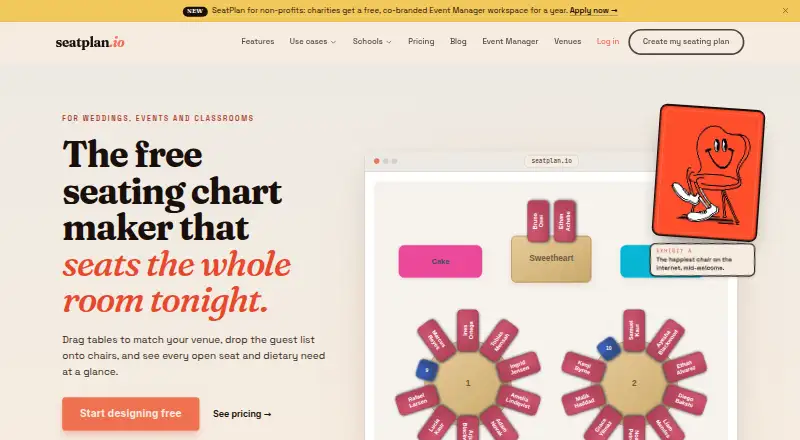
SeatPlan.io is a web-based seating chart maker for weddings, classrooms, events, and other gatherings.
What SeatPlan.io is
SeatPlan.io is a web-based seating chart maker for weddings, classrooms, events, and other gatherings. Its designer supports drag-and-drop arrangements around round or rectangular tables, and users can import guest lists from CSV. Event Manager can import floor plans from photos, screenshots, PDFs, and CAD DXF files, with DXF blueprints imported to exact scale. It supports client links with view-only, editing, or check-in-only permissions, along with real-time updates. Door staff can check guests in from a phone using a link without an account. Depending on the plan, guest-facing tools include QR seat finding and Apple and Google Wallet seat passes. The Free plan costs nothing and includes design and guest-list import, but does not save work or export PDFs. Pro costs £8, paid once; Collaborate costs £14, paid once; Classroom costs £29 a year when billed annually; and Event Manager costs £35 a month when billed annually. Event Manager is aimed at professionals managing multiple events.
Good
- Drag-and-drop seating with round or rectangular tables
- Imports CSV guest lists
- Event Manager supports real-time collaboration
- Phone check-in link needs no account
Watch out
- Free plan does not save work
- Free plan has no PDF export
- Guest-list imports are capped at 5MB per file
Who it suits
SeatPlan.io suits people arranging seats for weddings, classrooms, events, or other gatherings. Event Manager is intended for wedding planners, venues, and event professionals handling multiple events.
Verdict
SeatPlan.io covers seating layouts and guest lists, with Event Manager adding floor-plan imports and event collaboration tools. Compare the plan-specific features and prices, especially if you need saved work or PDF export.
Plans and prices
From SeatPlan.io's own pricing page, checked 2 Oct 2026.
| Plan | Price | What it gives you |
|---|---|---|
| Free | Free | Full design · guest list import · 1 AI floor-plan import to try · no saved work · no PDF export · £0 forever |
| Pro | £8, paid once | Save work for 90 days · version history and restore · PDF export · 3 AI floor-plan imports/month · £8 one-time payment; pay once — not a subscription |
| Collaborate | £14, paid once | Save work for 90 days · up to 2 collaborators · real-time editing · share links · QR seat finder · Apple and Google Wallet passes · 3 AI floor-plan imports/month · £14 one-time payment; pay once — not a subscription |
| Classroom | £29 a year | Unlimited saved classes · shuffle with rules · PDF export · 1 AI floor-plan import to try · £29 per school year when billed annually |
| Event Manager | £35 a month | Unlimited events and templates · unlimited collaborators · 10 AI floor-plan imports/month · free CAD/DXF import · event workspace · priority email support · CSV or Excel guest-list import limited to 5MB · £35 per month when billed annually |
The facts
Each one read from SeatPlan.io's own pages, with the date it was checked.
What it does
- Audience
- SeatPlan.io describes Event Manager as intended for wedding planners, venues, and event professionals managing multiple events.checked 2 Oct 2026
- Collaboration
- Event Manager supports client links with view-only, editing, or check-in-only permissions and real-time updates.checked 2 Oct 2026
- Design
- The designer supports drag-and-drop seating arrangements and round or rectangular tables.checked 2 Oct 2026
- Guest check-in
- Event Manager lets door staff use a check-in link from a phone without an account.checked 2 Oct 2026
- Guest-facing tools
- SeatPlan.io offers QR seat finding and Apple and Google Wallet seat passes on eligible plans.checked 2 Oct 2026
- Guest lists
- Users can import guest lists from CSV, and Event Manager also offers Excel guest-list export.checked 2 Oct 2026
- Integration
- The Event Temple integration imports booking guests and refreshes the roster when an event is reopened; seating assignments are not written back to Event Temple.checked 2 Oct 2026
- Limits
- Event Manager states there is no guest or table limit, while guest-list CSV or Excel imports are capped at 5MB per file.checked 2 Oct 2026
- Privacy
- For users who do not sign up, the seating chart is stored in browser local storage, deleted at midnight, and not transmitted to SeatPlan.io servers.checked 2 Oct 2026
- Privacy controls
- The privacy policy says SeatPlan.io does not sell or rent personal information and that optional analytics and advertising cookies are off until accepted in the EEA, UK, and Switzerland.checked 2 Oct 2026
- Product
- SeatPlan.io is an online seating chart maker for weddings, classrooms, events, and other gatherings.checked 2 Oct 2026
- Support
- SeatPlan.io lists [email protected] for support inquiries, and Event Manager includes priority email support.checked 2 Oct 2026
Money
- Floor plans
- Event Manager can import photos, screenshots, PDFs, and CAD DXF files, with DXF blueprints imported to exact scale.checked 2 Oct 2026
- Integration trial
- Eligible Event Temple accounts can start a 14-day SeatPlan.io trial without a card, and accounts that have already used a trial are not eligible for another.checked 2 Oct 2026
The company
- Headquarters
- London, United Kingdomchecked 28 Sep 2026
The full review of SeatPlan.io
SeatPlan.io is a web seating-chart tool for weddings, classrooms, and events. It best fits planners who need shared event workflows, while its free tier suits chart-making only if you do not need to save or export the result. The paid options are unusual in offering both one-time purchases and a monthly professional workspace.
Overview
The drag-and-drop designer arranges seating around round or rectangular tables, and guest lists can be imported from CSV. Event Manager extends that workflow with Excel guest-list export and floor-plan imports from photos, screenshots, PDFs, and CAD DXF files. DXF plans are imported to exact scale, which helps when a layout must fit a venue rather than just look plausible on screen.
Event Manager has no guest or table limit, but CSV and Excel guest-list files are capped at 5MB each. That is a practical constraint for large or richly formatted rosters. For users who do not sign up, charts stay in browser local storage, are deleted at midnight, and are not sent to SeatPlan.io’s servers; that is convenient for a temporary chart, not a way to preserve ongoing work.
Key features
Collaboration and check-in
Event Manager supports client links with view-only, editing, or check-in-only permissions and real-time updates. Door staff can open a check-in link on a phone without an account. These role options suit events where clients and staff need different access, though they are more than a solo user needs for a one-off seating plan. The Collaborate plan also offers real-time editing and sharing, but caps the team at two collaborators.
Guest-facing tools and integration
Eligible plans include QR seat finding and Apple and Google Wallet seat passes, useful when guests need to locate their seats without relying on a printed chart. The Event Temple integration imports booking guests and refreshes the roster when an event is reopened, but it does not send seating assignments back to Event Temple. Eligible Event Temple accounts can begin a 14-day SeatPlan.io trial without a card; an account that has already used a trial cannot start another.
Privacy and support
SeatPlan.io says it does not sell or rent personal information. Optional analytics and advertising cookies remain off until accepted in the EEA, UK, and Switzerland. Support inquiries go to [email protected], while Event Manager includes priority email support.
Pricing
The Free plan costs £0 forever and includes full design, guest-list import, and one AI floor-plan import to try. It does not save work or export PDFs, so it is a trial of the chart-building workflow rather than a lasting free workspace.
Pro is a £8 one-time payment, not a subscription. It saves work for 90 days and adds version history and restore, PDF export, and three AI floor-plan imports per month. It is the straightforward fit for an individual who needs a printable chart and some protection against mistakes, but the 90-day saving window is not indefinite storage.
Collaborate costs £14 as a one-time payment. It includes the same 90-day saved work and three monthly AI floor-plan imports as Pro, plus up to two collaborators, real-time editing, share links, QR seat finding, and Apple and Google Wallet passes. Choose it when a small team or guest-facing tools matter; the two-person cap makes it a poor fit for a larger planning group.
Classroom costs £29 per school year when billed annually. It offers unlimited saved classes, rule-based shuffling, PDF export, and one AI floor-plan import to try. It is tailored to repeated classroom seating rather than multi-event coordination, and its AI import allowance is smaller than Pro or Collaborate.
Event Manager costs £35 per month when billed annually. It includes unlimited events and templates, unlimited collaborators, 10 AI floor-plan imports per month, free CAD/DXF import, an event workspace, and priority email support; CSV or Excel guest-list imports remain limited to 5MB per file. It is aimed at wedding planners, venues, and event professionals managing multiple events. Its recurring annual billing makes less sense for an occasional event than the one-time plans.
Platforms
SeatPlan.io runs on the web. The plans cover different workflows rather than different device platforms, from a single chart to a multi-event workspace.
Who it's for
Choose SeatPlan.io if you need seating plans tied to guest lists, accurate venue layouts, or coordinated event work. Event Manager is the strongest match for professionals running multiple events; Classroom is the focused option for school-year seating. For an individual who only needs a saved PDF, Pro costs less than Collaborate and avoids a recurring subscription. Avoid the free plan if you need to retain your chart or print it as a PDF.
Pros and cons
- Pros: DXF floor plans import to exact scale, making venue-fit planning more grounded than drawing from scratch.
- Pros: Collaborate and Event Manager provide real-time updates and distinct link permissions, while phone check-in links do not require staff accounts.
- Pros: Pro and Collaborate are one-time purchases rather than subscriptions, and Pro includes version history and restore.
- Cons: The free plan cannot save work or export PDFs, so a lasting chart requires payment.
- Cons: Pro and Collaborate retain work for only 90 days, which may not suit long-term records.
- Cons: Guest-list imports are capped at 5MB per file, and Collaborate allows only two collaborators.
Alternatives
Event Diagramming Software is a useful category starting point if you want to compare tools beyond SeatPlan.io.
Pick Event Floor Planner if a free, no-signup tool with PDF export is the priority and you want Android or iOS as well as web access.
Table-Plan.com may suit a smaller event with up to 30 guests on its free plan, or a one-time Premium purchase for up to 250 guests; it supports macOS, web, and Windows.
EventDiagram is another freemium web option for event diagrams.
Consider OnePlan if its free plan’s one event, 25 objects, and watermarked low-resolution PNG export cover your needs, or if you need a Team plan for 3–10 people.
SeatPlanning is another freemium web choice, with a free plan capped at one project, 40 seats per project, five tables, and 80 elements.
Eventscript may be worth considering if one upcoming event at a time is enough and you want all features included on its free plan.
SeatChart.io offers a free plan with one event, three AI floor-plan imports, and export, sharing, and QR features, making it a relevant comparison for a single event.
TablePlan.io is another web-based freemium alternative.
Verdict
SeatPlan.io is a strong choice for event professionals who need exact-scale floor-plan imports, collaborative permissions, and a workspace for multiple events. For occasional use, its one-time Pro and Collaborate plans are more practical than the annual-billed Event Manager subscription. Look elsewhere if you require free saved work and PDF export, or if your team exceeds Collaborate’s two-person limit without needing Event Manager’s broader workspace.
Alternatives to SeatPlan.io
- 1

EventDiagram
Free planWebAPI7.3Free plan - 2

Cvent
AndroidiOSWeb6.9 - 3
EventReception
AndroidiOSWeb6.9From 47 € a month - 4
Table-Plan.com
Free planWebmacOSWindows6.8From $49 a month - 5
OnePlan
Free planWeb6.7From $900 a year - 6
SeatPlanning
Free planWeb6.7From $39 a month