
EventDiagram
EventDiagram is a web application for creating, sharing, and collaborating on event floor plans and diagrams.
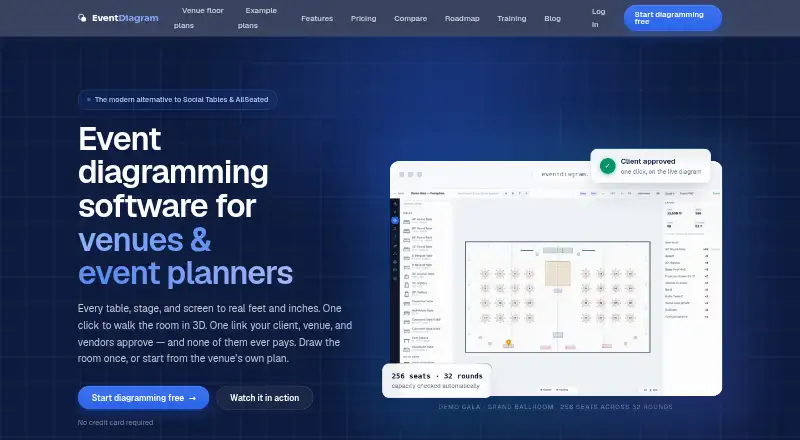
What EventDiagram is
EventDiagram is a web application for creating, sharing, and collaborating on event floor plans and diagrams. Plans use real-world dimensions, and capacity, spacing, and square feet per seat update as objects move. A 3D view is generated from the same scene as the 2D plan and represents objects at their real heights. The AI copilot can build or edit a to-scale layout from plain-language requests, with proposed changes available for review and approval. An MCP server and API keys let users connect Claude or other AI tools to read and write diagrams. Share links allow recipients to view in 3D, leave pinned comments, and approve a specific version without an account. Seating tools cover guest-list imports, table assignments, meal and dietary tracking, and check-in. PDF, image, and data exports are available on every plan, though Free exports carry a watermark.
Good
- Plans use real-world dimensions with live capacity updates.
- 3D views reflect object heights from the 2D scene.
- Share links support comments and version approval without accounts.
- Exports are available on every plan.
- Seating tools include guest, meal, and check-in tracking.
Watch out
- Free exports include a watermark.
- The free plan allows one active diagram.
- The free plan includes three AI copilot messages per month.
- EventDiagram is not SOC 2 certified today.
Who it suits
EventDiagram is presented for hotels and venues, planners, caterers, rental companies, and AV and production teams. It suits people who need to create and share event layouts with collaborators or clients.
Verdict
EventDiagram combines dimensioned floor plans, 3D views, collaboration, and seating workflows. Its free plan includes exports but applies a watermark, while the product states that it is not SOC 2 certified today.
Plans and prices
From EventDiagram's own pricing page, checked 15 Oct 2026.
| Plan | Price | What it gives you |
|---|---|---|
| Free | Free | 1 active diagram · 3 AI copilot messages/month · unlimited viewers/commenters · core object library · watermarked exports · $0 forever |
| Venue Group / Enterprise | $9 a year | Multi-property hierarchy · SSO/SCIM · audit logs · API · managed migration · SLA and dedicated success · Custom; scoped with the company. |
| Solo | $9 a month | 1 editor · unlimited events/diagrams · standard library · watermark-free exports · 25 AI messages/month · $9 /mo or $90/yr |
| Pro | $18 a month | Up to 3 editors · 75 AI messages/month · 3D view · production library · branding · version history · $18 /mo or $180/yr |
| Event Pass | $24, paid once | Full library · clean exports · 3D · valid for 90 days · no renewal · $24 paid once |
| Small Venue | $49 a month | Up to 3 event spaces · 1 converted space · unlimited team · own inventory · 150 AI messages/month · $49/property/mo |
| Drawn for your event | $49, paid once | Team draws one event space from your supplied plan · plan for 90 days · $49 paid once |
| Business | $149 a month | Unlimited members · 1 converted property · own inventory · 150 AI messages/month · production library · 3D · $149 /mo or $1,490/yr |
| Venue | $149 a month | Up to 10 event spaces · up to 5 converted spaces · unlimited team · 300 AI messages/month · guided onboarding · $149/property/mo |
| Large Venue | Priced on request | More than 10 spaces · scoped migration · SSO/API requirements · managed rollout · service agreement · Custom quoted in one call |
The facts
Each one read from EventDiagram's own pages, with the date it was checked.
What it does
- 3D walkthrough
- The product renders a 3D view from the same scene as the 2D diagram, using real object heights.checked 15 Oct 2026
- AI copilot
- The copilot accepts plain-language layout requests, creates a draft for review and runs on Claude.checked 15 Oct 2026
- AI data handling
- The maker says private content and copilot prompts are not used to train AI models; the diagram being worked on is processed by Anthropic to fulfill a copilot request.checked 29 Sep 2026
- Airwall modeling
- A divisible ballroom can be defined once and its section combinations and capacities derived automatically.checked 15 Oct 2026
- API and MCP
- EventDiagram provides API keys and a remote MCP server that can let Claude or other AI clients read and write diagrams.checked 15 Oct 2026
- Compliance disclaimer
- Terms state that capacity and spacing outputs are planning aids and are not fire-code, accessibility or structural certifications.checked 15 Oct 2026
- Compliance limit
- EventDiagram states that it is not SOC 2 certified today.checked 29 Sep 2026
- Current integrations
- The currently documented external connection is MCP/API; HoneyBook, CRM, calendar, webhook and automation integrations are listed as future work.checked 15 Oct 2026
- Data processors
- The privacy policy names DigitalOcean, Resend, Stripe, Anthropic, Sentry, Cloudflare and Google Workspace as processors or service providers.checked 15 Oct 2026
- Documentation
- The help site lists 26 articles and a 21-lesson course totaling about 32 minutes, using recordings of the product.checked 15 Oct 2026
- Exports
- PDF, image and data exports are available on every plan; Free exports contain a watermark.checked 15 Oct 2026
- Exports and data portability
- PDF, image, and data exports are available on every plan, including Free, with a watermark on Free exports.checked 29 Sep 2026
- Import limitation
- An importer exists for Social Tables, Prismm and AllSeated files, but reliable self-serve import for every export is still under development.checked 15 Oct 2026
- Independent feature praise
- Centric Events selected EventDiagram as its best overall option, highlighting unlimited free collaborators on every tier.checked 15 Oct 2026
- Infrastructure
- The application and database run on managed cloud infrastructure with encrypted backups and monitoring.checked 15 Oct 2026
- Integrations
- EventDiagram provides an MCP server and API keys so users’ Claude or other AI tools can read and write diagrams.checked 29 Sep 2026
- Intended users
- The product is presented for hotels and venues, corporate and wedding planners, caterers, rental companies, and AV and production teams.checked 29 Sep 2026
- Limit: incumbent integrations
- Centric Events says teams relying on Cvent sourcing integrations may experience friction moving to EventDiagram.checked 15 Oct 2026
- Limit: not CAD
- Centric Events says the product is not CAD and does not provide hang plots, cable schedules, point loads or photometrics.checked 15 Oct 2026
- Limit: track record
- Centric Events identifies EventDiagram’s shorter history compared with incumbents as a factor buyers should weigh.checked 15 Oct 2026
The company
- Company stage
- The security page describes EventDiagram as an early-stage product built by a small Phoenix team.checked 15 Oct 2026
- Data ownership
- Terms say customer diagrams, floor plans and guest lists remain customer content and can be exported at any time.checked 15 Oct 2026
- Headquarters
- Phoenix, Arizona, USAchecked 23 Sep 2026
- Maker
- Founder Daniel Pitner identifies himself as a live-event producer in Phoenix, Arizona.checked 29 Sep 2026
The full review of EventDiagram
Overview
EventDiagram is a web workspace for drawing and coordinating event floor plans, with a separate API platform for integrations. It suits venues and event teams that need measured layouts, seating, and stakeholder sign-off together. Its operational depth is a strength, but the free tier is limited and its lack of SOC 2 certification rules it out for some organizations.
Key features
Layouts use real-world dimensions, recalculating capacity, spacing, and square feet per seat as objects move. That makes EventDiagram more useful for evaluating whether a setup fits than a drawing tool focused only on visual arrangement. Its 3D view uses the same scene as the 2D plan and represents objects at their real heights, avoiding the need to maintain a separate model.
The AI copilot can build or edit a to-scale layout from plain-language requests, with changes presented for approval. An MCP server and API keys let Claude and other AI tools read and write diagrams, which gives technically equipped teams another route into their plans. The maker says private content and copilot prompts are not used to train AI models; the diagram being worked on is processed by Anthropic to fulfill a copilot request. Message limits vary by plan, so the copilot is not an unlimited assistant.
Guest-list import, table assignments, meal and dietary tracking, and check-in extend the product beyond room design into event operations. Share-link recipients can view plans in 3D, leave pinned comments, and approve a specific version without an account—a useful way to involve clients or venue stakeholders without asking them to adopt another tool. PDF, image, and data exports are included on every plan, but Free exports carry a watermark.
The maker says passwords are stored as salted bcrypt hashes, sessions use signed expiring tokens in HTTP-only cookies, and traffic uses HTTPS. EventDiagram is not SOC 2 certified today, which may be decisive for organizations with that compliance requirement. Its help center has 16 articles and a 25-minute course of 16 short lessons; security questions can be sent directly to the team.
Pricing
Free costs nothing, requires no credit card, and has no trial clock. It allows one active diagram, three AI copilot messages per month, unlimited viewers and commenters, the core object library, share links, and watermarked exports. It is a credible way to share a simple plan, but the single-diagram cap and small AI allowance constrain ongoing work.
Solo costs $990 a month and includes one editor, unlimited events and diagrams, 25 AI copilot messages per month, and clean exports. It suits a solo planner who needs room to manage multiple events, though the single-editor limit excludes team collaboration at this level. Pro costs $18,180 a month, monthly or annually, and raises the limit to up to three editors and 75 messages; it adds 3D view, the full production library, branding, version history, and attendee import. That bundle fits a small production team needing richer planning and guest workflows.
Business costs $1,491,490 a month, monthly or annually, for unlimited members, conversion of one property's floor plans, the company's own inventory, and 150 AI messages per month. It is aimed at organizations coordinating a property's spaces and inventory, rather than a single planner. Venue costs $149 a month per property and includes unlimited event spaces and team members, concierge floor-plan conversion, a verified venue profile, branded share links, and 300 AI messages per month; venues that need a property-wide workflow get a higher copilot allowance and team capacity than Solo or Pro.
Venue Group / Enterprise has custom pricing, scoped with the company, and includes a multi-property hierarchy, SSO/SCIM, audit logs, API, managed migration, SLA, and dedicated success. It is the relevant tier for groups managing several properties or requiring enterprise controls. The published plan terms say monthly billing is always available for Venue and for Solo and above where noted; the free plan has no trial clock, and EventDiagram offers no free trial.
Platforms
EventDiagram is available on web and through an API. Its browser-based workflow keeps plan sharing straightforward, while the API and MCP server support integrations with AI tools.
Who it's for
The product is presented for hotels and venues, corporate and wedding planners, caterers, rental companies, and AV and production teams. It is best for groups that need accurate room layouts connected to seating and review. A casual user planning a one-off event may find the higher plans more than they need, while organizations requiring SOC 2 certification should choose another option.
Pros and cons
- Pro: Real-world dimensions and live capacity figures make layouts useful for checking whether a setup works in the room.
- Pro: Seating, dietary tracking, and check-in connect floor plans to attendee logistics.
- Pro: Share links support 3D review, pinned comments, and version-specific approval without requiring recipients to create accounts.
- Con: Free is capped at one active diagram and three copilot messages per month, and exports are watermarked.
- Con: Solo has one editor; teams need a higher tier for multiple editors or unlimited members.
- Con: The product is not SOC 2 certified, so it may not meet some organizations' compliance requirements.
Alternatives
For a broader category comparison, see Event Diagramming Software.
- OnePlan is another freemium web option, with a free tier limited to one event, 25 objects, and low-resolution watermarked PNG export.
- SeatPlan.io is worth comparing for guest-list imports and an AI floor-plan import preview on its free plan, though that plan does not save work or export PDFs.
- SeatPlanning offers a free project with limits of 40 seats, five tables, and 80 elements, plus a watermarked PDF export.
- EventReception covers Android and iOS as well as web, and offers a per-event MAX-150 plan capped at 150 guests and two tablet devices.
- Cvent is a paid web and mobile option; its registration product can be tried for free.
- 3D Event Designer is a paid alternative spanning Android, iOS, macOS, web, and Windows, with a Basic plan that includes 2D/3D diagramming.
- A Seat Awaits offers event-based passes, including a Starter Pass for up to 50 guests.
- Interactiva is a paid web alternative with monthly plans.
Verdict
Choose EventDiagram if your venue or event team needs dimensioned plans tied to seating, collaboration, and attendee workflows. Its strongest case is keeping layout review and event logistics in one shared workspace. Look elsewhere if a watermarked, one-diagram free tier is too restrictive or if SOC 2 certification is a requirement.
Getting started
- Open EventDiagram on the web
- Create a Free account without a credit card
- Create an event diagram using the object library
- Use the AI copilot or edit the layout manually
- Share a link for 3D viewing, comments, or approval
- Export the diagram as PDF, image, or data
Limits worth knowing
Free includes one active diagram and three AI copilot messages per month, with unlimited viewers and commenters. Free exports are watermarked.
Questions
Does EventDiagram have a free plan?
Yes. Free costs 0.00 USD, has no trial clock or credit card requirement, and includes one active diagram.
Which platforms does it support?
EventDiagram runs on the web and provides an API.
What does the Free plan include?
It includes three AI copilot messages per month, unlimited viewers and commenters, core objects, share links, and watermarked exports.
Can people review diagrams without accounts?
Yes. Share-link recipients can view in 3D, leave pinned comments, and approve a specific version without an account.
What paid plans are listed?
Venue is $149 a month, Solo is $990 a month, Pro is $18,180 a month, Business is $1,491,490 a month, and Venue Group / Enterprise is $9 a year with custom billing.
Is EventDiagram SOC 2 certified?
EventDiagram states that it is not SOC 2 certified today.
Alternatives to EventDiagram
- 1

Cvent
AndroidiOSWeb6.9 - 2
EventReception
AndroidiOSWeb6.9From 47 € a month - 3
Table-Plan.com
Free planWebmacOSWindows6.8From $49 a month - 4
OnePlan
Free planWeb6.7From $900 a year - 5

SeatPlan.io
Free planWeb6.7From £29 a year - 6
SeatPlanning
Free planWeb6.7From $39 a month