
3D Event Designer
3D Event Designer is web-based software for creating 2D and 3D floor plans for event planning, commercial real estate, and audio visual work.
What 3D Event Designer is
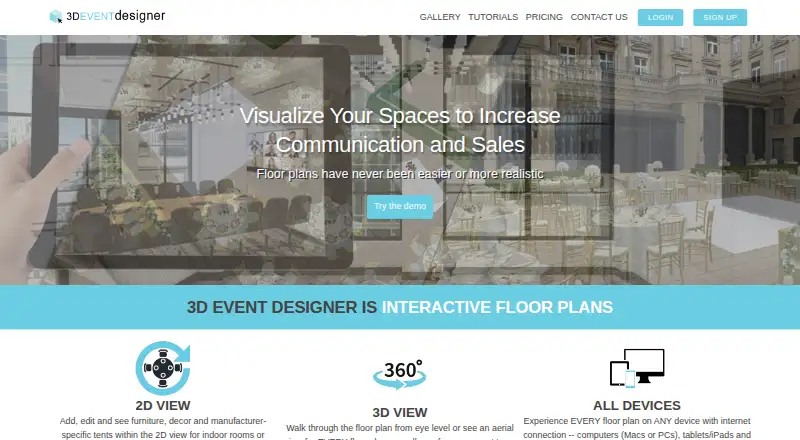
3D Event Designer is web-based software for creating 2D and 3D floor plans for event planning, commercial real estate, and audio visual work. Users can make event layouts, buffet and beverage diagrams, tent plans, seating charts, and inventory lists, then view designs at eye level or from above in 3D. Templates can be created and reused or chosen from the Floor Plan Gallery. The software includes thousands of furniture and decor options, and users can inquire about adding their own inventory. Interactive plans can be shared by email, with editing rights granted to clients. It integrates with Agilysys and Alert; website integration through its API is an add-on. The browser-based service runs on Mac and PC computers, tablets, iPads, and mobile phones without a download, and can be switched among English, Spanish, French, and German. All plans include email support and training videos; Pro and Enterprise also include phone support and one-on-one online training.
Good
- Creates 2D and 3D diagrams.
- Includes seating charts and inventory lists.
- Clients can receive editing rights.
- Works in a browser without a download.
- Available in four listed languages.
Watch out
- There is no free version.
- Basic is limited to one floor plan.
- Website API integration is an add-on.
Who it suits
It suits event planners and people in commercial real estate or audio visual industries who need to create and share interactive floor plans and seating layouts.
Verdict
3D Event Designer covers a range of event layouts, 3D views, and client collaboration in a browser-based tool. Its entry plan starts at $14.95 a month per user, and the service does not offer a free version.
Plans and prices
From 3D Event Designer's own pricing page, checked 30 Sep 2026.
| Plan | Price | What it gives you |
|---|---|---|
| Basic | $14.95 a month | 1 user license · 1 floor plan · 2D/3D event diagramming · upload and convert 2D to 3D · per month, billed monthly |
| Select | $24.95 a month | 1 user license · 4 floor plans · email support · per month, billed monthly |
| Pro | $59.95 a month | 1 user license · unlimited floor plans · email and phone support · dedicated account manager · per month, billed monthly |
The facts
Each one read from 3D Event Designer's own pages, with the date it was checked.
What it does
- 3D views
- Floor plans can be viewed in 3D from eye level or as an aerial view.checked 30 Sep 2026
- Collaboration
- Users can share interactive floor plans by email and give clients editing rights.checked 30 Sep 2026
- Integrations
- The site says the product integrates with Agilysys and Alert, and lists website integration via its API as an add-on.checked 30 Sep 2026
- Intended users
- The company describes use across event planning, commercial real estate, and audio visual industries.checked 30 Sep 2026
- Inventory
- The software includes thousands of furniture and decor options, and users can inquire about including their own inventory.checked 30 Sep 2026
- Languages
- The software can be switched from English to Spanish, French, or German.checked 30 Sep 2026
- Limit
- The site says it does not currently offer a free version.checked 30 Sep 2026
- Privacy and security
- The privacy policy says personal information is sent using SSL encryption and that safeguards include firewalls where appropriate.checked 30 Sep 2026
- Product
- The product is web-based interactive software for creating 2D and 3D floor plans.checked 30 Sep 2026
- Support
- All plans include email support and training videos; Pro and Enterprise users also get phone support and one-on-one online training.checked 30 Sep 2026
- Templates
- Users can create and reuse templates or select templates from the Floor Plan Gallery.checked 30 Sep 2026
Where it runs
- Devices
- The cloud-based software works on Mac and PC computers, tablets, iPads, and mobile phones through a web browser without a download.checked 30 Sep 2026
Money
- Floor plans
- Users can create floor plans, buffet and beverage diagrams, tent diagrams, seating charts, and inventory lists.checked 30 Sep 2026
The company
- Founded
- 2010checked 23 Sep 2026
The full review of 3D Event Designer
Overview
3D Event Designer is browser-based software for building 2D and 3D event layouts, seating charts, and related diagrams. It best suits planners and venue teams who need to shape a space visually and share an editable plan with clients. Its range of diagram types and 3D views is useful, but the paid-only entry point and one-plan Basic limit make it a focused purchase rather than a low-commitment option.
Key features
The tool covers more than room layouts: users can make buffet and beverage diagrams, tent diagrams, seating charts, and inventory lists. Eye-level and aerial 3D views help communicate how a floor plan may read from different perspectives, while importing a 2D plan and converting it to 3D can bring an existing layout into the workflow.
Templates can be created and reused, or selected from the Floor Plan Gallery. Thousands of furniture and decor options give users a broad starting catalogue; those who need their own items can inquire about including their inventory. Plans can be shared by email as interactive diagrams, with clients granted editing rights. That makes collaboration practical, though the product is best suited to workflows built around shared diagrams rather than a broader event-management suite.
The product integrates with Agilysys and Alert, and website integration through its API is an add-on. The interface can be switched among English, Spanish, French, and German. All plans include email support and training videos; Pro and Enterprise also include phone support and one-on-one online training. The privacy policy says personal information is sent using SSL encryption, with safeguards such as firewalls where appropriate.
Pricing
There is no free version, so even occasional users must pay. All listed plans are billed monthly and include one user license, making the plan choice primarily about how many floor plans and what support level a single user needs.
- Basic — $14.95 a month. Includes one floor plan, 2D/3D event diagramming, and upload and conversion of 2D plans to 3D. It is the lowest-cost way to build and visualize a single layout, but the one-plan cap is restrictive for users handling multiple events or venues.
- Select — $24.95 a month. Includes four floor plans and email support. It suits a user who needs a small portfolio of active layouts; the price increase over Basic buys three more plans, but not unlimited capacity.
- Pro — $59.95 a month. Includes unlimited floor plans, email and phone support, and a dedicated account manager. It is the clearest fit for frequent planning work or users who value direct support, though it remains a single-user license.
- Enterprise — custom pricing. Pro and Enterprise users also receive phone support and one-on-one online training.
Platforms
3D Event Designer runs in a web browser without a download and is listed for Android, iOS, macOS, and Windows. The cloud-based service is described as working on computers, tablets, iPads, and mobile phones, so users can access the diagrams across common device types. The product has been offered since 2010.
Who it's for
Its stated audiences span event planning, commercial real estate, and audio visual work. It is a strong fit when the job calls for detailed space diagrams, seating arrangements, 3D presentation, or client editing. It is less compelling for a solo user who only needs a simple occasional seating chart: the absence of a free version and the Basic plan's single-floor-plan limit leave little room to try the workflow before committing.
Pros and cons
- Pros: Multiple diagram types, including seating, buffet, beverage, and tent layouts, give venue-focused users more than a basic floor-plan tool.
- Pros: Eye-level and aerial 3D views, plus 2D-plan conversion, help translate existing layouts into a more visual presentation.
- Pros: Email sharing with client editing rights supports a collaborative review process, and reusable templates can reduce repeated setup.
- Cons: No free version means users cannot keep using the product at no cost, and must pay to assess whether it fits.
- Cons: The entry plan allows only one floor plan and one user license, while expanding capacity requires moving to Select or Pro.
- Cons: Pro's unlimited plans and stronger support are a substantial step up from Basic in monthly cost, particularly for a single user with modest needs.
Alternatives
For a wider comparison, see Event Diagramming Software.
EventDiagram is worth considering if a free plan matters more than a listed mobile-app option; it is freemium and available on the web and via API.
SeatPlan.io may suit users who want a free plan and a web-based seating workflow, with a trial option as well.
Metis Room Planner is a web-based paid alternative with a 14-day trial and full feature access during that period.
EventReception is an option for teams who prefer Android, iOS, and web access and want a freemium service with a trial.
SeatPlanning is another freemium web option; its free plan sets explicit project, seat, table, and element caps and watermarks PDF exports.
Interactiva may fit users who need a web-based paid option with a one-event starter plan or a three-event premium plan.
A Seat Awaits is worth comparing for per-event pricing: its Starter Pass is a one-time $9.99 per event for up to 50 guests, with export and print.
E3D Planner is another paid web-based option.
Verdict
Choose 3D Event Designer if your work depends on flexible event diagrams, 3D views, and client collaboration in one browser-based tool. The breadth of layouts and editable sharing are its strongest reasons to buy. Look elsewhere if you need a free starting point, more than one user on the entry plan, or only an occasional simple seating chart; the Basic plan's one-plan ceiling and paid-only model are real constraints.
Alternatives to 3D Event Designer
- 1

EventDiagram
Free planWebAPI7.3Free plan - 2

Cvent
AndroidiOSWeb6.9 - 3
EventReception
AndroidiOSWeb6.9From 47 € a month - 4
Table-Plan.com
Free planWebmacOSWindows6.8From $49 a month - 5
OnePlan
Free planWeb6.7From $900 a year - 6

SeatPlan.io
Free planWeb6.7From £29 a year