Salesforce Sales Cloud
Salesforce Sales Cloud is a CRM for managing sales activity through a browser extension and mobile app.
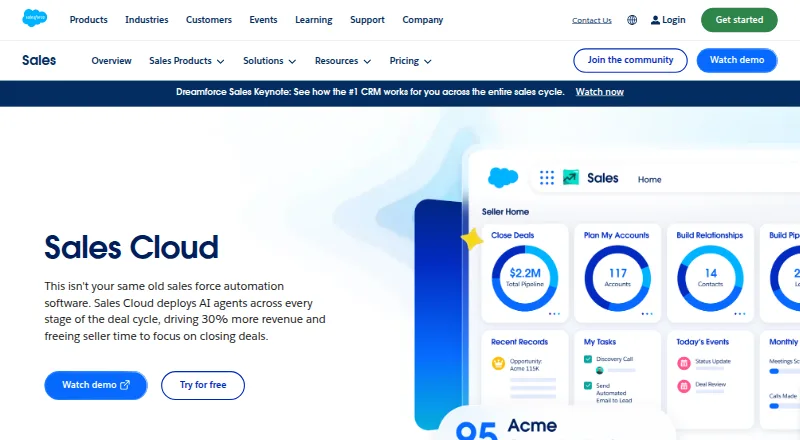
What Salesforce Sales Cloud is
Salesforce Sales Cloud is a CRM for managing sales activity through a browser extension and mobile app. Users can automatically sync emails, events, and contacts, and view a consolidated sales pipeline with charts, AI assistance, and deal insights. The listed capabilities also include AI agents across deal stages, lead research and qualification, automated follow-up, contact enrichment, and tools for sales planning and approvals. Starter Suite includes dynamic email marketing and analytics. Teams can share account plans, knowledge, files, and data, and collaborate on opportunities. Salesforce lists a Free Suite at no cost per user per month and Starter Suite at $25 a month per user, billed monthly. Pro Suite costs $100 a month per user billed annually; higher listed suites are also billed annually. Several suites list 10GB per organization, with additional per-user storage on higher tiers. Salesforce lists full offline mobile functionality. Some advanced capabilities are available for purchase rather than included in the free tier; Advanced includes enhanced security, expanded data capacity, and Security Center.
Good
- Automatically syncs emails, events, and contacts
- Pipeline view includes charts and deal insights
- Salesforce lists full offline mobile functionality
- Free Suite listed as free per user per month
Watch out
- Some advanced capabilities are sold separately from the free tier
- Pro Suite and higher listed suites are billed annually
- Starter Suite costs $25 a month per user
Who it suits
Sales Cloud suits sales teams that want CRM access through a browser extension and mobile app, with email synchronization and pipeline tools. It may also suit teams seeking sales planning, AI features, and shared account resources.
Verdict
Salesforce Sales Cloud combines CRM access with pipeline management, collaboration, and sales workflow features. Compare the free-tier limits and billing terms with the capabilities your team requires.
Plans and prices
From Salesforce Sales Cloud's own pricing page, checked 27 Sep 2026.
| Plan | Price | What it gives you |
|---|---|---|
| Free Suite | Free | 10GB/org · billed monthly |
| Starter Suite | $25 a month | Per user · 10GB/org · Billed monthly |
| Pro Suite | $100 a month | Per user · 10GB/org · Billed annually |
| Core | $195 a month | Per user · 10GB/org + 20MB/user · Billed annually |
| Advanced | $395 a month | Per user · 1GB/user · Billed annually |
| Max | $550 a month | Per user; contact sales for detailed pricing information · 1GB/user · 2.75M Flex Credits per org per year · Billed annually |
The facts
Each one read from Salesforce Sales Cloud's own pages, with the date it was checked.
What it does
- AI Capabilities
- Sales Cloud deploys AI agents across every stage of the deal cycle.checked 27 Sep 2026
- AI features
- Yeschecked 20 Sep 2026
- Data Storage
- The comparison lists 10GB per org for several suites and additional per-user storage for higher tiers.checked 27 Sep 2026
- Email sync
- Yeschecked 20 Sep 2026
- Email Synchronization
- The product can automatically sync emails, events, and contacts.checked 27 Sep 2026
- Integrations
- Sales Cloud is presented with Slack, Tableau, AgentExchange, AppExchange, and Lightning Platform connections.checked 27 Sep 2026
- Marketing automation
- Yeschecked 20 Sep 2026
- Marketing Tools
- Starter Suite includes dynamic email marketing and analytics.checked 27 Sep 2026
- Mobile Support
- The comparison lists Salesforce Mobile App, Sales Cloud Everywhere, and full offline mobile functionality.checked 27 Sep 2026
- Paid from
- 25checked 20 Sep 2026
- Pipeline Management
- Pipeline Management provides a consolidated view, charts, AI help, and deal insights.checked 27 Sep 2026
- Refund Policy
- The supplied page text does not state a refund policy.checked 27 Sep 2026
Money
- Billing Options
- Starter Suite can be billed monthly or annually; higher listed suites are billed annually.checked 27 Sep 2026
- Free plan
- Yeschecked 20 Sep 2026
- Free Tier
- A Free Suite is listed at $0 per user per month.checked 27 Sep 2026
- Free Tier Limit
- The comparison lists some advanced capabilities as available for purchase rather than included.checked 27 Sep 2026
- Free trial
- Yeschecked 20 Sep 2026
- Free Trial
- Sales Cloud offers a 30-day free trial with no credit card or installations.checked 27 Sep 2026
- Paid Starting Price
- Starter Suite starts at $25 USD per user per month.checked 27 Sep 2026
The company
- Company Recognition
- Salesforce says it was named a Leader in CRM Sales Platforms for the 20th year in a row.checked 27 Sep 2026
- Founded
- 1999checked 28 Sep 2026
- Headquarters
- San Francisco, California, United Stateschecked 28 Sep 2026
Where it runs
- Mobile app
- Yeschecked 20 Sep 2026
- Platform Access
- Users can access and update CRM through a browser extension and mobile app.checked 27 Sep 2026
The full review of Salesforce Sales Cloud
Overview
Salesforce Sales Cloud is a CRM and sales-operations suite for teams managing leads, opportunities, and deal workflows. It is best suited to organizations that need sales activity and compensation processes in one system and can match the suite to their per-user budget. The free entry point is useful for exploring the product, but costs rise sharply across the paid tiers.
Key features
Pipeline and prospecting
Pipeline Management brings opportunities into a consolidated view with charts, deal insights, and AI assistance, giving managers a way to follow deals without relying on scattered updates. Autonomous prospecting, lead research and qualification, contact enrichment, and automated follow-up extend that workflow from finding prospects through continuing engagement. AI agents are positioned across the deal cycle, though the advanced-capability distinction matters: some capabilities are available for purchase rather than included in the Free Suite.
Sales operations and collaboration
Configuration rules, quote templates, discount approvals, and approval workflows cover the mechanics of configuring and authorizing deals. Commission calculation, quota management, plan simulation, payout tracking, and compensation reporting also reach into sales planning and incentive administration. Teams can swarm on opportunities and share account plans, knowledge, files, and data; that breadth is useful when several people contribute to a deal, but it also makes the product a larger commitment than a lightweight contact tracker.
Email, marketing, and connections
Automatic synchronization of emails, events, and contacts reduces the need to maintain those records separately. Starter Suite includes dynamic email marketing and analytics, while connections with Slack, Tableau, AgentExchange, AppExchange, and Lightning Platform give teams routes into collaboration, analytics, and Salesforce's wider platform. The range is a strength for organizations already using those tools, but buyers should weigh suite costs against the functions their team will actually use.
Pricing
Sales Cloud has a Free Suite at $0 per user per month, with 10GB per org. That is the no-cost starting point, but advanced capabilities are available for purchase rather than all being included, so it is not a substitute for a paid suite where those functions are essential.
- Starter Suite: $25 USD per user per month, billed monthly or annually, with 10GB per org. It includes dynamic email marketing and analytics and is the lowest paid tier for teams that need those tools. It has less storage than higher plans and does not include every advanced capability.
- Pro Suite: $100 per user per month, billed annually, with 10GB per org. Premier Support is an add-on. The annual billing requirement and fourfold step up from Starter make it a more considered commitment.
- Core: $195 per user per month, billed annually, with 10GB per org plus 20MB per user. This tier adds per-user storage, but its price puts it beyond teams seeking an inexpensive CRM entry point.
- Advanced: $395 per user per month, billed annually, with 1GB per user. It includes enhanced security, expanded data capacity, and Security Center, making it the clearer fit when those controls and capacity justify the premium.
- Max: $550 per user per month, billed annually, with 1GB per user and 2.75M Flex Credits per org per year; contact sales for detailed pricing information. Its annual per-user cost and credit allocation make it a high-commitment option rather than a casual upgrade.
A 30-day trial is available. Apart from Starter's monthly billing option, the listed paid suites are billed annually, so teams should account for the longer billing commitment before choosing a tier.
Platforms
Users can access and update CRM through a browser extension and mobile app. Mobile support includes Salesforce Mobile App, Sales Cloud Everywhere, and full offline mobile functionality, which matters for teams that need to work away from a dependable connection.
Who it's for
Sales Cloud suits organizations that want pipeline oversight alongside prospecting, deal approvals, collaboration, and compensation workflows, especially when Salesforce's integrations are relevant to their setup. It is less compelling for small teams that need only basic CRM functions: the Free Suite has limits, and paid per-user pricing quickly becomes substantial.
Pros and cons
- Pro: Pipeline, lead-work, approval, quota, commission, and payout tools cover a broad sales process rather than stopping at contact management.
- Pro: Email, event, and contact sync, plus mobile access with offline functionality, support work across devices.
- Pro: Advanced includes enhanced security, expanded data capacity, and Security Center for organizations that need those provisions.
- Con: The Free Suite does not include every advanced capability, limiting its usefulness for teams that need the full feature set at no cost.
- Con: Paid plans are per user, and most listed suites require annual billing; costs can become significant as teams grow.
- Con: Storage allocations vary substantially by tier, from 10GB per org on several plans to 1GB per user on Advanced and Max, so the right fit depends on team size and data needs.
Alternatives
For a dedicated planning or incentive-management need, the right specialist may be a better fit than Sales Cloud's broader sales suite:
- Workday Adaptive Planning is a paid option with a 30-day trial and support across Android, iOS, MacOS, web, and Windows.
- GTMKit Quota Planning has a free Starter Plan for up to 10 reps, with two scenarios, basic forecasting, and email support; its Pro Plan is $199 a month.
- Optymyze is a paid alternative available on Android, iOS, web, and API.
- OneStream is a paid platform with pricing discussed through a demo.
- Xactly Incent is a paid incentive-management option with calculation, configuration, dashboards, AI assistants, and standard data integrations.
- Forma.ai offers tailored pricing for its CompOps Platform and a separate one-time onboarding and implementation fee.
- Varicent Incentive Compensation Management prices by package, payees, and add-ons through a quote.
- Board is a paid, self-hosted alternative with customized quotes.
Readers comparing specialist functions can also browse Quota Management Software, AI Sales Forecasting Software, CPQ Software, Revenue Planning Software, Incentive Compensation Management Software, and Sales Commission Software.
Verdict
Choose Salesforce Sales Cloud if your team needs pipeline management tied to prospecting, collaboration, approvals, and sales compensation workflows, and you can budget for the per-user suite that fits. Look elsewhere if you need a low-cost, fully featured option: the free tier has capability limits, while the paid plans carry meaningful prices and mostly annual terms.
Getting started
- Visit https://www.salesforce.com/sales/cloud/.
- Start with the Free Suite or the available 30-day trial.
- Choose Starter Suite at $25 per user per month, or review the higher listed suites.
- Access and update CRM through a browser extension or the Salesforce mobile app.
- Select monthly or annual billing for Starter Suite; higher listed suites are billed annually.
Limits worth knowing
The Free Suite is free per month and lists 10GB per organization. Some advanced capabilities are available for purchase rather than included. Starter Suite costs $25 per user per month and lists 10GB per organization.
Questions
Does Salesforce Sales Cloud have a free plan or trial?
Yes. The Free Suite is listed as free per month, and a 30-day trial is listed.
How much does Starter Suite cost?
Starter Suite costs $25 per user per month. It can be billed monthly or annually.
How are the higher listed suites billed?
Pro Suite, Core, Advanced, and Max are listed with annual billing. Max costs $550 a month and directs buyers to contact sales for detailed pricing information.
Can I use Sales Cloud on a phone or offline?
The comparison lists a Salesforce Mobile App, Sales Cloud Everywhere, and full offline mobile functionality. It also lists browser extension access.
Does Sales Cloud sync email and support marketing?
It can automatically sync emails, events, and contacts. Starter Suite includes dynamic email marketing and analytics.
Which integrations or connections are listed?
Sales Cloud is presented with Slack, Tableau, AgentExchange, AppExchange, and Lightning Platform connections.
Alternatives to Salesforce Sales Cloud
- 1
OpenIncent
Free planOpen sourceAPILinuxmacOSSelf-hosted8.0From C$500 a month - 2

CloudComp
AndroidiOSWebAPI7.6From $34 a month - 3
Driven
Free planWebExtension7.3Free plan - 4

Varicent Incentive Compensation Management
AndroidiOSWebAPI7.3From $56 a month - 5
Core Commissions
WebAPI7.0From $5 a month - 6
QCommission
WebAPISelf-hostedWindows6.9From $17 a month