
Sage Expense Management
Sage Expense Management helps businesses track, report, approve and reimburse employees’ out-of-pocket expense claims.
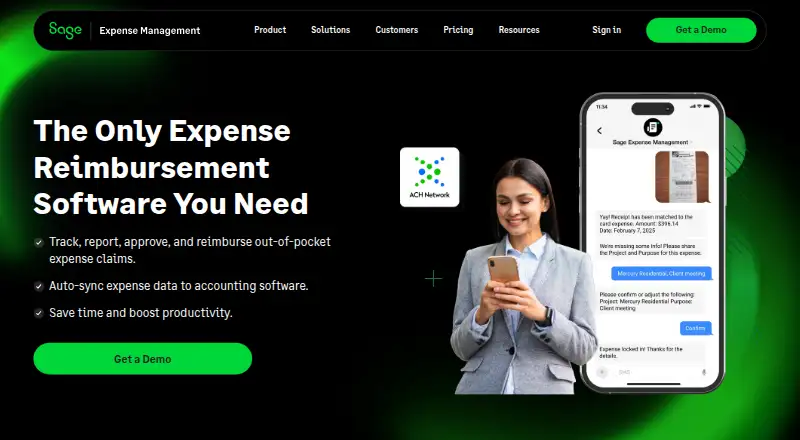
What Sage Expense Management is
Sage Expense Management helps businesses track, report, approve and reimburse employees’ out-of-pocket expense claims. Employees can send receipts by text message, Gmail, Outlook, or the mobile and web apps. Mileage tracking uses Google Maps, while per diem rates can be customized by currency, employee level, department and location. Approval workflows can be sequential, parallel or project-led, among other options; actions are available through the mobile app, email or Slack. The policy engine applies rules by category, employee, project, department and location, and AI checks for unusual expenses before submission. Business-plan users can reimburse employees directly by ACH in the US. Listed accounting integrations include QuickBooks Online, Xero, QuickBooks Desktop, Sage 50, Sage Intacct and Sage 300 Construction & Real Estate; some may require extra or implementation fees. The service is available on web, Android and iOS. It has no free plan. Growth costs $11.99 per user per month, billed annually, with a five-user minimum; Business costs $14.99 per user per month, billed annually, with a ten-user minimum.
Good
- Receipts can be submitted through email, text or apps.
- Mileage tracking uses Google Maps.
- Approval actions are available through email, Slack or mobile.
- Business plan supports US ACH reimbursements.
- Integrates with multiple accounting systems.
Watch out
- There is no free plan.
- Growth requires a five-user minimum.
- Business requires a ten-user minimum.
- Some accounting integrations may carry extra fees.
Who it suits
It suits finance teams and businesses that need to manage employee expense claims, approvals and reimbursements. The listed industries include construction, nonprofits, technology, healthcare and professional services.
Verdict
Sage Expense Management covers receipt collection, policy checks, approvals and reimbursement, with accounting integrations and mobile access. Check the plan minimums and integration fees against your needs; US-only ACH reimbursement is limited to Business-plan users.
Plans and prices
From Sage Expense Management's own pricing page, checked 8 Oct 2026.
| Plan | Price | What it gives you |
|---|---|---|
| Growth | $11.99 a month | $11.99 per active user/month · minimum billing: 5 users · annually |
| Business | $14.99 a month | $14.99 per active user/month · minimum billing: 10 users · annually |
| Enterprise | Priced on request | for enterprises with 250+ employees · custom pricing |
The facts
Each one read from Sage Expense Management's own pages, with the date it was checked.
What it does
- Accounting integrations
- The listed accounting integrations include QuickBooks Online, Xero, QuickBooks Desktop, Sage 50, Sage Intacct, and Sage 300 Construction & Real Estate, with some requiring extra fees or implementation fees.checked 8 Oct 2026
- Data controls
- The company says customers own their data, can export it, and that customer data is deleted 30 days after contract termination.checked 8 Oct 2026
- Intended customers
- The company describes the product as serving employees and finance teams, and lists construction, nonprofits, technology, healthcare, and professional services among its industries.checked 8 Oct 2026
- Mileage and per diem
- Mileage tracking uses Google Maps, and per diem rates can be customized by currency, employee level, department, and location.checked 8 Oct 2026
- Policy checks
- Its policy engine can apply rules based on categories, employees, projects, departments, and locations, while AI checks for unusual expenses before submission.checked 8 Oct 2026
- Purpose
- The product lets businesses track, report, approve, and reimburse employees’ out-of-pocket expense claims.checked 8 Oct 2026
- Receipt capture
- Employees can submit receipts through text messages, Gmail, Outlook, and the mobile or web app.checked 8 Oct 2026
- Reimbursement
- Business-plan users can make employee reimbursements directly by ACH, which the page specifies is US only.checked 8 Oct 2026
- Security
- The security page says the service is SOC 2 Type 1 and Type 2 certified and GDPR compliant.checked 8 Oct 2026
- Support
- Business-plan users receive business-hours live chat, email support, and a named account manager; Growth includes basic email and knowledge-base support.checked 8 Oct 2026
Where it runs
- Approvals
- The product supports sequential, parallel, project-led, and other approval workflows, with approval actions available from the mobile app, email, or Slack.checked 8 Oct 2026
Money
- Notable plan limit
- Growth includes single-stage approvals, while multi-stage and policy-driven approvals are listed among Business plan benefits.checked 8 Oct 2026
Alternatives to Sage Expense Management
- 1

Expensify
Free planOpen sourceAndroidiOSWebAPI8.7From $5 a month - 2

Zoho Expense
Free planAndroidiOSWebAPI8.3From $4 a month - 3

Pleo
AndroidiOSWebAPI7.8 - 4

BILL Accounts Payable
AndroidiOSWebAPI7.7From $49 a month - 5
Ottimate
Free planAndroidiOSWebAPI7.6$0.50 one-time - 6

Vergo
AndroidiOSWebAPI7.2From $5 a month