
Pulumi
Pulumi helps engineers define and manage infrastructure with Infrastructure as Code using general-purpose languages.
What Pulumi is
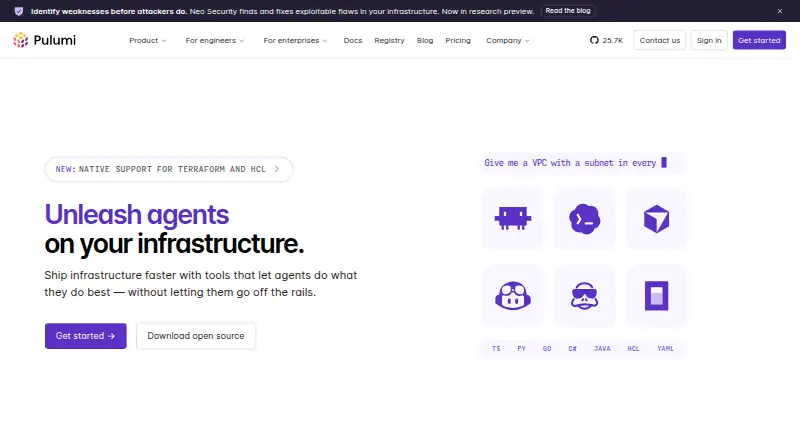
Pulumi helps engineers define and manage infrastructure with Infrastructure as Code using general-purpose languages. It supports TypeScript, JavaScript, Python, Go, .NET, Java, YAML, and HCL, with providers that include AWS, Azure, Google Cloud, Kubernetes, Cloudflare, Datadog, and GitHub. Pulumi ESC centralizes secrets and configuration from major vaults and cloud providers, and supports short-lived credentials through OIDC. Pulumi Neo can plan and execute infrastructure tasks, debug deployments, generate code, and provide cloud insights. Pulumi Deployments connects with CI/CD services including Azure DevOps, Bitbucket, CircleCI, GitHub, GitLab, Google Cloud Build, and Jenkins. The CLI runs on Windows, macOS, and Linux, and can use self-managed state in S3, Azure Blob, GCS, or local storage. Listed capabilities include policy as code, drift detection, resource import, and self-hosted execution. The free plan supports one user and up to 500 workflow minutes. Paid plans start with Essentials at $40 per month. Pulumi states that its platform is SOC 2 Type II certified.
Good
- Supports eight listed infrastructure languages
- Includes providers such as AWS, Azure, and Google Cloud
- CLI supports Windows, macOS, and Linux
- Free plan includes unlimited projects, stacks, and environments
Watch out
- Free plan is limited to one user
- Free plan allows up to 500 workflow minutes
Who it suits
Pulumi suits engineering teams defining infrastructure in code across the listed cloud providers and languages. Its free plan is for one user and allows up to 500 workflow minutes.
Verdict
Pulumi combines infrastructure definitions, deployment integrations, and secrets management with support for several languages and providers. The free plan has user and workflow-minute limits; paid plans start at $40 per month.
Plans and prices
From Pulumi's own pricing page, checked 30 Sep 2026.
| Plan | Price | What it gives you |
|---|---|---|
| Free | Free | 1 user · Unlimited projects, stacks, and environments · Unlimited updates and history · Up to 500 workflow minutes |
| Essentials | $40 a month | 40 Credits · Up to 500 managed resources · Unlimited users · $40 /month |
| Pro | $400 a month | 400 Credits · Up to 2,000 managed resources · Unlimited users · $400 /month |
| Enterprise | $2,000 a month | 2,000 Credits · Up to 4,750 managed resources · Self-hosting available · $2,000 /month |
The facts
Each one read from Pulumi's own pages, with the date it was checked.
What it does
- AI features
- Pulumi Neo can plan and execute infrastructure tasks, debug deployments, generate code, and provide cloud insights.checked 30 Sep 2026
- CI/CD
- Pulumi Deployments integrates with AWS Code Services, Azure DevOps, Bitbucket, CircleCI, GitHub, GitLab, Google Cloud Build, and Jenkins, among others.checked 30 Sep 2026
- Cloud providers
- Pulumi lists AWS, Azure, Google Cloud, Kubernetes, Cloudflare, Datadog, and GitHub among its supported providers.checked 30 Sep 2026
- Enterprise governance
- The Enterprise plan includes conformance packs for CIS, CIS Kubernetes, CMMC, HITRUST, ISO 27001, NIST, and PCI DSS.checked 30 Sep 2026
- Languages
- Pulumi supports TypeScript, JavaScript, Python, Go, .NET, Java, YAML, and HCL for infrastructure code.checked 30 Sep 2026
- Notable limits
- Free includes one user and up to 500 workflow minutes, while Essentials, Pro, and Enterprise include up to 500, 2,000, and 4,750 managed resources respectively.checked 30 Sep 2026
- Purpose
- Pulumi helps engineers ship infrastructure faster with Infrastructure as Code in general-purpose languages.checked 30 Sep 2026
- Secrets
- Pulumi ESC centralizes secrets and configuration from major vaults and cloud providers, and supports short-lived credentials through OIDC.checked 30 Sep 2026
- Security
- Pulumi states that its platform is SOC 2 Type II certified.checked 30 Sep 2026
- Self-managed state
- The CLI can use self-managed state backends including S3, Azure Blob, GCS, or local storage.checked 30 Sep 2026
- Support
- Every edition includes access to the support agent and ticket submission; Standard support is included with Enterprise contracts of at least one year.checked 30 Sep 2026
Where it runs
- CLI platforms
- Pulumi documents CLI installation for Windows, macOS, and Linux.checked 30 Sep 2026
The company
- Founded
- 2017checked 23 Sep 2026
- Headquarters
- Seattle, Washington, United Stateschecked 23 Sep 2026
The full review of Pulumi
Pulumi is an infrastructure-as-code platform for engineers who want to define infrastructure in programming languages and manage deployments across cloud providers. It suits teams with existing software development workflows and varied infrastructure; solo users can start free, but the one-user and workflow-minute caps make that tier a trial ground rather than a broad team workspace.
Overview
Pulumi’s central appeal is language choice: teams can use TypeScript, JavaScript, Python, Go, .NET, Java, YAML, or HCL to describe infrastructure. That flexibility can bring infrastructure work closer to familiar development practices, though it is less compelling for teams that prefer a single-purpose configuration approach. Providers include AWS, Azure, Google Cloud, Kubernetes, Cloudflare, Datadog, and GitHub.
It covers policy as code, drift detection, and importing existing resources, with either Pulumi-managed state or CLI-configured backends such as S3, Azure Blob, GCS, and local storage. That range supports teams moving between managed and self-managed workflows, but the choice of state backend remains a meaningful operational decision. The CLI runs on Windows, macOS, and Linux; the service also supports API and web access and self-hosting.
Key features
Secrets and deployment integrations
Pulumi ESC centralizes secrets and configuration from major vaults and cloud providers, and supports short-lived credentials through OIDC. This is useful for teams trying to coordinate credentials across environments without relying only on long-lived secrets. Pulumi Deployments connects with CI/CD services including AWS Code Services, Azure DevOps, Bitbucket, CircleCI, GitHub, GitLab, Google Cloud Build, and Jenkins, giving teams several routes to fit deployments into established pipelines.
Automation and governance
Pulumi Neo can plan and execute infrastructure tasks, debug deployments, generate code, and provide cloud insights. These capabilities extend the platform beyond defining and deploying infrastructure, although teams should assess whether they want those tasks in their workflow. Pulumi states that its platform is SOC 2 Type II certified. Enterprise adds conformance packs for CIS, CIS Kubernetes, CMMC, HITRUST, ISO 27001, NIST, and PCI DSS, which makes that tier more relevant to organizations with formal compliance requirements.
Pricing
The Free plan costs nothing and provides one user, unlimited projects, stacks, and environments, unlimited updates and history, and up to 500 workflow minutes. It is a useful way for an individual to begin, but the seat and minutes cap quickly constrain collaborative or deployment-heavy use.
Essentials costs $40 a month, billed $40 /month, and includes 40 Credits, unlimited users, and up to 500 managed resources. It removes the free tier’s one-user restriction, making it the practical starting point for a team, though the resource ceiling still matters as infrastructure grows. Pro costs $400 a month, billed $400 /month, with 400 Credits, unlimited users, and up to 2,000 managed resources; it fits larger estates needing more headroom, at a substantial price increase. Enterprise costs $2,000 a month, billed $2,000 /month, with 2,000 Credits, up to 4,750 managed resources, and self-hosting available. Its governance features and self-hosting make it the tier for larger organizations with compliance or deployment-control needs, not a modest team upgrade.
Essentials, Pro, and Enterprise include access to up to 500, 2,000, and 4,750 managed resources respectively. Every edition includes access to the support agent and ticket submission; Standard support is included with Enterprise contracts of at least one year. Paid plans start at $40 a month.
Platforms
Pulumi supports API and web access, Windows, macOS, Linux, and self-hosted use. The CLI is documented for Windows, macOS, and Linux, while self-managed state options give teams control over where state is stored. That breadth suits mixed environments, but teams choosing self-hosted execution take on more operational responsibility than those using managed state.
Who it's for
Pulumi is best suited to engineering teams that want infrastructure definitions in familiar languages, need to connect deployments to existing CI/CD systems, or manage resources across multiple providers. Its free tier works for an individual exploring the workflow. Teams needing multiple users should budget for Essentials; organizations with larger resource counts, self-hosting, or compliance governance have clearer reasons to consider Pro or Enterprise. It is less suitable for teams whose needs fit comfortably within a small, tightly capped free workspace.
Pros and cons
- Pros: Broad language support gives development teams options beyond a dedicated configuration language.
- Pros: Provider coverage, CI/CD integrations, drift detection, and resource import support workflows across varied infrastructure.
- Pros: ESC and OIDC support centralized configuration and short-lived credentials.
- Cons: Free is limited to one user and 500 workflow minutes, restricting collaborative use.
- Cons: The managed-resource caps require a move up tiers as infrastructure expands, with Pro and Enterprise priced far above Essentials.
- Cons: Self-managed state offers control but leaves backend selection and operation to the team.
Alternatives
Terraform is worth comparing for teams seeking another freemium infrastructure-as-code option; its Free plan includes 500 managed resources, one concurrent remote run, and one concurrent agent run. Choose AWS CloudFormation when a free service for CloudFormation itself is the priority and AWS resource charges are acceptable; it has no free trial. Cloudify is an option for users willing to set up Docker or a VM and connect a cloud provider for workloads.
Terramate may suit small teams preferring a free Community tier capped at two users and 1,000 resources, with 30-day data retention. Kusion is a free, open-source platform orchestrator. OpenTofu is a free, open-source infrastructure-as-code tool. Scalr offers a free allowance of 50 runs per month, then business usage at $0.99 per run with volume discounts. env0 offers a free tier with up to 250 runs per month, 30 active environments, one concurrent run, and unlimited users and agents.
Explore more tools in Infrastructure as Code Tools, GitOps Tools, Cloud Orchestration Software, IT Configuration Management Software, Platform Engineering Software, and Cloud Management Software.
Verdict
Pulumi is a strong fit for engineering teams that want to express infrastructure in familiar languages and connect it to established deployment pipelines. Its provider breadth, secrets tooling, and flexible state options make it capable across varied environments. The main reasons to look elsewhere are the free tier’s tight collaboration and workflow limits and the sharp price jump for higher resource ceilings. Start with Free to assess the approach; choose a paid tier only when the team or managed-resource cap demands it.
Getting started
- Visit https://www.pulumi.com/.
- Choose the free plan or a paid plan, starting at $40 per month.
- Install the CLI for Windows, macOS, or Linux.
- Use a supported infrastructure language and provider.
- Choose Pulumi-managed state or a self-managed backend such as S3, Azure Blob, GCS, or local storage.
Limits worth knowing
The free plan provides one user and up to 500 workflow minutes. Managed-resource limits are 500 for Essentials, 2,000 for Pro, and 4,750 for Enterprise.
Questions
Is Pulumi free?
Yes. The Free plan costs nothing and includes one user, unlimited projects, stacks, and environments, unlimited updates and history, and up to 500 workflow minutes.
How much do the paid plans cost?
Essentials is $40 per month, Pro is $400 per month, and Enterprise is $2,000 per month.
Which platforms does Pulumi support?
The listed platforms are API, Linux, macOS, self-hosted, web, and Windows. The CLI installation options are Windows, macOS, and Linux.
Can Pulumi use self-managed state?
Yes. The CLI can use S3, Azure Blob, GCS, or local storage as self-managed state backends.
What languages and providers does it support?
Languages include TypeScript, JavaScript, Python, Go, .NET, Java, YAML, and HCL. Providers listed include AWS, Azure, Google Cloud, Kubernetes, Cloudflare, Datadog, and GitHub.
Who makes Pulumi, and what security certification does it state?
Pulumi was founded in 2017 and is headquartered in Seattle, Washington, United States. It states that its platform is SOC 2 Type II certified.
Alternatives to Pulumi
- 1

Portainer
Free planOpen sourceAndroidiOSWebAPI8.6Free plan - 2
Plural
Free planOpen sourceWebAPILinuxmacOS8.2From $450 a month - 3
Nullstone
Free planWebAPILinuxmacOS7.9From $50 a month - 4

PipeCD
Free planOpen sourceWebAPILinuxmacOS7.5Free plan - 5
Google Config Sync
Free planOpen sourceWebAPILinuxSelf-hosted7.2Free plan - 6

GitLab Package Registry
Free planWebAPILinuxSelf-hosted7.1Free plan