
Terramate
Terramate is an Infrastructure as Code orchestration and observability platform for platform teams.
What Terramate is
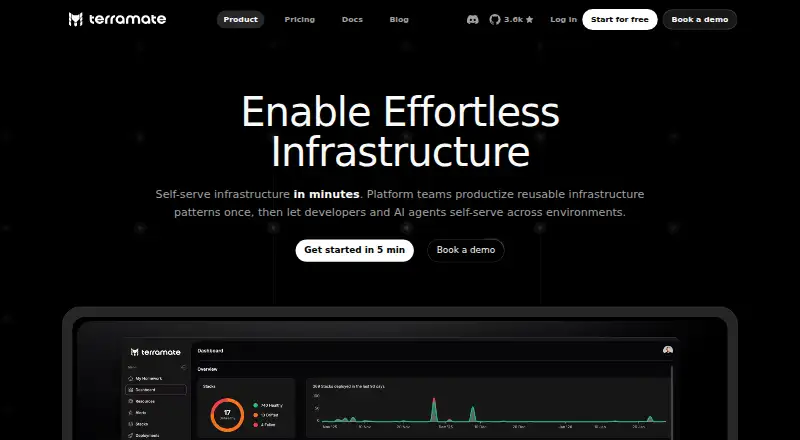
Terramate is an Infrastructure as Code orchestration and observability platform for platform teams. It is designed to package reusable infrastructure patterns so developers and AI agents can self-serve across environments. Terramate Cloud lists Terraform, OpenTofu, and Terragrunt as supported tools. Features include stacks, orchestration, custom workflows, rendered pull request plan previews, GitOps, drift detection, and drift reconciliation. It integrates with CI/CD systems such as GitHub Actions, GitLab CI/CD, Bitbucket Pipelines, and Azure DevOps, and documents pull request integration for GitHub, GitLab, Bitbucket, and other VCS platforms. The CLI removes sensitive values from plan data on the client before syncing it to Terramate Cloud. Terramate says it does not require access to customer cloud accounts, state files, or source code; data is encrypted at rest with AES-256 and communications use HTTPS with TLS 1.2. The free Community plan costs nothing for up to 2 users and 1,000 resources, with 30-day data retention. Teams costs $449 a month, supports unlimited users and up to 5,000 resources, and lists a 24-hour support response time. Enterprise has custom pricing and a 4-hour response time. Supported clouds include AWS, Google Cloud, and Azure.
Good
- Supports Terraform, OpenTofu, and Terragrunt.
- Includes drift detection and reconciliation.
- Integrates with several CI/CD systems.
- CLI removes sensitive plan values before syncing.
- Community plan includes up to 2 users.
Watch out
- Community is limited to 1,000 resources.
- Teams costs $449 a month.
- Community data retention is 30 days.
- Enterprise pricing is custom.
Who it suits
Terramate suits platform teams coordinating reusable infrastructure patterns and IaC workflows across environments. Community fits small teams within its user and resource limits; Teams and Enterprise offer higher or custom limits.
Verdict
Terramate brings IaC orchestration, pull request workflows, and drift features into one platform. The free plan has defined user, resource, and retention limits; larger teams can review the paid tiers.
Plans and prices
From Terramate's own pricing page, checked 15 Oct 2026.
| Plan | Price | What it gives you |
|---|---|---|
| Community | Free | up to 2 users · up to 1000 resources · 30-day data retention · community support · forever free |
| Teams | $449 a month | 14-day free trial · unlimited users · up to 5000 resources · 90-day data retention · 24-hour support response · asset management · policies · CIS benchmarks · DORA metrics · incident management · Slack and email support · $449 / month |
| Enterprise | Priced on request | PoC trial program · unlimited users · custom resources · custom data retention · 4-hour support response · SAML SSO · RBAC · audit trail · private source control · cloud or cloud-prem deployment · dedicated support and account manager · Custom |
The facts
Each one read from Terramate's own pages, with the date it was checked.
What it does
- API
- Organization administrators can create API keys for the CLI or Terramate Cloud API, and keys are shown only once after creation.checked 15 Oct 2026
- API authentication
- Cloud authentication supports API keys, GitHub OIDC, GitLab OIDC and local user credentials; GitHub OIDC tokens are short-lived.checked 15 Oct 2026
- Capabilities
- The feature list includes stacks, orchestration, custom workflows, rendered pull request plan previews, GitOps, drift detection, and drift reconciliation.checked 3 Oct 2026
- Change detection
- Commands and scripts can be restricted to stacks changed since the previous execution by using the changed option.checked 15 Oct 2026
- CI/CD integration
- Terramate Cloud integrates with existing GitHub Actions, GitLab CI/CD, Bitbucket Pipelines and other CI/CD systems instead of replacing them.checked 15 Oct 2026
- Data handling
- The CLI removes sensitive values from plan data on the client before syncing it to Terramate Cloud.checked 3 Oct 2026
- Developer tooling
- The documentation links to a VS Code extension, JetBrains plugin, Vim plugin and language server.checked 15 Oct 2026
- Documentation depth
- The docs cover stacks, orchestration, workflows, change detection, code generation, CI/CD providers, cloud synchronization, policies, integrations, configuration blocks, functions and CLI commands.checked 15 Oct 2026
- Drift management
- The platform provides scheduled drift detection, drift reconciliation and deployment drift health checks.checked 15 Oct 2026
- Funding
- Crunchbase classifies Terramate as private, pre-seed and lists Fly Ventures as its investor.checked 15 Oct 2026
- GitHub permissions
- The GitHub app requests metadata read access plus read/write access to actions, commit statuses, environments and pull requests, but not source-code access.checked 15 Oct 2026
- IaC tools
- Terramate Cloud lists Terraform, OpenTofu, and Terragrunt as supported IaC tools.checked 3 Oct 2026
- Installation
- The CLI can be installed with Homebrew or Go, and releases are published through the project's GitHub repository.checked 15 Oct 2026
- Integrations
- Documentation lists integrations with GitHub, Slack, GitLab, OPA, Infracost, Checkov, Trivy and Terrascan.checked 15 Oct 2026
- Licence
- The Terramate CLI repository is released under the Mozilla Public License 2.0.checked 15 Oct 2026
- Limit: pricing
- A Reddit user said Terramate Cloud pricing was too expensive for their company and built a small self-hosted replacement focused on drift and resources.checked 15 Oct 2026
- Notable news
- A Terramate LinkedIn post said the first release candidate of CLI v0.17.0 added a terramate ui terminal interface for bundles, components and stacks.checked 15 Oct 2026
- Notifications
- Notifications can be delivered through Slack, Microsoft Teams, email or webhooks.checked 15 Oct 2026
- Observability
- Cloud includes dashboards, stack insights, stack analytics, DORA metrics, incident management and notifications.checked 15 Oct 2026
Where it runs
- CLI platforms
- Terramate CLI installation instructions list macOS, Ubuntu and Debian, Fedora and CentOS, and Windows.checked 3 Oct 2026
The company
- Company founded
- LinkedIn lists Terramate as founded in 2023.checked 15 Oct 2026
- Company headquarters
- LinkedIn lists Berlin as Terramate's headquarters and gives Köpenicker Str. 124, Berlin 10179, Germany as the primary location.checked 15 Oct 2026
- Company legal name
- Crunchbase identifies the legal entity as Terramate GmbH.checked 15 Oct 2026
- Company size
- LinkedIn lists Terramate in the 11–50 employee range and displays 15 employees.checked 15 Oct 2026
The full review of Terramate
Terramate is an Infrastructure as Code orchestration and observability platform aimed at platform teams that want reusable infrastructure patterns to be self-served by developers and AI agents. It is best for organizations coordinating Terraform, OpenTofu, or Terragrunt across several environments, while smaller teams may find its free limits restrictive.
Overview
Terramate organizes infrastructure work around stacks, orchestration, custom workflows, and GitOps. That combination is more than a wrapper around an IaC engine: it gives platform teams a way to standardize how environments are proposed, reviewed, and operated. HCL configuration, policy as code, resource import, and self-hosted state management fit teams that need governance without moving state into a separate hosted service.
Support for AWS, Google Cloud, and Azure covers the major public-cloud choices. Terramate Cloud works with Terraform, OpenTofu, and Terragrunt, so it can coordinate existing investments rather than force a wholesale tool change. The trade-off is that its appeal depends on needing orchestration and operational visibility; a team seeking only an IaC language or basic provisioning tool may be paying for a broader control plane than it needs.
Key features
Orchestration and pull-request workflows
Stacks let teams structure reusable patterns, while custom workflows and GitOps provide ways to automate changes across environments. Rendered pull-request plan previews put proposed infrastructure changes into code review, making approvals more concrete than a raw pipeline log. Native pull-request integration covers GitHub, GitLab, Bitbucket, and other VCS platforms. CI/CD connections include GitHub Actions, GitLab CI/CD, Bitbucket Pipelines, and Azure DevOps, which is useful for teams with established delivery systems.
Drift and governance
Drift detection identifies differences between declared and deployed infrastructure, and drift reconciliation extends that process toward correction. These capabilities are valuable for long-lived environments where manual changes accumulate. Policy as code adds an explicit governance layer, while importing existing resources helps bring established estates under management instead of requiring a clean-slate deployment.
Security and data handling
Terramate says it does not need access to customers’ cloud accounts, state files, or source code. Its CLI removes sensitive values from plan data before synchronizing that data to Terramate Cloud. Data is encrypted at rest with AES-256 and transmitted over HTTPS using TLS 1.2; independent external parties penetration-test the infrastructure, web applications, and APIs annually. Those controls reduce exposure for organizations that want cloud-based visibility without handing over direct infrastructure credentials.
Pricing
The Community plan is free forever at no cost. It allows up to two users, 1,000 resources, 30-day data retention, and community support. That is a sensible evaluation tier or fit for a very small platform group, but the user and resource ceilings can become an immediate operational constraint.
Teams costs $449 a month, billed at $449 / month, with unlimited users, up to 5,000 resources, 90-day data retention, and a 24-hour support response time. It is the practical plan for a growing organization that needs broad access and longer operational history, though the jump from free to $449 per month is substantial. Enterprise uses custom pricing and adds unlimited users, custom resource and retention limits, and a four-hour support response time for organizations with stricter scale or support requirements. A 14-day trial gives prospective paid users a short window to validate fit before committing.
Platforms
Terramate is offered through web and API access, with support for Linux, macOS, and Windows. The CLI installation guidance covers macOS, Ubuntu and Debian, Fedora and CentOS, and Windows, making it practical for mixed developer workstations and self-hosted execution environments.
Who it's for
Terramate suits platform engineering teams standardizing infrastructure for many application teams, especially those already using Terraform, OpenTofu, or Terragrunt and needing pull-request visibility, drift operations, and policy controls in one workflow. It is less compelling for a solo practitioner or a small project that stays below the Community caps, or for teams wanting a narrowly focused IaC tool without orchestration overhead.
Pros and cons
- Pros: Coordinates Terraform, OpenTofu, and Terragrunt; combines plan previews, GitOps, drift detection, and reconciliation; integrates with major VCS and CI/CD platforms; avoids requiring cloud-account, state-file, or source-code access; supports AWS, Google Cloud, and Azure.
- Cons: Community is limited to two users, 1,000 resources, and 30-day retention; Teams starts at $449 per month; Enterprise pricing is custom; the broad platform may be excessive when basic provisioning is all that is required.
Alternatives
Terraform is the better choice when you want a widely used IaC tool with a free plan covering 500 managed resources, one concurrent remote run, and one concurrent agent run, rather than Terramate's orchestration layer.
Pulumi fits teams preferring a free plan with one user and unlimited projects, stacks, environments, updates, and history, subject to its workflow-minute allowance.
AWS CloudFormation is the straightforward option for AWS-native provisioning; the service itself is free, while deployed AWS resources incur their normal charges.
Cloudify is worth considering when a no-time-limit community edition and Docker or VM deployment model suit your operating approach.
Kusion provides a free, open-source platform orchestrator with Helm-based installation.
Terragrunt is a leaner alternative when you need infrastructure orchestration around up to 25 infrastructure units on its free plan.
AWS CDK is appropriate for AWS-focused teams wanting a no-charge tool and accepting that deployed resources are billed separately.
OpenTofu is the free, open-source choice when the IaC engine itself matters more than hosted orchestration and observability.
Browse more options in Infrastructure as Code Tools.
Verdict
Choose Terramate when a platform team needs one coordinating layer for reusable IaC patterns, pull-request plans, GitOps, and drift management across multiple clouds and IaC engines. Look elsewhere if two users and 1,000 resources are enough for a small deployment, or if $449 per month is hard to justify for orchestration beyond a core IaC tool.
Alternatives to Terramate
- 1

Cloudify
Free planOpen sourceWebAPILinuxmacOS8.4From $395 a month - 2

Terraform
Free planWebAPILinuxmacOS8.0Free plan - 3
AWS CloudFormation
Free planiOSWebAPILinux7.7Free plan - 4

Pulumi
Free planWebAPILinuxmacOS7.4From $40 a month - 5

Oracle Cloud Infrastructure Container Registry
Free planWebAPILinux7.0Free plan - 6
Spacelift
Free planWebAPISelf-hosted6.9From $20,000 a year