PopupForge
PopupForge is a lead-form tool for adding branded popups and modals to a website.
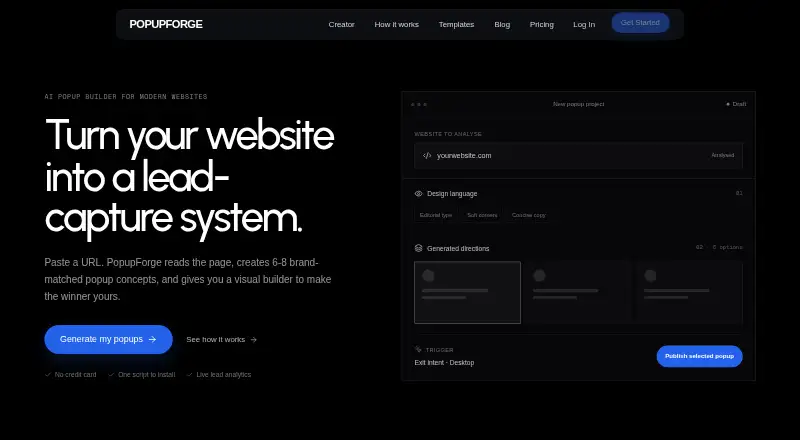
What PopupForge is
PopupForge is a lead-form tool for adding branded popups and modals to a website. It reads the visible copy, colors, typography, and style of a public webpage to generate popup concepts. You can preview designs on desktop and mobile, then change the copy, colors, fields, and triggers before publishing. Forms can use multiple steps and configurable fields. PopupForge tracks views, submissions, and conversion rate live. Publishing uses a script tag that injects an iframe; updates to a published popup go live without redeploying the site. Leads can be sent to Slack or a signed HTTPS webhook for Zapier, Make, or a custom backend. The script works on sites that allow custom HTML or JavaScript, and guides are listed for platforms including WordPress, Shopify, Webflow, Wix, and Next.js. The free plan is free and includes one website, one modal, 50 submissions per month, and three AI generations total. PopupForge lists bloggers, ecommerce stores, SaaS startups, course creators, agencies, and marketers among its intended users.
Good
- Generates concepts from a webpage’s visual style.
- Previews are available for desktop and mobile.
- Supports multi-step forms with configurable fields.
- Tracks views, submissions, and conversion rate live.
- Routes leads to Slack or HTTPS webhooks.
Watch out
- Free plan covers one website and one modal.
- Free plan caps submissions at 50 per month.
- Free plan includes three AI generations total.
Who it suits
PopupForge may suit marketers, creators, and businesses that want branded lead forms on a site that permits custom HTML or JavaScript. Its free plan is limited to one website and one modal.
Verdict
PopupForge combines styled lead forms, publishing, and live conversion metrics. The free plan’s website, modal, submission, and generation limits are important to weigh before choosing it.
Plans and prices
From PopupForge's own pricing page, checked 4 Oct 2026.
| Plan | Price | What it gives you |
|---|---|---|
| Free | Free | 1 website · 1 modal · 50 submissions/month · 3 AI generations total · Basic analytics |
| Agency | — | 15 websites · Unlimited modals · 50,000 submissions/month · 200 AI generations/month · White-label popups · Priority support |
| Pro | — | 3 websites · Unlimited modals · 5,000 submissions/month · 50 AI generations/month · Advanced analytics · Slack + HTTPS webhooks · Remove PopupForge branding |
The facts
Each one read from PopupForge's own pages, with the date it was checked.
What it does
- AI generation
- The product reads a public webpage’s visible copy, colors, typography, and visual style to generate popup concepts.checked 4 Oct 2026
- Analytics
- The product tracks popup views, submissions, and conversion rate live.checked 4 Oct 2026
- Editor
- Users can preview popup compositions on desktop and mobile and edit copy, colors, fields, and triggers before publishing.checked 4 Oct 2026
- Forms
- PopupForge supports multi-step forms with configurable fields.checked 4 Oct 2026
- Integrations
- Leads can be routed to Slack or a signed HTTPS webhook for Zapier, Make, or a custom backend.checked 4 Oct 2026
- Notable limits
- The Free plan allows one website and one modal, with 50 submissions per month and three AI generations total.checked 4 Oct 2026
- Product
- PopupForge builds brand-matched lead forms, publishes them with one script, and measures what happens after they appear.checked 4 Oct 2026
- Publishing
- PopupForge installs with a script tag that injects an iframe, and published changes go live without redeploying the site.checked 4 Oct 2026
- Security and privacy
- The maker says the embed renders in an iframe so the site's CSS and popup do not interfere with each other.checked 4 Oct 2026
- Support
- PopupForge lists [email protected] as its support contact, and the Agency plan includes priority support.checked 4 Oct 2026
- Website compatibility
- The script works on sites that allow custom HTML or JavaScript; listed platform guides include WordPress, Shopify, Webflow, Squarespace, Wix, Framer, Ghost, Carrd, and Next.js.checked 4 Oct 2026
- Who it is for
- PopupForge describes use cases for bloggers, ecommerce stores, SaaS startups, course creators, agencies, and marketers.checked 4 Oct 2026
The company
- Company
- The maker describes PopupForge as an independent product and says Leo designs, builds, and supports it.checked 4 Oct 2026
The full review of PopupForge
Overview
PopupForge creates brand-matched lead forms, publishes them through a site script and tracks their conversions. It suits marketers and site owners who want to build and measure popups without redeploying their website. Its live metrics and flexible form setup are compelling, but the free plan’s tight caps may make it a short-term fit.
Key features
PopupForge can read a public webpage’s visible copy and visual style to generate popup concepts. The editor lets users preview designs on desktop and mobile, then adjust copy, colors, fields and triggers. That combination can speed up brand-matched campaigns, though the free plan includes only three AI generations total.
Forms can use multiple steps and configurable fields. Popups can appear immediately, after a delay, at a scroll threshold or on exit intent, with audience targeting available. Live tracking covers views, submissions and conversion rate, giving teams a way to monitor whether a campaign is turning attention into leads.
Publishing uses a script tag that injects an iframe; changes to a published popup go live without redeploying the site. The maker says the iframe keeps the popup’s CSS separate from the host site’s styles. The script works on sites that permit custom HTML or JavaScript, with guides for platforms including WordPress, Shopify, Webflow, Squarespace, Wix, Framer, Ghost, Carrd and Next.js.
Leads can go to Slack or a signed HTTPS webhook for Zapier, Make or a custom backend. These integrations are included on Pro, not Free. PopupForge is an independent product; its maker says Leo designs, builds and supports it. Support is available at [email protected], and Agency includes priority support.
Pricing
PopupForge is freemium. Free costs nothing and includes one website, one modal, 50 submissions per month, three AI generations total and basic analytics. It can cover a small experiment, but the single-site and single-modal limits leave little room for running multiple campaigns, while the submission cap may constrain a growing list.
Pro has custom pricing and includes three websites, unlimited modals, 5,000 submissions per month, 50 AI generations per month, advanced analytics, Slack and HTTPS webhooks, and removal of PopupForge branding. It is the more practical tier for a business running several campaigns or routing leads into other tools.
Agency also has custom pricing. Its 15 websites, unlimited modals, 50,000 monthly submissions, 200 monthly AI generations, white-label popups and priority support are aimed at agencies managing client sites at scale. The trade-off is that neither paid plan has a published price, so buyers cannot compare its cost with their expected usage from the plan alone.
Platforms
PopupForge lists Android, iOS, Linux, macOS, Windows, web, API, extension and self-hosted platforms. Its embed is suited to websites that allow custom HTML or JavaScript; the listed guides cover a range of site builders and frameworks.
Who it's for
Bloggers, ecommerce stores, SaaS startups, course creators, agencies and marketers are among its stated audiences. Free is best for a limited test on one site. Pro fits teams that need more sites, campaign capacity, analytics or lead-routing integrations; Agency is for multi-client work where higher quotas, white-labeling and priority support matter. It is less suited to buyers who need to know paid costs upfront or whose site cannot accept a custom script.
Pros and cons
- Pros: Style-aware generation and desktop and mobile previews help shape a campaign before publishing.
- Pros: Multi-step forms, configurable triggers and audience targeting support more tailored lead capture.
- Pros: Live conversion metrics and script-based updates make it possible to monitor and change campaigns without redeploying the site.
- Cons: Free is capped at one site, one modal, 50 monthly submissions and three lifetime AI generations, limiting continued use as a campaign grows.
- Cons: Slack and webhook routing require Pro, and both paid tiers use custom pricing.
- Cons: The embed requires a site that permits custom HTML or JavaScript.
Alternatives
For a clearer published price and a known impression allowance, consider Promolayer: its Basic plan is ¥2,083 a month, billed annually at ¥25,000 per year, and includes 15K monthly impressions, A/B testing and Mailchimp, Klaviyo and webhook integrations.
ConvertFlow may suit readers who want funnel campaigns: its free plan includes five campaigns, with integrations requiring a paid plan, and Personal costs $29 a month billed monthly.
OptiMonk is another free option, with 10,000 pageviews per month, 1,000 AI credits per month and one domain on its Free plan; Essential costs $19 a month, billed $228 yearly.
Popupsmart offers a Free plan with 5K pageviews per month, one website, one live popup and a 100-email monthly quota; its Basic plan is $39 a month, billed monthly.
Appocalypsis is a free web option with limited functionality.
BDOW! is worth considering for email opt-in forms: its free plan includes one site, 100 conversions, 500 emails per month, visitor targeting and analytics.
Common Ninja Form Builder is a form-focused alternative with one form on its free plan and an Essentials plan at $24 a year.
Icegram Engage offers a free self-hosted and web plan for a single site, with popups, action bars, toasts, messengers, basic targeting, two-step opt-in and essential design themes.
For broader category comparisons, browse Pop-Up Builder Software, Popup Software and Lead Capture Software.
Verdict
PopupForge is a strong fit for marketers who want styled lead forms, flexible triggers and live conversion tracking in a script-based workflow. Its best reason to choose is the combination of brand-aware generation, editable multi-step forms and updates without redeploying. Look elsewhere if the free caps are too restrictive, the site cannot accept the embed, or you need published pricing before committing to a paid tier.
Getting started
- Visit the PopupForge website.
- Create popup concepts from a public webpage’s visible content and style.
- Preview the composition on desktop and mobile, then edit the copy, fields, colors, and triggers.
- Choose the Free plan or review Pro and Agency plan limits.
- Add the script tag to a website that allows custom HTML or JavaScript.
- Route captured leads to Slack or a signed HTTPS webhook if needed.
Limits worth knowing
The Free plan covers one website and one modal, allows 50 submissions per month, and includes three AI generations total. Its analytics are basic.
Questions
Is there a free plan?
Yes. The Free plan costs nothing and includes one website, one modal, 50 submissions per month, three AI generations total, and basic analytics.
What platforms can it work with?
The script works on sites that allow custom HTML or JavaScript. Listed guides include WordPress, Shopify, Webflow, Squarespace, Wix, Framer, Ghost, Carrd, and Next.js.
How are popups published?
A script tag injects an iframe. Changes to published popups go live without redeploying the site.
What integrations are available for leads?
Leads can be routed to Slack or a signed HTTPS webhook for Zapier, Make, or a custom backend.
Who makes PopupForge?
The maker describes PopupForge as an independent product and says Leo designs, builds, and supports it.
What do the paid plans include?
Pro includes three websites, unlimited modals, 5,000 monthly submissions, 50 monthly AI generations, advanced analytics, Slack and HTTPS webhooks, and branding removal. Agency includes 15 websites, unlimited modals, 50,000 monthly submissions, 200 monthly AI generations, white-label popups, and priority support.
Alternatives to PopupForge
- 1

Typeform
Free planAndroidiOSWebAPI8.4From $39 a month - 2

Wufoo
Free planAndroidiOSWebAPI7.8From $16.25 a month - 3

ConvertFlow
Free planWebAPI7.6From $29 a month - 4

Paperform
Free planWebAPI7.6Free plan - 5

involve.me
Free planWebAPI7.5From $29 a year - 6

Picreel
Free planWebAPI7.5From $39.99 a month