Phone-Free 2FA
Phone-Free 2FA generates time-based one-time passwords in a browser, so you can retrieve login codes at a computer.
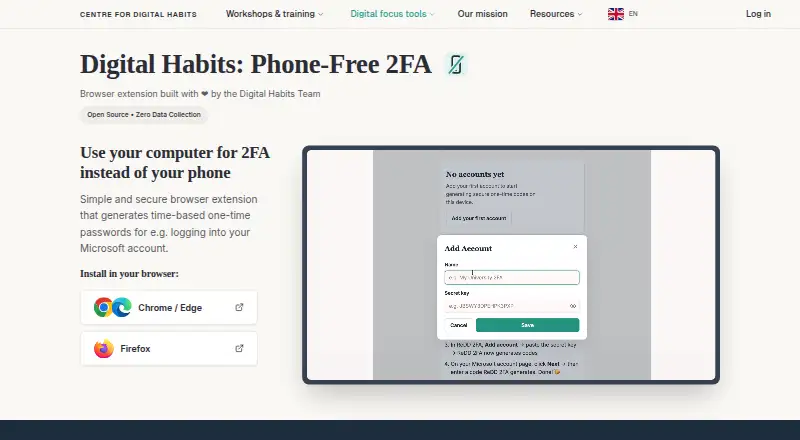
What Phone-Free 2FA is
Phone-Free 2FA generates time-based one-time passwords in a browser, so you can retrieve login codes at a computer. It creates a six-digit code every 30 seconds, available to copy from the browser sidebar, for services that use standard TOTP codes, such as Microsoft 365. It does not handle push-approval requests. The extension is available for Chrome, Edge, Firefox, and other Chromium browsers. Account details are encrypted and stored locally, and the extension says it sends nothing over the network. On Chrome, secret keys use AES-256-GCM encryption with a key derived from the master passphrase using PBKDF2 at 600,000 iterations. You can configure it to lock when the sidebar closes or after inactivity; failed unlock attempts lead to longer delays. Touch ID is available on supported Chrome and Edge devices, while Firefox uses a master passphrase. Encrypted backups and standard otpauth exports help move accounts. There is no central passphrase recovery, so accounts cannot be restored through the extension without a usable backup. It is free and open source.
Good
- Generates six-digit TOTP codes every 30 seconds.
- Available for Chrome, Edge, Firefox, and Chromium browsers.
- Stores encrypted account details locally.
- Supports encrypted backups and otpauth exports.
Watch out
- Does not support push approvals.
- No cross-device sync or team administration.
- No central passphrase reset or recovery.
Who it suits
It suits people who want TOTP login codes in a browser while working at a computer. The lack of sync and central recovery may not suit people who need shared administration or account recovery.
Verdict
Phone-Free 2FA puts standard TOTP codes in a browser sidebar and keeps account details locally. Keep a usable backup: the extension has no central recovery or cross-device sync.
Plans and prices
From Phone-Free 2FA's own pricing page, checked 30 Sep 2026.
| Plan | Price | What it gives you |
|---|---|---|
| Free | Free | Browser extension · TOTP accounts · no central recovery or sync |
The facts
Each one read from Phone-Free 2FA's own pages, with the date it was checked.
What it does
- Backups and migration
- Users can export encrypted backups and export standard otpauth records to move accounts to another authenticator.checked 30 Sep 2026
- Biometric unlock
- Touch ID is available on supported Chrome and Edge devices; Firefox users unlock with their master passphrase.checked 30 Sep 2026
- Code generation
- It generates a new six-digit code every 30 seconds and lets users copy it from the browser sidebar.checked 30 Sep 2026
- Code type
- totpchecked 22 Sep 2026
- Compatible accounts
- It works with services that provide standard TOTP authenticator codes, such as Microsoft 365, and does not receive push-approval requests.checked 30 Sep 2026
- Encrypted backup
- Yeschecked 22 Sep 2026
- Encryption
- The Chrome Web Store listing says secret keys are encrypted with AES-256-GCM using a key derived from the master passphrase with PBKDF2 at 600,000 iterations.checked 30 Sep 2026
- Intended users
- The maker says it can help staff who need TOTP codes during computer-based work without keeping a phone beside them.checked 30 Sep 2026
- Local storage
- Account details are encrypted and stored locally in the browser, and the extension says it sends nothing over the network.checked 30 Sep 2026
- Organisation limits
- The project has no backend, tenant, administrator account, central recovery, cross-device sync, or administrative view of users’ accounts.checked 30 Sep 2026
- Purpose
- Phone-Free 2FA generates time-based one-time passwords in a browser so users can get login codes without reaching for a phone.checked 30 Sep 2026
- Recovery limit
- There is no central passphrase reset or recovery; without a usable backup, stored accounts cannot be recovered through the extension.checked 30 Sep 2026
- Support
- The maker directs users to the project’s GitHub repository for questions, suggestions, problems, and contributions.checked 30 Sep 2026
- Unlock protection
- The extension can lock when the sidebar closes or after configurable inactivity, and failed unlock attempts trigger progressively longer delays.checked 30 Sep 2026
Where it runs
- Browser availability
- The project lists installs for Chrome and other Chromium browsers, including Edge and Brave, and for Firefox.checked 30 Sep 2026
- Multi-device sync
- Nochecked 22 Sep 2026
- Push approvals
- Nochecked 22 Sep 2026
- Supported platforms
- Chrome,Edge,Firefox,and other Chromium browserschecked 22 Sep 2026
The company
- Founded
- 2019checked 23 Sep 2026
- Headquarters
- Oxford, United Kingdomchecked 28 Sep 2026
- Maker
- The product is developed by Centre for Digital Habits with computer scientists at the University of Oxford and Maastricht University.checked 30 Sep 2026
- Team administration
- Nochecked 22 Sep 2026
The full review of Phone-Free 2FA
Phone-Free 2FA is a browser-side authenticator for standard TOTP codes, aimed at people who sign in from a computer and want their second factor close at hand. Its local storage and encrypted exports offer control without a service account, but recovery and device migration depend on the user.
Overview
The extension produces a six-digit code every 30 seconds and lets you copy it from the browser sidebar. It works with services that accept standard TOTP, including Microsoft 365, but cannot handle push-approval requests. Choose it for code-based sign-ins, not accounts that require tapping an approval notification.
Account details are encrypted and kept in the browser; the extension says it sends nothing over the network. That design avoids a backend holding account data, but also means no central passphrase reset, account recovery, or cross-device sync. If you lose access to the passphrase and have no usable backup, the extension cannot restore the accounts.
Key features
Local protection
The Chrome Web Store listing describes AES-256-GCM encryption for secret keys, with a key derived from the master passphrase using PBKDF2 at 600,000 iterations. You can set the extension to lock when the sidebar closes or after configurable inactivity; failed unlock attempts trigger progressively longer delays. Touch ID is supported on compatible Chrome and Edge devices, while Firefox requires the master passphrase. These controls make the browser a practical place to retrieve codes, but they do not replace a backup if the passphrase becomes unavailable.
Backups and portability
Encrypted backups let you preserve a protected copy, while standard otpauth exports let you move accounts to another authenticator. Those options are important because there is no sync or central recovery: keep a backup somewhere you can reach if the browser or device is lost, and make sure you can unlock it. The project has no administrator view or organisation-level account management, so it is not a centrally managed workforce authenticator.
Pricing
Phone-Free 2FA is free and open source. The Free plan costs nothing and includes the browser extension and TOTP accounts, with no central recovery or sync. There is no free trial because the product is free; there are no paid tiers, seat charges, or stated account quotas to weigh against the recovery trade-off.
Platforms
Phone-Free 2FA is a browser extension for Chrome, Edge, Firefox, and other Chromium browsers, including Brave. The project’s platform tags also include Android, iOS, macOS, and Windows, but the supported browser list is the relevant way to choose where to install the extension. Touch ID is available on supported Chrome and Edge devices; Firefox users unlock with the master passphrase.
Who it's for
This is a sensible fit for individuals and staff who do computer-based work, use standard TOTP sign-ins, and prefer not to keep a phone beside the computer. It also suits people comfortable maintaining their own encrypted backup. Avoid it if you need push approvals, seamless access across devices, administrator oversight, or a recovery route when a passphrase is lost. The maker directs questions, suggestions, problems, and contributions to the project’s GitHub repository.
Pros and cons
- Pros: Codes are available in the browser sidebar, avoiding a phone lookup during computer-based sign-ins.
- Pros: Encrypted local storage and the extension’s claim that it sends nothing over the network suit users who want account data kept out of a service backend.
- Pros: Encrypted backups and otpauth exports provide ways to preserve or move accounts without relying on sync.
- Cons: No central recovery or passphrase reset leaves users responsible for keeping a usable backup.
- Cons: No cross-device sync means the extension is less convenient for people who regularly switch devices.
- Cons: It generates TOTP codes only; push-approval sign-ins are outside its scope.
- Cons: No administrative account or view makes it unsuitable for organisations that need central management.
Alternatives
For a broader set of authenticators, see Authenticator apps. If your goal is limiting distractions rather than generating login codes, compare Distraction Blocking Software and these options:
- Freedom is the better fit if you want app, website, or internet blocking across Android, iOS, Linux, macOS, web, and Windows, with multi-device sync and custom blocklists in its free plan.
- Focus Bear suits users who want routines alongside blocking; its free Essentials plan limits Pomodoro sessions to 25 minutes, blocks up to five websites or apps, and caps habits and break activities.
- Pluckeye is another free option if you want all its features at no charge, with support for Android, Linux, macOS, and Windows.
- Opal is worth considering for basic app blocking on iOS, Android, or Mac; its free plan includes one rule, basic timers and soundscapes, and a daily Opal Score.
- ScreenZen offers a free core app with optional donations and supports Android, iOS, macOS, and Windows.
- Focuser is a free, open-source blocker for people who want an extension or a desktop option on Linux, macOS, or Windows.
- AppBlock is a freemium alternative available on Android, iOS, and as an extension.
- Cold Turkey Blocker has a free plan with website blocking, exceptions, timed blocks, and statistics for extension, macOS, and Windows users.
Verdict
Choose Phone-Free 2FA if you want standard TOTP codes in your browser and are willing to protect your own backup. Its local-first approach keeps retrieval simple without sending account data over the network, but the lack of recovery and sync is the deciding reason to look elsewhere if you need resilience across devices or help regaining access.
Getting started
- Open the Phone-Free 2FA website
- Install the extension for Chrome, Edge, Firefox, or another Chromium browser
- Create a master passphrase to unlock stored accounts
- Add accounts that provide standard TOTP authenticator codes
- Use the browser sidebar to copy six-digit login codes
- Export an encrypted backup or otpauth records for migration
Limits worth knowing
The free plan has no central recovery or cross-device synchronization. Stored accounts cannot be recovered through the extension without a usable backup.
Questions
How much does Phone-Free 2FA cost?
The Free plan costs nothing. The project is open source.
Which browsers are supported?
Installs are listed for Chrome, Edge, Firefox, Brave, and other Chromium browsers.
Does it handle push approvals?
No. It works with standard TOTP authenticator codes and does not receive push-approval requests.
Where are account details stored?
Account details are encrypted and stored locally in the browser, and the extension says it sends nothing over the network.
Can accounts be moved to another authenticator?
Yes. You can export encrypted backups and standard otpauth records.
Who makes Phone-Free 2FA?
The maker is Phone-Free 2FA, based in Oxford, United Kingdom.
Alternatives to Phone-Free 2FA
- 1

Bitwarden
Free planOpen sourceAndroidiOSWebAPI9.3From $1.65 a month - 2

Duo Mobile
Free planAndroidiOS8.5From $3 a month - 3
SAASPASS Authenticator
Free planAndroidiOSWebExtension8.4From $1 a year - 4

LastPass
Free planAndroidiOSWebExtension8.4Free plan - 5
Yubico Authenticator
Free planAndroidiOSLinuxmacOS8.1Free plan - 6
HYPR Authenticate
AndroidiOSWebAPI8.1From $3 a month