
LastPass
LastPass is a password manager and access security platform for individuals and businesses.
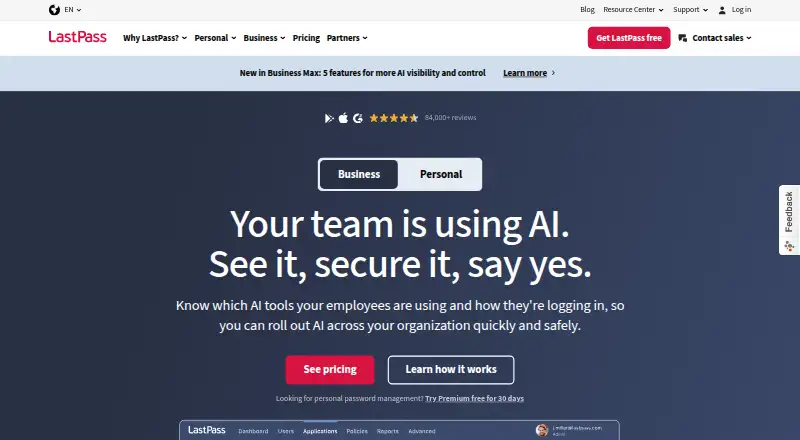
What LastPass is
LastPass is a password manager and access security platform for individuals and businesses. It stores login credentials in an encrypted vault unlocked with the user’s Master Password, then can autofill saved details at sign-in. A built-in generator creates random, unique passwords, and users can securely share passwords, files, and sensitive documents with access controls. LastPass describes its security model as zero-knowledge, with AES-256 encryption performed on the user’s device. It also provides data-breach monitoring and a dashboard for weak or reused passwords. Business administrators can manage directories, policies, reporting, groups, and shared credentials through an admin console. Directory integrations include Microsoft Active Directory, Microsoft Entra ID, Google Workspace, Okta, PingOne/PingFederate, OneLogin, and a custom API. Its SSO offering provides access to over 1,200 pre-integrated applications. LastPass is available on web, Windows, macOS, Linux, iOS, and Android, plus a Chrome extension. A free plan and 30-day trial are listed; Business costs $7 a month, billed annually.
Good
- Encrypted vault with autofill and password generation.
- Secure sharing for passwords, files, and documents.
- Dashboard flags weak or reused passwords.
- Business console manages policies, groups, and shared credentials.
- Available on desktop, mobile, web, and Chrome extension.
Watch out
- Free plan is limited to 1 device type.
- Business plan is billed annually.
- Business plan costs $7 a month.
Who it suits
LastPass suits individuals who want to store and autofill credentials, and businesses that need shared credentials and administrative controls. Its listed platforms include desktop, mobile, web, and a Chrome extension.
Verdict
LastPass combines credential storage, sharing, and monitoring with administrative tools for businesses. The free plan is limited to one device type, while the listed Business plan costs $7 a month when billed annually.
Plans and prices
From LastPass's own pricing page, checked 28 Sep 2026.
| Plan | Price | What it gives you |
|---|---|---|
| Families | — | 6 Premium accounts · independent encrypted vaults · annually |
| Free | Free | 1 device type · unlimited password storage · autofill · dark web monitoring · basic sharing |
| Premium | $3 a month | Unlimited passwords · all devices · 1 GB secure-note file storage · annually |
| Teams | $4.25 a month | Up to 50 users · 25 security policies · shared folders · admin console · annually |
| Business | $7 a month | Unlimited users · 100+ security policies · Families for employees · group management · annually |
| Business Max | $9 a month | Everything in Business · SaaS Monitoring · SaaS Protect · unlimited SSO apps · advanced MFA · annually |
The facts
Each one read from LastPass's own pages, with the date it was checked.
What it does
- Autofill
- LastPass saves credentials to an encrypted vault and autofills them the next time the user logs in.checked 28 Sep 2026
- Business admin controls
- Yeschecked 20 Sep 2026
- Business administration
- Business administrators can manage directories, policies, reporting, groups, and shared credentials from an admin console.checked 28 Sep 2026
- Compliance
- LastPass lists ISO 27001, SOC 2 Type II, SOC 3, BSI C5, and TRUSTe among its third-party security certifications.checked 28 Sep 2026
- Encrypted vault
- LastPass creates an encrypted vault for login credentials that is decrypted by the user's Master Password.checked 28 Sep 2026
- Integrations
- Directory integrations include Microsoft Active Directory, Microsoft Entra ID, Google Workspace, Okta, PingOne/PingFederate, OneLogin, and a custom API.checked 28 Sep 2026
- Monitoring
- LastPass provides data-breach monitoring and a security dashboard for weak and reused passwords.checked 28 Sep 2026
- Passkey support
- Yeschecked 20 Sep 2026
- Password generation
- The built-in password generator creates random, unique passwords.checked 28 Sep 2026
- Passwordless account login
- Yeschecked 20 Sep 2026
- Password sharing
- LastPass lets users securely share passwords, files, and sensitive documents while controlling access.checked 28 Sep 2026
- Secure sharing
- Yeschecked 20 Sep 2026
- Security model
- LastPass uses a zero-knowledge encryption model with AES-256 encryption performed on the user's device.checked 28 Sep 2026
- Security testing
- LastPass says independent security organizations conduct routine audits and testing of its service and infrastructure.checked 28 Sep 2026
- SSO
- LastPass SSO provides access to over 1,200 pre-integrated applications.checked 28 Sep 2026
- Support
- LastPass provides a Support Center, community forum, system status page, and support for subscribed customers.checked 28 Sep 2026
- What it does
- LastPass is a password manager and access security platform for businesses and individuals.checked 28 Sep 2026
- Who it serves
- LastPass says more than 100,000 organizations and millions of people use it.checked 28 Sep 2026
Money
- Family plan
- Yeschecked 20 Sep 2026
- Free plan
- Yeschecked 20 Sep 2026
The company
- Founded
- 2008checked 28 Sep 2026
- Headquarters
- Boston, Massachusetts, USAchecked 28 Sep 2026
Where it runs
- Supported platforms
- web,windows,macos,linux,ios,android,chrome_extensionchecked 20 Sep 2026
The full review of LastPass
Overview
LastPass is a password manager for people and organizations that want to combine saved logins with controlled sharing and administrative oversight. Its strongest case is for households or businesses that need more than a personal credential vault; the main trade-off is that the free plan restricts use to one device type.
Key features
Credential management
LastPass stores logins in an encrypted vault that the user's Master Password decrypts, then autofills saved credentials at later sign-ins. Its generator creates random, unique passwords, making it a practical choice for replacing reused credentials without having to remember each one.
Sharing and security visibility
Users can securely share passwords, files, and sensitive documents while controlling access, a useful extension beyond keeping credentials for personal use. Passkey support and passwordless account login broaden the ways users can access accounts. Breach monitoring and a dashboard flag weak and reused passwords, though the value of that oversight depends on users acting on what it identifies.
Security and business administration
LastPass says it uses a zero-knowledge model with AES-256 encryption performed on the user's device. It lists ISO 27001, SOC 2 Type II, SOC 3, BSI C5, and TRUSTe certifications, and says independent security organizations routinely audit and test its service and infrastructure. These are meaningful parts of its stated security approach, not a substitute for users choosing a strong Master Password.
For organizations, an admin console supports directory management, policies, reporting, groups, and shared credentials. Directory integrations include Microsoft Active Directory, Microsoft Entra ID, Google Workspace, Okta, PingOne/PingFederate, OneLogin, and a custom API. SSO provides access to over 1,200 pre-integrated applications, making the business offering more compelling where centralized access management matters.
Pricing
LastPass uses a freemium model, with a free plan and a 30-day trial. The Free plan is limited to one device type, so it is a constrained starting point for anyone who needs to move between phone and computer.
- Free: Price not listed; limited to one device type. Best for trying the basic approach if that restriction fits your routine.
- Premium: Price not listed; one user and 1 GB encrypted file storage, billed annually. A personal step up for an individual who wants encrypted file storage, but it remains a single-user plan.
- Families: Price not listed; billed annually and includes six Premium accounts with independent encrypted vaults. It suits a household that wants separate vaults rather than one shared credential store.
- Teams: Price not listed; billed annually for up to 50 users, with 25 security policies and 1 GB encrypted file storage. Its user cap and policy allowance make it the more bounded business option.
- Business: $7 a month (billed annually); unlimited users, 100+ security policies, and 1 GB encrypted file storage. This is the clearest priced fit for organizations needing broad administration, though annual billing is the stated term.
- Business Max: Price not listed; billed annually, with unlimited users, unlimited SSO apps, and 1 GB encrypted file storage. It is aimed at organizations for which unrestricted SSO app access is important.
Platforms
LastPass supports web, Windows, macOS, Linux, iOS, Android, and browser extensions, including Chrome. That range suits mixed-device households and workplaces, but the Free plan's one-device-type cap sharply limits the benefit of cross-platform support for free users.
Who it's for
LastPass is a strong fit for households needing multiple independent vaults or businesses that want shared credentials, policy controls, directory connections, and SSO in one product. Individual users who only need a free manager across several types of devices should look elsewhere if the one-device-type limit is a dealbreaker.
Pros and cons
- Pros: Secure sharing covers passwords, files, and sensitive documents, with access controls that suit family and team use.
- Pros: Business administration spans directories, policies, groups, reporting, and shared credentials; Business includes unlimited users and 100+ security policies.
- Pros: A broad platform range includes desktop, mobile, web, and browser extension access.
- Cons: Free access is limited to one device type, a substantial constraint for users who switch between phone and computer.
Alternatives
For a wider comparison, browse Password Managers or Authenticator apps.
- Proton Pass is another freemium option with a free plan; consider it if its hide-my-email aliases are a priority.
- NordPass offers a free plan described as lifetime access for one user account; it may suit an individual looking for that specific free-plan term.
- Zoho Vault has a free plan with unlimited storage and device access, making it worth considering if those free-tier limits matter more than LastPass's broader business offering.
- RoboForm offers a free single-device plan and a Premium plan at $2.49 a month (billed annually; renews at $29.88/yr; first-year terms apply). It is an alternative for someone comparing a stated individual subscription price.
- Intuitive Password is another freemium password manager to consider.
- Passbolt has a Community Edition that is free forever with unlimited users and unlimited instances; that makes it a distinct option for groups prioritizing those terms.
- Devolutions Password Manager offers a free plan with browser autofill, desktop and mobile apps, a built-in OTP authenticator, and cloud or self-hosted workspaces; consider it if those elements are the deciding factors.
- Padloc has a free plan described with unlimited vault items and unlimited devices; it may fit users who want those free-plan allowances.
Verdict
Choose LastPass if your priority is bringing encrypted credential storage together with controlled sharing and, especially for businesses, substantial administrative tools and SSO. Look elsewhere if you need a free plan that works across device types or need clear prices before narrowing down paid options.
Getting started
- Visit the LastPass website
- Choose the Free plan or start the 30-day trial
- Select from the listed platforms
- Create an encrypted vault protected by a Master Password
- Save credentials so LastPass can autofill future sign-ins
Limits worth knowing
The Free plan is limited to one device type. The Business plan is $7 a month billed annually.
Questions
Is LastPass free?
Yes. A free plan is listed, along with a 30-day trial.
What platforms does LastPass support?
It supports web, Windows, macOS, Linux, iOS, Android, and a Chrome extension.
How much is the Business plan?
Business costs $7 a month, billed annually.
Does LastPass support passkeys?
Yes, passkey support is listed.
Who makes LastPass?
LastPass makes the product. Its maker is headquartered in Boston, Massachusetts, USA, and was founded in 2008.
Alternatives to LastPass
- 1

Bitwarden
Free planOpen sourceAndroidiOSWebAPI9.3From $1.65 a month - 2

Duo Mobile
Free planAndroidiOS8.5From $3 a month - 3
SAASPASS Authenticator
Free planAndroidiOSWebExtension8.4From $1 a year - 4
Yubico Authenticator
Free planAndroidiOSLinuxmacOS8.1Free plan - 5
HYPR Authenticate
AndroidiOSWebAPI8.1From $3 a month - 6

LoginTC
Free planAndroidiOSWebAPI8.1From $36 a year