SAASPASS Authenticator
SAASPASS Authenticator generates TOTP and HOTP one-time passwords and supports push approvals.
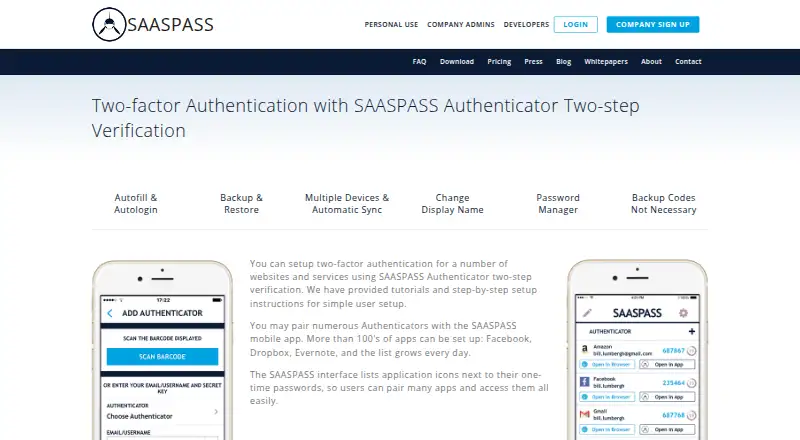
What SAASPASS Authenticator is
SAASPASS Authenticator generates TOTP and HOTP one-time passwords and supports push approvals. It is available on iOS, Android, web, Windows, macOS, Linux, and browser extensions, with encrypted backup and multi-device sync. Security options include PIN protection, a scrambled keypad, fingerprint, Face ID, and Android pattern support. Backup and restore tools include phone verification and custom questions. Personal mobile app use is free, though no numeric free-tier limit is stated, and a 30-day trial does not require a credit card. For organizations, features include team administration, an admin dashboard, role-based access policies, and sharing that does not expose passwords or authenticator codes. Browser extensions are listed for Firefox, Chrome, Safari, and Opera. Developer plans are priced at $1, $2, or $3 per user per year. Company pricing includes $10 a month for up to 10 employees, with annual per-employee tiers also listed at 20.00 USD, 40.00 USD, and 60.00 USD.
Good
- Supports both TOTP and HOTP codes.
- Encrypted backup and multi-device sync are available.
- Free personal mobile app use is listed.
- Offers multiple device security and recovery options.
- Company tools include role-based access policies.
Watch out
- No numeric limit is stated for free personal use.
- Some company plans require contacting sales.
- Company tiers are priced per employee.
Who it suits
It suits people who want an authenticator across mobile, desktop, and browser platforms, as well as organizations needing administration and team sharing. Developers can also consider its per-user annual plans for MFA integration.
Verdict
SAASPASS Authenticator covers individual code generation as well as company administration and developer integration options. Personal mobile use is free, while the available company and developer plans have distinct pricing structures.
Plans and prices
From SAASPASS Authenticator's own pricing page, checked 27 Sep 2026.
| Plan | Price | What it gives you |
|---|---|---|
| Personal Use | Free | Mobile app available for personal use · Personal mobile app use |
| Company plan — up to 10 employees | $10 a month | Up to 10 employees |
| Company plan | $20 a year | Authenticator code vaulting · SAML applications · Single sign-on · per employee / year |
| Company plan — contact sales | — | — |
| Developer plan | $1 a year | MFA integration · Ready code snippets · per user / year |
| Developer Tier 1 | $1 a year | $1 per user / year |
| Developer Tier 2 | $2 a year | $2 per user / year |
| Developer Tier 3 | $3 a year | $3 per user / year |
| Company Up to 10 Employees | $10 a year | Up to 10 employees · $10 |
| Company Tier 1 | $20 a year | $20 per employee / year |
| Company Tier 2 | $40 a year | $40 per employee / year |
| Company Tier 3 | $60 a year | $60 per employee / year |
| Company Tier 4 | $100 a year | $100 per employee / year |
| Company Trial | — | No credit card required · 1 month free trial |
| Company Contact Sales | Priced on request | For 500+ employees or other inquiries |
| Developer Trial | — | No credit card required · 1 month free trial |
The facts
Each one read from SAASPASS Authenticator's own pages, with the date it was checked.
What it does
- Admin dashboard
- Enterprise support includes an admin dashboard and administration features such as role-based access policies.checked 27 Sep 2026
- Backup and recovery
- Backup and restore are available, with recovery options including phone verification and custom questions.checked 27 Sep 2026
- Code type
- totp and hotpchecked 21 Sep 2026
- Data encryption
- SAASPASS says it encrypts all data, unlike Google Authenticator storing keys in plain or clear text.checked 27 Sep 2026
- Developer pricing
- Developer plans are priced at $1, $2, or $3 per user per year.checked 27 Sep 2026
- Encrypted backup
- Yeschecked 21 Sep 2026
- Integrations
- The page lists more than 100,000 pre-built enterprise password manager integrations and over 1,700 SAML integrations.checked 27 Sep 2026
- TOTP support
- The authenticator supports time-based one-time passwords, or TOTP.checked 27 Sep 2026
Where it runs
- Browser extensions
- Browser extensions are available for Firefox, Chrome, Safari, and Opera.checked 27 Sep 2026
- Device security
- Security options include PIN protection, scrambled keypad, fingerprint, Face ID, and Android pattern support.checked 27 Sep 2026
- Multi-device sync
- The app supports multiple devices, device management, cloning, and optional cloud syncing across Android and iOS.checked 27 Sep 2026
- Push approvals
- Yeschecked 21 Sep 2026
- Supported platforms
- Supported platforms include iPhone, Android, Apple Watch, Android Wear, iPad, tablets, Windows, and Blackberry.checked 27 Sep 2026
The company
- Company identity
- The supplied pricing page identifies the company as SAASPASS and shows a 2021 copyright.checked 27 Sep 2026
- Company pricing
- Company plans range from $10 for up to 10 employees to $100 per employee per year, with contact sales also available.checked 27 Sep 2026
- Headquarters
- San Francisco, California, United Stateschecked 28 Sep 2026
- Team administration
- Yeschecked 21 Sep 2026
- Team sharing
- Enterprise sharing allows sharing without sharing passwords or authenticator codes.checked 27 Sep 2026
Money
- Free mobile apps
- The iPhone, iPad, Apple Watch, Android, Android tablet, and Android Wear apps are available for free.checked 27 Sep 2026
- Free plan
- Yeschecked 21 Sep 2026
- Free tier limits
- The supplied text does not state a numeric limit for the free personal mobile app.checked 27 Sep 2026
- Free trial
- Company and developer offerings include a one-month free trial.checked 27 Sep 2026
- Trial payment
- The free trial does not require a credit card.checked 27 Sep 2026
The full review of SAASPASS Authenticator
SAASPASS Authenticator pairs a personal authenticator with administration and integration tools for companies and developers. It suits people who want backup and multi-device sync, and organizations that need more than code generation. For a standalone personal authenticator, its broader business offering may be more than necessary.
Overview
The app supports TOTP and HOTP codes, plus push approvals. Personal mobile use is free; company and developer plans add tools for managing teams and integrating multi-factor authentication. The free personal app has no stated numeric cap, so its boundaries are unclear.
Key features
Codes, device security, and recovery
TOTP and HOTP give users two code-generation methods, while push approvals offer another way to confirm sign-ins. Security options include a PIN, scrambled keypad, fingerprint, Face ID, and Android pattern support, with availability depending on the device.
Backup and restore, encrypted backup, and multi-device sync help users recover access and keep the app usable across devices. Recovery options include phone verification and custom questions. SAASPASS says it encrypts all data and contrasts this with Google Authenticator storing keys in plain or clear text.
Extensions and organization tools
Browser extensions are available for Firefox, Chrome, Safari, and Opera. For organizations, enterprise sharing allows information to be shared without sharing passwords or authenticator codes. An admin dashboard and role-based access policies give administrators tools to manage access. The product also lists more than 100,000 pre-built enterprise password manager integrations and over 1,700 SAML integrations, making its company offering relevant to organizations with integration needs.
Pricing
Personal Use costs nothing, with the mobile app available for personal use. The iPhone, iPad, Apple Watch, Android, Android tablet, and Android Wear apps are free.
The company plans include a plan at $10 a month for up to 10 employees and a Company plan at $20 a year, billed per employee per year. The latter includes authenticator code vaulting, SAML applications, and single sign-on. Company Tier 1, Tier 2, and Tier 3 are priced at 20.00 USD, 40.00 USD, and $60 per employee per year, respectively. A company plan with contact sales has custom pricing. These options target organizations rather than individual users; the up-to-10 plan states its seat cap, while per-employee plans scale with headcount.
Developer plans cost $1, $2, or $3 per user per year across Tiers 1, 2, and 3. The $1 Developer plan includes MFA integration and ready code snippets. These low per-user prices make the developer offering distinct from company administration, but the listed inclusions are clearest for the $1 plan.
A 30-day free trial does not require a credit card. The free mobile app and trial make it possible to start without payment, while paid plans are aimed at team or developer use.
Platforms
SAASPASS supports iOS, Android, the web, Windows, macOS, Linux, and browser extensions. Its breadth suits users who move between mobile and desktop environments, with extensions also available for Firefox, Chrome, Safari, and Opera.
Who it's for
Choose SAASPASS for free personal mobile authentication when encrypted backup, recovery options, or multi-device sync matter. It is a stronger fit for businesses needing administration, role-based policies, sharing, or SAML integrations, and for developers seeking MFA integration tools. Those wanting only a simple standalone code generator may prefer a more focused free app.
Pros and cons
- Pros: Free personal mobile apps and a trial without a credit card lower the barrier to trying it.
- Pros: TOTP, HOTP, push approvals, encrypted backup, recovery, and multi-device sync cover more than code generation alone.
- Pros: Team administration, role-based policies, and extensive integration support serve organizations with access-management needs.
- Cons: The free personal tier has no stated numeric limit, so users cannot judge its ceiling from the plan terms.
- Cons: The company and developer pricing structures differ, and company per-employee costs rise with headcount.
- Cons: Individual users who need only an authenticator may not benefit from its broader business and developer offering.
Alternatives
For a wider range of authenticator apps, browse Authenticator apps.
- Ente Auth is a free, open-source option with data export and import.
- Proton Authenticator is a free, open-source option whose code can be inspected.
- Zoho OneAuth is free for Zoho work accounts and personal online accounts.
- LoginTC offers a free cloud starter plan for up to 3 users, with VPN and firewall protection.
- Yubico Authenticator is free and open source, but requires a YubiKey to store credentials and generate codes.
- 2FAS Auth is a free authenticator option for Android, iOS, and browser extensions.
- Duo Mobile has a free plan for 10 users and a Duo Essentials plan at $3 a month.
- 4OTP offers free apps with TOTP, encrypted local storage and backups, offline use, and no account requirement.
Verdict
SAASPASS Authenticator is best for individuals who value backup and cross-device use, and for organizations or developers that need administration or integration tools. Its main advantage is the range from personal authentication to company and developer use; its main drawback for individuals is that much of that breadth may be unnecessary, while the free tier's numeric limits are unclear.
Alternatives to SAASPASS Authenticator
- 1

Bitwarden
Free planOpen sourceAndroidiOSWebAPI9.3From $1.65 a month - 2

Duo Mobile
Free planAndroidiOS8.5From $3 a month - 3

LastPass
Free planAndroidiOSWebExtension8.4Free plan - 4
Yubico Authenticator
Free planAndroidiOSLinuxmacOS8.1Free plan - 5
HYPR Authenticate
AndroidiOSWebAPI8.1From $3 a month - 6

LoginTC
Free planAndroidiOSWebAPI8.1From $36 a year