
2FAS Auth
2FAS Auth is a free authenticator for generating TOTP and HOTP codes used to verify identity when signing in to online accounts.
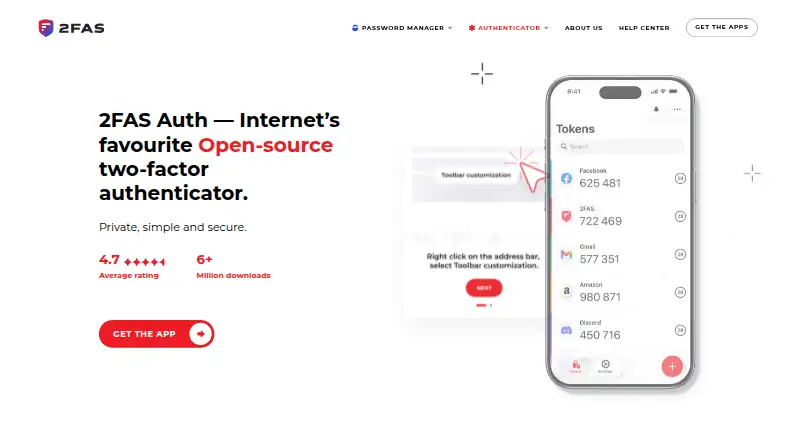
What 2FAS Auth is
2FAS Auth is a free authenticator for generating TOTP and HOTP codes used to verify identity when signing in to online accounts. It works offline and also supports push approval requests. Mobile apps are available for iOS and Android, with browser extensions for Chrome, Brave, Firefox, Edge, Opera, and Safari. Pair an extension by scanning its QR code with the mobile app, then confirm token requests in the app. Communication between the phone and extension is end-to-end encrypted, with no unencrypted fallback. Tokens can be synchronized through 2FAS export files, iCloud, or Google Drive, and encrypted backup is available. The app does not require an account, describes itself as anonymous, and says it does not use tracking codes. Its source code is open for review. The mobile download page lists iOS 18.6 or later and Android 9.0 or later; the app supports 16 languages.
Good
- Generates both TOTP and HOTP codes
- Works offline
- Encrypted backup and token synchronization
- No account required
- Source code is open for review
Watch out
- iOS requires version 18.6 or later
- Android requires version 9.0 or later
Who it suits
It suits people who want offline authentication codes on a phone, or who want to confirm browser-extension requests through a paired mobile app. It also fits users looking for an authenticator that does not require an account.
Verdict
2FAS Auth combines offline codes with encrypted backup, synchronization, and browser-extension pairing. Check the listed mobile operating-system requirements before installing.
Plans and prices
From 2FAS Auth's own pricing page, checked 3 Oct 2026.
| Plan | Price | What it gives you |
|---|---|---|
| 2FAS Auth | Free | Open-source authenticator · works offline · Free to use; donations support the project. |
The facts
Each one read from 2FAS Auth's own pages, with the date it was checked.
Where it runs
- Browser support
- The browser extension is offered for Chrome, Brave, Firefox, Edge, Opera, and Safari.checked 3 Oct 2026
- Multi-device sync
- Yeschecked 21 Sep 2026
- Push approvals
- Yeschecked 21 Sep 2026
- Supported platforms
- iOS,Android,Chrome,Brave,Firefox,Edge,Opera,Safarichecked 21 Sep 2026
What it does
- Code type
- totp and hotpchecked 21 Sep 2026
- Encrypted backup
- Yeschecked 21 Sep 2026
- Encryption
- Communication between the mobile device and browser extension is end-to-end encrypted, with no fallback to unencrypted connections.checked 3 Oct 2026
- Extension workflow
- Users pair the extension with the mobile app by scanning a QR code, then confirm token requests in the app.checked 3 Oct 2026
- History
- The about page says Mark founded 2FAS in 2015 and 2FAS Auth launched in 2017.checked 3 Oct 2026
- Languages
- The app supports 16 languages.checked 3 Oct 2026
- Mobile requirements
- The download page lists iOS 18.6 or later and Android 9.0 or later for the authenticator mobile apps.checked 3 Oct 2026
- Offline use
- The app works offline.checked 3 Oct 2026
- Privacy
- The app is anonymous and does not require an account to use.checked 3 Oct 2026
- Purpose
- 2FAS Auth generates two-factor authentication tokens to help users verify their identity when signing in to online accounts.checked 3 Oct 2026
- Source code
- 2FAS Auth is open-source, and its security features can be reviewed by independent security experts.checked 3 Oct 2026
- Support
- 2FAS Auth offers a Help Center and a dedicated support channel on Discord.checked 3 Oct 2026
- Token sync
- Users can synchronize tokens with 2FAS export files, iCloud, or Google Drive.checked 3 Oct 2026
- Tracking
- 2FAS says it does not use tracking codes.checked 3 Oct 2026
Money
- Free plan
- Yeschecked 21 Sep 2026
The company
- Maker
- The maker is Two Factor Authentication Service, Inc., which lists an address in Henderson, Nevada.checked 3 Oct 2026
Alternatives to 2FAS Auth
- 1

Bitwarden
Free planOpen sourceAndroidiOSWebAPI9.3From $1.65 a month - 2

Duo Mobile
Free planAndroidiOS8.5From $3 a month - 3
SAASPASS Authenticator
Free planAndroidiOSWebExtension8.4From $1 a year - 4

LastPass
Free planAndroidiOSWebExtension8.4Free plan - 5
Yubico Authenticator
Free planAndroidiOSLinuxmacOS8.1Free plan - 6
HYPR Authenticate
AndroidiOSWebAPI8.1From $3 a month