
ScreenZen
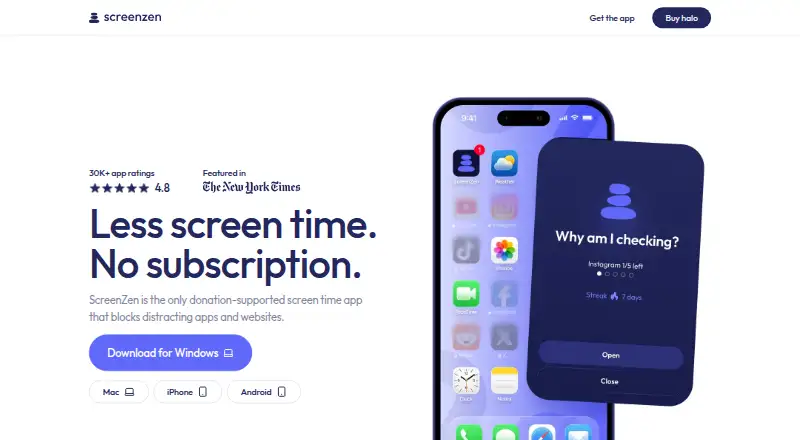
ScreenZen is a digital-wellbeing app that blocks distracting apps and websites to help people reduce screen time.
What ScreenZen is
ScreenZen is a digital-wellbeing app that blocks distracting apps and websites to help people reduce screen time. Users can choose what to block, set daily limits, schedule focus blocks, use apps mindfully, and track progress. Lock mode helps guard against common workarounds and can prevent uninstalling. The core app is free and runs on Android, iOS, macOS, and Windows without requiring an account. The maker says core app settings and blocking data stay on the device and that the core app collects no personally identifiable information. Optional social accountability and Halo features may store account details and selected usage or Halo data in Google Firebase and cloud storage. Halo uses Bluetooth to block selected apps and sites when a device enters a chosen boundary; it supports unlimited iOS 16.4+ or Android 12.0+ phones and tablets, adjustable radius up to 50 ft, and custom schedules. Halo costs $49, paid once, and an account is required to manage the device and add users. ScreenZen’s terms require users to be at least 13 and state that it is not medical or mental-health advice.
Good
- Blocks selected apps and websites
- Daily limits and recurring schedules are available
- Core app works without an account
- Core settings and blocking data stay on-device, according to the maker
Watch out
- Halo costs $49, paid once
- Halo requires an account to manage devices and users
- Halo supports iOS 16.4+ or Android 12.0+
- The terms require users to be at least 13
Who it suits
ScreenZen suits people who want app and website blocking, daily limits, or scheduled focus periods across supported devices. Halo may suit users who want Bluetooth-triggered blocking within a chosen physical boundary.
Verdict
ScreenZen’s core app provides app and website blocking across four platforms without an account. Halo adds Bluetooth boundary-based blocking for a separate one-time cost and requires an account; ScreenZen is not medical or mental-health advice.
Plans and prices
From ScreenZen's own pricing page, checked 3 Oct 2026.
| Plan | Price | What it gives you |
|---|---|---|
| ScreenZen app | Free | Core app is free; optional donations support the project |
| halo | $49, paid once | US shipping only · 1 halo · Free shipping · 30-day money-back guarantee · Pay once, use it forever |
The facts
Each one read from ScreenZen's own pages, with the date it was checked.
What it does
- Account requirement
- The core ScreenZen app does not require an account, while Halo requires an account to manage the device and add users.checked 3 Oct 2026
- Analytics
- ScreenZen says it may use self-hosted OpenPanel analytics and does not collect per-app usage or activity from apps users have not chosen to block.checked 3 Oct 2026
- Blocking controls
- Users choose which apps and websites to block and can use schedules or daily limits.checked 3 Oct 2026
- Halo
- Halo uses Bluetooth to block selected apps and websites when a device enters a chosen physical boundary.checked 3 Oct 2026
- Halo compatibility
- Halo works with unlimited phones and tablets running iOS 16.4+ or Android 12.0+.checked 3 Oct 2026
- Halo limits
- Halo has an adjustable radius up to 50 ft and supports custom schedules.checked 3 Oct 2026
- Lock mode
- Lock mode helps protect against common loopholes and can prevent uninstalling.checked 3 Oct 2026
- Optional data
- Optional social accountability and Halo features can store account details and selected usage or Halo data in Google Firebase and cloud storage.checked 3 Oct 2026
- Privacy
- The maker says core app settings and blocking data are stored only on the device and that the core app collects no personally identifiable information.checked 3 Oct 2026
- Purpose
- ScreenZen blocks distracting apps and websites to help people reduce screen time.checked 3 Oct 2026
- Security reporting
- Potential Halo security issues can be reported in the app or by email; the stated acknowledgement target is within five business days.checked 3 Oct 2026
- Support
- The site lists [email protected] and invites users to join its Discord community.checked 3 Oct 2026
- Terms and audience
- The terms describe ScreenZen as a digital-wellbeing tool, require users to be at least 13, and state that it is not medical or mental-health advice.checked 3 Oct 2026
Where it runs
- App features
- Users can choose apps, set daily limits, schedule focus blocks, use apps mindfully, and track their progress.checked 3 Oct 2026
The company
- Headquarters
- Sonoma, California, United Stateschecked 23 Sep 2026
The full review of ScreenZen
ScreenZen is a distraction blocker for apps and websites, built around schedules, daily limits and mindful use. It suits people who want cross-platform controls without creating an account for the core app. Its strongest distinction is the optional Halo device, which adds physical-boundary blocking but brings a separate purchase and account requirement.
Overview
ScreenZen lets users choose which apps and websites to block, then shape those restrictions around routines or daily usage limits. Progress tracking and mindful-use features make it more than an on-off blocker, while lock mode is intended to make common workarounds harder, including uninstalling the app. That combination is useful for people who want structure without turning every session into an all-or-nothing ban.
Halo takes a different approach: it uses Bluetooth to trigger blocking when a device enters a chosen physical boundary. That can suit routines tied to a place, but it is an add-on rather than part of the free core app, and its setup requires an account.
Key features
Scheduled and locked blocking
Users can block selected apps and websites with daily limits, recurring schedules and focus blocks. Lock mode can protect against common loopholes and prevent uninstalling, which makes ScreenZen a better fit for users who want their rules to hold during a session than for someone seeking only a usage dashboard.
Halo boundaries
Halo supports custom schedules and an adjustable Bluetooth boundary up to 50 ft. It works with unlimited iOS 16.4+ or Android 12.0+ phones and tablets. The unlimited-device compatibility is useful for households or people with several devices, though the boundary-based feature is tied to a separate paid Halo purchase.
Privacy and support
The maker says core settings and blocking data stay on the device, and that the core app collects no personally identifiable information. Optional social accountability and Halo features can store account details and selected usage or Halo data in Google Firebase and cloud storage. ScreenZen says it may use self-hosted OpenPanel analytics and does not collect per-app usage or activity from apps a user has not chosen to block. Potential Halo security issues can be reported in the app or by email, with an acknowledgement target of five business days. Support is also offered through [email protected] and Discord.
Pricing
The ScreenZen app is free at no cost, with optional donations supporting the project. There is no free trial because the core app is already free. This is the right starting point for anyone who wants app and website blocking, schedules, daily limits and locked sessions without paying or opening an account.
Halo costs $49, paid once, billed Pay once, use it forever. The purchase includes 1 halo, free shipping and a 30-day money-back guarantee; shipping is US only. Choose it only if physical-boundary blocking is worth the hardware purchase and Halo account. The core app does not require an account, but Halo requires one to manage the device and add users.
Platforms
The core app is available on Android, iOS, macOS and Windows, giving ScreenZen broader desktop coverage than a phone-only blocker. Halo compatibility is narrower: iOS 16.4+ and Android 12.0+ phones and tablets. ScreenZen’s terms require users to be at least 13 years old.
Who it's for
ScreenZen is a sensible choice for people who want customizable app and website restrictions across phone and desktop, particularly if they value a free core app and on-device settings. Halo may appeal to users who want blocking to respond to a physical location and are comfortable with its separate one-time hardware cost and account. It is not medical or mental-health advice, so it is not a substitute for professional care.
Pros and cons
- Pro: The free core app covers selected apps and websites, daily limits, recurring schedules and locked sessions, so users can build meaningful restrictions without a subscription.
- Pro: Android, iOS, macOS and Windows support makes it useful across mobile and desktop devices.
- Pro: The maker says core settings and blocking data remain on-device, with no personally identifiable information collected by the core app.
- Con: Halo is a separate 49.00 USD one-time purchase, and US-only shipping limits who can buy it.
- Con: Halo requires an account and compatible newer mobile operating systems, unlike the account-free core app.
Alternatives
For more options, browse Screen Time Management Apps or Distraction Blocking Software.
- Freedom is a better fit if multi-device sync and custom blocklists matter; its free plan also offers app, website or internet blocking with website exceptions, and it has a free trial.
- StayFree suits readers who want cross-device screen-time tracking and usage control in a free app, with support for browser extensions and Linux as well as mobile and desktop platforms.
- AppBlock is another freemium blocker for Android, iOS and browser extensions.
- one sec is worth considering for its intervention types and time tracking; its Pro plan costs $6.99 a month and includes website blocking and block sessions.
- Opal offers a free plan with one rule, basic timers and soundscapes, app blocking and a same-day Opal Score on iOS, Android and Mac.
- YourHour is a free-download option for Android and iOS, though its free version contains ads and in-app purchases.
- FocusMe may suit someone seeking a lifetime plan with core features; it costs 249.00 USD once and supports Android, browser extensions, iOS, Linux, macOS and Windows.
- Lock Me Out is an Android-only alternative for readers who want to consider a platform-specific freemium option.
Verdict
Choose ScreenZen if you want free, configurable app and website blocking across mobile and desktop, with an account-free core app and controls that can resist common workarounds. Its main reason to look elsewhere is equally clear: Halo adds a compelling location-based option, but only through a separate hardware purchase, account and compatible mobile device.
Alternatives to ScreenZen
- 1

Freedom
Free planAndroidiOSWebExtension8.2From $40 a year - 2

Opal
Free planAndroidiOSExtensionmacOS8.0From $8.29 a month - 3
one sec
AndroidiOSExtensionLinux7.2From $19.99 a year - 4
FocusMe
AndroidiOSExtensionLinux7.1$249 one-time - 5
YourHour
Free planAndroidiOS7.1From $12.99 a year - 6
Focusly
Free planOpen sourceExtensionmacOSWindows7.0Free plan