YourHour
YourHour is a screen-time app for Android and iOS that tracks use, offers app blocking and provides tools for building digital habits.
What YourHour is
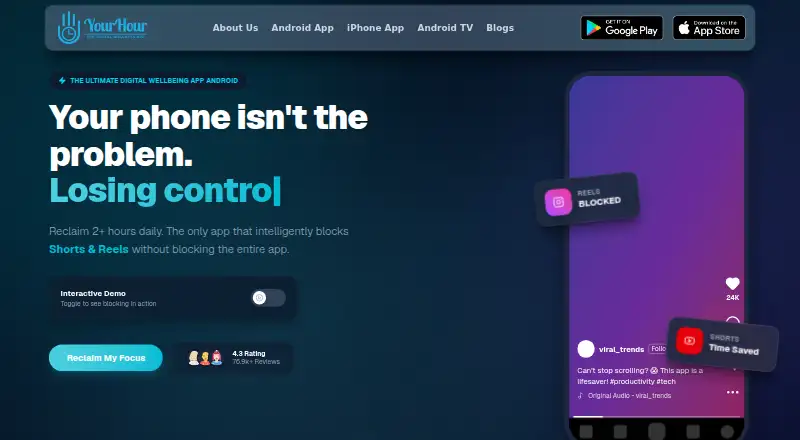
YourHour is a screen-time app for Android and iOS that tracks use, offers app blocking and provides tools for building digital habits. Its dashboard shows usage time, unlock counts, top apps and daily trends, with daily, weekly and monthly reports. Blocking options include Reels and endless scrolling; the Android listing names Instagram Reels, YouTube Shorts and Facebook Reels. Mindful Pause can show a breathing exercise or reflection prompt before selected apps open. YourHour also supports Android TV, where users can set app limits, view usage and remotely lock TV apps from a phone. The TV page describes parent-approved extensions of 5 minutes, 15 minutes or 1 hour. Core usage tracking can work offline. Device usage data is processed locally, though some features may request a name, email, date of birth and country. On Android, Reel Blocker and Focus use AccessibilityService, with accessibility data processed on-device. The free download contains ads and in-app purchases; Pro costs $1.99 per month or $12.99 per year. The iPhone app requires iOS 18.0 or later.
Good
- Tracks usage time, unlocks, top apps and trends.
- Includes daily, weekly and monthly reports.
- Core tracking can work offline.
- Supports app limits on Android TV.
- Usage data is locally processed.
Watch out
- Free download contains ads and in-app purchases.
- Pro costs $1.99 per month or $12.99 per year.
- iPhone requires iOS 18.0 or later.
- Android Reel Blocker and Focus use AccessibilityService.
Who it suits
YourHour may suit students, professionals and parents who want usage reports, app limits or focus tools. Android TV support may also suit parents managing TV app use from a phone.
Verdict
YourHour combines tracking and reports with blocking, focus prompts and Android TV controls. Consider its subscription options, iPhone requirement and Android accessibility permission when deciding whether it fits.
Plans and prices
From YourHour's own pricing page, checked 3 Oct 2026.
| Plan | Price | What it gives you |
|---|---|---|
| Free | Free | Free download; contains ads and in-app purchases |
| YourHour Pro Monthly | $1.99 a month | Pro subscription; exact included limits not stated |
| YourHour Pro Yearly | $12.99 a year | Pro subscription; exact included limits not stated |
The facts
Each one read from YourHour's own pages, with the date it was checked.
What it does
- Accessibility permission
- Google Play says YourHour uses Android AccessibilityService for Reel Blocker and Focus features, processing accessibility data locally on the device.checked 3 Oct 2026
- Audience
- The Google Play listing names students, professionals and parents among the people YourHour is for.checked 3 Oct 2026
- Blocking
- Features include blocking Reels and endless scrolling, and the Android listing describes blocking Instagram Reels, YouTube Shorts and Facebook Reels.checked 3 Oct 2026
- Data retention
- The privacy policy says daily usage logs are retained for 90 days and account deletion has a 30-day grace period.checked 3 Oct 2026
- Exports
- Google Play lists PDF and XLSX report exports as Premium features.checked 3 Oct 2026
- Mindful Pause
- Mindful Pause can show a breathing exercise or reflection prompt before selected apps open.checked 3 Oct 2026
- Offline use
- Google Play says core usage tracking can work without an internet connection.checked 3 Oct 2026
- Privacy
- The app privacy policy says device usage data is locally processed and that some features may request a name, email, date of birth and country.checked 3 Oct 2026
- Privacy controls
- The maker says it does not sell personal information and describes internal security reviews of data practices.checked 3 Oct 2026
- Privacy processing
- The privacy policy says the app locally processes device usage data; some features may request a name, email, date of birth and country.checked 3 Oct 2026
- Purpose
- YourHour offers screen time tracking, app blocking and tools for building healthier digital habits.checked 3 Oct 2026
- Reel blocking
- The app says it can block Reels and endless scrolling.checked 3 Oct 2026
- Reports
- The app lists daily, weekly and monthly reports and detailed analytics.checked 3 Oct 2026
- Support
- The Google Play listing gives [email protected] and +919096126060 for app support.checked 3 Oct 2026
- TV parental controls
- The TV page describes parent-approved temporary extensions of 5 minutes, 15 minutes or 1 hour.checked 3 Oct 2026
- Usage dashboard
- Its dashboard tracks usage time, unlock count, top apps and daily trends.checked 3 Oct 2026
Where it runs
- Android accessibility permission
- The Android listing says YourHour uses Android AccessibilityService for its Reel Blocker and Focus features, with accessibility data processed locally on the device.checked 3 Oct 2026
- Android TV
- YourHour says users can set Android TV app limits, view usage and remotely lock TV apps from a phone.checked 3 Oct 2026
- iOS compatibility
- The App Store listing requires iOS 18.0 or later for iPhone.checked 3 Oct 2026
The company
- Headquarters
- Indore, Madhya Pradesh, Indiachecked 28 Sep 2026
The full review of YourHour
YourHour is a screen-time manager that combines measurement with blocking and deliberate pauses. It is a strong match for Android users, families controlling an Android TV, and anyone who wants reports before changing habits; iPhone owners need a recent operating system. The main appeal is its range of interventions, while the precise boundaries of its paid tier require a cautious buying decision.
Overview
YourHour records how a device is used and provides controls intended to reduce compulsive checking. Tracking continues offline for core usage data, so the basic record does not depend on a constant connection. The app is designed for students, professionals and parents, but its controls are primarily personal or household tools rather than a shared workplace system.
Key features
Measurement and reports
The usage dashboard shows time spent, unlock totals, most-used apps and day-by-day trends. Daily, weekly and monthly reports turn that snapshot into a longer view, while application limits, scheduled limits and focus sessions provide ways to respond to the numbers. Premium is required for PDF and XLSX exports, which matters if reports must be archived, printed or analyzed elsewhere.
Blocking and interruption
YourHour targets the formats most associated with automatic scrolling. It can block Instagram Reels, YouTube Shorts and Facebook Reels, as well as endless-scroll behavior generally. Mindful Pause adds a softer intervention: before a chosen app opens, it can present a breathing exercise or a reflection prompt. That combination suits users who want a moment to reconsider rather than an immediate hard lock. On Android, Reel Blocker and Focus use AccessibilityService; the app says the accessibility data is processed locally, but granting that permission is a significant part of setup.
Android TV management
A phone can set limits for Android TV apps, inspect television usage and lock TV apps remotely. Parent-approved extensions of five minutes, 15 minutes or one hour offer a practical compromise when a limit needs to be relaxed temporarily. This household control is a distinctive reason to choose YourHour, provided the home uses Android TV.
Privacy and retention
Device-usage data is processed locally, and the maker says it does not sell personal information while conducting internal reviews of its data practices. Some functions may request a name, email address, date of birth and country. Daily usage logs are retained for 90 days, and account deletion includes a 30-day grace period, so the service is not an indefinite historical archive.
Pricing
YourHour is freemium. The Free plan costs nothing, is a free download, and contains ads and in-app purchases. It is the sensible starting point for basic tracking and for checking whether the intervention style suits you, but the paid feature boundary is important for report-heavy use.
YourHour Pro Monthly costs $1.99 a month. YourHour Pro Yearly costs $12.99 a year, making the annual term the lower-cost route for someone who expects to keep the controls long term. Both are Pro subscriptions, but the exact included limits are not defined, so buyers needing a particular quota or capability should confirm it before renewing. PDF and XLSX exports are explicitly Premium features.
Platforms
YourHour supports Android, iOS and Android TV. The iPhone app requires iOS 18.0 or later. Android offers the deepest control set, including AccessibilityService-powered Reel Blocker and Focus functions; Android TV management is performed from a phone. Support is provided at [email protected] and +919096126060.
Who it's for
Choose YourHour if you want usage evidence paired with limits, scheduled restrictions, focus sessions and prompts that interrupt social-video habits. Parents with Android TV can use the remote locks and fixed extension choices to manage television time. It is less suitable for iPhone households below iOS 18, for organizations seeking multi-seat administration, or for anyone unwilling to grant Android accessibility access.
Pros and cons
Pros
- Actionable tracking: unlocks, top apps and multi-period reports make patterns easier to interpret than a single daily total.
- Targeted scrolling controls: blocking Reels, Shorts and endless feeds addresses specific high-distraction behaviors.
- Mindful Pause: breathing and reflection prompts provide a graduated alternative to an outright block.
- Android TV tools: phone-based limits, remote locks and five-minute, 15-minute or one-hour extensions are useful for families.
- Local processing and offline core tracking: usage monitoring can work without internet access, with device data processed locally.
Cons
- Unclear Pro scope: the monthly and yearly subscriptions do not publish exact limits, making it difficult to predict what payment unlocks.
- Free tier includes ads: the no-cost option is not an ad-free experience.
- Accessibility permission required for key Android controls: users must accept elevated access for Reel Blocker and Focus.
- Short usage history: daily logs are retained for 90 days, limiting long-term comparisons.
- iPhone requirement: iOS 18.0 or later excludes older iPhones from the mobile experience.
Alternatives
Freedom is the better choice when you need blocking across Android, iOS, Linux, macOS, Windows and the web, with multi-device sync and custom blocklists; its free tier is limited.
StayFree fits readers who want a free, cross-device tracker and usage-control tool spanning mobile, desktop and browser platforms.
Opal suits users seeking a free plan with one rule, basic timers and app blocking across iOS, Android and Mac, plus a free trial.
ScreenZen is an option for a free core app on Android, iOS, macOS and Windows, with no free trial and optional donations.
AppBlock is another freemium blocking alternative for Android, iOS and browser use.
Apple Screen Time is the natural pick for Apple-device households wanting a built-in free control, including family management through Family Sharing.
Focusly is preferable for a free, offline, no-account desktop and browser tool with all features included.
Jomo is an iOS and macOS alternative with a free plan and paid annual student option.
For a broader comparison, see Screen Time Management Apps.
Verdict
YourHour is a good choice for Android users who want detailed usage feedback followed by concrete limits, focus prompts and targeted short-video blocking, especially when Android TV controls matter. Start with Free if ads and basic access are acceptable; choose Pro only after confirming that its unspecified limits cover your export and control needs. Look elsewhere if you need transparent paid quotas, older-iPhone support or a management system built for teams.
Alternatives to YourHour
- 1

Freedom
Free planAndroidiOSWebExtension8.2From $40 a year - 2

Opal
Free planAndroidiOSExtensionmacOS8.0From $8.29 a month - 3

ScreenZen
Free planAndroidiOSmacOSWindows7.3$49 one-time - 4
one sec
AndroidiOSExtensionLinux7.2From $19.99 a year - 5

FocusMe
AndroidiOSExtensionLinux7.1$249 one-time - 6
Focusly
Free planOpen sourceExtensionmacOSWindows7.0Free plan