StayFree
StayFree is a free tool for tracking device usage and limiting time spent on apps and websites.
What StayFree is
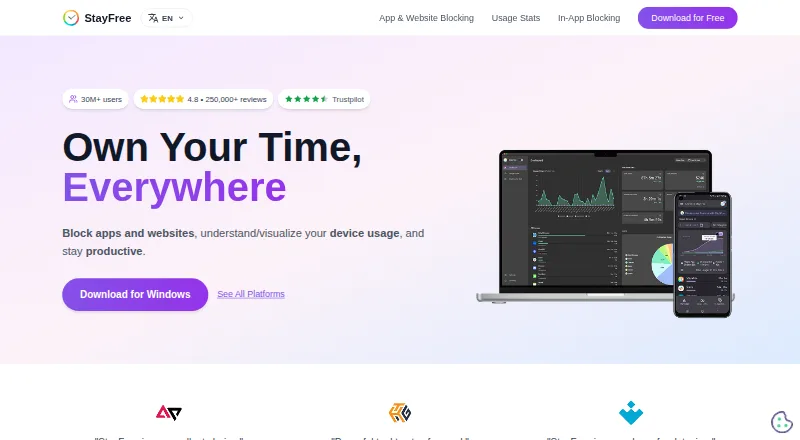
StayFree is a free tool for tracking device usage and limiting time spent on apps and websites. It is available on Android, iOS, Windows, macOS, Linux, the web, browser extensions, and Wear OS. Blocking controls include instant blocks, scheduled blocks, daily limits, and session limits. Focus Mode can make chosen websites inaccessible at set times or when activated manually. For social media, it can hide selected distracting sections instead of blocking a whole site. When a website limit is reached, StayFree can stop further use, send a notification, or display a popup that can be dismissed. Usage reports include statistics and graphs across connected devices; a six-digit pairing code links mobile, PC, and smartwatch data. Its extension also offers tools to export or import usage data and settings, clear history, or reset settings. PIN Protection can restrict access to important extension settings. The maker describes it for both work and personal use, with support offered by email and through a Discord community.
Good
- Free plan across mobile, desktop, web, and extensions
- Instant, scheduled, daily, and session blocking
- Can hide distracting parts of social media
- Usage statistics and graphs span linked devices
- Extension includes backup, restore, and PIN controls
Watch out
- Connecting devices requires entering a six-digit pairing code
- Some controls and data tools are specific to the extension
Who it suits
StayFree suits people who want to monitor device use and set limits across several devices. Its work and personal usage positioning, focus schedules, and partial social-media blocking offer different ways to manage distractions.
Verdict
StayFree combines cross-device usage reporting with several blocking and focus controls at no cost. Its range of platforms and options may suit people who want to tailor limits to different devices and distractions.
Plans and prices
From StayFree's own pricing page, checked 29 Sep 2026.
| Plan | Price | What it gives you |
|---|---|---|
| StayFree | Free | Download for free · cross-device screen time tracking and usage control |
The facts
Each one read from StayFree's own pages, with the date it was checked.
What it does
- Blocking controls
- Its blocking options include instant blocks, scheduled blocks, daily limits, and session limits.checked 29 Sep 2026
- Data portability
- The extension’s Backup & Restore settings let users export or import usage data and settings, delete history, or reset settings.checked 29 Sep 2026
- Focus schedules
- Focus Mode can make selected websites inaccessible on a schedule or when manually activated.checked 29 Sep 2026
- Purpose
- StayFree tracks device usage, blocks apps and websites, and helps users stay productive.checked 29 Sep 2026
- Security control
- PIN Protection requires a PIN to access and modify significant extension settings.checked 29 Sep 2026
- Support
- The maker lists [email protected] and a Discord community for support.checked 29 Sep 2026
- Usage stats
- StayFree provides cross-device usage statistics and graphs.checked 29 Sep 2026
- Website limits
- Website limits can block further use, send a notification, or show a dismissible popup when a time limit is reached.checked 29 Sep 2026
- Who it serves
- The maker describes the product for work and personal usage.checked 29 Sep 2026
Where it runs
- Device linking
- Users can connect mobile, PC, and smartwatch usage data by entering a six-digit device pairing code.checked 29 Sep 2026
- In-app blocking
- StayFree can hide distracting parts of social media without blocking the entire site.checked 29 Sep 2026
The company
- Headquarters
- San Francisco, California, United Stateschecked 28 Sep 2026
- Ownership
- The site identifies ST Pulse as a Sensor Tower company.checked 29 Sep 2026
The full review of StayFree
Overview
StayFree tracks usage across devices and offers tools to curb distracting apps and websites. It is best suited to people who want both a broader picture of their screen time and configurable ways to intervene, rather than a single-purpose blocker. Its free plan covers the core mix of reporting and usage controls; the trade-off is that the range of controls spans several platforms and device types.
Interventions need not shut down an entire site: StayFree can hide distracting social-media elements, while website limits can block further use, send a notification, or show a dismissible popup. That flexibility is useful when a firm cutoff feels too blunt, though a dismissible prompt is a softer boundary than a block.
Key features
Cross-device reporting and controls
Usage statistics and graphs bring activity into view across connected devices. Users can link mobile, PC, and smartwatch data with a six-digit pairing code, which makes the reports more useful for someone switching among devices than a device-by-device view. Application limits, scheduled limits, and focus sessions pair measurement with action.
Blocking and focus options
Instant blocks, scheduled blocks, daily limits, and session limits cover both immediate distractions and recurring routines. Focus Mode can make selected websites inaccessible on a schedule or when manually activated. For social media, hiding distracting parts can preserve access to the rest of a site. The range suits people who want to adjust the strictness of a boundary; those seeking only a simple, single-device timer may not need this breadth.
Extension safeguards and data controls
The extension’s Backup & Restore settings can export or import usage data and settings, delete history, or reset settings. PIN Protection adds a barrier to changing significant extension settings, useful when users want their restrictions harder to undo casually. Support is offered by email at [email protected] and through a Discord community.
Pricing
StayFree: free. The free plan includes cross-device screen-time tracking and usage control, making it a straightforward fit for individuals who want reports and limits without a subscription. No paid StayFree plan is described, so there is no higher tier to compare for expanded capacity or features.
Platforms
StayFree supports Windows, macOS, Linux, Android, iOS, Chrome, Firefox, Safari, and Wear OS. That spread is a strength for people who use a mix of computers, phones, browsers, and a smartwatch; device linking still requires pairing each relevant device with a six-digit code.
Who it's for
StayFree suits people managing screen habits for work or personal use, particularly those who move between devices and want usage reports alongside scheduled or threshold-based controls. Its adjustable website responses and social-media element hiding fit users who prefer graduated friction over blocking every site outright. Someone who wants an uncomplicated blocker on just one platform may find the cross-device emphasis unnecessary.
Pros and cons
- Pros: Free cross-device reports and usage controls make it possible to track and act without a paid tier.
- Pros: Instant, scheduled, daily, and session controls offer several ways to set boundaries, including lighter website prompts.
- Pros: Support for desktop, mobile, browsers, and Wear OS can accommodate mixed-device routines.
- Cons: A dismissible popup or notification is less decisive than blocking, so users seeking an enforceable cutoff should choose the block response.
- Cons: The broad platform and control set may be more than someone needs for a basic single-device limit.
Alternatives
Screen Time Management Apps is the broader category to browse if StayFree’s combination of reports and controls is not the right fit.
Freedom is worth considering for users who want app, website, or internet blocking with multi-device sync and custom blocklists; its free plan has limited features.
Opal may suit someone who wants a basic free app-blocking option with timers and soundscapes across iOS, Android, and Mac; its free plan is limited to one rule and today-only Opal Score.
ScreenZen is another free option, across Android, iOS, macOS, and Windows; its core app is free and donations are optional.
YourHour is an Android- and iOS-only alternative with a free download that contains ads and in-app purchases.
AppBlock is an alternative for readers looking for an app blocker on Android, iOS, or as an extension.
Focusly may appeal to users who want a free, offline-capable extension or desktop app with no account and an MIT license.
one sec is an alternative for users considering a freemium option with a paid Pro plan at $6.99 a month.
Hikage is a macOS alternative whose free plan records app and website usage locally and includes data export, iCloud backup, and statistics.
Verdict
Choose StayFree if you want free usage reports and a range of ways to set limits across a varied device lineup. Its strongest reason to choose it is the blend of cross-device visibility with flexible interventions; look elsewhere if a simpler, narrower tool better matches how you manage distractions.
Getting started
- Visit https://stayfreeapps.com/.
- Download or open StayFree on a listed platform: Android, iOS, Windows, macOS, Linux, a supported browser, or Wear OS.
- Connect mobile, PC, and smartwatch usage data by entering a six-digit device pairing code.
- Set instant or scheduled blocks, or configure daily or session limits.
- Use Focus Mode to restrict selected websites on a schedule or manually.
Questions
Is StayFree free?
Yes. The listed StayFree plan costs $0.00 USD.
Which platforms support StayFree?
Supported platforms include Windows, macOS, Linux, Android, iOS, Chrome, Firefox, Safari, and Wear OS.
Can StayFree limit apps and websites?
Yes. It offers instant blocks, scheduled blocks, daily limits, and session limits. Website limits can block further use, send a notification, or show a dismissible popup.
Does StayFree provide cross-device tracking?
Yes. Users can link mobile, PC, and smartwatch usage data by entering a six-digit device pairing code.
Can StayFree help reduce distractions on social media?
It can hide distracting parts of social media without blocking the entire site. Focus Mode can also make selected websites inaccessible on a schedule or when activated manually.
How can users contact support?
The maker lists [email protected] and a Discord community for support.
Alternatives to StayFree
- 1

Freedom
Free planAndroidiOSWebExtension8.2From $40 a year - 2

Opal
Free planAndroidiOSExtensionmacOS8.0From $8.29 a month - 3

ScreenZen
Free planAndroidiOSmacOSWindows7.3$49 one-time - 4
one sec
AndroidiOSExtensionLinux7.2From $19.99 a year - 5

FocusMe
AndroidiOSExtensionLinux7.1$249 one-time - 6
YourHour
Free planAndroidiOS7.1From $12.99 a year