one sec
one sec interrupts or blocks apps, social media, and websites to help users manage their time.
What one sec is
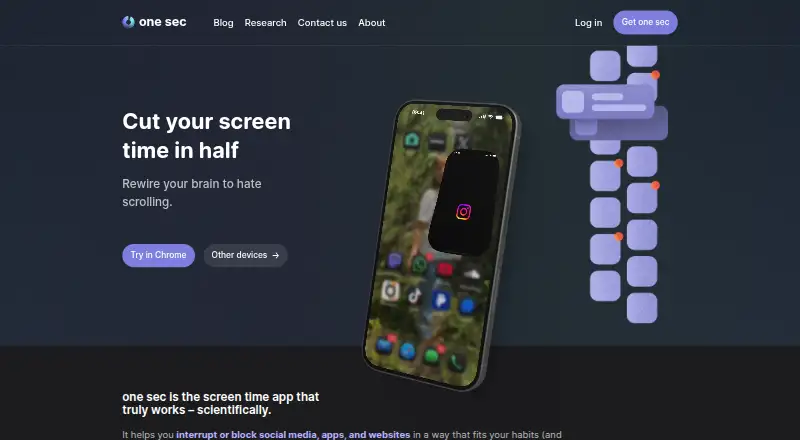
one sec interrupts or blocks apps, social media, and websites to help users manage their time. Its customizable prompts can ask users to breathe, reflect, rotate their phone, or complete a typing exercise before continuing. Scheduled sessions can prevent chosen apps or websites from opening during defined periods. Healthy Alternatives can suggest activities such as journaling, while structured integrations can block distracting apps during unfinished tasks and show upcoming tasks as alternatives. The free version targets one app; Pro supports unlimited apps and adds intentional app switching, time tracking, website blocking, strict sessions, and other intervention types. The free LENGO integration asks users to complete a vocabulary exercise before opening social-media apps. Browser extensions support Chrome, Firefox, Safari, Edge, and other major browsers. One account can be used across iOS and Android devices and browser extensions on Windows, macOS, and Linux. By default, data stays offline and intervention logic runs on the device. The service lists a seven-day trial; Pro costs $6.99 a month, the family plan $9.99 a month, and family lifetime access $149, paid once.
Good
- Customizable mindful prompts interrupt app use.
- Scheduled sessions block selected apps and websites.
- Healthy Alternatives can suggest journaling.
- Browser extensions support major browsers.
- Intervention logic runs locally by default.
Watch out
- The free version targets one app.
- Unlimited apps require Pro.
- Pro costs $6.99 a month.
- Family lifetime access costs $149, paid once.
Who it suits
one sec suits people who want prompts or scheduled blocks to interrupt app and website use. Its cross-device support also suits users who move between iOS or Android devices and desktop browsers.
Verdict
one sec offers both brief interruptions and scheduled blocking, with alternatives and task integrations to redirect attention. The free version is limited to one app, so users wanting broader coverage need Pro.
Plans and prices
From one sec's own pricing page, checked 30 Sep 2026.
| Plan | Price | What it gives you |
|---|---|---|
| one sec pro | $6.99 a month | Unlimited apps · intervention types · time tracking · website blocking · block sessions · monthly |
| one sec pro Family Plan | $9.99 a month | Family sharing · monthly |
| one sec pro | $19.99 a year | Unlimited apps · intervention types · time tracking · website blocking · block sessions · annually |
| one sec pro Family Plan | $29.99 a year | Family sharing · annually |
| one sec pro | $99.99, paid once | Unlimited apps · intervention types · time tracking · website blocking · block sessions · lifetime |
| one sec pro Family Lifetime | $149, paid once | Family sharing · lifetime |
The facts
Each one read from one sec's own pages, with the date it was checked.
What it does
- Audience
- The product is offered for individuals, companies, and schools, with team licenses available from 83ct per user per month billed annually.checked 30 Sep 2026
- Blocking
- Users can schedule block sessions so configured apps or websites cannot be opened during defined periods.checked 30 Sep 2026
- Core intervention
- The app uses customizable mindful interruptions, including breathing, reflection, phone rotation, and typing exercises.checked 30 Sep 2026
- Data practices
- one sec says it does not sell or analyze user data, and intervention logic runs locally on the device.checked 30 Sep 2026
- Healthy alternatives
- Healthy Alternatives can replace unwanted scrolling with activities such as journaling or other suggested behaviors.checked 30 Sep 2026
- Integrations
- Structured integration blocks distracting apps during unfinished tasks and can show upcoming tasks as healthy alternatives.checked 30 Sep 2026
- LENGO integration
- The free LENGO integration requires a vocabulary exercise before social-media apps can be opened.checked 30 Sep 2026
- Privacy
- By default, user data remains offline; data is processed only when users choose features such as support contact, subscriptions, feedback, or iCloud sync.checked 30 Sep 2026
- Pro features
- Pro adds intentional app switching, time tracking, website blocking, strict block sessions, and other intervention types.checked 30 Sep 2026
- Purpose
- one sec interrupts or blocks social media, apps, and websites to help users regain control of their time.checked 30 Sep 2026
- Research result
- The homepage reports an average 57% reduction in app openings and about two additional hours of sleep per week.checked 30 Sep 2026
- Support
- Support is provided through help articles, tutorials, an ideas and bug-feedback board, and direct contact.checked 30 Sep 2026
Where it runs
- Browser support
- The browser extension works with Chrome, Firefox, Safari, Edge, and other major browsers.checked 30 Sep 2026
- Cross-device
- The same account can be used simultaneously on iOS and Android devices plus browser extensions on Windows, macOS, and Linux.checked 30 Sep 2026
The company
- Founded
- 2020checked 28 Sep 2026
- Headquarters
- Barcelona, Spainchecked 28 Sep 2026
Money
- Free limit
- The free version can target one app, while Pro supports unlimited apps.checked 30 Sep 2026
The full review of one sec
Overview
one sec is an attention-management app for people who want a deliberate pause before opening distracting apps and websites. It suits users who benefit from prompts and task-linked alternatives as well as scheduled blocks; its main trade-off is that the free version covers only one app.
Instead of treating every lapse as a willpower problem, one sec inserts a customizable interruption—such as breathing, reflection, turning the phone, or typing—before access. Users can also schedule periods when selected apps or websites are blocked. The company reports an average 57% reduction in app openings and about two additional hours of sleep per week; those averages are not a promise of individual results.
Key features
Interruptions and scheduled blocks
The brief exercises make one sec a better fit for people who want to reconsider an impulse than for those who want blocking alone. For firmer boundaries, scheduled and recurring sessions prevent configured apps or websites from opening during defined periods, and locked sessions are supported. Pro adds strict block sessions and website blocking, alongside unlimited app targets. The free one-app cap is a meaningful constraint for anyone trying to curb several services at once.
Alternatives and integrations
Healthy Alternatives can redirect an urge toward activities such as journaling. Structured integrations can block distracting apps while a task remains unfinished and surface upcoming tasks as alternatives. The free LENGO integration requires a vocabulary exercise before social-media apps can open. These features make one sec more useful when distraction is tied to a routine or unfinished work, though the available options may not suit everyone.
Cross-device use and privacy
The same account can be used simultaneously on iOS and Android devices and browser extensions on Windows, macOS, and Linux. Extensions work with Chrome, Firefox, Safari, Edge, and other major browsers. By default, data stays offline and intervention logic runs locally. Data is processed when users choose features such as support contact, subscriptions, feedback, or iCloud sync; one sec says it does not sell or analyze user data. Support includes help articles, tutorials, a feedback board, and direct contact.
Pricing
one sec is freemium, with a free plan and a 7-day trial. Free access is limited to one app, making it suitable for someone focused on a single distracting service but restrictive for broader blocking.
- one sec pro: $6.99 a month (billed monthly). Includes unlimited apps, intervention types, time tracking, website blocking, and block sessions. This is the practical choice for individual users who need several targets or the additional controls.
- one sec pro Family Plan: $9.99 a month (billed monthly), with family sharing. It suits households that want to share the plan rather than buy individual coverage.
- one sec pro Family Lifetime: $149, paid once (billed lifetime), with family sharing. It avoids recurring billing in exchange for a higher upfront payment.
For companies and schools, team licenses are available from 83ct per user per month, billed annually. This is the entry point for organizations; the individual plans do not provide the same team licensing arrangement.
Platforms
one sec supports iOS, Android, and browser extensions, with extension use on Windows, macOS, and Linux. Its simultaneous cross-device account support is useful for users who switch between phones and computers. The mobile apps are available for iOS and Android.
Who it's for
Choose one sec if you want a pause that can interrupt automatic app opening, with scheduled blocks available when prompts are not enough. It is especially relevant to people who want task integrations, replacement activities, or coverage across phone and desktop browsers. It is less compelling for someone who needs several app targets but will not pay for Pro, or who wants only an unadorned blocker.
Pros and cons
- Pro: Mindful prompts offer a softer intervention than an immediate block, which suits users trying to break habitual checking.
- Pro: Scheduled, recurring, and locked sessions support firmer boundaries when a pause is insufficient.
- Pro: Task integrations and Healthy Alternatives connect blocking to unfinished work or a substitute activity.
- Pro: Offline-by-default data handling and locally run intervention logic are meaningful privacy strengths.
- Con: The free version targets just one app, limiting its usefulness for people with multiple distractions.
- Con: Website blocking and several advanced controls require Pro, so the free tier is not a full multi-target solution.
Alternatives
For broader comparisons, see Distraction Blocking Software and Screen Time Management Apps.
- Freedom is worth considering for people who want app, website, or internet blocking, custom blocklists, website exceptions, and multi-device sync on a free plan.
- Focuser is a free, open-source blocker for users who prefer a desktop-oriented option across extension, Linux, macOS, and Windows.
- ScreenZen is a free alternative for users seeking a core app across Android, iOS, macOS, and Windows, with optional donations.
- Pluckeye offers all its features free, making it an option for users who want a free alternative.
- AppBlock is another freemium option for Android, iOS, and browser extension users.
- FocusMe is a freemium alternative across mobile, desktop, and extension platforms, with a 249.00 USD one-time lifetime plan for core features.
- Opal may suit users who want a free plan with one rule, basic timers, soundscapes, app blocking, and an Opal Score on iOS, Android, or Mac.
- Focus Bear offers a free Essentials plan with capped Pomodoro sessions, website and app targets, habits, and break activities.
Verdict
one sec is a strong choice for people who want to interrupt reflexive app use with a prompt, then strengthen that pause with schedules, task integrations, and alternatives. Its privacy approach and cross-device support add practical appeal. Look elsewhere if you need broad coverage without a subscription: the free plan's one-app limit is the clearest reason to choose another blocker.
Alternatives to one sec
- 1

Freedom
Free planAndroidiOSWebExtension8.2From $40 a year - 2

Opal
Free planAndroidiOSExtensionmacOS8.0From $8.29 a month - 3

ScreenZen
Free planAndroidiOSmacOSWindows7.3$49 one-time - 4
FocusMe
AndroidiOSExtensionLinux7.1$249 one-time - 5
YourHour
Free planAndroidiOS7.1From $12.99 a year - 6
Focusly
Free planOpen sourceExtensionmacOSWindows7.0Free plan