
Freedom
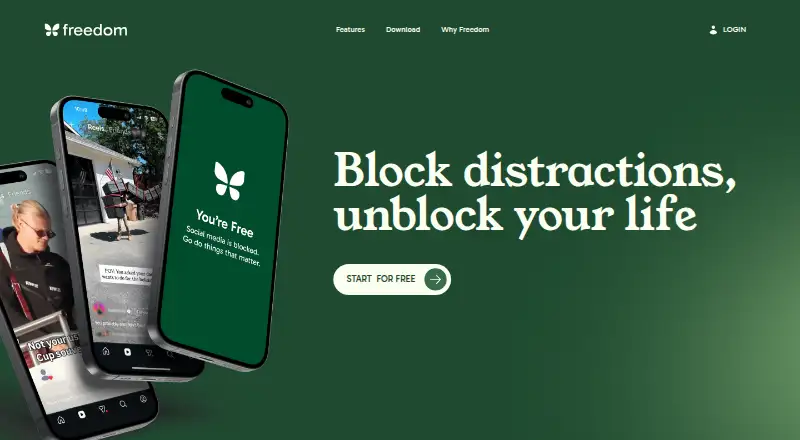
Freedom blocks distracting apps, websites, or internet access to help people focus.
What Freedom is
Freedom blocks distracting apps, websites, or internet access to help people focus. Blocking sessions and schedules sync across supported devices, including Mac, Windows, iPhone, iPad, Android, and Chromebook. Users can set sessions to start in advance or repeat automatically, while Locked Mode prevents ending a session early. Website Exceptions allow users on Mac and Windows to permit selected sites while blocking others. This feature is not available on iOS, Android, or Chromebook. Freedom also offers focus-oriented music and ambient sounds, including Brain.fm tracks. The free plan includes blocking, multi-device sync, custom blocklists, and limited features. Premium adds scheduling, recurring and advance sessions, Locked Mode, unlimited sessions, and Premium Perks. Premium costs $3.33 a year when billed yearly or $8.99 a month; a Forever option costs 99.50 USD as a one-time payment. A 7-day trial is listed. Freedom says it does not track browsing, app usage, or personal activity.
Good
- Blocks apps, websites, or internet access
- Schedules can start in advance or recur
- Locked Mode prevents ending a session early
- Says it does not track browsing or app use
Watch out
- Website Exceptions are unavailable on iOS and Android
- Chromebook lacks app blocking and website exceptions
- Premium yearly plan costs $3.33 a year
Who it suits
Freedom may suit people seeking fewer interruptions for work, study, or daily life. Its device syncing is useful for people who switch between supported platforms, while site exceptions are limited by platform.
Verdict
Freedom combines blocking with synced schedules and an option to lock sessions against early exit. Review platform-specific limits on Website Exceptions and the pricing terms for the plan you choose.
Plans and prices
From Freedom's own pricing page, checked 14 Oct 2026.
| Plan | Price | What it gives you |
|---|---|---|
| Free | Free | App, website, or internet blocking · Unlimited devices · Custom blocklists · Focus sounds · Desktop app blocking · Website exceptions on Mac/Windows · Sessions limited to 2 hours · Start Now sessions only |
| Premium (monthly) | $8.99 a month | Everything in Free · Scheduling · Recurring and advance sessions · Locked Mode · Sessions over 2 hours · Premium Perks · Monthly |
| Premium (yearly) | $40 a year | Everything in Free · Scheduling · Recurring and advance sessions · Locked Mode · Sessions over 2 hours · Premium Perks · 7-day free trial · Yearly - Save 40% |
| Forever | $99.50, paid once | Premium features · No subscription or recurring charges · One payment |
The facts
Each one read from Freedom's own pages, with the date it was checked.
What it does
- Advance scheduling
- Users can schedule sessions to start automatically later.checked 14 Oct 2026
- API and SDKs
- The reviewed product and support pages describe no public API or developer SDK.checked 14 Oct 2026
- Custom blocklists
- Users can build custom lists of sites and apps or select preset lists.checked 14 Oct 2026
- Documentation
- Freedom's help center includes setup instructions, feature guides, FAQs, privacy information, and platform release notes.checked 14 Oct 2026
- Focus sounds
- Freedom includes ambient sounds and music intended to support focus.checked 14 Oct 2026
- Integration
- Freedom's feature pages mention Brain.fm tracks as part of its focus music offering.checked 14 Oct 2026
- Integrations
- The homepage describes exclusive focus audio tracks from Brain.fm as an included feature.checked 29 Sep 2026
- Internet blocking
- Freedom offers sessions that block the entire internet.checked 14 Oct 2026
- Licence
- Freedom's terms describe its software as proprietary and license object-code use; the terms prohibit reverse engineering and modification.checked 14 Oct 2026
- Limit: Blocking coverage
- A Trustpilot reviewer says YouTube remained accessible through browsers on a child's laptop after purchase.checked 14 Oct 2026
- Limit: Feature development
- A long-time Trustpilot reviewer says they were disappointed by the pace of new features.checked 14 Oct 2026
- Limit: Reliability
- Reviewers report instances where sessions did not activate until they opened the app or where blocking stopped working unexpectedly.checked 14 Oct 2026
- Locked Mode
- Locked Mode restricts changes to active sessions and can prevent users from ending a session early.checked 14 Oct 2026
Where it runs
- App blocking
- Freedom can block desktop apps on Mac and Windows as well as apps on mobile platforms.checked 14 Oct 2026
- Browser extensions
- The main extension is available for Chrome, Firefox, Edge, and Opera; on Chromebook and Linux it can act as a standalone blocking app.checked 14 Oct 2026
- Cross-device sessions
- Blocking sessions and focus schedules sync across supported devices, including Mac, Windows, iPhone, iPad, Android, and Chromebook.checked 29 Sep 2026
- Cross-device sync
- Users can sync blocking sessions across supported devices and choose which devices participate in a session.checked 14 Oct 2026
- News: Android release
- Freedom's Android release notes list version 7.16 on September 22, 2026, with onboarding and backend fixes.checked 14 Oct 2026
The company
- Company founded
- LinkedIn lists the company as founded in 2011.checked 14 Oct 2026
- Company headquarters
- LinkedIn lists Freedom's headquarters as Raleigh/Durham, North Carolina.checked 14 Oct 2026
- Company legal name
- The provider identifies itself in its terms as Eighty Percent Solutions Corporation DBA Freedom.to, a Delaware business corporation.checked 14 Oct 2026
- Company ownership
- LinkedIn describes Freedom as privately held.checked 14 Oct 2026
- Company size
- LinkedIn lists the company size as 11–50 employees.checked 14 Oct 2026
Money
- Limit: Free tier duration
- Trustpilot reviewers complain that free sessions are limited to two hours and consider the subscription requirement restrictive.checked 14 Oct 2026
The full review of Freedom
Overview
Freedom is a distraction blocker for people who want to restrict apps, websites, or internet access across several devices. It suits work and study routines that benefit from scheduled sessions; its main drawback is that some blocking controls are unavailable on mobile and Chromebook.
Free access covers core blocking, while paid plans add automated schedules, Locked Mode, unlimited sessions, and Premium Perks. Focus audio and cross-device syncing make Freedom broader than a simple blocklist, but platform-specific limits matter if you expect the same controls everywhere.
Compare it with other options in Distraction Blocking Software and Screen Time Management Apps.
Key features
Choose what to block
Freedom can block selected apps or websites, or cut off internet access for a session. Custom blocklists are included in Free, giving occasional users a useful starting point without a subscription. Website Exceptions let Mac and Windows users keep chosen sites accessible while blocking others, but that flexibility is not universal: Chromebook lacks both app blocking and Website Exceptions, and iOS and Android do not support Website Exceptions.
Sessions across devices
Sessions and schedules sync across supported devices, including Mac, Windows, iPhone, iPad, Android, and Chromebook. That is useful when interruptions simply shift from a computer to a phone, though Chromebook’s narrower blocking support makes it a less complete part of a setup.
Schedules and Locked Mode
Paid plans add advance and recurring schedules that can start sessions automatically. Locked Mode prevents early exits, an important distinction for users who want a commitment device rather than a reminder they can dismiss. Unlimited sessions remove a cap on how often paid users can block.
Focus audio and privacy
Freedom offers focus-optimized music and ambient sounds, including café, library, and nature settings, as well as exclusive focus audio tracks from Brain.fm. These extras can support a focus routine, though the core case for choosing Freedom remains its blocking and synchronization. Freedom says it does not track browsing, app usage, or personal activity, and offers human in-app support across platforms. Premium Perks add partner discounts and offers tied to productivity, wellness, and intentional living.
Pricing
Freedom is freemium, with a 7-day trial and three paid options. The free plan costs nothing and includes limited-feature blocking of apps, websites, or the internet, multi-device sync, custom blocklists, and Website Exceptions on Mac and Windows only. It is best for light or occasional use; it gives up scheduling, Locked Mode, unlimited sessions, and Premium Perks.
Premium (yearly) costs $3.33 a year (billed Yearly - Save 40%), while Premium (monthly) costs $8.99 a month (billed Monthly). Both include everything in Free plus scheduling, recurring and advance sessions, Locked Mode, unlimited sessions, and Premium Perks. The yearly plan is the lower stated monthly equivalent for someone ready to commit to annual billing; monthly billing costs more but avoids that annual term.
Forever costs $99.50, paid once (billed One payment, yours forever; no subscription or recurring charges). It includes scheduling, recurring and advance sessions, Locked Mode, unlimited sessions, and Premium Perks. It fits users who expect to rely on Freedom long-term and prefer a one-time payment; the subscription plans are the alternatives for those who do not want that upfront cost.
Platforms
Freedom supports Android, iOS, Linux, macOS, web, and Windows. Browser extensions are also available. Blocking sessions and focus schedules sync across supported devices, but feature parity is limited: Chromebook does not support app blocking or Website Exceptions, and iOS and Android do not support Website Exceptions.
Who it's for
Freedom is strongest for people who want recurring focus routines across devices and need a way to make sessions harder to abandon. Free is a reasonable fit for basic blocking, while Premium is more suitable for users who will use schedules, Locked Mode, and unlimited sessions. Look elsewhere if Website Exceptions are essential on mobile or Chromebook, or if you want app blocking on Chromebook.
Pros and cons
- Pro: Cross-device session and schedule syncing helps carry a focus routine from computer to phone.
- Pro: Advance and recurring schedules plus Locked Mode support consistent routines and reduce easy early exits.
- Pro: Free includes multi-device sync and custom blocklists for basic blocking.
- Con: Website Exceptions are limited to Mac and Windows, so mobile users cannot allow selected sites while blocking the rest.
- Con: Chromebook lacks app blocking and Website Exceptions, making its synced sessions less capable there.
- Con: Scheduling, Locked Mode, and unlimited sessions require a paid plan.
Alternatives
one sec is worth considering if intervention types and time tracking are priorities; its one sec pro plan is $6.99 a month (billed monthly) and includes unlimited apps, intervention types, time tracking, website blocking, and block sessions.
FocusMe offers a lifetime plan for $249, paid once (billed one-time; pay once and use forever, with core features), for buyers comparing a one-time purchase with Freedom’s Forever option.
Focus Bear has a free Essentials plan with a 25-minute Pomodoro maximum, no AI blocking, up to five websites or apps, and limits of three habits per routine and three break activities. It may suit someone willing to work within those caps.
Phone-Free 2FA is a free option centered on browser-extension TOTP accounts, without central recovery or sync.
Pluckeye is a free alternative with all features included in its free plan.
ScreenZen offers a free core app, with optional donations supporting the project.
BlockSite is another freemium option for web, iOS, and Android.
Focuser is a free alternative for Windows, macOS, and Linux.
Verdict
Choose Freedom if you want scheduled, synced blocking with Locked Mode and a free tier that supports basic multi-device use. Its strongest case is the combination of automated routines and a barrier against quitting early; its clearest limitation is uneven support for app blocking and Website Exceptions across platforms. If those controls need to work consistently on Chromebook or mobile, choose a tool whose platform support matches that requirement.
Getting started
- Visit https://freedom.to/.
- Choose the free plan or a paid option.
- Install or access Freedom on a supported platform: Android, iOS, Linux, macOS, web, or Windows.
- Start a 7-day trial if you want to try a paid plan.
- Set blocking sessions; Premium includes advance and recurring schedules.
Limits worth knowing
The free plan has limited features, although it includes blocking, multi-device sync, custom blocklists, and Website Exceptions on Mac and Windows. Premium adds scheduling, recurring and advance sessions, Locked Mode, unlimited sessions, and Premium Perks.
Questions
Is Freedom free?
Yes. Freedom has a free plan with limited features, including blocking, multi-device sync, custom blocklists, and Website Exceptions on Mac and Windows.
How much does Freedom cost?
Premium is also listed at $8.99 per month, and Forever costs $99.50 as a one-time payment.
Is there a free trial?
Yes, a 7-day trial is listed.
Which platforms does Freedom support?
Its listed platforms are Android, iOS, Linux, macOS, web, and Windows. Blocking sessions and schedules also sync across supported devices including Chromebook.
Does Freedom offer website exceptions on phones?
No. Website Exceptions are available on Mac and Windows, but not on iOS, Android, or Chromebook.
Does Freedom track browsing or app activity?
Freedom says it does not track browsing, app usage, or personal activity.
Alternatives to Freedom
- 1

Opal
Free planAndroidiOSExtensionmacOS8.0From $8.29 a month - 2

ScreenZen
Free planAndroidiOSmacOSWindows7.3$49 one-time - 3
one sec
AndroidiOSExtensionLinux7.2From $19.99 a year - 4
FocusMe
AndroidiOSExtensionLinux7.1$249 one-time - 5
YourHour
Free planAndroidiOS7.1From $12.99 a year - 6
Focusly
Free planOpen sourceExtensionmacOSWindows7.0Free plan