Paperless Forms
Paperless Forms is a cloud-based builder for online forms such as HR, registration, employment application, survey, contact, and payment forms.
What Paperless Forms is
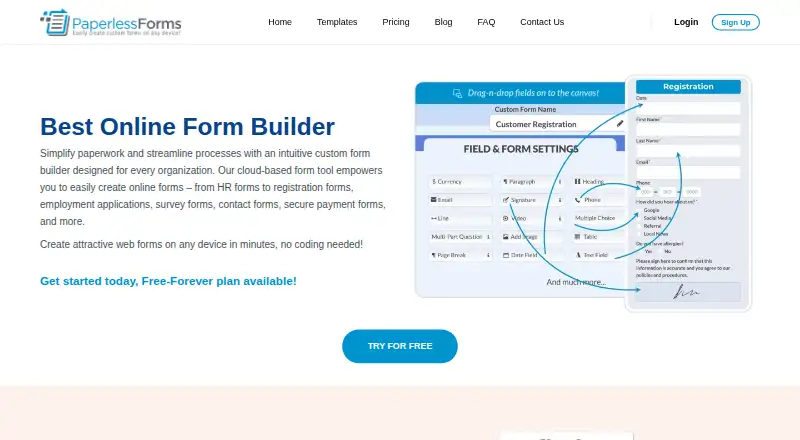
Paperless Forms is a cloud-based builder for online forms such as HR, registration, employment application, survey, contact, and payment forms. Its drag-and-drop editor requires no coding, and users can begin with ready-made templates. Forms can be sent by email or SMS, shared through a link, or embedded in multiple ways. Completed responses can be managed in the service, with form data downloadable as Excel or CSV files. Listed capabilities include branding customization, electronic signatures, PDF attachments, internal notes, reusable templates, and payment collection. The service describes integrations with CRM, email marketing, project management, and cloud storage software, with data sharing set up without coding. Paperless Forms runs on Android, iOS, and the web, with no download or installation required. The free plan allows 3 forms, 25 fields per form, and 100 submissions per month. Plan limits on forms, fields, and submissions can restrict adding forms or fields or lock forms when exceeded.
Good
- Drag-and-drop form builder requires no coding.
- Forms can be shared by email, SMS, or link.
- Responses can be downloaded as Excel or CSV.
- Payment collection is listed as a capability.
Watch out
- Free plan allows 3 forms and 100 monthly submissions.
- Additional user licenses cost $14.95 per user per month.
- Exceeding plan limits can lock forms.
Who it suits
It suits individuals, entrepreneurs, small and medium businesses, schools, churches, nonprofits, and community organizations that need online forms. Teams collecting payments or exporting responses may find its listed capabilities relevant.
Verdict
Paperless Forms combines form creation, distribution, response management, and payment collection. Compare the plan limits with your expected forms, fields, submissions, and admin users.
Plans and prices
From Paperless Forms's own pricing page, checked 9 Oct 2026.
| Plan | Price | What it gives you |
|---|---|---|
| Free Forever | Free | 3 Forms · 25 Fields per Form · 100 Submissions per month |
| Basic | $14.95 a month | 3 Forms · 50 Fields per Form · 250 Submissions per month · Upload your logo · $14.95/month |
| Business | $39.95 a month | 5 Forms · 100 Fields per Form · 500 Submissions per month · Upload your logo · Accept payments · Custom confirmation page · Remove Paperless Forms branding · Redirect to custom URL · $39.95/month |
| Enterprise | $59.95 a month | 10 Forms · 200 Fields · Unlimited Submissions · Upload your logo · Accept payments · Custom confirmation page · Remove Paperless Forms branding · Redirect to custom URL · $59.95/month |
| Premium | $129.95 a month | Unlimited Forms · Unlimited Fields · Unlimited Submissions · Upload your logo · Remove Paperless Forms branding · Accept payments · Custom confirmation page · Redirect to custom URL · $129.95/month |
The facts
Each one read from Paperless Forms's own pages, with the date it was checked.
What it does
- Access
- The FAQ says no download or installation is required and lists use on iPhone, Android phones, MacBooks, iPads, PCs, and tablets.checked 9 Oct 2026
- Account licensing
- Each account includes one admin user license, and additional user licenses cost $14.95 per user per month.checked 9 Oct 2026
- Audience
- The FAQ names individuals, entrepreneurs, small and medium businesses, schools, churches, nonprofits, and community organizations as potential users.checked 9 Oct 2026
- Builder
- Users can create forms with a drag-and-drop builder without coding and can start from ready-made templates.checked 9 Oct 2026
- Capabilities
- The FAQ lists branding customization, electronic signature fields, PDF attachments, internal notes, reusable templates, and payment collection among its features.checked 9 Oct 2026
- Data privacy
- The privacy policy says Paperless Forms does not use, sell, or share users' forms or collected data, and that integrations transmit account information only as directed by the user.checked 9 Oct 2026
- Distribution
- Forms can be sent by email or SMS, or shared as an online link.checked 9 Oct 2026
- Embed options
- multiplechecked 22 Sep 2026
- Form limit
- 3checked 22 Sep 2026
- Integrations
- The FAQ describes integrations with CRMs, email marketing, project management, and cloud storage software, and says form data can be shared without coding.checked 9 Oct 2026
- Limits
- The pricing page sets plan limits on forms, fields, and monthly submissions; the terms say exceeding a plan limit can lock forms or prevent new forms or fields from being added.checked 9 Oct 2026
- Paid from
- 14.95checked 22 Sep 2026
- Payment collection
- Yeschecked 22 Sep 2026
- Purpose
- Paperless Forms is a cloud-based online form builder for creating forms such as HR, registration, employment application, survey, contact, and payment forms.checked 9 Oct 2026
- Responses
- Users can view and manage completed form responses and download form data as Excel or CSV files.checked 9 Oct 2026
- Security
- The company says the site uses SSL and its software is ISO certified and compliant with SSAE-16, HIPAA, PCI-DSS, ISAE 3402, and AMS-IX.checked 9 Oct 2026
- Servers
- The company says it hosts on dedicated servers in Lansing, Michigan, Phoenix, Arizona, and Amsterdam, operating on a redundancy system.checked 9 Oct 2026
- Support
- The FAQ says users can contact a human for help, and the site lists [email protected] and 866.256.6900.checked 9 Oct 2026
Money
- Free plan
- Yeschecked 22 Sep 2026
The company
- Headquarters
- Southfield, Michigan, United Stateschecked 28 Sep 2026
The full review of Paperless Forms
Overview
Paperless Forms is a cloud-based service for building forms, sharing them, and managing submissions. It suits individuals and organizations with recurring administrative or payment-collection workflows who want a no-code builder. Its broad toolkit is useful, but tight submission caps on lower tiers and one included admin seat make choosing the right plan essential.
Key features
A drag-and-drop builder and ready-made templates cover HR, registration, employment applications, surveys, contact forms, and payment forms. That range makes it practical for varied routine work without coding; the form and field limits on lower plans can make it awkward for organizations running many separate workflows.
Forms can be distributed by email, SMS, online link, or multiple embed options. Responses can be managed in Paperless Forms and downloaded as Excel or CSV files, giving users a straightforward way to continue working with collected data elsewhere.
Branding customization, signature fields, PDF attachments, internal notes, and reusable templates add useful administrative controls. The service also describes integrations with CRM, email marketing, project management, and cloud storage software, with data sharing configured without coding. Payment collection is supported, but accepting payments is limited to Business and higher plans.
The company says the service uses SSL and meets several named security and compliance standards, including HIPAA and PCI-DSS. Its privacy policy says user forms and collected data are not used, sold, or shared, and that integrations transmit account information only as directed by the user. The company hosts on dedicated servers in Lansing, Phoenix, and Amsterdam with redundancy. These assurances may matter to organizations handling sensitive workflows, though they do not change the plan quotas.
Pricing
The free plan, Free Forever, costs nothing and allows 3 forms, 25 fields per form, and 100 submissions per month. It is a sensible way to build a small workflow, but the submission cap leaves little room for sustained high-volume use.
Basic costs $14.95 a month, billed $14.95/month. It keeps the 3-form limit, raises the cap to 50 fields per form and 250 submissions per month, and adds logo upload. Choose it for a modest workflow that needs more field and response capacity; it does not include payment acceptance or removal of Paperless Forms branding.
Business costs $39.95 a month, billed $39.95/month. It allows 5 forms, 100 fields per form, and 500 submissions per month, and adds logo upload, payment acceptance, a custom confirmation page, branding removal, and a redirect to a custom URL. This is the first tier suited to branded forms that collect payments, although 500 monthly submissions may still constrain busy operations.
Enterprise costs $59.95 a month, billed $59.95/month. It raises capacity to 10 forms and 200 fields, with unlimited submissions, and includes the same listed branding and payment controls as Business. It suits organizations whose response volume has outgrown Business but that can work within 10 forms.
Premium costs $129.95 a month, billed $129.95/month. Unlimited forms, fields, and submissions remove the main capacity ceilings, while the plan retains payment acceptance and branding controls. It is the clearest fit for larger or growing form libraries that need unrestricted volume, but its price is a substantial step up from Enterprise.
Each account includes one admin user license; additional licenses cost $14.95 per user per month. That per-seat charge can add up for teams that need several administrators. A free trial is available. Exceeding a plan limit can lock forms or prevent users from adding forms or fields, so quotas deserve attention before a workflow grows.
Platforms
Paperless Forms works on Android, iOS, and the web, with no download or installation required. The FAQ also describes access from phones, tablets, MacBooks, and PCs, making it suitable for organizations whose users work across device types.
Who it's for
The service names individuals, entrepreneurs, small and medium businesses, schools, churches, nonprofits, and community organizations among its potential users. It is strongest for those groups when they need to create and distribute routine forms, manage responses, and export data from one service. Teams needing multiple administrators should budget for extra licenses, and organizations with submission volumes above 500 per month need Enterprise or Premium for unlimited submissions.
Pros and cons
- Pros: Forms can be built without coding and distributed by link, email, SMS, or embed, supporting several common collection workflows.
- Pros: Excel and CSV exports, signatures, attachments, internal notes, and reusable templates extend the service beyond basic form creation.
- Pros: Enterprise and Premium remove monthly submission caps, and Premium also removes form and field caps.
- Cons: Free Forever is capped at 100 monthly submissions, while Basic and Business allow only 250 and 500 respectively.
- Cons: Payment collection and key branding controls begin at Business, which costs $39.95 a month.
- Cons: Only one admin license is included per account; each additional user costs $14.95 per month.
Alternatives
Online Form Builders and Form Builder Software are useful starting points for comparing this category. Consider Typeform if unlimited forms matter more than response volume: its free plan allows unlimited forms but only 10 responses per month.
Google Drive is a better fit when the priority is included storage rather than a dedicated form-builder plan; its free Google Account includes up to 15 GB of storage. Jotform is another freemium form-building alternative.
Wufoo may suit users comparing a free plan with 5 forms, 100 entries per month, and 10 fields per form. Formlets offers a free Personal plan for publishing one form with unlimited responses. Paperform has a free plan with 30 submissions per month and unlimited users, which may suit a small team prioritizing seats over volume.
forms.app is worth considering when unlimited responses and unlimited team members on a free plan are the priorities; its free tier allows 5 forms and 10 MB of file storage. Formsite is another freemium option for form creation.
Verdict
Paperless Forms is a good choice for individuals and organizations that need a no-code route from form creation through distribution, response management, and exports, especially when payments or branded forms justify Business or higher. Look elsewhere if multiple administrators or substantial submission volume are central and the added seat or plan costs do not fit: the free and lower-cost tiers impose tight response caps, and additional admin licenses are paid.