
Notion
Notion is a cloud workspace for organizing personal projects or coordinating work with a team.
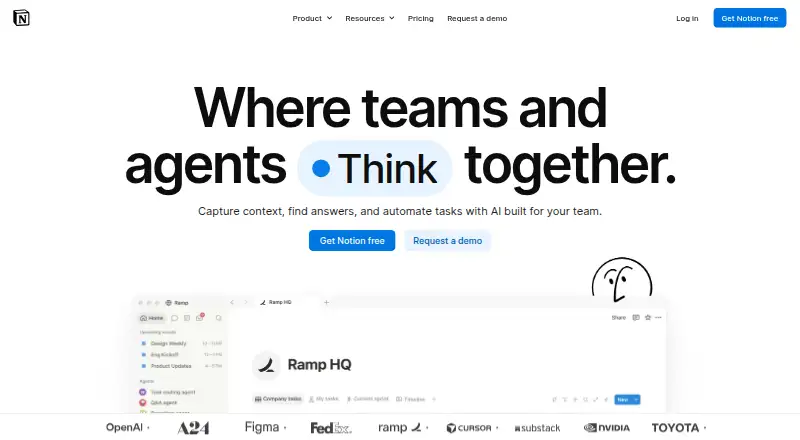
What Notion is
Notion is a cloud workspace for organizing personal projects or coordinating work with a team. Pages, blocks, and databases support note sharing and real-time collaboration, with offline access available. It runs on the web, Windows, macOS, iOS, and Android, and also supports a Chrome extension. Connections include Slack, Google Drive, Figma, GitHub, Zoom, and Microsoft Teams. Notion offers semantic search, AI search or answers, and version history. The Free plan costs $0 per member per month and includes trial AI capabilities and a trial of Notion AI. Free uploads are limited to 5 MB per file, multi-member workspaces have a limited number of blocks, and external guests are limited to 10. Plus costs $10 per member per month and Business costs $20 per member per month; yearly payment saves up to 20%. Paid plans list unlimited guests. Notion says data is encrypted and private, and that its AI does not use customer data for model training unless users opt in. Enterprise workspaces have zero data retention with LLM providers.
Good
- Pages, blocks, and databases support organizing information.
- Real-time collaboration and note sharing are available.
- Offline access is supported.
- Integrations include Slack, Google Drive, and GitHub.
- Yearly payment saves up to 20%.
Watch out
- Free uploads are limited to 5 MB per file.
- Multi-member Free workspaces have a block limit.
- Free external guests are limited to 10.
- Free AI access is a trial.
Who it suits
Notion suits individuals organizing personal projects and teams sharing notes or collaborating in a workspace. Its cross-device apps and offline access may also suit people who work across devices.
Verdict
Notion combines flexible workspace building blocks with collaboration, integrations, and search. The Free plan has file, block, and guest limits; Plus and Business raise the price per member and list unlimited guests.
Plans and prices
From Notion's own pricing page, checked 27 Sep 2026.
| Plan | Price | What it gives you |
|---|---|---|
| Free | Free | For individuals to organize personal projects and life. · Pages and blocks · Databases · Basic collaboration · billed monthly |
| Plus | $10 a month | For small teams and professionals to work together. · Unlimited pages and blocks · File uploads · Page history · billed annually |
| Business | $20 a month | For growing businesses to streamline teamwork. · Collaborative workspaces · Granular permissions · Advanced workspace features · $20 per member / month |
| Enterprise | Priced on request | For organizations to operate with scalability, control, and security. · Enterprise administration · Security and compliance controls · Custom support |
The facts
Each one read from Notion's own pages, with the date it was checked.
What it does
- AI data training
- Notion AI does not use customer data to train models unless users opt inchecked 27 Sep 2026
- Encryption and privacy
- Notion says data is encrypted and privatechecked 27 Sep 2026
- Enterprise data retention
- Enterprise workspaces get zero data retention with LLM providerschecked 27 Sep 2026
- External guest limit
- Free has an external guest limit of 10; paid plans list unlimited guestschecked 27 Sep 2026
- Integrations
- Slack,Google Drive,Figma,GitHub,Zoom,Microsoft Teamschecked 23 Sep 2026
- Note sharing
- Yeschecked 23 Sep 2026
- Offline access
- Offline use is available on desktop and mobile appschecked 27 Sep 2026
- Paid from
- 10checked 23 Sep 2026
- Payment methods
- Major credit and debit card brands are acceptedchecked 27 Sep 2026
- Real-time collaboration
- Yeschecked 23 Sep 2026
- Security certifications
- The provided text does not list certificationschecked 27 Sep 2026
- Support channels
- Desktop users can click the question-mark button; mobile users can tap Help & supportchecked 27 Sep 2026
Money
- Business plan price
- $20 per member per monthchecked 27 Sep 2026
- Custom Agents cost
- Free to try, then $10 per 1,000 monthly Notion creditschecked 27 Sep 2026
- Custom domain cost
- $8 per month per domain annually or $10 monthlychecked 27 Sep 2026
- Free AI trial
- Free includes trial AI capabilities and a trial of Notion AIchecked 27 Sep 2026
- Free block limit
- Multiple-member Free workspaces have a limited number of blockschecked 27 Sep 2026
- Free file limit
- Free plan uploads are limited to 5 MB per filechecked 27 Sep 2026
- Free plan
- Yeschecked 23 Sep 2026
- Free plan price
- $0 per member per monthchecked 27 Sep 2026
- Plus plan price
- $10 per member per monthchecked 27 Sep 2026
The company
- Company name
- Notion Labs, Inc.checked 27 Sep 2026
- Founded
- 2013checked 28 Sep 2026
- Headquarters
- San Francisco, California, United Stateschecked 28 Sep 2026
The full review of Notion
Notion is a workspace for bringing notes, databases, and shared work into one place. It suits people who want to organize personal projects and teams that need collaborative documents, but its Free tier’s upload and multi-member block limits make it less appealing for unrestricted team use.
Overview
Notion’s appeal is its range: pages and databases support personal organization as well as shared workspaces, with real-time collaboration and note sharing. AI search and semantic search add ways to find information across that workspace. The trade-off is that the broad feature set does not make every tier equally practical: Free is most compelling for individuals, while teams should weigh the per-member cost and the Free plan’s quotas.
Key features
Pages, databases, and collaboration
Free includes pages and blocks, databases, and basic collaboration. That is a useful starting point for personal projects, but multiple-member Free workspaces have a limited number of blocks, and uploads are capped at 5 MB per file. The 10-guest limit can also constrain sharing beyond a small circle.
Plus removes the stated page-and-block limit and adds file uploads and page history, making it a more credible fit for sustained team use. Business adds collaborative workspaces, granular permissions, and advanced workspace features; those permissions matter more as a growing organization needs tighter control over shared work. Paid plans list unlimited guests. Notion also supports version history, though page history is the specific history feature named for Plus.
Connections, search, and AI
Integrations include Slack, Google Drive, Figma, GitHub, Zoom, and Microsoft Teams; connections also include Asana. This breadth can make Notion more useful alongside a team’s existing tools. AI search or answers and semantic search strengthen its information-finding role, but the Free plan offers trial AI capabilities and a trial of Notion AI rather than an unlimited free AI tier. Notion says its AI does not train on customer data unless users opt in.
Notion says data is encrypted and private. Enterprise workspaces get zero data retention with LLM providers, a relevant distinction for organizations evaluating AI use. Single sign-on is supported. Custom Agents are free to try, then cost $10 per 1,000 monthly Notion credits.
Pricing
The Free plan costs $0 per member per month and is aimed at personal projects. Its pages, blocks, databases, and basic collaboration are enough to begin, but the 5 MB per-file upload cap, limited blocks in multi-member workspaces, 10 external guests, and trial-only AI make it a constrained choice for active teams.
Plus costs $10 per member per month, billed annually in the plan details. It is aimed at small teams and professionals, adding unlimited pages and blocks, file uploads, and page history. Business costs $20 per member per month and is aimed at growing businesses, with collaborative workspaces, granular permissions, and advanced workspace features. Yearly payment saves up to 20%. The per-member pricing means costs rise with team size; Enterprise has custom pricing and adds administration, security and compliance controls, and custom support.
Custom domains cost $8 per month per domain when billed annually or $10 monthly. Major credit and debit card brands are accepted.
Platforms
Notion supports Android, iOS, macOS, web, Windows, and a Chrome extension. Offline access is supported, which is useful when connectivity is intermittent, though the service itself is cloud-deployed.
Who it's for
Notion is a strong fit for individuals who want pages and databases in one free workspace, and for teams willing to pay per member for collaboration, integrations, and more room to grow. It is less suitable for teams that need generous uploads and block capacity without moving beyond Free, or organizations that want a fixed rather than per-member paid price.
Pros and cons
- Pros: Pages, databases, note sharing, and real-time collaboration serve both personal organization and team work.
- Pros: Integrations, AI search, and semantic search support a connected, searchable workspace.
- Pros: Paid plans list unlimited guests, while Business adds granular permissions for growing teams.
- Cons: Free uploads are limited to 5 MB per file, and multi-member Free workspaces have a block limit.
- Cons: Free allows 10 external guests and only trial AI capabilities, so team use can hit constraints quickly.
- Cons: Plus and Business charge per member, and Enterprise requires custom pricing.
Alternatives
For a simpler note-focused option, compare Notesnook, which has a free plan and supports Android, iOS, Linux, macOS, web, and Windows. Zoho Notebook is another free-plan choice, with an Essential tier that specifies 500 MB of cloud storage and 10 MB file uploads.
Choose Obsidian if its platform mix, including Linux, is a better fit; its Sync Standard plan costs $5.00 per month, billed annually. SiYuan is an option for readers seeking open-source software, described as mostly free, including for commercial use. Goodnotes has a free plan with caps including 100 MB storage and a 5 MB upload limit.
Craft offers a free tier with 1,500 blocks, 1 GB storage, and seven days of version history. Logseq is free for personal use. Workflowy has a free Basic plan capped at 100 nodes per month.
Browse Note-taking apps, AI Note-Taking Apps, Internal Knowledge Base Software, Document Collaboration Software, and Team Collaboration Software to compare by category.
Verdict
Choose Notion if you want one flexible workspace for notes, databases, and collaborative work, and are comfortable with paid per-member plans as your team grows. Its Free tier is useful for personal organization, but the file, block, and guest caps make it a poor bet for a team that expects to stay free; readers prioritizing that constraint should look elsewhere.
Getting started
- Open the Notion website or use its Windows, macOS, iOS, or Android app.
- Alternatively, use the Chrome extension.
- Choose the Free plan or a paid plan: Plus is $10 per member per month and Business is $20 per member per month.
- Use the workspace's pages, blocks, and databases to organize projects and share notes.
Limits worth knowing
The Free plan limits uploads to 5 MB per file, has a limited number of blocks in multi-member workspaces, and allows up to 10 external guests. It includes trial AI capabilities and a trial of Notion AI.
Questions
Is there a free plan?
Yes. Free costs $0 per member per month and includes pages, blocks, databases, basic collaboration, and trial AI capabilities.
What do the paid plans cost?
Plus costs $10 per member per month and Business costs $20 per member per month. Yearly payment saves up to 20%.
Which platforms does Notion support?
Notion supports the web, Windows, macOS, iOS, Android, and a Chrome extension.
Does Notion work offline?
Yes, offline access is supported.
Which integrations are available?
Connections include Slack, Google Drive, Figma, GitHub, Zoom, Microsoft Teams, and Asana.
How does Notion describe its AI data use?
Notion says its AI does not use customer data to train models unless users opt in. It also says data is encrypted and private.
Alternatives to Notion
- 1

Goodnotes
Free planAndroidiOSWebmacOS9.0From $11.99 a year - 2
Turtl
Free planOpen sourceAndroidAPIExtensionLinux9.0From $3 a month - 3

Obsidian
Free planAndroidiOSExtensionLinux8.9From $50 a year - 4

Supernotes
Free planAndroidiOSWebAPI8.9From £6 a month - 5
Notesnook
Free planAndroidiOSWebLinux8.8From $1.99 a month - 6

Mem Agent
Free planiOSWebAPIExtension8.8From $9 a month