Notesnook
Notesnook is a note-taking app available on web, Windows, macOS, Linux, iOS, and Android.
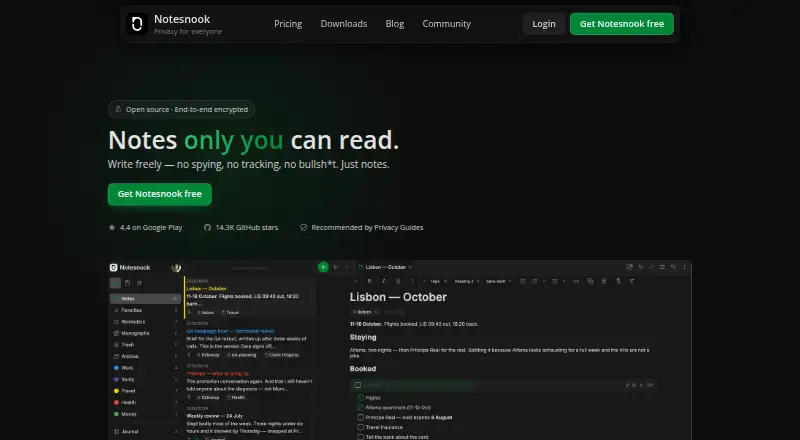
What Notesnook is
Notesnook is a note-taking app available on web, Windows, macOS, Linux, iOS, and Android. It supports sharing notes and offline access, with inbox connections through Zapier, IFTTT, or custom scripts using its Inbox API. Notes are encrypted end-to-end before leaving the device, and the apps and sync server are open source under GPLv3. App locking can use a fingerprint, PIN, or password, while a separate password can protect selected private notes. Individual notes can be published as web pages, optionally protected with a password. The free plan offers unlimited notes on unlimited devices, 50 MB of attachment storage per month, a 10 MB file-size limit, and limits of 50 notebooks and 50 tags. Free users can read web-clipped content offline; full offline mode is included in paid plans. Subscriptions can be cancelled without fees, and notes remain readable and exportable.
Good
- Unlimited notes on unlimited devices for free.
- Notes are encrypted before leaving the device.
- Apps and sync server are GPLv3 open source.
- Notes can be published as password-protected web pages.
- Subscriptions can be cancelled without fees.
Watch out
- Free attachments are limited to 50 MB monthly.
- Free file uploads are limited to 10 MB each.
- Full offline mode is limited to paid plans.
Who it suits
Notesnook suits people who want encrypted notes across desktop, mobile, and web, including users who need note sharing or inbox integrations. Its free plan may suit users comfortable with monthly attachment and file-size limits.
Verdict
Notesnook combines encrypted note-taking with broad platform support and a free tier without a notes or device cap. Compare its attachment limits and offline access terms with your needs before choosing a plan.
Plans and prices
From Notesnook's own pricing page, checked 28 Sep 2026.
| Plan | Price | What it gives you |
|---|---|---|
| Free | Free | Free forever; no card required · 50 MB storage per month · 10 MB maximum file size · 50 notebooks · 50 tags · Free forever, no card |
| Essential | $1.99 a month | 1 GB storage per month · 100 MB maximum file size · 500 notebooks · 500 tags · including tax |
| Pro | $6.99 a month | 10 GB storage per month · 1 GB maximum file size · Unlimited notebooks · Unlimited tags · including tax |
| Believer | $8.99 a month | 25 GB storage per month · 5 GB maximum file size · Unlimited notebooks · Unlimited tags · including tax |
| Essential Monthly | — | 14-day free trial; payment method required for trial · including tax |
| Essential Yearly | — | 14-day free trial · billed annually at ₹2,263.26 including tax |
| Pro 5-Year | — | Prepaid; no trial · billed every 5 years at ₹33,964.82 including tax |
| Pro Monthly | — | 14-day free trial · including tax |
| Pro Yearly | — | 50% off; 14-day free trial · billed annually at ₹3,961.57 including tax |
| Believer 5-Year | — | Prepaid; no trial · billed every 5 years at ₹45,286.82 including tax |
| Believer Monthly | — | 14-day free trial · including tax |
| Believer Yearly | — | 14-day free trial · billed annually at ₹10,188.65 including tax |
The facts
Each one read from Notesnook's own pages, with the date it was checked.
Where it runs
- App lock
- The app supports fingerprint, PIN, or password locking.checked 28 Sep 2026
- Supported platforms
- Windows, macOS, Linux, Android, iOS, and the web.checked 28 Sep 2026
What it does
- Cancellation policy
- Subscriptions can be cancelled anytime without fees, while notes remain readable and exportable.checked 28 Sep 2026
- Encryption model
- Notes are end-to-end encrypted before leaving the device.checked 28 Sep 2026
- Inbox integrations
- Zapier, IFTTT, or a custom script can send notes through the Inbox API.checked 28 Sep 2026
- Integrations
- Zapier,IFTTT,Gmailchecked 20 Sep 2026
- Note sharing
- Yeschecked 20 Sep 2026
- Offline access
- Yeschecked 20 Sep 2026
- Offline support
- Web-clipped content can be read offline, and paid plans include full offline mode.checked 28 Sep 2026
- Open-source scope
- Every app and the sync server are 100% open-source under GPLv3.checked 28 Sep 2026
- Paid storage
- Paid plans provide more attachment storage, from 1GB/mo to 25GB/mo.checked 28 Sep 2026
- Published notes
- A single note can be published as a web page, optionally password protected.checked 28 Sep 2026
- Refund policy
- Refunds can be requested from support within 14 days of subscription purchase.checked 28 Sep 2026
- Storage limit
- 0.05checked 20 Sep 2026
- Support channels
- Support is available through email, Discord, X/Twitter, or Reddit.checked 28 Sep 2026
- User base
- The site says more than 300,000 people write there every day.checked 28 Sep 2026
- Vault protection
- A separate password can protect especially private notes.checked 28 Sep 2026
The company
- Company identity
- Notesnook is made by Streetwriters (Private) Ltd.checked 28 Sep 2026
- Founded
- 2019checked 23 Sep 2026
- Headquarters
- Khushab, Pakistanchecked 23 Sep 2026
Money
- Free file size
- The free plan allows files up to 10MB.checked 28 Sep 2026
- Free plan
- Yeschecked 20 Sep 2026
- Free storage
- The free plan includes 50MB of attachment storage per month.checked 28 Sep 2026
- Free tier
- Unlimited notes on unlimited devices are free forever.checked 28 Sep 2026
The full review of Notesnook
Overview
Notesnook is an encrypted note-taking app for people who want their notes on several kinds of devices without paying just to remove a notes or device cap. Its standout case is private, everyday note-taking with generous free syncing; attachment limits and paid-only full offline mode are the trade-offs to weigh.
Made by Streetwriters (Private) Ltd., Notesnook encrypts notes on the device before they leave it, and publishes its apps and sync server under GPLv3. It supports sharing and password-protected web publication of individual notes, as well as app and note-level locks. That combination makes it a credible option for private personal notes, though the free tier is more constrained for file-heavy workflows.
It belongs on a shortlist of Secure Notes Apps and Note-taking apps.
Key features
- Encryption and locks: Notes are end-to-end encrypted before leaving the device. The app can require a fingerprint, PIN, or password, and especially private notes can have a separate password. These protections are useful for sensitive material, while the open-source apps and sync server offer an additional route to inspect the software.
- Notes and attachments: The free plan has unlimited notes and devices, but caps organization at 50 notebooks and 50 tags, and attachments at 50 MB per month with 10 MB per file. That is ample for text-heavy use, less so for regular scans or other large files.
- Sharing and publishing: Users can share notes or publish a single note as a web page, optionally protected by a password. This supports selective sharing without making every note public.
- Inbox connections: Zapier, IFTTT, and custom scripts can send notes through the Inbox API. Gmail is also listed as an integration.
- Offline access: Web-clipped content can be read offline, while full offline mode is included with paid plans. People who need complete access without a connection should treat that as a meaningful reason to upgrade.
Pricing
Notesnook is freemium, with a free plan and a 14-day trial on several paid options. The free plan costs nothing, requires no card, and remains free forever. It provides unlimited notes on unlimited devices, 50 notebooks, 50 tags, 50 MB of attachment storage per month, and a 10 MB maximum file size. The notes and device allowance is unusually forgiving for a free tier; its file and organization caps are the constraints.
Essential costs $1.99 a month, including tax. It raises attachment storage to 1 GB per month and the file-size ceiling to 100 MB, with 500 notebooks and 500 tags. This is the sensible step up for users who outgrow free attachments but do not need unlimited organization.
Pro costs $6.99 a month, including tax, for 10 GB per month and files up to 1 GB, plus unlimited notebooks and tags. Believer costs $8.99 a month, including tax, and increases the allowance to 25 GB per month and files up to 5 GB, while retaining unlimited notebooks and tags. Pro suits frequent attachment use; Believer is for people who regularly need substantially more room or larger files.
Annual and prepaid choices include Pro Yearly at ₹3,961.57 billed annually including tax, with a 14-day free trial, and Pro 5-Year at ₹33,964.82 billed every 5 years including tax, prepaid and without a trial. Essential Yearly is ₹2,263.26 billed annually including tax, with a 14-day trial; Believer Yearly is ₹10,188.65 billed annually including tax, also with a 14-day trial. Believer 5-Year costs ₹45,286.82 billed every 5 years including tax, prepaid and without a trial. Pro Monthly, Essential Monthly, and Believer Monthly have custom pricing; each has a 14-day trial, and Essential Monthly requires a payment method for its trial. Subscriptions can be cancelled without fees, and notes remain readable and exportable afterward. Refunds may be requested from support within 14 days of purchase.
Platforms
Notesnook supports Android, iOS, Linux, macOS, Windows, and the web. That range makes it a practical choice for households or individuals moving between mobile, desktop, and browser use. Offline access is available, but full offline mode requires a paid plan; free users can still read web-clipped content offline.
Who it's for
Choose Notesnook if end-to-end encryption, open-source clients and server, and broad platform coverage matter more than unrestricted free attachment storage. Its free plan works particularly well for text-first users who want unlimited notes and devices. Essential is the more appropriate fit for modest attachment needs, while Pro and Believer make sense when larger monthly quotas or file sizes matter. It is less suited to a user who needs full offline access at no cost or routinely stores large files on the free plan.
Pros and cons
- Pro: Unlimited notes and devices on the free plan mean users can keep a substantial text archive without a subscription.
- Pro: Device-side end-to-end encryption, optional app and note locks, and GPLv3 open-source apps and sync server reinforce its privacy focus.
- Pro: Android, iOS, Linux, macOS, Windows, and web support reduce platform lock-in.
- Con: Free attachments are limited to 50 MB per month and 10 MB per file, which can be restrictive for scans and media.
- Con: Full offline mode is paid-only, so the free tier does not offer the same offline reach as a paid plan.
- Con: Annual and multi-year prepaid plans require a larger commitment, and some monthly plan prices are custom pricing.
Alternatives
Joplin is worth considering if its wider platform range, including extensions and self-hosting, better fits your setup; its Basic plan is €2.99 a month, billed monthly, with a 14-day trial.
Cryptee is an alternative if you want a free plan with 100 MB and software and cryptography it says are open source and independently reviewable.
PrivacyNotes may suit users who prefer apps and encryption code published on GitHub under AGPL; it has a free plan and no free trial.
Anytype is another freemium option for users who want Android, iOS, Linux, macOS, and Windows support.
Dash is an alternative for readers interested in an open-source option with ongoing free use, offline support, and no account requirement on its Web PWA / iPhone plan.
Standard Notes is another option for a free plan centered on end-to-end encryption, unlimited device sync, plain-text notes, and offline access.
Turtl is worth a look if collaboration spaces or self-hosting are more important; its Basic plan allows three collaborators per Space and 50 MB storage.
Notyra offers a free plan for users who want to begin without an account.
Verdict
Notesnook is a strong choice for privacy-conscious note takers who want unlimited free notes across a broad mix of platforms and value open-source software. Its main reason to choose it is the combination of device-side encryption and a useful free tier; its main reason to look elsewhere is that full offline access and meaningful attachment headroom require a paid plan.
Getting started
- Open the Notesnook website.
- Choose the free plan or a paid plan; the free plan requires no card.
- Install Notesnook on Android, iOS, Linux, macOS, or Windows, or use the web app.
- For an eligible paid plan, use the 14-day free trial; the Essential Monthly trial requires a payment method.
Limits worth knowing
The free plan includes 50 MB of attachment storage per month, limits files to 10 MB, and provides 50 notebooks and 50 tags. Full offline mode is part of paid plans; the listed paid tiers provide 1 GB to 25 GB of attachment storage per month and file limits from 100 MB to 5 GB.
Questions
Is Notesnook free?
Yes. Its free plan is free forever and requires no card. It includes unlimited notes on unlimited devices, 50 MB of attachment storage per month, and a 10 MB maximum file size.
What do the listed paid plans cost?
Essential is $1.99 per month, Pro is $6.99 per month, and Believer is $8.99 per month, including tax.
Which platforms does Notesnook support?
Notesnook is available on Android, iOS, Linux, macOS, Windows, and the web.
Is Notesnook open source?
Yes. Every app and the sync server are open source under GPLv3.
Who makes Notesnook?
It is made by Streetwriters (Private) Ltd., founded in 2019 and based in Khushab, Pakistan.
Does Notesnook connect with other services?
Zapier, IFTTT, and custom scripts can send notes through the Inbox API. Gmail is also listed as an integration.
Alternatives to Notesnook
- 1

Notion
Free planAndroidiOSWebmacOS9.1From $10 a month - 2

Goodnotes
Free planAndroidiOSWebmacOS9.0From $11.99 a year - 3
Turtl
Free planOpen sourceAndroidAPIExtensionLinux9.0From $3 a month - 4

Obsidian
Free planAndroidiOSExtensionLinux8.9From $50 a year - 5

Supernotes
Free planAndroidiOSWebAPI8.9From £6 a month - 6

Mem Agent
Free planiOSWebAPIExtension8.8From $9 a month