
Amplenote
Amplenote combines notes, tasks, and calendar scheduling across four modes: Jots, Notes, Tasks, and Calendar.
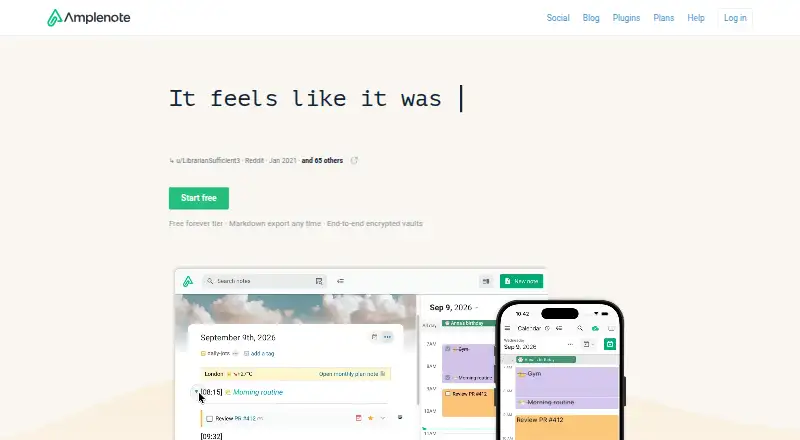
What Amplenote is
Amplenote combines notes, tasks, and calendar scheduling across four modes: Jots, Notes, Tasks, and Calendar. Its Idea Execution Funnel is intended to help users work toward long-term goals. The app supports offline access, note sharing, and real-time collaboration, and is available on the web, Windows, macOS, Linux, iOS, and Android, with a Chrome extension and API also listed. Calendar integrations include Google Calendar, Microsoft Outlook Calendar, and Apple Calendar, alongside Siri Shortcuts, IFTTT, Pipedream, and Google Drive. Tasks can be scheduled in Amplenote’s calendar and synced with connected calendars on Pro or higher. The free plan and 15-day trial are listed, along with Personal, Pro, Unlimited, and Founder plans. Personal is limited to non-commercial use and 5 MB file uploads; Pro allows larger uploads and unlimited devices. The native desktop app requires Pro, Unlimited, or Founder, while downloadable PWAs are supported. Standard notes are encrypted before leaving a device and at rest on Amplenote’s servers, but are not end-to-end encrypted by default. Attachments are not encrypted, including those associated with Vault Notes.
Good
- Combines notes, tasks, and calendar scheduling.
- Supports offline access and real-time collaboration.
- Available across mobile, desktop, and web platforms.
- Connects with three major calendar services.
- Vault Notes use a client-derived key.
Watch out
- Personal is limited to non-commercial use.
- Personal file uploads are limited to 5 MB.
- Native desktop app requires a paid-tier subscription.
- Attachments are not encrypted.
Who it suits
Amplenote suits people who want to bring notes, tasks, and scheduling together, including users who need offline access or shared notes. Its plan and desktop-app limits matter to commercial users and those who want native desktop software.
Verdict
Amplenote connects note-taking and task planning with calendars across a wide range of platforms. Check the plan restrictions, desktop requirement, and encryption limits against your needs.
Plans and prices
From Amplenote's own pricing page, checked 19 Oct 2026.
| Plan | Price | What it gives you |
|---|---|---|
| Personal | Free | Notes, tasks and calendar · mobile apps · Windows/macOS PWA · 5 MB file uploads · non-commercial license · no customer support |
| Pro | $5.84 a month | Native desktop app · Graph View · Sidebar note viewer · external calendar sync · 6 themes · tag sharing · table of contents · uploads over 5 MB · billed annually |
| Unlimited | $10 a month | Pro features · Vault Notes · publish notes as web pages · desktop MCP Server · 8 themes · billed annually |
| Founder | $20 a month | Unlimited features · Ample Agent Pro plugin included · 10 themes · early feature access · 10x roadmap votes · Discord channel · onboarding call · billed annually |
The facts
Each one read from Amplenote's own pages, with the date it was checked.
What it does
- API documentation
- A full RESTful API reference is linked from the API application page.checked 19 Oct 2026
- Attachment limitation
- Attachments such as images and PDFs are not encrypted, including when associated with Vault Notes.checked 11 Oct 2026
- Authentication security
- The API uses OAuth2 authorization-code flow with PKCE, two-hour access-token expiry and refresh tokens; passwords use BCrypt cost 10.checked 19 Oct 2026
- Calendar integrations
- Pro and higher plans support two-way synchronization with Google, Microsoft Outlook and Apple calendars.checked 19 Oct 2026
- Calendar modes
- External calendars can be configured as event-import-only or to receive tasks scheduled in Amplenote.checked 19 Oct 2026
- Changelog
- The product changelog is automatically generated from commit activity through GitClear Snap Changelog.checked 19 Oct 2026
- Collaboration
- Notes can be shared for multi-party editing and published as web pages.checked 19 Oct 2026
- Desktop access
- The native Windows, macOS, and Linux desktop app requires a Pro, Unlimited, or Founder subscription; downloadable PWAs are also supported.checked 11 Oct 2026
- Desktop availability
- Native Windows, macOS and Linux clients require Pro, Unlimited, Founder or an active subscription trial.checked 19 Oct 2026
- Desktop requirements
- Native desktop minimums are 1 GB RAM and 300 MB disk; recommended resources are 2 GB RAM and 1 GB disk.checked 19 Oct 2026
- Documentation and support
- The help center provides topic documentation, videos, Reddit, Discord and email support; free users lack customer support on the Personal plan.checked 19 Oct 2026
- Encryption
- Standard note content uses client-side AES-256-CBC encryption, while Vault keys are never transmitted to Amplenote servers.checked 19 Oct 2026
- Encryption limitation
- Standard notes are encrypted before leaving the device and at rest on Amplenote’s servers, but are not end-to-end encrypted by default.checked 11 Oct 2026
- Idea workflow
- Amplenote describes its mission as helping users set and achieve long-term goals through an Idea Execution Funnel.checked 11 Oct 2026
- Import and export
- An Evernote importer preserves notes and tags, and note content can be downloaded.checked 19 Oct 2026
- Integrations
- Google Calendar,Microsoft Outlook Calendar,Apple Calendar,Siri Shortcuts,IFTTT,Pipedream,Google Drivechecked 21 Sep 2026
- Legal entity and funding
- Crunchbase identifies the legal name as Alloy.dev, Inc., active and for-profit, with one undisclosed venture round and Vantera VC listed as investor.checked 19 Oct 2026
- Limit: interface and learning curve
- Independent reviews describe the interface as dated or cluttered and the organization model as requiring a learning period.checked 19 Oct 2026
- Limit: mobile feature gap
- G2 reviewers report that mobile lacks desktop capabilities such as Graph View and completed-task views.checked 19 Oct 2026
- Limit: task structure
- Reviewers complain that tasks must live inside notes and that task completion can require extra steps.checked 19 Oct 2026
- Limit: widget workflow
- An App Store reviewer reports that the task widget cannot complete a task directly and requires opening the app.checked 19 Oct 2026
Where it runs
- Browser support
- The web app supports the latest versions of Chrome, Firefox, and Safari on Windows, Linux, and macOS.checked 11 Oct 2026
The company
- Company
- Amplenote is built by Alloy.dev; its About page says the beta began in 2019 and the official launch followed in 2020.checked 11 Oct 2026
Money
- Free plan
- Yeschecked 21 Sep 2026
The full review of Amplenote
Amplenote is a cross-platform workspace that turns ideas into notes, tasks, and scheduled calendar work. It suits people who want long-term planning and execution in one system, especially those working across several devices or with collaborators. Its strongest case is the connected workflow; its main compromises are paid access to key sync and desktop capabilities, modest free-plan allowances, and incomplete encryption coverage.
Overview
Amplenote divides work into Jots, Notes, Tasks, and Calendar. The structure follows an Idea Execution Funnel: capture an idea, develop it in a note, convert it into tasks, and place those tasks on a calendar. That progression is more deliberate than a simple note archive and will appeal to users who want their reference material to lead to action.
Offline access means work can continue without a connection. Notes can be shared, and real-time collaboration supports joint editing. Calendar integrations cover Google Calendar, Microsoft Outlook Calendar, and Apple Calendar. Amplenote also connects with Siri Shortcuts, IFTTT, Pipedream, and Google Drive. However, scheduling tasks in Amplenote and syncing them with those external calendars is a Pro-or-higher feature, so the most valuable part of the workflow is not included at the entry level.
Key features
Ideas through execution
The four modes give a long-term goal a clear route from rough thought to scheduled commitment. This is a meaningful advantage for project planning, study, and personal organization where tasks need context from the notes that produced them. Users who only want quick text capture may find the broader system unnecessary.
Sharing and publishing
Users can share notes and tags, with tag sharing reserved for Pro. Real-time collaboration makes shared documents practical for teams or households. Unlimited adds the ability to publish notes as web pages and embed notes on websites, making that tier more suitable for creators who want their notes to become public material.
Security boundaries
Vault Notes use a Vault Key created on the device from a password that never reaches Amplenote's servers. Standard notes are encrypted in transit from the device and while stored on the servers, but they are not end-to-end encrypted by default. Attachments such as images and PDFs are not encrypted, including attachments associated with Vault Notes. Sensitive-file workflows therefore need extra caution.
Pricing
Amplenote uses a freemium model with a 15-day trial. Personal has custom pricing and is intended for non-commercial use; it limits file uploads to 5 MB and does not include customer support. It can suit a solo user testing the core workflow, provided the upload ceiling and lack of support are acceptable.
Pro has custom pricing, supports unlimited devices, accepts uploads larger than 5 MB, and unlocks calendar synchronization and tag sharing. It is the practical starting point for users who want Amplenote to coordinate with Google, Outlook, or Apple calendars and who work across multiple devices.
Unlimited has custom pricing, unlimited devices, and publishing features for turning notes into web pages or embedded content. Founder also has custom pricing and unlimited devices. The plan descriptions do not establish additional Founder benefits, so buyers should confirm what distinguishes it before subscribing. The 15-day trial provides a short window to assess the workflow and paid feature gates.
Platforms
Amplenote runs on the web, Windows, macOS, Linux, iOS, and Android, with a Chrome extension and API support. The web app supports current Chrome, Firefox, and Safari releases on Windows, Linux, and macOS. Amplecap capture extensions are available for Chrome and Firefox.
The native Windows, macOS, and Linux desktop application requires Pro, Unlimited, or Founder. Downloadable progressive web apps are also supported, giving lower-tier users a desktop-like option without the native subscription requirement.
Who it's for
Choose Amplenote if your work regularly moves from ideas to written context, actionable tasks, and calendar commitments. It is particularly well suited to goal-driven individuals, distributed collaborators, and users who need the same workspace on mobile, desktop, and web.
Look elsewhere if you need end-to-end encryption for ordinary notes and attachments, require a free native desktop app, or mainly want lightweight note storage without planning overhead. The Personal plan's 5 MB upload limit and absent customer support further reduce its appeal for demanding free users.
Pros and cons
- Pro: The Idea Execution Funnel links capture, notes, tasks, and scheduling in one workflow.
- Pro: Offline access and broad coverage across web, desktop, mobile, extension, and API support make it adaptable to mixed-device use.
- Pro: Real-time collaboration, shared notes, and integrations with three major calendar services support coordinated work.
- Con: External-calendar task sync and native desktop apps require Pro or above.
- Con: Personal limits uploads to 5 MB and excludes customer support.
- Con: Standard notes are not end-to-end encrypted by default, and attachments are not encrypted even with Vault Notes.
Alternatives
Notion is a better pick for users who want databases, pages, and basic collaboration on a free individual plan across major desktop, mobile, and web platforms.
Notability suits readers focused on notes, PDFs, documents, and templates, with a free Starter tier and trial.
Notesnook is worth choosing when a free-forever plan, broad platform support, and a privacy-oriented notes alternative matter more than Amplenote's task-calendar funnel.
Zoho Notebook fits users who prefer a straightforward notebook with defined storage and file-size limits and a free Essential tier.
Obsidian is the alternative for users who want a local, markdown-centered knowledge system and are willing to pay separately for Sync.
Goodnotes is aimed at notebook, text-document, and whiteboard work with a capped free plan.
Logseq is a free personal option for users who prefer an outlining and knowledge-work approach, with optional sync support.
SiYuan is an open-source choice for readers who want most features free, including commercial use.
Browse more options in Note-taking apps.
Verdict
Amplenote is a strong choice for goal-oriented users who want notes to become scheduled, trackable work without stitching together separate apps. Choose Pro or higher if calendar sync and a native desktop client are central to your routine. Choose another tool if attachment security, a fully capable free tier, or a simpler note-first experience matters more than the integrated planning model.
Alternatives to Amplenote
- 1

Notion
Free planAndroidiOSWebmacOS9.1From $10 a month - 2

Goodnotes
Free planAndroidiOSWebmacOS9.0From $11.99 a year - 3
Turtl
Free planOpen sourceAndroidAPIExtensionLinux9.0From $3 a month - 4

Obsidian
Free planAndroidiOSExtensionLinux8.9From $50 a year - 5

Supernotes
Free planAndroidiOSWebAPI8.9From £6 a month - 6
Notesnook
Free planAndroidiOSWebLinux8.8From $1.99 a month