
SiYuan
SiYuan is a personal knowledge management system built around Markdown, block-level references, and bidirectional links.
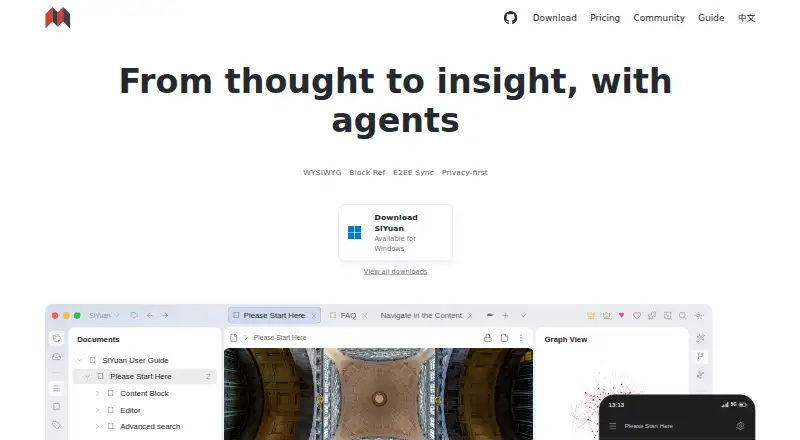
What SiYuan is
SiYuan is a personal knowledge management system built around Markdown, block-level references, and bidirectional links. It structures notes as blocks, with more than 20 block element types and more than 10 span-level types. Users can search and filter backlinks and explore global or block-level relationship graphs. Its databases support relations, rollups, and templates, while spaced repetition uses the FSRS algorithm. The AI feature accesses OpenAI for writing continuation, translation, summaries, brainstorming, and grammar or spelling correction. SiYuan supports offline use on desktop and mobile, alongside a web interface, browser extensions, an API, and Docker self-hosting. The maker says data remains under the user's control on their device and that multi-device sync is end-to-end encrypted and incremental. The download FAQ describes notebook documents as .sy files using JSON format. Free access includes basic functions and local storage at no cost. The PRO Features listing shows $64 a month, while describing a one-time payment for lifetime use; the subscription listing shows $148 a month and 8GB cloud storage, with its FAQ also referring to an annual subscription.
Good
- Notes support Markdown, references, and bidirectional links.
- Works offline across desktop and mobile platforms.
- Databases include relations, rollups, and templates.
- Self-hosting is available through Docker.
- Most features are free, including for commercial use.
Watch out
- The $64 a month listing describes lifetime use.
- The subscription listing has conflicting term descriptions.
- Subscriptions are non-refundable.
Who it suits
It suits people who want structured personal notes with backlinks, databases, and spaced repetition. It also offers offline use and self-hosting options for users who want data on their own device or server.
Verdict
SiYuan offers a block-based approach to personal knowledge management, with linking, databases, and flashcards alongside offline and self-hosted options. Its listed paid-plan terms are not fully consistent, so check those details before subscribing.
Plans and prices
From SiYuan's own pricing page, checked 4 Oct 2026.
| Plan | Price | What it gives you |
|---|---|---|
| Free | Free | Basic functions · Local storage · $0 Lifetime |
| PRO Features | $64, paid once | Basic functions · Third-party S3 and WebDAV sync and backup integrations; storage service not included · $64 Lifetime~~$96~~ |
| Subscription | $148, paid once | PRO Features · 8GB official cloud storage · Cloud assets hosting · Cloud Inbox · Official data sync and backup · $148 Lifetime~~$296~~ |
The facts
Each one read from SiYuan's own pages, with the date it was checked.
What it does
- AI
- The AI feature accesses OpenAI and can help continue writing, translate, summarize, brainstorm, and correct grammar and spelling.checked 4 Oct 2026
- Block editing
- It organizes content as blocks and includes more than 20 block-level element types and more than 10 span-level element types.checked 4 Oct 2026
- Databases
- Databases support relations, rollups, and templates.checked 4 Oct 2026
- Data format
- The download FAQ says notebook documents use .sy files and the data format is JSON.checked 4 Oct 2026
- Encrypted sync
- The maker describes multi-device sync as end-to-end encrypted and incremental.checked 4 Oct 2026
- Flashcards
- Spaced repetition uses the FSRS algorithm.checked 4 Oct 2026
- Integrations
- Paid options include third-party S3 and WebDAV data sync and backup; users must provide their own storage, and Nutstore is not supported for WebDAV.checked 4 Oct 2026
- Knowledge links
- The product provides backlinks with filtering and search, plus global and block-level relationship graphs.checked 4 Oct 2026
- Large documents
- The maker says dynamic loading allows documents with millions of words to be edited smoothly on ordinary computers.checked 4 Oct 2026
- Note sharing
- Yeschecked 20 Sep 2026
- Offline access
- Yeschecked 20 Sep 2026
- Open source
- The download page says SiYuan is completely open source and that most features are free, including for commercial use.checked 4 Oct 2026
- Privacy
- The privacy policy says SiYuan does not collect user personal information or usage data and that data is kept on the user's device under their control.checked 4 Oct 2026
- Purpose
- SiYuan describes itself as a privacy-first personal knowledge management system supporting Markdown, block-level references, and bidirectional links.checked 4 Oct 2026
- Self-hosting
- SiYuan can be deployed on a server using its Docker image, with access rights controlled through an authorization code.checked 4 Oct 2026
- Storage limit
- 8checked 20 Sep 2026
Money
- Free plan
- Yeschecked 20 Sep 2026
- Support and trial
- The pricing FAQ says users can enable a trial subscription in SiYuan Desktop under Settings - Account, but does not state its duration; it also says subscriptions are non-refundable.checked 4 Oct 2026
Where it runs
- Supported platforms
- Windows,macOS,Linux,iOS,Android,web interface,Chrome/Edge extension,API,Docker self-hostingchecked 20 Sep 2026
The full review of SiYuan
Overview
SiYuan is a privacy-first personal knowledge management system built around Markdown, block-level references, and bidirectional links. It suits people who want connected notes alongside databases and spaced-repetition flashcards, especially if offline use or self-hosting matters.
Its block-based tools cover a lot of ground, but the paid plans have conflicting price and billing terms that are worth resolving before you subscribe.
Key features
SiYuan breaks documents into blocks, with more than 20 block-level element types and more than 10 span-level types. That structure enables block references, backlinks with filtering and search, and relationship graphs at both global and block level. It is a strong fit for building a connected knowledge base; readers who prefer a simpler, page-first notebook may not need this level of structure.
Databases add relations, rollups, and templates, while flashcards use the FSRS spaced-repetition algorithm. Together, these make SiYuan more than a place to collect notes: it can support structured information and review workflows in the same system.
The maker says dynamic loading lets users edit documents containing millions of words smoothly on ordinary computers. AI features use the OpenAI API for writing continuation, translation, summaries, brainstorming, and grammar and spelling corrections. Integrations also include Amazon S3-compatible storage and WebDAV.
SiYuan says its privacy policy does not collect personal information or usage data and that data stays under the user's control on their device. Its multi-device sync is described as end-to-end encrypted and incremental. Those claims make it appealing to privacy-conscious users, while the AI tools and third-party storage integrations are distinct options rather than reasons to assume all data stays local.
Documents use the .sy format, with data stored as JSON. The software is open source, and most features are free, including for commercial use.
Pricing
The Free plan costs nothing, billed $0 Lifetime. It includes basic functions and local storage, so it is the straightforward choice for individual use without third-party sync or backup.
PRO Features is shown at $64 a month, billed Pay once, use for life. It includes basic functions plus third-party S3 and WebDAV data sync and backup integrations; third-party storage itself is not included. The displayed price and lifetime billing wording do not align, so confirm the charge before choosing it.
Subscription is shown at $148 a month, with the pricing page displaying Lifetime while the FAQ also refers to an annual subscription. It includes 8GB of cloud storage. This is the plan for someone who wants cloud storage rather than arranging third-party storage, but the billing terms need clarification. Subscriptions are non-refundable.
A trial subscription can be enabled in SiYuan Desktop under Settings - Account.
Platforms
SiYuan supports Windows, macOS, Linux, iOS, Android, and a web interface, plus a Chrome/Edge extension and API. It also offers Docker self-hosting, with access rights controlled through an authorization code. Offline access is supported, giving it a practical advantage for people who want to work locally or host their own instance.
Who it's for
Choose SiYuan if you want a flexible personal knowledge system that connects notes at block level, adds databases and flashcards, and can work offline or run on your own server. Its local-storage free plan and open-source availability make it especially suitable for users who want control over their setup.
Look elsewhere if you need clearly stated subscription terms before committing, or if a simpler note-taking workflow would make block references, graphs, databases, and spaced repetition unnecessary overhead.
Pros and cons
- Pros: Block-level references, backlinks, and relationship graphs support detailed connections between ideas.
- Pros: Databases, FSRS flashcards, and OpenAI-powered writing tools bring several knowledge-work functions into one application.
- Pros: Offline use, local storage, Docker self-hosting, and stated end-to-end encrypted sync offer meaningful control over where and how data is kept.
- Pros: The free plan includes basic functions with local storage, and the software is open source.
- Cons: The paid plans show prices and billing terms that conflict, making it difficult to judge their actual commitment.
- Cons: The Free plan is limited to local storage; cloud storage and third-party sync and backup integrations are paid-plan features.
Alternatives
Browse our Personal Knowledge Management Software and Note-taking apps lists to compare options across those categories.
- TheBrain is worth considering if you want unlimited thoughts, links, and brains, with all features and private sync up to 1,000 thoughts on its free app plan.
- Logseq is a free alternative for personal use across desktop, mobile, and web platforms.
- Obsidian is another option if its Sync Standard plan suits your needs: it costs $5 a month, billed annually, per user, for one synced vault, 1 GB total storage, and a 5 MB maximum file size.
- Supernotes is a card-based alternative, with a Starter plan capped at 100 cards and an Unlimited plan at £6 a month, billed £72 billed annually.
- Capacities may suit users who prefer its media-upload allowance: the Basic plan includes 5 GB total, then 100 MB per month.
- Mem Agent is an option for readers seeking a different note-taking app, with a free plan that includes 25 messages to Mem and 25 new notes per month.
- TriliumNext Notes is a free, open-source alternative with no paid tiers and no account requirement.
- Heptabase is an alternative with a Pro plan at $11.99 a month, billed monthly, including 100 AI credits per month.
Verdict
SiYuan is a strong choice for people who want a private, block-based knowledge system with links, databases, flashcards, offline access, and self-hosting. Its broad feature set and free local-storage plan are persuasive; the main reason to look elsewhere is the uncertainty around paid-plan pricing and billing. Start with the free plan, and confirm the terms before subscribing.
Getting started
- Open the SiYuan website to choose a supported platform.
- Install SiYuan on Windows, macOS, Linux, iOS, or Android, or use the web interface or Chrome/Edge extension.
- Start with the free plan for basic functions and local storage.
- Enable a trial subscription in SiYuan Desktop under Settings - Account.
- For server deployment, use the Docker image and control access with an authorization code.
Limits worth knowing
The free plan includes basic functions and local storage. PRO Features excludes third-party storage, while Subscription includes 8GB cloud storage; the pricing page displays lifetime pricing, and the FAQ also refers to an annual subscription.
Questions
Is SiYuan free?
Yes. The Free plan is free and includes basic functions with local storage.
What do the paid plans cost?
PRO Features is listed at $64 a month, billed once for lifetime use. Subscription is listed at $148 a month; the pricing page displays lifetime pricing, while its FAQ also refers to an annual subscription.
Which platforms does SiYuan support?
It supports Windows, macOS, Linux, iOS, Android, a web interface, Chrome and Edge extensions, API access, and Docker self-hosting.
Can I try a subscription?
The pricing FAQ says a trial subscription can be enabled in SiYuan Desktop under Settings - Account. It does not state the trial duration, and subscriptions are non-refundable.
Is SiYuan open source?
Yes. The download page describes it as completely open source and says most features are free, including for commercial use.
What integrations does it offer?
The listed integrations are the OpenAI API, Amazon S3-compatible storage, and WebDAV.
Alternatives to SiYuan
- 1

Notion
Free planAndroidiOSWebmacOS9.1From $10 a month - 2
Goodnotes
Free planAndroidiOSWebmacOS9.0From $11.99 a year - 3
Turtl
Free planOpen sourceAndroidAPIExtensionLinux9.0From $3 a month - 4

Obsidian
Free planAndroidiOSExtensionLinux8.9From $50 a year - 5

Supernotes
Free planAndroidiOSWebAPI8.9From £6 a month - 6
Notesnook
Free planAndroidiOSWebLinux8.8From $1.99 a month