TheBrain
TheBrain connects notes, files, links, projects, and AI in a visual knowledge network organized around linked thoughts.
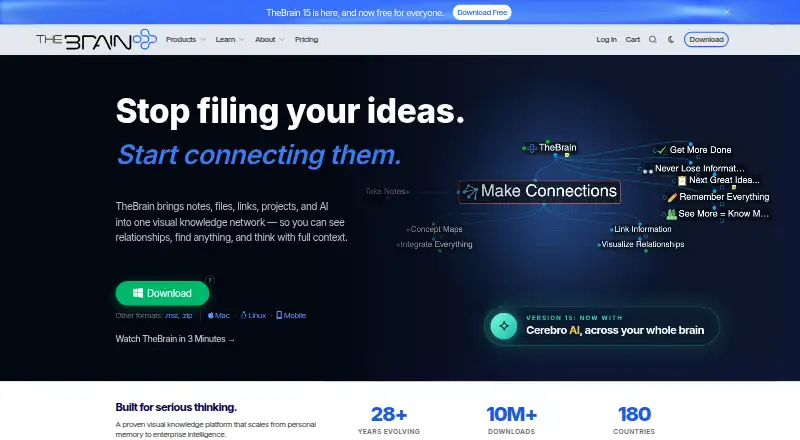
What TheBrain is
TheBrain connects notes, files, links, projects, and AI in a visual knowledge network organized around linked thoughts. Its views include Card View, Mind Map, and Tree View, with backlinks and graph views for navigating relationships. Cerebro AI can create content, search and summarize a brain, suggest links, and answer questions using its knowledge. The app is available on Windows, macOS, Linux, iOS, Android, and the web; Windows, Mac, and Linux users can keep brains local without cloud sync. The Free App costs nothing and allows unlimited thoughts, links, and brains, with private sync for up to 1,000 thoughts, 100 MB of synced attachment storage, and limited daily AI. Pro Service costs $15 a month, billed $180 / year, and adds unlimited private sync, Cerebro AI, 30 GB online storage, and one-on-one support. TeamBrain and Max Service add multi-user editing and more storage or AI usage. A local API lets scripts and external tools create and link thoughts, run commands, and query brain data. Linked external files and folders stored elsewhere are not synchronized.
Good
- Unlimited thoughts, links, and brains on the free plan
- Offers Card View, Mind Map, and Tree View
- Local brains available without cloud sync on desktop
- Local API supports scripts and external tools
- Backlinks and graph views help connect information
Watch out
- Free private sync is limited to 1,000 thoughts
- Free synced attachment storage is limited to 100 MB
- External linked files and folders are not synchronized
- Cloud data beyond free limits may eventually be removed after a long plan lapse
Who it suits
It suits people who want to connect notes, files, projects, and links in a navigable knowledge graph. Local use is an option for desktop users who do not want cloud sync.
Verdict
TheBrain combines linked-note organization with multiple views, AI features, and local-use options. Check the sync and attachment limits if you plan to rely on the free cloud allowance.
Plans and prices
From TheBrain's own pricing page, checked 22 Sep 2026.
| Plan | Price | What it gives you |
|---|---|---|
| Free | Free | 1,000 thoughts private sync · 100 MB synced attachment storage · Free forever; no account required |
| Free App | Free | Unlimited thoughts, links & brains · all features · private sync up to 1,000 thoughts · 100 MB synced attachment storage · limited daily AI · $0 forever |
| Pro Service | $15 a month | Unlimited private sync · Cerebro AI · 30 GB online storage · one-on-one support · encrypted backup · $180 / year |
| TeamBrain | $25 a month | Per person · Pro Service features · multi-user editing & sync · unlimited shared brains · 100 GB storage · per-user reporting and auditing · priority support · $299 per person / year |
| Max Service | $40 a month | Everything in TeamBrain · 4× Cerebro AI usage · 250 GB online storage · priority support · unlimited sync devices · early feature access · $479 / year |
| Pro Service | $180 a year | Unlimited private sync · Cerebro AI · 30 GB online storage · one-on-one support · encrypted backup · $180 / year |
| TeamBrain | $299 a year | Per person · Pro Service features · multi-user editing & sync · unlimited shared brains · 100 GB storage · per-user reporting and auditing · priority support · $299 per person / year |
| Max Service | $479 a year | Everything in TeamBrain · 4× Cerebro AI usage · 250 GB online storage · priority support · unlimited sync devices · early feature access · $479 / year |
| Enterprise | Priced on request | On-premises server deployment · Contact sales |
The facts
Each one read from TheBrain's own pages, with the date it was checked.
What it does
- AI
- Cerebro AI can create content, search and summarize a brain, suggest links, and converse using its knowledge.checked 30 Sep 2026
- API
- TheBrain 15 provides a local API for scripts and external tools to create and link thoughts, run commands, and query brain data.checked 30 Sep 2026
- Attachments
- External files and folders linked from a brain but stored elsewhere are not synchronized.checked 30 Sep 2026
- Local use
- Brains are local by default, and Windows, Mac, and Linux users can keep data local without cloud sync.checked 30 Sep 2026
- Privacy
- TheBrain says it does not sell personal information or use private synced content for advertising; Cerebro inputs may be processed by contracted AI providers to provide the feature.checked 30 Sep 2026
- Purpose
- TheBrain connects notes, files, links, projects, and AI in a visual knowledge network.checked 30 Sep 2026
- Security
- The privacy policy describes administrative, technical, and physical safeguards, including encryption in transit and protections for data at rest.checked 30 Sep 2026
- Support
- Pro Service includes one-on-one support, while TeamBrain and Max Service include priority support.checked 30 Sep 2026
- Views
- TheBrain 15 includes Card View, Mind Map, and Tree View.checked 30 Sep 2026
The company
- Company use
- TheBrain says its software is designed to help people organize information and that more than half of Fortune 100 organizations use it.checked 30 Sep 2026
- Founded
- 1996checked 28 Sep 2026
- Headquarters
- Los Angeles, California, USAchecked 28 Sep 2026
Money
- Free limits
- The free cloud allowance includes private sync for up to 1,000 thoughts, 100 MB synced attachment storage, and a daily AI allowance.checked 30 Sep 2026
- Plan lapse
- After a paid plan lapses for six months or more, cloud data beyond free limits may eventually be removed to reclaim storage.checked 30 Sep 2026
Where it runs
- Platforms
- TheBrain is available for Windows, Mac, Linux, iOS, Android, and through a browser client.checked 30 Sep 2026
The full review of TheBrain
Overview
TheBrain is a knowledge-management app that links notes, files, web links, projects, and AI in a visual network. It suits people who want to navigate information through relationships and keep their data local on desktop, as well as teams that need shared editing. Its main trade-off is that free cloud sync and attachment storage are capped.
Founded in 1996 and headquartered in Los Angeles, TheBrain offers a graph-based approach to organizing information, with backlinks, offline access, and import and export support. Instead of relying on a single list or folder hierarchy, users can connect related items and move among them as a network.
Key features
TheBrain 15 offers Card View, Mind Map, and Tree View, giving users several ways to inspect the same knowledge base. That flexibility is useful when a graph is helpful for discovering connections but not the clearest way to review a particular set of information.
Cerebro AI can create content, search and summarize a brain, suggest links, and answer questions using its knowledge. The free plan includes a limited daily AI allowance; Pro Service adds Cerebro AI, while Max Service provides four times the AI usage of TeamBrain. Users should also weigh the privacy terms: inputs to Cerebro may be processed by contracted AI providers. TheBrain says it does not sell personal information or use private synced content for advertising.
TheBrain 15's local API lets scripts and external tools create and link thoughts, run commands, and query brain data. That makes it a stronger fit for users who want to work with their knowledge base programmatically. Brains are local by default, and Windows, Mac, and Linux users can keep data local without cloud sync. External files and folders linked from a brain but stored elsewhere do not sync, so that workflow needs separate file management.
Pricing
TheBrain is freemium, with paid plans starting at $15 a month. The free plan costs nothing, billed $0 forever, and includes unlimited thoughts, links, and brains, all features, private sync for up to 1,000 thoughts, 100 MB of synced attachment storage, and limited daily AI. It is a capable entry point, but the sync and attachment caps matter if the brain becomes a primary cloud workspace.
Pro Service costs $15 a month, billed $180 / year. It adds unlimited private sync, Cerebro AI, 30 GB of online storage, one-on-one support, and encrypted backup. This is the paid fit for an individual who needs more cloud capacity and support without team editing.
TeamBrain costs $25 a month, billed $299 per person / year. It includes Pro Service features, multi-user editing and sync, unlimited shared brains, 100 GB of storage, per-user reporting and auditing, and priority support. The per-person price suits teams that need shared work and oversight; it is a substantial step up from an individual subscription.
Max Service costs $40 a month, billed $479 / year. It adds four times the Cerebro AI usage of TeamBrain, 250 GB of online storage, unlimited sync devices, priority support, and early feature access. It is aimed at heavy users who will make use of the extra AI and storage, rather than those who only need a shared brain. Enterprise has custom pricing and offers on-premises server deployment.
If a paid plan lapses for six months or more, cloud data beyond free-plan limits may eventually be removed to reclaim storage. That makes continued subscription important for users relying on paid cloud capacity.
Platforms
TheBrain supports Windows, macOS, Linux, iOS, Android, and the web, with an API also available. The desktop local-use option is particularly relevant for people who prefer not to sync their brains to the cloud; free cloud sync limits still apply to those who do sync.
Who it's for
TheBrain is a good choice for people who think in connections and want notes, projects, links, and files represented together, especially when multiple views or a local desktop brain matter. Its API and team plans also make it worth considering for technically inclined users and groups that need shared editing or reporting. It is less compelling for someone who wants generous cloud attachments at no cost, or a simple notes app without a graph-centered model.
Pros and cons
- Pros: Multiple views let users inspect a knowledge network as cards, a mind map, or a tree.
- Pros: Local-by-default brains and offline access suit users who want to work without cloud sync.
- Pros: The API supports scripted creation, linking, commands, and queries for users who want programmatic access.
- Cons: Free cloud sync covers up to 1,000 thoughts and 100 MB of synced attachments, limiting its usefulness as a growing cloud archive.
- Cons: Linked external files and folders do not synchronize, so they can be unavailable on another device even when the brain syncs.
- Cons: Cerebro inputs may be processed by contracted AI providers, which may not suit users who prefer not to send AI requests for processing.
Alternatives
For other approaches to this category, see Personal Knowledge Management Software.
Choose SiYuan if open-source software and a self-hosted option are priorities; it is freemium, has a free trial, and supports desktop, mobile, and web platforms.
Logseq is a free alternative for personal use, with a paid Sync Backer option at $5 a month billed as a recurring monthly donation for sync beta access.
Consider Obsidian if its freemium model and separate Sync Standard plan fit better; that plan is $5 a month billed annually and includes one synced vault, 1 GB total storage, and a 5 MB maximum file size.
Supernotes is another freemium option, organized around cards; its Unlimited plan costs £6 a month, billed £72 billed annually.
Pick Capacities if its Basic plan's 5 GB of total media uploads and 100 MB monthly uploads thereafter better fit your needs.
Mem Agent is a freemium alternative available on web, desktop, iOS, and as an extension.
Tana offers a free plan with five meetings per month, one calendar, and 50 AI queries; its Pro plan is listed at $2,030 a month per user as an early-bird price.
TriliumNext Notes is a free, open-source option with no paid tiers and no account requirement.
Verdict
Choose TheBrain if you want a connected knowledge base with multiple views, local desktop use, and the option to add AI or team collaboration as needs grow. Its graph model and API are meaningful strengths, but the free sync and attachment allowances are small, and external linked files do not sync. Look elsewhere if generous free cloud storage or a simpler notes workflow matters more than navigating information through relationships.
Getting started
- Visit the TheBrain website
- Choose the free app or a paid service plan
- Install on Windows, macOS, Linux, iOS, or Android, or use the web version
- Create thoughts and link notes, files, links, and projects
- Use Card View, Mind Map, or Tree View to explore a brain
Limits worth knowing
The Free App includes private sync for up to 1,000 thoughts, 100 MB of synced attachment storage, and limited daily AI. After a paid plan lapses for six months or more, cloud data beyond free limits may eventually be removed to reclaim storage.
Questions
Is TheBrain free?
Yes. The Free App costs nothing, billed $0 forever, and includes unlimited thoughts, links, and brains.
What does Pro Service cost?
Pro Service costs $15 a month, billed $180 / year.
Which platforms does TheBrain support?
It supports Windows, macOS, Linux, iOS, Android, and web.
Can I keep my data local?
Brains are local by default. Windows, Mac, and Linux users can keep data local without cloud sync.
Does TheBrain have an API?
Yes. TheBrain 15 provides a local API for scripts and external tools to create and link thoughts, run commands, and query brain data.
What happens to external files linked from a brain?
External files and folders stored elsewhere are linked from a brain but are not synchronized.
Alternatives to TheBrain
- 1

Mem Agent
Free planiOSWebAPIExtension8.2From $9 a month - 2

Supernotes
Free planAndroidiOSWebAPI8.2From £6 a month - 3

Obsidian
Free planAndroidiOSExtensionLinux8.1From $50 a year - 4

Logseq
Free planAndroidiOSWebLinux7.7From $5 a month - 5

RemNote
Free planAndroidiOS7.7From $8 a month - 6

SiYuan
Free planAndroidiOSWebExtension7.7$64 one-time