
Midnight Commander
Midnight Commander is a free, full-screen file manager that uses a visual, dual-pane text interface.
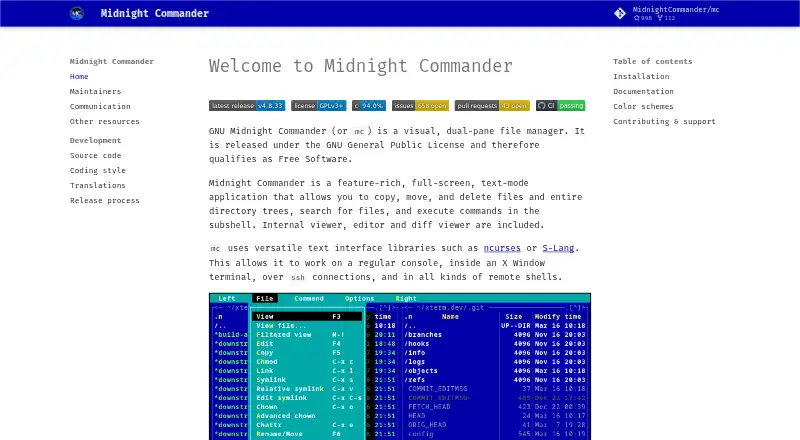
What Midnight Commander is
Midnight Commander is a free, full-screen file manager that uses a visual, dual-pane text interface. It handles file and directory tasks such as copying, moving, deleting, searching, and running commands in a subshell. Built-in tools include a file viewer, editor, and diff viewer. It works in a regular console or X Window terminal, as well as over SSH and in remote shells. Its virtual filesystem supports FTP and shell connections; SFTP support depends on whether it was compiled with sftpfs. The tar filesystem offers read-only access to tar and compressed tar archives, and scripts can extend the virtual filesystem with additional features and file types. The project is free software under the GNU General Public License, with a listed price of no cost. It supports Linux and macOS. The project points users to context-sensitive F1 help and manual pages, and uses mailing lists, GitHub Discussions, and an issue tracker for communication.
Good
- Dual-pane layout supports file operations.
- Built-in viewer, editor, and diff viewer.
- Works over SSH and in remote shells.
- Free software under the GNU General Public License.
Watch out
- Tar archive access is read-only.
- SFTP requires compilation with sftpfs.
- Maintainers do not promise commercial-grade support or warranties.
Who it suits
It suits users who prefer a text-mode file manager and need to work in local consoles or remote shells. Its built-in viewer, editor, and diff viewer also serve users who want file tools within the same program.
Verdict
Midnight Commander offers file management and inspection tools in a text interface, including access to remote shells and FTP. Consider its SFTP setup requirement and volunteer support limits if those matter for your workflow.
Plans and prices
From Midnight Commander's own pricing page, checked 7 Oct 2026.
| Plan | Price | What it gives you |
|---|---|---|
| GNU Midnight Commander | Free | GNU General Public License · free software |
The facts
Each one read from Midnight Commander's own pages, with the date it was checked.
What it does
- Archives
- Its tar filesystem provides read-only access to tar and compressed tar archives.checked 7 Oct 2026
- Archive support
- Yeschecked 20 Sep 2026
- Batch rename
- Yeschecked 20 Sep 2026
- Built-in tools
- It includes an internal file viewer, editor, and diff viewer.checked 7 Oct 2026
- Documentation
- The project identifies context-sensitive F1 help and manual pages as its primary official documentation.checked 7 Oct 2026
- Dual-pane layout
- Yeschecked 20 Sep 2026
- Extensibility
- An external virtual filesystem can add features and file types through scripts.checked 7 Oct 2026
- File manager
- Midnight Commander is a visual, dual-pane, full-screen text-mode file manager.checked 7 Oct 2026
- File operations
- It can copy, move, and delete files and directory trees, search for files, and execute commands in a subshell.checked 7 Oct 2026
- Installation
- The project recommends system package managers and lists Debian/Ubuntu, Fedora/Red Hat, FreeBSD/OpenBSD, and macOS installation options.checked 7 Oct 2026
- License
- The project says it is released under the GNU General Public License and qualifies as Free Software.checked 7 Oct 2026
- Project history
- The maintainers page says the project was founded around 1994 by Miguel de Icaza and is maintained by a team.checked 7 Oct 2026
- Remote filesystems
- Its virtual filesystem supports FTP and shell connections, and supports SFTP when compiled with sftpfs.checked 7 Oct 2026
- Support
- Project communication is primarily through mailing lists, with GitHub Discussions and an issue tracker also available.checked 7 Oct 2026
- Support limits
- The project says volunteer maintainers do not provide an entitlement to commercial-grade support, service-level agreements, or warranties.checked 7 Oct 2026
- Terminal access
- It works in a regular console, an X Window terminal, over SSH, and in remote shells.checked 7 Oct 2026
- Themes
- Midnight Commander supports skins included with the distribution or created by users.checked 7 Oct 2026
Money
- Free plan
- Yeschecked 20 Sep 2026
Where it runs
- Supported platforms
- linux,macoschecked 20 Sep 2026
The full review of Midnight Commander
Midnight Commander is a full-screen, dual-pane file manager for text-mode environments. It best serves Linux and macOS users who work comfortably in consoles, SSH sessions, or remote shells and want file operations alongside inspection tools. Its broad command-line workflow is compelling at no cost, but users needing a graphical interface or guaranteed SFTP support should choose differently.
Overview
Midnight Commander brings core file management into a terminal-oriented workspace. It copies, moves, and deletes files and directory trees, searches for files, and opens a subshell for running commands. The result is a practical alternative when a desktop file manager is unavailable, undesirable, or inefficient for shell-based administration.
The project, founded around 1994 by Miguel de Icaza and now maintained by a team, is released under the GNU General Public License as Free Software. Installation is generally handled through system package managers, with options documented for Debian and Ubuntu, Fedora and Red Hat, FreeBSD and OpenBSD, and macOS.
Key features
The dual-pane layout keeps two locations visible while you work, making transfers and directory-to-directory comparison easier to follow than a single-list workflow. Copy, move, delete, search, and batch-rename commands cover routine and repetitive file work. This is especially useful for keyboard-driven users managing large directory trees; those expecting drag-and-drop interaction will find the model less natural.
An internal file viewer, editor, and diff viewer allow inspection, modification, and comparison without leaving the manager. A subshell preserves access to ordinary commands while keeping the file panels in the same session. Midnight Commander runs in a regular console, an X Window terminal, over SSH, and in remote shells, so it remains useful on machines where a graphical session is unavailable.
Its virtual filesystem supports FTP and shell connections. SFTP requires a build compiled with sftpfs, so deployment details matter for anyone whose main task is secure file transfer. The tar filesystem provides read-only access to tar and compressed tar archives: it is suitable for browsing and extracting workflows, not archive editing. Scripts can add virtual filesystems and file types, and user-created or distribution-provided skins offer customization within the text interface.
Pricing
GNU Midnight Commander — free (GNU General Public License · free software). There is no paid tier or free trial. Every supported user gets the same feature set, making it a straightforward choice for individuals, administrators, and organizations that can operate without commercial support terms. Volunteer maintainers explicitly do not provide commercial-grade support, service-level agreements, or warranties, which may disqualify it for teams requiring contractual assistance.
Platforms
Supported platforms are Linux and macOS, with self-hosted deployment also listed. The program is designed for regular consoles, X Window terminals, SSH, and remote shells, so its reach depends more on terminal access than on a desktop environment. Installation guidance covers Debian/Ubuntu, Fedora/Red Hat, FreeBSD/OpenBSD, and macOS package-manager routes.
Who it's for
Choose Midnight Commander if you prefer keyboard-driven, two-pane work; administer systems through SSH or remote shells; or need viewing, editing, diffing, and file operations in one console application. It is also a strong fit for self-hosted environments and cost-sensitive users who value Free Software licensing.
Look elsewhere if you require a graphical desktop experience, built-in SFTP in every installation, writable archive browsing, or guaranteed commercial support. Official help centers on context-sensitive F1 documentation and manual pages, with project communication through mailing lists, GitHub Discussions, and an issue tracker rather than a paid support desk.
Pros and cons
Pros
- Complete dual-pane workflow: Copy, move, delete, search, and batch rename are convenient when two directories must stay visible.
- Useful inspection tools: The viewer, editor, and diff viewer reduce the need to switch applications.
- Strong remote reach: Console, SSH, remote-shell, FTP, and shell-connection support suits server administration.
- Free and extensible: GPL licensing, scripts, and skins allow customization without subscription costs.
Cons
- Text interface only: Users seeking graphical navigation or mouse-led file management should pick a desktop manager.
- Conditional SFTP: Secure transfers depend on compilation with sftpfs.
- Read-only archive filesystem: Tar and compressed tar archives can be browsed, but not edited through that filesystem.
- No commercial service guarantees: Volunteer support does not include SLAs, warranties, or commercial-grade entitlement.
Alternatives
For a broader directory of choices, see File Manager Software or Terminal File Managers.
Dolphin is a free, open-source Linux and Windows file manager when you want a graphical desktop alternative.
Filestash suits users seeking a freemium, web-oriented option spanning desktop, mobile, and self-hosted platforms, with a paid Self Served plan at $50 a month billed monthly.
TagSpaces is a freemium, cross-platform choice for users who prefer tagged, extensible file organization.
WinSCP is a free Windows client when SFTP, FTP, FTPS, SCP, WebDAV, or S3 transfer is the priority.
Krusader is a free Linux alternative for users wanting another dual-pane file manager.
muCommander is a free, open-source option across Linux, macOS, and Windows.
Owlfiles fits users who need cross-device connections and media viewing, with a free Basic plan limited to three connections.
GNOME Commander is a free Linux desktop file manager under GPL-3.0-or-later.
Verdict
Midnight Commander is an excellent choice for terminal-focused Linux and macOS users who want dependable two-pane file work, built-in inspection, and remote-shell access without paying. Choose it for its breadth and Free Software licensing; look elsewhere if you need a graphical interface, universally available SFTP, editable archive handling, or commercial support commitments.
Alternatives to Midnight Commander
- 1

Filestash
Free planOpen sourceAndroidiOSWebAPI9.2From $50 a month - 2

Owlfiles
Free planAndroidiOSExtensionmacOS8.7From $12.99 a year - 3

WinSCP
Free planOpen sourceWindows7.9Free plan - 4

Dolphin
Free planOpen sourceLinuxWindows7.8Free plan - 5
FileRun
AndroidiOSWebAPI7.8From €9.90 a year - 6

OneCommander
Free planWindows7.8$30 one-time