Krusader
Krusader is a free, twin-panel file manager for Linux, designed for KDE Plasma and other Unix-like desktops.
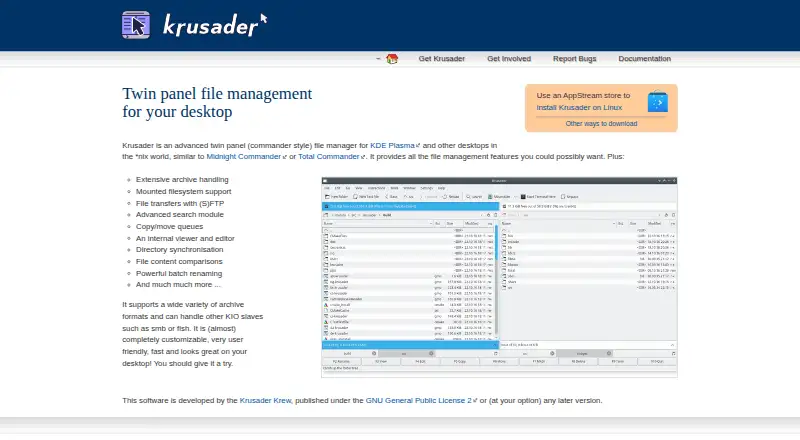
What Krusader is
Krusader is a free, twin-panel file manager for Linux, designed for KDE Plasma and other Unix-like desktops. Its dual-pane view and tabbed interface support working across directories, while its file tools include archive handling, mounted filesystem access, (S)FTP transfers, search, copy and move queues, an internal viewer and editor, directory synchronization, file comparison, and batch renaming. It can also work with KIO services such as SMB and fish. The interface is highly customizable, and users can add custom User Actions; KDE Store add-ons are unofficial and should be treated cautiously. Krusader may be available through a Linux distribution or an AppStream store. The project lists stable version 2.9.0 and development version 2.10.0-dev, and provides source code, a detailed handbook, and links for reporting bugs. It is published under the GNU General Public License version 2 or later.
Good
- Dual-pane view and tabbed interface
- Handles archives and mounted filesystems
- Includes search, queues, and batch renaming
- Supports KIO services such as SMB and fish
- Free under GPL version 2 or later
Watch out
- Linux is the only listed platform
- KDE Store add-ons are unofficial
- Stable and development versions are listed separately
Who it suits
Krusader suits Linux users who want a customizable file manager with two panes and a broad set of file operations. Its queues, synchronization, comparisons, and batch renaming may also suit users handling many files.
Verdict
Krusader offers a broad set of file-management tools in a dual-pane interface for Linux. Consider it if you need its archive, transfer, synchronization, or batch-renaming features; use caution with unofficial add-ons.
Plans and prices
From Krusader's own pricing page, checked 11 Oct 2026.
| Plan | Price | What it gives you |
|---|---|---|
| Krusader | Free | GNU General Public License 2 or later · Linux installation and source code offered |
The facts
Each one read from Krusader's own pages, with the date it was checked.
What it does
- Archive support
- Yeschecked 20 Sep 2026
- Batch rename
- Yeschecked 20 Sep 2026
- Customization
- The site describes Krusader as almost completely customizable.checked 11 Oct 2026
- Distribution
- The site says Krusader can be installed on Linux using an AppStream store and may already be available through a user's distribution.checked 11 Oct 2026
- Documentation
- The project provides a detailed handbook with an online HTML version and a weekly PDF build.checked 11 Oct 2026
- Dual-pane view
- Yeschecked 20 Sep 2026
- Extensions
- Krusader supports custom add-ons called User Actions, and the site says KDE Store add-ons are unofficial and should be used with caution.checked 11 Oct 2026
- File operations
- It includes extensive archive handling, mounted filesystem support, (S)FTP transfers, advanced search, copy and move queues, an internal viewer and editor, directory synchronisation, file comparisons, and batch renaming.checked 11 Oct 2026
- Issue reporting
- The site links users to Bugs.kde.org to report bugs.checked 11 Oct 2026
- License
- The site says Krusader is published under the GNU General Public License 2 or any later version.checked 11 Oct 2026
- Protocols
- It can handle other KIO slaves such as smb or fish.checked 11 Oct 2026
- Purpose
- Krusader is an advanced twin panel file manager for KDE Plasma and other desktops in the *nix world.checked 11 Oct 2026
- Release
- The page lists stable version 2.9.0 and development version 2.10.0-dev.checked 11 Oct 2026
- Source code
- The project offers source code downloads and provides KDE Git repository checkout instructions.checked 11 Oct 2026
- Support and participation
- The project invites people to help document, translate, test, support users, package, hunt bugs, and develop Krusader.checked 11 Oct 2026
- Tabbed interface
- Yeschecked 20 Sep 2026
Money
- Free plan
- Yeschecked 20 Sep 2026
Where it runs
- Supported platforms
- linuxchecked 20 Sep 2026
The full review of Krusader
Krusader is a feature-heavy, twin-panel file manager for Linux and KDE Plasma desktops. It suits users who routinely move, compare, synchronize, search, and rename files across several locations. The trade-off is a Linux-only scope and a toolset that asks more configuration and attention than a basic file browser.
Overview
The side-by-side workspace keeps two directories visible while you work, making source-to-destination operations easier to follow than in a single-pane browser. Tabs let you keep several locations open, and queued copy and move jobs are useful when a series of transfers would otherwise become difficult to track. Directory synchronization and file comparison add practical control for backups, migrations, and keeping two trees aligned.
Krusader also covers mounted filesystems, archives, and remote locations. Support for (S)FTP and KIO services including SMB and fish means it can reach common network and shell-oriented endpoints from the same interface. That concentration is valuable for technically minded Linux users, while people who only browse folders may find the breadth excessive.
Key features
Dual panes, tabs, and batch work
The twin-panel design is most effective when files must be moved between two visible locations. Tabs extend that model to multiple working sets without closing a directory. Batch renaming handles groups of files in one operation, and copy or move queues let larger jobs proceed in an organized sequence. These are meaningful advantages for media libraries, project trees, and repetitive housekeeping, rather than conveniences aimed at occasional browsing.
Archives, search, and inspection
Extensive archive handling keeps compressed-file work inside the manager. Advanced search helps locate items in large directory structures, while the internal viewer and editor provide a way to inspect or adjust files without immediately opening another application. File comparisons and synchronization add a more deliberate way to identify and reconcile differences. Together, these functions make Krusader a general workstation for file operations, not merely a launcher for folders.
Network access and customization
Mounted filesystems, (S)FTP, SMB, and fish support a mix of local, network, and remote workflows. The interface is described as almost completely customizable, and User Actions allow tailored commands for recurring tasks. That flexibility can repay time spent arranging a preferred workflow, but it also makes Krusader a better fit for users comfortable managing a dense, configurable desktop application. KDE Store add-ons are unofficial, so adding them warrants caution.
Documentation and project participation
A detailed handbook is offered in online HTML and in a weekly PDF build, giving new users a substantial reference for the many controls. The project also welcomes documentation, translation, testing, user support, packaging, bug hunting, and development contributions. Bugs can be reported through Bugs.kde.org. Stable release 2.9.0 is listed alongside development version 2.10.0-dev, so users who prioritize predictable software should distinguish the stable track from development work.
Pricing
Krusader has one free plan at free. It is released under the GNU General Public License 2 or any later version, with Linux installation and source code offered. There are no paid tiers, seat charges, quotas, trials, or renewal terms to weigh. The free plan is therefore the complete product, appropriate for individuals, technical teams, and organizations that can use Linux and want software they can install from their distribution or an AppStream store. Users needing another operating system cannot solve that limitation by moving to a higher tier.
| Plan | Price | Includes |
|---|---|---|
| Krusader | free | GNU GPL 2 or later; Linux installation and source code offered |
Platforms
Krusader supports Linux. It may already be packaged by a user's distribution, and it can be installed through an AppStream store; source downloads and KDE Git checkout instructions are also provided. No Windows, macOS, Android, iOS, or web edition is offered in this entry, so cross-platform households should look elsewhere.
Who it's for
Choose Krusader if you work primarily on Linux and need one configurable console for local, mounted, archived, and remote files. It is particularly well matched to people who benefit from queued transfers, synchronization, comparisons, batch renaming, and protocol support. It is less suitable for a casual user seeking a minimal folder view or for anyone who must share the same manager across non-Linux devices.
Pros and cons
Pros
- Broad file-operation coverage: archives, advanced search, comparisons, synchronization, and batch renaming reduce the need to switch tools.
- Efficient two-location workflow: dual panes, tabs, and operation queues give structured control over multi-step transfers.
- Strong Linux and network fit: mounted filesystems, (S)FTP, SMB, and fish cover varied Linux storage setups.
- Highly adaptable: extensive customization and User Actions can support specialized routines.
- Complete free access: the GPL-licensed product, source code, and Linux installation cost nothing.
Cons
- Linux only: users on Windows, macOS, or mobile platforms need another manager.
- Potentially demanding interface: its extensive controls and customization are more than occasional file browsing requires.
- Add-on caution: KDE Store User Actions are unofficial and should not be treated like an integrated, vetted extension catalog.
- Development build is separate: the listed 2.10.0-dev version may not be the right choice for users who want only stable software.
Alternatives
Dolphin is the better pick when you want a free, open-source file manager with downloads for both Linux and Windows, rather than Krusader's Linux-only reach.
Choose Filestash when a freemium service spanning web, mobile, desktop, API, and self-hosted deployments matters more than a dedicated Linux twin-panel application; its Self Served plan is $50 a month billed monthly, while Hobby supports up to three users at a custom price.
TagSpaces is an alternative for users who want a freemium, multi-platform file organization tool with TagSpaces Lite under AGPL-3.0.
Pick WinSCP instead for a free, open-source Windows transfer client focused on SFTP, FTP, FTPS, SCP, WebDAV, and S3.
Midnight Commander offers free GPL software for Linux, macOS, and self-hosted environments.
muCommander is a free, open-source GNU GPL v3 option covering Linux, macOS, and Windows.
Choose Owlfiles when mobile and desktop access is the priority: its free Basic plan allows up to three connections, while Pro costs $1.99 a month.
GNOME Commander is another free Linux desktop file manager under GPL-3.0-or-later.
Verdict
Krusader is a strong recommendation for Linux power users who want a single, highly configurable workspace for transfers, archives, synchronization, comparisons, and batch operations. Its complete zero-cost licensing and protocol coverage are compelling. Look elsewhere if you need Windows, macOS, or mobile support, or if a simpler file browser would accomplish your work without the added interface complexity.
Alternatives to Krusader
- 1

Filestash
Free planOpen sourceAndroidiOSWebAPI9.2From $50 a month - 2

Owlfiles
Free planAndroidiOSExtensionmacOS8.7From $12.99 a year - 3

WinSCP
Free planOpen sourceWindows7.9Free plan - 4

Dolphin
Free planOpen sourceLinuxWindows7.8Free plan - 5
FileRun
AndroidiOSWebAPI7.8From €9.90 a year - 6

OneCommander
Free planWindows7.8$30 one-time