
muCommander
muCommander is a free, open-source file manager for Windows, macOS and Linux.
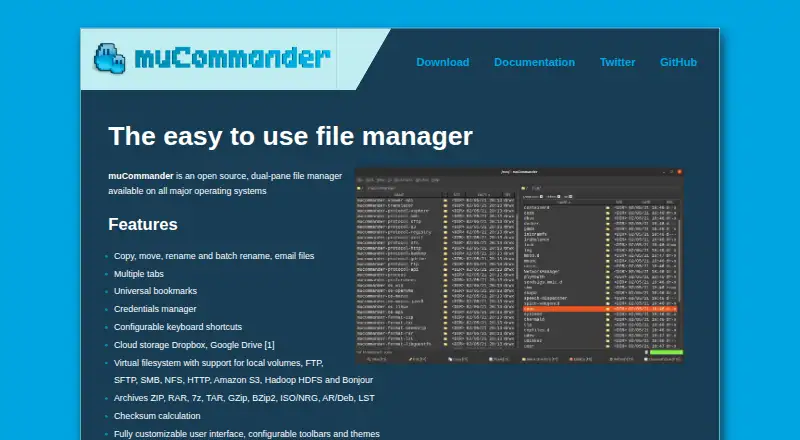
What muCommander is
muCommander is a free, open-source file manager for Windows, macOS and Linux. Its dual-pane view lets users work with two file locations side by side, while tabs provide another way to keep locations open in the same interface. It supports batch renaming for handling multiple file names together and can work with archives. Cloud storage access is also listed, so users can access cloud storage through the file manager. A portable version is available for people who want to use the software without treating it as a standard installed app. muCommander’s listed features focus on file browsing and file operations across its supported desktop platforms. It is available at no cost, and the listed details do not describe platform-specific feature differences or name particular cloud services. For users who want a free file manager with dual panes, tabs and archive support, it covers several common file-handling needs across three desktop operating systems.
Good
- Free and open source
- Available on Windows, macOS and Linux
- Includes dual-pane and tabbed views
- Supports batch renaming and archives
- Portable version available
Watch out
- No mobile platforms listed
- Specific cloud services are not named
Who it suits
muCommander suits desktop users looking for a free, open-source file manager on Windows, macOS or Linux. Its dual-pane layout, tabs, batch rename and archive support may be useful for people managing files across folders and storage locations.
Verdict
muCommander covers core file-management tasks with dual panes, tabs, batch renaming and archive support, without a listed price. Its stated platform range is limited to desktop operating systems.
Plans and prices
From muCommander's own pricing page, checked 7 Oct 2026.
| Plan | Price | What it gives you |
|---|---|---|
| muCommander | Free | Open source · GNU GPL v3 |
The facts
Each one read from muCommander's own pages, with the date it was checked.
What it does
- Archives
- It supports ZIP, RAR, 7z, TAR, GZip, BZip2, ISO/NRG, AR/Deb, and LST archives.checked 7 Oct 2026
- Archive support
- Yeschecked 20 Sep 2026
- Available systems
- Downloads are listed for macOS, Windows, and Linux, with additional packages for FreeBSD and other Java supporting operating systems.checked 7 Oct 2026
- Batch rename
- Yeschecked 20 Sep 2026
- Cloud storage
- The listed cloud storage services are Dropbox and Google Drive.checked 7 Oct 2026
- Cloud storage access
- Yeschecked 20 Sep 2026
- Data handling
- The privacy policy says it does not transfer or disclose user information to third parties, while noting that requested operations may copy file content to remote services, remote servers, or local files.checked 7 Oct 2026
- Dual-pane view
- Yeschecked 20 Sep 2026
- File operations
- It supports copying, moving, renaming, batch renaming, and emailing files.checked 7 Oct 2026
- File systems and protocols
- Its virtual filesystem supports local volumes, FTP, SFTP, SMB, NFS, HTTP, Amazon S3, Hadoop HDFS, and Bonjour.checked 7 Oct 2026
- License
- muCommander is released under the GNU GPL v3 license.checked 7 Oct 2026
- Navigation
- It supports multiple tabs, universal bookmarks, a credentials manager, and configurable keyboard shortcuts.checked 7 Oct 2026
- Other features
- It includes checksum calculation, customizable toolbars and themes, and support for many languages.checked 7 Oct 2026
- Portable version
- Yeschecked 20 Sep 2026
- Privacy
- The privacy policy says the application may persist file names and paths locally, but does not retain file content or information about file content.checked 7 Oct 2026
- Product
- muCommander is an open source, dual-pane file manager.checked 7 Oct 2026
- Runtime requirement
- Java 11 or later is required to run muCommander.checked 7 Oct 2026
- Security
- The download page lists SHA-256 checksums for release packages and an RPM GPG key.checked 7 Oct 2026
- Support and community
- Users are directed to the Gitter community, GitHub issues, and FAQ for questions and support.checked 7 Oct 2026
- Tabbed interface
- Yeschecked 20 Sep 2026
Where it runs
- Supported platforms
- Windows,macOS,Linuxchecked 20 Sep 2026
Alternatives to muCommander
- 1

Filestash
Free planOpen sourceAndroidiOSWebAPI9.2From $50 a month - 2

Owlfiles
Free planAndroidiOSExtensionmacOS8.7From $12.99 a year - 3

WinSCP
Free planOpen sourceWindows7.9Free plan - 4

Dolphin
Free planOpen sourceLinuxWindows7.8Free plan - 5
FileRun
AndroidiOSWebAPI7.8From €9.90 a year - 6

OneCommander
Free planWindows7.8$30 one-time