Markup Hero
Markup Hero creates markups from screenshots, uploaded or pasted images and PDFs, blank canvases, or captures made with its Chrome extension.
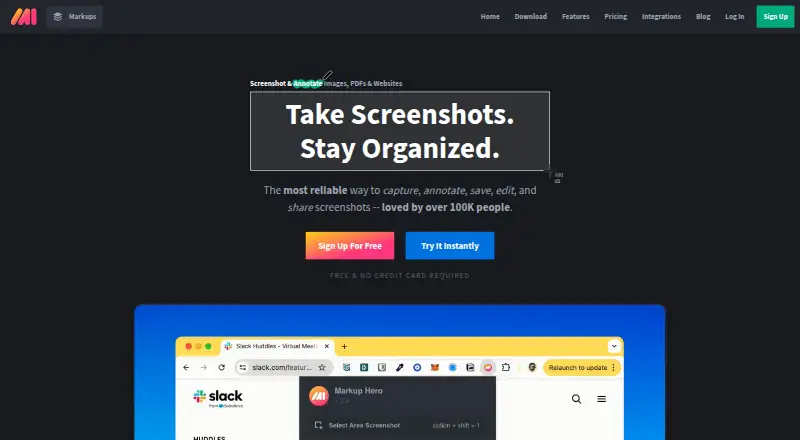
What Markup Hero is
Markup Hero creates markups from screenshots, uploaded or pasted images and PDFs, blank canvases, or captures made with its Chrome extension. It supports Mac, Windows, and Chrome, with tools for annotation, scrolling capture, OCR, and cloud sharing. Markups can be exported as JPG, PNG, or PDF files. The free plan is listed as free and allows up to 25 markups, with annotation, sharing, and export features; each free-plan markup can be edited for 24 hours. An account is required after five markups. Premium plans provide unlimited markups and editing: Premium Monthly costs $5 a month, while Premium Annual costs $3 a month billed annually. Super Hero Monthly is also $5 a month, and Super Hero Annual is $3 a month billed annually; those listings include unlimited markups, editing, and saving. Other listed plans include teams and lifetime access, but no prices are specified for them. The account requirement is described as connecting files to users and supporting customer service.
Good
- Creates markups from screenshots, images, PDFs, or blank canvases.
- Includes annotation, scrolling capture, and OCR.
- Exports JPG, PNG, and PDF.
- Chrome extension can create markups.
Watch out
- Free plan caps markups at 25.
- Free-plan markups are editable for 24 hours.
- An account is required after five markups.
Who it suits
Markup Hero suits people who need to capture or import visual material, annotate it, and share or export the result. It supports desktop use on Mac and Windows as well as Chrome-based capture.
Verdict
Markup Hero covers several ways to create and share annotated material, with free and paid options. Note the free markup cap and editing window, and the account prompt after five markups.
Plans and prices
From Markup Hero's own pricing page, checked 19 Sep 2026.
| Plan | Price | What it gives you |
|---|---|---|
| Forever Free | Free | 25 screenshots and history · Annotation, sharing, and export features |
| Premium Monthly | $5 a month | Unlimited markups · Permanent editing history · billed monthly |
| Premium Annual | $3 a month | Unlimited markups · Permanent editing history · billed annually |
| Premium Teams Annual | — | Team accounts · Centralized billing |
| Lifetime | — | Lifetime access |
| Super Hero Annual | $3 a month | Save 40%; unlimited markups, editing, and saving. · for annual |
| Super Hero Monthly | $5 a month | Unlimited markups, editing, and saving. · for monthly |
| Hero Plan | Free | Email and password required; maximum of 25 markups; editing available for 24 hours. |
The facts
Each one read from Markup Hero's own pages, with the date it was checked.
What it does
- Account Prompt Limit
- An account is required after five markups.checked 28 Sep 2026
- Account Requirement Reason
- The account requirement ties files to users and supports customer service.checked 28 Sep 2026
- Chrome Extension
- Markup Hero supports creating markups from its Chrome Extension.checked 28 Sep 2026
- Creation Methods
- Markups can be screenshots, uploaded or pasted images or PDFs, blank canvases, or Chrome Extension creations.checked 28 Sep 2026
- Customer Support
- The account requirement is partly intended to provide exceptional customer service and support.checked 28 Sep 2026
- Export formats
- JPG, PNG, PDFchecked 19 Sep 2026
- Markup Definition
- A markup is anything created in Markup Hero.checked 28 Sep 2026
- Premium Features
- The Super Hero plan includes everything in the free plan and all features.checked 28 Sep 2026
- Premium Unlimited Scope
- The Super Hero plan provides unlimited markups, editing, and saving.checked 28 Sep 2026
Where it runs
- Browser extension
- Yeschecked 19 Sep 2026
- Supported Platforms
- The help page describes Markup Hero for Mac, Windows, and Chrome.checked 28 Sep 2026
The company
- Company Name
- The copyright notice identifies the company as HERO, INC.checked 28 Sep 2026
Money
- Free Editing Window
- Free-plan markups can be edited for 24 hours.checked 28 Sep 2026
- Free plan
- Yeschecked 19 Sep 2026
- Free Plan Features
- The Hero plan includes every feature in the product.checked 28 Sep 2026
- Free Plan Limit
- The free Hero plan allows a maximum of 25 markups.checked 28 Sep 2026
The full review of Markup Hero
Overview
Markup Hero is a capture and annotation tool for people who need to mark up screenshots, images, or PDFs and share the result. It suits users who want several ways to create visual material without paying upfront. Its free tier includes the product’s feature set, but the 25-markup ceiling and 24-hour editing window make it better for occasional work than an enduring archive.
Key features
Capture and creation
A markup can begin as a screenshot, an uploaded or pasted image or PDF, a blank canvas, or a capture made through the Chrome extension. Scrolling capture adds value when a page extends beyond one screen. This range makes the tool useful for both documenting on-screen material and annotating files someone already has.
Annotation and output
Markup Hero includes annotation tools, OCR, cloud sharing, and exports to JPG, PNG, and PDF. The free plan includes annotation, sharing, and export, so the core workflow is not held back for unpaid users. That is a substantial advantage for occasional feedback or explanation; the constraints instead concern volume and how long free markups remain editable.
Accounts and editing
An account is required after five markups. Markups remain tied to users, which also supports customer service, but anyone seeking an account-free workflow will encounter friction early. The free plan caps creation at 25 markups and allows editing for 24 hours. That is workable for short-lived tasks, but a poor fit for material that needs revisions later. Super Hero removes these constraints with unlimited markups, editing, and saving.
Pricing
Markup Hero uses a freemium model. The Forever Free plan costs nothing and includes 25 screenshots, history, annotation, sharing, and export features. The broader Hero plan also includes every product feature, but its 25-markup maximum and 24-hour editing window limit how much long-term value those features provide.
Super Hero Monthly costs $5 a month, billed monthly, for unlimited markups, editing, and saving. Super Hero Annual costs $3 a month, billed for annual, and includes the same unlimited scope. The annual price is the lower-cost choice for steady use, while monthly billing suits those unwilling to commit annually. Premium Monthly is also priced at $5 a month, billed monthly, and Premium Annual at $3 a month, billed annually; both include unlimited markups and permanent editing history. These descriptions emphasize history rather than explicitly naming unlimited saving, so readers should distinguish them from Super Hero’s stated unlimited saving.
Premium Teams Annual includes team accounts and centralized billing with custom pricing. Lifetime offers lifetime access with custom pricing. Both are aimed at buyers whose needs match those terms, but without a published price they cannot be compared on cost.
Platforms
Markup Hero is available as a browser extension and on Mac and Windows, with Chrome supported for extension-based creation. That covers common desktop workflows, but it is not a fit for Linux or mobile users seeking a native app.
Who it's for
Choose Markup Hero for desktop screenshot and document annotation when multiple input types, scrolling capture, OCR, and cloud sharing matter. The free plan is sensible for occasional, near-term markups. Teams or individuals who need continuing edits and unlimited volume should consider a paid plan; those who want to avoid an account prompt or need mobile or Linux support should look elsewhere.
Pros and cons
- Pro: Screenshots, imported images and PDFs, blank canvases, and Chrome captures give users several practical starting points.
- Pro: Annotation, OCR, cloud sharing, scrolling capture, and JPG, PNG, and PDF export cover a broad markup workflow, including on the free plan.
- Con: Free editing lasts only 24 hours, making the free tier unsuitable for work that needs later revision.
- Con: The 25-markup ceiling and account requirement after five creations limit users who want a large or account-free workflow.
- Con: Mac and Windows support leaves Linux and mobile users without a listed platform option.
Alternatives
For a broader comparison, browse Screenshot Annotation Software or Screen Capture Software.
- Awesome Screenshot is worth considering if you need iOS or web access alongside desktop and extension support, with a free plan offering screenshot and recording quotas.
- Monosnap may suit users who want Linux support, a free trial, and a defined free storage and upload allowance.
- Screenpresso is a Windows-only option whose free plan includes image and HD video capture, though video and sharing carry branding and its editor is limited.
- ShareX is a free, open-source Windows alternative with no account requirement.
- Shottr is a macOS alternative with a free tier usable indefinitely, though it begins prompting users to consider upgrading after 30 days.
- Snagit is a paid Mac and Windows option at $39 a year, suited to readers who prefer a subscription product without a free plan.
- ApexShot is a Linux desktop alternative with a free plan that includes cloud storage, monthly uploads, retention, and public share links.
- CaptureWebPage is a free web option for users who prefer local offline storage and no account requirement.
Verdict
Markup Hero is a good choice for desktop users who want a flexible way to create, annotate, and share screenshots or documents, especially when the free feature set is enough for short-term tasks. Choose a paid tier for unlimited work and continuing edits; look elsewhere if the 24-hour free editing window, early account prompt, or lack of mobile and Linux support conflicts with your workflow.
Alternatives to Markup Hero
- 1

Awesome Screenshot
Free planiOSWebExtensionmacOS8.3From $5 a month - 2

Monosnap
Free planWebExtensionLinuxmacOS8.1From $2.50 a month - 3
Usersnap
AndroidiOSWebAPI7.9From €49 a month - 4

Greenshot
Free planWindows7.8$1.99 one-time - 5
ShareX
Free planOpen sourceWindows7.6Free plan - 6

PicPick
Free planWindows7.5From $3,630 a year