
Monosnap
Monosnap captures, edits, uploads, and shares screenshots and videos.
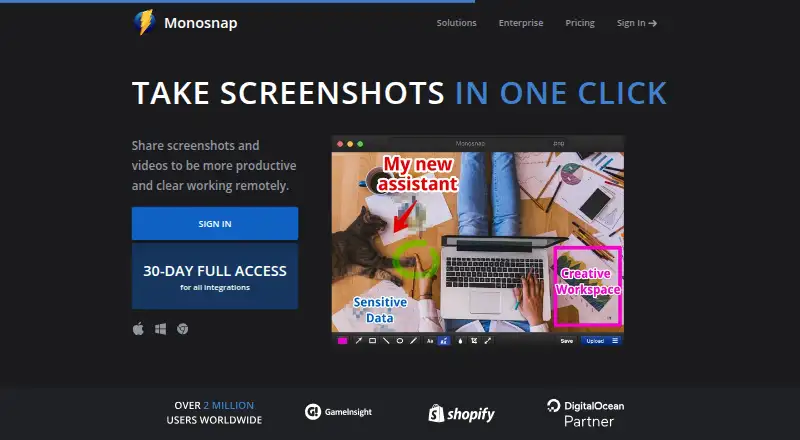
What Monosnap is
Monosnap captures, edits, uploads, and shares screenshots and videos. It can capture a full screen, a selected area, or a window, with hotkeys for capture. Its editor offers highlighting, blur for sensitive information, drag-and-drop editing, and export to an external editor. Monosnap also records video and GIFs, with shareable links for content. The browser extension can record desktop, window, or browser content in WebM and GIF, and add audio to videos. Apps and extensions are available for Windows, macOS, Linux, and the web. The Free plan includes 2 GB of storage, a 100 MB single-file upload limit, five-minute video recordings, and 1,000 monthly uploads. Non-Commercial, Commercial, and Enterprise plans are also listed, though their prices are not provided here. Commercial or public use is paid and may be subject to an additional agreement.
Good
- Captures fullscreen, area, or window screenshots.
- Records videos and GIFs.
- Editor can highlight and blur sensitive information.
- Free plan includes 2 GB of storage.
- Chrome extension can add audio to videos.
Watch out
- Free recordings are limited to five minutes.
- Free single-file uploads are limited to 100 MB.
- Commercial or public use is paid.
- Free plan has 1,000 monthly uploads.
Who it suits
Monosnap suits people who need screenshot and video capture with editing and link sharing across desktop, web, or a Chrome extension. The Free plan may fit individual users who can work within its storage, upload, and recording limits.
Verdict
Monosnap combines screen capture, recording, editing, and sharing across several platforms. Check the Free plan's limits and the paid-use rule if you need commercial or public use.
Plans and prices
From Monosnap's own pricing page, checked 28 Sep 2026.
| Plan | Price | What it gives you |
|---|---|---|
| Non-Commercial | $2.50 a month | 10+ GB storage · Unlimited video recording · 2 GB single-file upload · External cloud integrations · yearly |
| Commercial | $5 a month | Commercial use · Team account · Unlimited apps · Private links · 10+ GB/member storage · 2+ GB single-file upload · yearly |
| Enterprise | Priced on request | Commercial use · SSO · Tailored support & SLA · Advanced security options · Custom contracts and invoicing |
| Free | — | Personal & family use only · 2 GB Monosnap storage · 5-minute video recording · 100 MB single-file upload |
The facts
Each one read from Monosnap's own pages, with the date it was checked.
Where it runs
- Browser extension
- The Chrome extension can record desktop, window or browser content in WebM and GIF and add audio to videos.checked 28 Sep 2026
- Supported platforms
- web,windows,macos,linux,chrome_extensionchecked 20 Sep 2026
- Windows availability
- Monosnap provides a Windows app.checked 28 Sep 2026
What it does
- Cloud storage
- Monosnap offers its own cloud storage and integrations with DigitalOcean Spaces, Amazon S3, S3-compatible storage, Google Drive, Dropbox, Box, FTP, SFTP and FTPS.checked 28 Sep 2026
- Commercial-use rule
- Commercial or public use is paid and may be governed by an additional agreement.checked 28 Sep 2026
- Editing
- The editor supports highlighting, blur for sensitive data, drag and drop, and export to an external editor.checked 28 Sep 2026
- Enterprise security
- Enterprise includes advanced ACL, settings control, single sign-on, enterprise SLAs and support, and zero-trust integrations.checked 28 Sep 2026
- Export formats
- PNG,JPG,MP4,GIF,WEBM,WEBP,SVG,MOVchecked 20 Sep 2026
- OCR text extraction
- Yeschecked 20 Sep 2026
- Purpose
- Monosnap lets users capture, edit, upload and share screenshots and videos.checked 28 Sep 2026
- Recording
- It records videos and GIFs.checked 28 Sep 2026
- Screenshot capture
- It captures fullscreen, area or window screenshots and supports hotkeys.checked 28 Sep 2026
- Scrolling capture
- Yeschecked 20 Sep 2026
- Shareable links
- Yeschecked 20 Sep 2026
- Support
- The pricing page directs users to [email protected] for support.checked 28 Sep 2026
Money
- Commercial plan
- The Commercial plan provides commercial use, team accounts, unlimited apps and private links.checked 28 Sep 2026
- Free plan
- Yeschecked 20 Sep 2026
- Free recording limit
- The Free plan limits video recording to 5 minutes.checked 28 Sep 2026
- Free storage
- The Free plan includes 2 GB of Monosnap storage.checked 28 Sep 2026
The company
- Headquarters
- 2035 Sunset Lake Rd B2, Newark, Delaware 19702-2600, United Stateschecked 28 Sep 2026
The full review of Monosnap
Monosnap is a screen-capture tool for making and sharing screenshots, videos, and GIFs. It suits people who need to annotate what they see or send a recording as well as an image. Its capture and editing range is broad, but free-use caps are tight and commercial or public use requires a paid plan.
Overview
Monosnap combines capture, editing, uploading, and sharing in one workflow. It can capture a full screen, window, or selected area, then let users highlight details or blur sensitive information before sharing. That combination is useful for visual feedback and documentation; it is less compelling if all you need is an occasional screenshot without a cloud-sharing step.
Scrolling capture and OCR text extraction extend it beyond basic screen grabs. The editor also supports drag and drop and export to an external editor, so users can handle quick markups in Monosnap and move more involved edits elsewhere. Shareable links make distribution direct, though the free tier's storage and upload ceilings can interrupt frequent use.
Key features
Capture, annotate, and record
Hotkeys support repeat screenshot capture, while video and GIF recording cover situations where a sequence is clearer than a still image. Highlighting and blur are practical essentials for directing attention or concealing information. Recording is more flexible in the Chrome extension: it can capture desktop, window, or browser content as WebM or GIF and add audio to videos.
Formats and sharing
Exports include PNG, JPG, MP4, GIF, WEBM, WEBP, SVG, and MOV, a broad mix for stills and recordings. Cloud storage and shareable links keep capture and delivery together, but the amount of storage and upload capacity depends heavily on the plan. The free plan's 100 MB per-file ceiling can be a constraint for larger uploads.
Pricing
Monosnap has a free plan and a 30-day trial. Free costs nothing for one user and includes 2 GB storage, a 100 MB single-file upload limit, five minutes of video recording, and 1,000 monthly uploads. That is enough to assess the workflow or handle occasional captures, but the short recording limit and upload quota make it a poor fit for sustained recording or a busy shared process.
Non-Commercial has custom pricing for one user, with 10+ GB storage, a 2 GB single-file upload limit, 10 GB monthly bandwidth, and unlimited monthly uploads. It is the step up for heavier personal use, but it does not grant commercial or public use. Commercial also has custom pricing, starts at one or more users, and provides 10+ GB storage per member, a 2+ GB file limit, 20+ GB monthly bandwidth, and unlimited monthly uploads. It adds commercial use, team accounts, unlimited apps, and private links; the extra capacity and use rights make it the relevant tier for business workflows.
Enterprise has custom pricing and includes single sign-on, tailored support and SLA, custom features, advanced ACL and settings control, and zero-trust integrations. It is aimed at organizations that need administrative controls and enterprise security rather than simply more capture capacity. Commercial or public use is paid and may be governed by an additional agreement, so the free plan is not suitable for that purpose. The pricing page directs support requests to [email protected].
Platforms
Monosnap is available on Windows, macOS, Linux, the web, and as a browser extension. The Chrome extension records desktop, window, or browser content, while desktop apps make the service relevant beyond browser-only capture. This breadth suits mixed-device workflows; users should still match the extension's recording formats and the desktop app's role to their own capture needs.
Who it's for
Monosnap is a good fit for people who regularly need to explain a visual issue, share annotated captures, or record a short process across desktop and browser environments. Its blur, highlighting, OCR, and scrolling capture make it more capable than a simple screenshot utility. It is a weaker fit for long recordings on the free plan, high-volume uploads without a paid tier, or commercial and public use without a paid plan.
Pros and cons
- Pro: Screenshots, video, GIFs, editing, and cloud sharing sit in one workflow, reducing the need to move between separate capture and delivery tools.
- Pro: Scrolling capture, OCR, blur, and highlighting support more involved documentation and feedback than basic screen capture.
- Pro: Windows, macOS, Linux, web, and extension availability support varied device and browser setups.
- Con: Free video recording stops at five minutes, and free storage is 2 GB with a 100 MB per-file upload limit.
- Con: Commercial or public use requires a paid plan and may involve an additional agreement.
- Con: Paid tiers use custom pricing, so users cannot compare their cost from a fixed published price.
Alternatives
For an alternative with a free plan that allows up to 100 screenshots, 20 recordings, and recordings up to six hours at up to 720p, consider Awesome Screenshot; that recording allowance may suit users whose sessions exceed Monosnap Free's five-minute cap.
Screenpresso is a Windows-focused option with free image and HD video capture, a limited editor, branded sharing, and commercial use on its Free plan. Consider it if Windows use and free commercial rights matter more than Monosnap's broader platform coverage and cloud workflow.
Markup Hero offers a free plan capped at 25 screenshots and history, with annotation, sharing, and export; choose it if that bounded screenshot-and-markup allowance fits your needs.
ShareX is a free, open-source Windows option that requires no account.
Pixtel is another Windows option.
Shottr is a macOS option.
Snagit is a paid option for macOS and Windows.
FireShot is available across extension, Linux, macOS, and Windows platforms.
For category comparisons, browse Screen Capture Software, Screenshot Annotation Software, and Screenshot Software.
Verdict
Choose Monosnap if you want screenshots, short recordings, annotation, and shareable cloud links in one tool across several platforms. Its range is the main reason to pick it; the free quotas and paid-use rule are the main reasons to look elsewhere, particularly for long recordings or commercial work on a fixed budget.
Getting started
- Open the Monosnap website or use its Windows, macOS, Linux or Chrome extension offering
- Choose the Free plan or another available plan
- Create or access your Monosnap account
- Capture a fullscreen, area or window screenshot with the app or hotkeys
- Edit the capture with annotations, blur or drag-and-drop tools
- Upload, export or share the result with a link
Limits worth knowing
The Free plan allows one user, 2 GB of storage, 100 MB per uploaded file, five-minute video recordings and 1,000 uploads each month. Commercial or public use is paid and may be subject to an additional agreement.
Questions
Does Monosnap have a free plan?
Yes. The Free plan costs nothing and includes one user, 2 GB of storage, a 100 MB single-file limit, five-minute recordings and 1,000 monthly uploads.
Which platforms does Monosnap support?
Monosnap is available on the web, Windows, macOS, Linux and as a Chrome extension.
What can the Chrome extension record?
The Chrome extension can record desktop, window or browser content in WebM and GIF, and it can add audio to videos.
What export formats are available?
Listed formats are PNG, JPG, MP4, GIF, WEBM, WEBP, SVG and MOV.
Are there plans for teams and businesses?
The Commercial plan includes commercial use, team accounts, unlimited apps and private links. Enterprise adds single sign-on, advanced access controls, settings control, tailored support and service-level agreements.
Is Monosnap open source?
The listed facts do not identify Monosnap as open source.
Alternatives to Monosnap
- 1

Awesome Screenshot
Free planiOSWebExtensionmacOS8.3From $5 a month - 2
Usersnap
AndroidiOSWebAPI7.9From €49 a month - 3

Greenshot
Free planWindows7.8$1.99 one-time - 4
ShareX
Free planOpen sourceWindows7.6Free plan - 5
Markup Hero
Free planExtensionmacOSWindows7.6From $3 a month - 6

PicPick
Free planWindows7.5From $3,630 a year