
Greenshot
Greenshot is screenshot software for Windows PCs, with tools for capturing, editing, and sharing images.
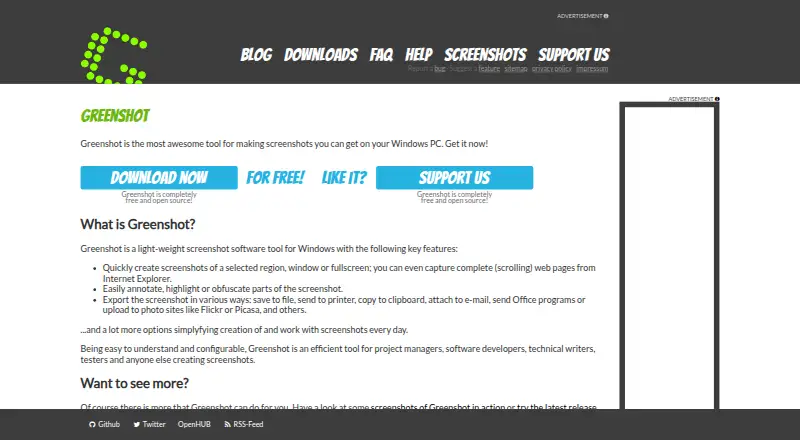
What Greenshot is
Greenshot is screenshot software for Windows PCs, with tools for capturing, editing, and sharing images. You can capture a selected region, a window, or the full screen; it can also capture scrolling web pages from Internet Explorer. After capture, annotation and highlighting tools help mark up an image, while an obfuscation tool can conceal parts of it. Screenshots can be saved, printed, copied, emailed, sent to Office, or uploaded to photo sites such as Flickr or Picasa. Greenshot includes OCR text extraction, and its listed export formats are PNG and JPEG. The software is free and open source, with a free plan at no cost; an optional cost contribution is $1.99, paid once. It is intended for people who create screenshots, including project managers, developers, technical writers, and testers. The latest stable Windows release is version 1.3.315, dated 20 Mar 2026. Its source code is available in Git repositories.
Good
- Captures regions, windows, and full screens.
- Supports scrolling capture from Internet Explorer.
- Includes annotation, highlighting, and obfuscation tools.
- Exports as PNG and JPEG.
- Free and open source for Windows.
Watch out
- Listed platform support is Windows only.
- Scrolling web capture is specified for Internet Explorer.
- Windows 8 users may see a .NET 3.5 prompt.
Who it suits
Greenshot suits Windows users who need to capture and annotate screenshots for project, development, technical writing, or testing work. It also fits people who need OCR or several ways to export captures.
Verdict
Greenshot brings several capture types, annotation, OCR, and export options together in a free, open-source Windows tool. Check the Internet Explorer limit for scrolling captures and the Windows-only platform listing before choosing it.
Plans and prices
From Greenshot's own pricing page, checked 20 Sep 2026.
| Plan | Price | What it gives you |
|---|---|---|
| Free | Free | Screenshot capture · Image annotation and editing · Export to files, clipboard, printer, and email |
| Greenshot for Windows | Free | Free and open source for Windows |
| Cost contribution | $1.99, paid once | To cover the project's own costs |
The facts
Each one read from Greenshot's own pages, with the date it was checked.
What it does
- Annotation Tools
- Screenshots can be annotated and highlighted.checked 28 Sep 2026
- Community Tested
- The latest stable version has been thoroughly tested by the community.checked 28 Sep 2026
- Configurable Tool
- Greenshot is easy to understand and configurable.checked 28 Sep 2026
- Export Destinations
- Screenshots can be saved, printed, copied, emailed, sent to Office, or uploaded to photo sites.checked 28 Sep 2026
- Export formats
- PNG,JPEGchecked 20 Sep 2026
- Fullscreen Capture
- Users can quickly capture the fullscreen.checked 28 Sep 2026
- Latest Release
- The latest stable Windows release is version 1.3.315.checked 28 Sep 2026
- Obfuscation Tool
- Parts of screenshots can be obfuscated.checked 28 Sep 2026
- OCR text extraction
- Yeschecked 20 Sep 2026
- Photo Site Uploads
- Uploads are supported to photo sites such as Flickr or Picasa.checked 28 Sep 2026
- Region Capture
- Users can quickly capture a selected region.checked 28 Sep 2026
- Release Date
- The latest stable release is dated 20 Mar 2026.checked 28 Sep 2026
- Scrolling capture
- Yeschecked 20 Sep 2026
- Scrolling Web Capture
- Complete scrolling web pages can be captured from Internet Explorer.checked 28 Sep 2026
- Source Repositories
- Source code is available in Greenshot's Git repositories at GitHub or BitBucket.checked 28 Sep 2026
- Target Users
- Greenshot is intended for project managers, developers, technical writers, testers, and others creating screenshots.checked 28 Sep 2026
- Window Capture
- Users can quickly capture a window.checked 28 Sep 2026
- Worldwide Usage
- The stable version is used by many people around the world.checked 28 Sep 2026
Money
- Free Open Source
- Greenshot is completely free and open source.checked 28 Sep 2026
- Free plan
- Yeschecked 20 Sep 2026
Where it runs
- Supported platforms
- Windowschecked 20 Sep 2026
- Windows 8 Note
- Windows 8 users may be asked to install .NET 3.5, but can skip it.checked 28 Sep 2026
- Windows Support
- Greenshot is screenshot software for Windows PCs.checked 28 Sep 2026
The full review of Greenshot
Greenshot is a Windows screenshot utility for capturing, marking up, and sharing images. It is a strong fit for people who produce project documentation, bug reports, or technical explanations. Its focused capture-and-export workflow is compelling at no cost, but the Windows requirement and Internet Explorer-only scrolling capture narrow its reach.
Overview
Capture a region, a window, or the full screen, then add annotations and highlights or obscure parts of the image. That combination suits work where a screenshot needs to explain a problem or guide a reader, and the option to redact details helps when preparing an image for others. OCR text extraction is another useful tool when the image contains text someone needs to reuse.
Greenshot sends captures to files, the clipboard, a printer, email, Office, or photo sites such as Flickr and Picasa. PNG and JPEG are the supported export formats. Scrolling capture can produce complete web pages, but only in Internet Explorer; users whose browsing workflow relies on another browser should not choose it for that task. The latest stable Windows release is version 1.3.315, dated 20 Mar 2026.
Key features
- Three capture modes: Region, window, and fullscreen capture cover both a precise detail and the broader screen context, without making users switch capture tools.
- Annotation and highlighting: Markup helps turn an image into an explanation, which is valuable for technical writers, testers, developers, and project managers sharing instructions or findings.
- Obfuscation: The ability to obscure part of a screenshot is useful before sharing images that contain information that should not be exposed.
- OCR: Text extraction makes screenshot content more useful when someone needs to work with the words in an image rather than only view it.
- Broad export destinations: Saving, printing, copying, emailing, sending to Office, and uploading to photo sites give users several ways to move a finished capture into their workflow. The image formats remain PNG and JPEG.
- Scrolling capture: Complete-page capture is a welcome extra for Internet Explorer users, but the browser restriction makes it a poor reason to adopt Greenshot for other web workflows.
Pricing
Greenshot is free and open source. The Free plan costs nothing and includes screenshot capture, image annotation and editing, and export to files, the clipboard, printer, and email. The Greenshot for Windows plan is also free, with the software free and open source for Windows. There is no paid tier to unlock the core capture and markup workflow.
A separate Cost contribution option is $1.99, paid once to help cover the project's own costs. It is a contribution rather than a required purchase: users can use Greenshot without paying. That makes the free option suitable for individual or project use where Windows is available, while the contribution is for users who want to support the project.
Platforms
Greenshot is for Windows PCs. That makes it a straightforward fit for Windows users, but not a cross-platform choice for people who need the same tool on macOS or Linux. Windows 8 users may be asked to install .NET 3.5, though they can skip that installation.
Who it's for
Project managers, developers, technical writers, and testers are natural users: each can capture a screen, add context, and send the resulting image through a familiar export route. It also makes sense for anyone who wants a free, configurable Windows tool for routine annotated screenshots. Choose something else if you need scrolling captures outside Internet Explorer or need a tool for a non-Windows device.
Pros and cons
Pros
- Free and open source: Capture, annotation, editing, and several export paths are available without a purchase.
- Useful end-to-end screenshot workflow: Region, window, and fullscreen capture pair with annotation, highlighting, obfuscation, OCR, and multiple destinations.
- Configurable: Its configurable design can suit users who want to adapt a regular screenshot tool to their workflow.
Cons
- Windows only: Users on macOS or Linux need a different option.
- Limited scrolling capture: Full-page web capture is confined to Internet Explorer, limiting its value for other browser workflows.
- PNG and JPEG exports: The supported image formats may not fit workflows that require other export formats.
Alternatives
Screenshot Annotation Software, Screen Capture Software, and Screenshot Software are useful starting points for comparing tools by category.
- Awesome Screenshot is worth considering if you want a choice of extension, iOS, macOS, web, or Windows platforms and a free plan with stated screenshot and recording allowances.
- ShareX is another free, open-source Windows option, and may suit users who prefer a free tool that does not require an account.
- Screenpresso offers a free plan with image capture, HD video capture, a limited editor, and branded sharing; consider it if video capture is also a priority.
- Monosnap has a free plan and trial across extension, Linux, macOS, web, and Windows, with stated storage, upload, recording, and monthly upload limits; consider it if cross-platform access matters.
- Flameshot is a free, open-source screenshot alternative with downloads for Windows, macOS, and Linux, making it the more suitable choice when you need those platforms.
- PicPick offers a free Home plan for personal, non-commercial use with screen capture, image editing, and design tools; consider it for that personal-use combination.
- Markup Hero has a free plan capped at 25 screenshots and history, with annotation, sharing, and export; it may suit users whose needs fit that allowance.
- ScreenAI offers a free plan with capture, annotation, OCR, quick redaction, several export formats, native sharing, and 10 AI requests per day; consider it if those extra capabilities matter.
Verdict
Choose Greenshot for a free, open-source Windows workflow that brings capture, markup, OCR, and sharing together, especially for documentation, development, testing, or project communication. Its main advantages are the useful annotation and export tools at no cost. Look elsewhere if you need a non-Windows app, broader image-format support, or scrolling capture outside Internet Explorer.
Getting started
- Open https://getgreenshot.org/
- Install Greenshot on a Windows PC
- Choose a region, window or full-screen capture
- Use scrolling capture for a complete Internet Explorer page
- Annotate, highlight or obscure the captured image
- Save, copy, print, email, send to Office or upload the result
Limits worth knowing
Greenshot is provided for Windows PCs. Scrolling web capture is specified for Internet Explorer, and the listed export formats are PNG and JPEG.
Questions
Is Greenshot free?
Yes. The Windows plan is free, and Greenshot is completely free and open source.
Which platforms does Greenshot support?
Greenshot supports Windows PCs.
Can Greenshot capture scrolling pages?
Yes. It can capture complete scrolling web pages from Internet Explorer.
What export formats are listed?
The listed formats are PNG and JPEG.
Does Greenshot include OCR?
Yes. OCR text extraction is included.
Is there an optional payment?
A cost-contribution option is listed at $1.99, paid once.
Alternatives to Greenshot
- 1

Awesome Screenshot
Free planiOSWebExtensionmacOS8.3From $5 a month - 2

Monosnap
Free planWebExtensionLinuxmacOS8.1From $2.50 a month - 3
Usersnap
AndroidiOSWebAPI7.9From €49 a month - 4
ShareX
Free planOpen sourceWindows7.6Free plan - 5
Markup Hero
Free planExtensionmacOSWindows7.6From $3 a month - 6

PicPick
Free planWindows7.5From $3,630 a year