
Flameshot
Flameshot is a free, open-source screenshot tool for Linux, macOS, and Windows.
What Flameshot is
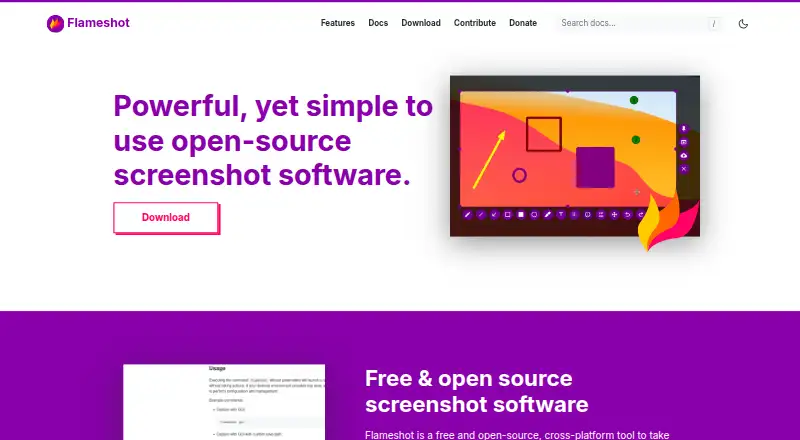
Flameshot is a free, open-source screenshot tool for Linux, macOS, and Windows. Its capture process starts with selecting an area of the screen; you can then annotate the image on-screen and save it to your computer. Editing tools include arrows, text, highlighting, drawing, shapes, counters, solid color boxes, and blur or pixelation. The interface color, visible buttons, keyboard shortcuts, and image-saving behavior can be customized. Export formats include PNG, TIFF, WebP, and additional Qt image formats. A command-line interface can run without opening the graphical app and supports scripting and key bindings. Flameshot can upload screenshots to Imgur, alerts users before uploading, and allows deletion afterward. The project warns that uploaded images are no longer under the user’s control, and recommends pixelation or a filled rectangle rather than blur to protect private details. Windows downloads include 64-bit installer and portable versions; macOS installation is available through Homebrew or a DMG, while Linux options include AppImage, package managers, Snapcraft, and Flathub.
Good
- Annotation tools include arrows, text, shapes, and pixelation
- Customizable shortcuts and image-saving behavior
- CLI supports scripting and key bindings
- Available on Linux, macOS, and Windows
Watch out
- Uploaded Imgur images are no longer under your control
- The project recommends pixelation or a filled rectangle, not blur, for privacy
Who it suits
Flameshot suits people who want to capture and annotate screen areas before saving images locally. Its command-line interface may also suit users who want screenshot commands for scripts or key bindings.
Verdict
Flameshot combines screen-area capture, annotation, and local saving across desktop platforms. Treat Imgur uploads carefully when an image contains private details.
Plans and prices
From Flameshot's own pricing page, checked 7 Oct 2026.
| Plan | Price | What it gives you |
|---|---|---|
| Flameshot | Free | Free and open-source screenshot software · 64-bit downloads for Windows, macOS, and Linux |
The facts
Each one read from Flameshot's own pages, with the date it was checked.
What it does
- Annotations
- Built-in editing tools include arrows, text highlighting, blur or pixelation, text, drawing, shapes, counters, and solid color boxes.checked 7 Oct 2026
- Capture workflow
- Users select a screen area, annotate it on-screen if desired, and save the screenshot to their computer.checked 7 Oct 2026
- Command line
- The CLI can run commands without launching the GUI and supports scripting and key bindings.checked 7 Oct 2026
- Customization
- Users can customize the interface color, button selection, keyboard shortcuts, and how images are saved.checked 7 Oct 2026
- Documentation and help
- Official docs include installation guides, FAQ, troubleshooting, Wayland help, Windows help, configuration, CLI options, and privacy guidance.checked 7 Oct 2026
- Export formats
- PNG, TIFF, WebP, and additional Qt image formatschecked 19 Sep 2026
- Imgur integration
- Flameshot can upload screenshots to Imgur and alerts users before upload; it also allows deletion after upload.checked 7 Oct 2026
- Privacy guidance
- The project warns that uploaded images are no longer under the user's control and recommends pixelation or a filled rectangle instead of blur for privacy protection.checked 7 Oct 2026
- Project support
- The project invites contributions through documentation, bug reproduction, design, C++ development, and feature suggestions.checked 7 Oct 2026
- Purpose
- Flameshot is a free and open-source, cross-platform tool for taking screenshots.checked 7 Oct 2026
Money
- Free plan
- Yeschecked 19 Sep 2026
Where it runs
- Linux support
- The site lists 64-bit Linux AppImage, package manager, Snapcraft, and Flathub installation options.checked 7 Oct 2026
- macOS support
- The site offers 64-bit macOS installation via Homebrew or a DMG download.checked 7 Oct 2026
- Windows support
- The site offers 64-bit Windows installer and portable downloads.checked 7 Oct 2026
The full review of Flameshot
Flameshot is a free, open-source desktop screenshot utility for Linux, macOS, and Windows. It suits people who want to capture a selected area, mark it up immediately, and keep control of the saved file. The trade-off is a deliberately focused tool rather than a full recording or team-sharing suite.
Overview
The workflow is direct: select a screen region, annotate on screen when useful, and save the result to the computer. That makes Flameshot a practical choice for support instructions, bug reports, documentation, and any situation where a visual explanation matters more than elaborate production features. Local saving also avoids requiring an account or subscription for ordinary captures.
It is less suitable if your priority is extensive video recording, cloud-based collaboration, or a large asset-management system. Flameshot concentrates its value in fast still-image capture and editing.
Key features
Capture and editing
The built-in toolbar covers arrows, text, highlighting, blur or pixelation, freehand drawing, shapes, counters, and solid-color boxes. Having these tools at the capture point means common callouts and redactions can be completed without opening a separate editor. The privacy distinction matters: the project recommends pixelation or a filled rectangle instead of blur when concealing sensitive information.
Customization and automation
You can change the interface color, choose which buttons appear, configure keyboard shortcuts, and control how images are saved. Those settings make the interface more appropriate for personal habits or repeatable support procedures. A command-line interface can run commands without launching the GUI and supports scripting and key bindings, giving technical users a way to integrate capture into automated workflows.
Formats and sharing
Exports include PNG, TIFF, WebP, and additional Qt image formats, covering common web, documentation, and archival needs. Imgur uploading is built in and the application warns before sending an image, with an option to delete it afterward. That convenience should not be mistaken for private storage: once uploaded, an image is no longer under your control, so inspect captures carefully before confirming.
Pricing
Flameshot is free and open source. The Flameshot plan costs nothing and includes 64-bit downloads for Windows, macOS, and Linux. There is no free trial because the software is already offered as a free plan, with no paid tier or subscription term to manage.
Platforms
Linux users can install a 64-bit AppImage, package-manager build, Snapcraft package, or Flathub version. macOS is supported through Homebrew or a 64-bit DMG. Windows has both a 64-bit installer and a portable download. This range is useful for mixed-device households and teams that need the same capture approach across desktop operating systems.
Who it's for
Choose Flameshot for free-form screenshot annotation, local file saving, and customizable shortcuts on a desktop. It is particularly well matched to developers, support staff, educators, and documentation writers who repeatedly point out interface details. Look elsewhere if you need a substantial recording workflow, hosted collaboration, or managed cloud libraries.
Pros and cons
Pros
- Free and open source: there is no subscription or trial deadline, making it easy to deploy broadly.
- Strong annotation set: arrows, text, highlights, shapes, counters, drawing, and redaction-oriented tools cover most explanatory captures.
- Cross-platform distribution: Linux, macOS, and Windows packages include portable and multiple installation routes.
- Automation support: CLI commands, scripting, and key bindings suit repeatable technical workflows.
- Flexible output: PNG, TIFF, WebP, and other Qt formats accommodate varied downstream uses.
Cons
- Focused scope: it is a still-capture and markup tool, not a broad recording or collaboration suite.
- Imgur requires caution: uploaded images leave your control, so sensitive content should be pixelated or covered before upload.
Alternatives
Awesome Screenshot is the better fit when browser, iOS, web, and desktop coverage, plus capped screenshot and recording plans, matter more than an open-source desktop utility.
ShareX suits Windows users who want another free, open-source option with no account requirement.
Screenpresso is worth considering for Windows users who need image and HD video capture, accepting branding and feature limits on its free plan.
Greenshot fits Windows users seeking capture, annotation, and export to files, clipboard, printer, or email.
Monosnap is aimed at users who want cross-platform capture with cloud storage, uploads, and limited video recording on its free tier.
PicPick targets Windows users needing screen capture, image editing, and design tools, with its Home plan restricted to personal, non-commercial use.
Markup Hero is a choice for browser and desktop users who prefer hosted screenshot history and sharing, with 25 screenshots on its free plan.
ScreenAI suits users who want OCR, quick redaction, native sharing, and a daily allowance of AI requests alongside capture and annotation.
For broader category comparisons, see Screenshot Annotation Software, Screen Capture Software, and Screenshot Software.
Verdict
Flameshot is an easy recommendation for desktop users who want capable on-screen annotation, configurable controls, and local saving without paying. Its main reason to choose it is the combination of open-source licensing, cross-platform installers, and CLI automation. Look elsewhere when video, cloud collaboration, or a larger sharing platform is central to your work.
Alternatives to Flameshot
- 1

Awesome Screenshot
Free planiOSWebExtensionmacOS8.3From $5 a month - 2

Monosnap
Free planWebExtensionLinuxmacOS8.1From $2.50 a month - 3
Usersnap
AndroidiOSWebAPI7.9From €49 a month - 4

Greenshot
Free planWindows7.8$1.99 one-time - 5
ShareX
Free planOpen sourceWindows7.6Free plan - 6
Markup Hero
Free planExtensionmacOSWindows7.6From $3 a month