Macro Recorder
Macro Recorder captures mouse and keyboard actions on Windows or Mac and replays them, helping users repeat desktop procedures.
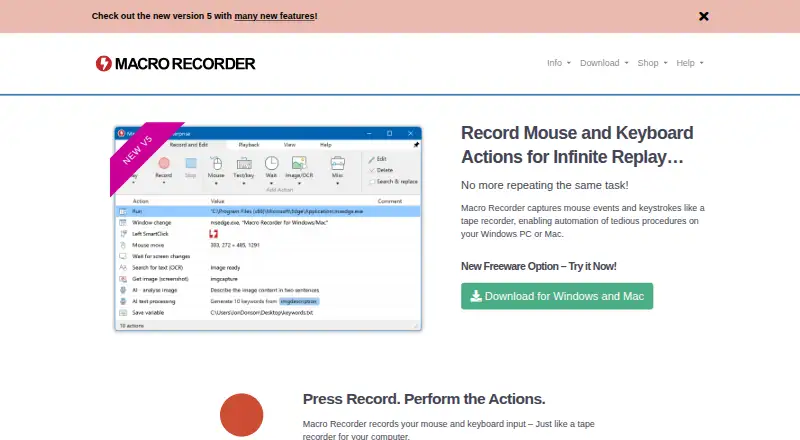
What Macro Recorder is
Macro Recorder captures mouse and keyboard actions on Windows or Mac and replays them, helping users repeat desktop procedures. Recordings appear as individual actions that can be edited or rearranged, and macros can also be assembled step by step. SmartClick looks for visual context around a captured click target during playback and clicks when it finds a match. The software can capture screen images, recognize OCR text and extract barcode or QR code data into variables. Optional cloud and self-hosted AI integrations include OpenAI and local models such as Llama and DeepSeek; AI is disabled by default. The maker says the software runs locally, apart from optional update checks and one-time license activation. A free plan is available, but freeware use is limited to personal purposes; company or organizational use and paid-edition features require a license. Financially beneficial use requires purchase after 30 days. Paid licenses are one-time purchases with no recurring payment, valid for versions released during the maintenance term. Linux is not currently planned.
Good
- Recorded actions can be edited or rearranged
- SmartClick searches for visual context
- Supports screen capture, OCR and barcode data
- Optional cloud and self-hosted AI integrations
Watch out
- No Linux version is planned
- Organizational use requires a license
- Freeware support is reserved for paying users
Who it suits
Macro Recorder suits Windows and Mac users who want to record, edit and replay desktop actions. Its free plan is limited to personal use, while company use requires a license.
Verdict
Macro Recorder offers editable action recording and additional recognition tools on Windows and macOS. Check the freeware restrictions and one-computer license terms before choosing a plan.
Plans and prices
From Macro Recorder's own pricing page, checked 4 Oct 2026.
| Plan | Price | What it gives you |
|---|---|---|
| Freeware | Free | Personal use · limited features · no limit on repeats or number of actions |
| Enterprise | — | Lifetime license · includes PhraseExpress support and AI support · One-time payment; includes 1 year maintenance |
| Professional | — | Lifetime license · includes Standard features and additional professional features · One-time payment; includes 1 year maintenance |
| Standard | — | Lifetime license · feature set shown in shop comparison · One-time payment; includes 1 year maintenance |
The facts
Each one read from Macro Recorder's own pages, with the date it was checked.
What it does
- AI
- The product supports optional cloud and self-hosted AI integrations, including OpenAI and local models such as Llama and DeepSeek.checked 4 Oct 2026
- Editing
- Recordings appear as editable individual actions that users can adjust or rearrange, and macros can also be composed step by step.checked 4 Oct 2026
- License
- A paid license is a one-time purchase with no recurring payment and is valid for life for versions released during its maintenance term.checked 4 Oct 2026
- License use
- One license is for either one Mac or one Windows user and cannot run simultaneously on both computers.checked 4 Oct 2026
- PhraseExpress integration
- PhraseExpress can organize macros, trigger them with hotkeys or text shortcuts, and share them with users on a network; both products need Enterprise licenses for this use.checked 4 Oct 2026
- Privacy
- The maker says the software runs locally and does not send data to third parties or the maker except optional update checks and one-time license activation; AI is optional and disabled by default.checked 4 Oct 2026
- Purpose
- Macro Recorder records mouse and keyboard actions on Windows or Mac and can replay the procedure repeatedly.checked 4 Oct 2026
- Screen capture
- The software supports screen image capture, OCR text capture, and barcode or QR code data extraction into variables.checked 4 Oct 2026
- Smart clicks
- During playback, SmartClick searches the desktop for visual context around the captured click target and clicks when it finds it.checked 4 Oct 2026
- Support
- The maker says product support is handled directly by the people who build its products, while support for freeware users is reserved for paying users.checked 4 Oct 2026
The company
- Company
- Bartels Media GmbH lists its address as Rudi-Schillings-Str. 5, 54296 Trier, Germany.checked 4 Oct 2026
- Headquarters
- Trier, Germanychecked 28 Sep 2026
Money
- Free plan
- Yeschecked 21 Sep 2026
- Free-use limits
- Personal freeware use is limited: company or organizational use and features from paid editions require a license, and financially beneficial use requires a purchase after 30 days.checked 4 Oct 2026
Where it runs
- Linux
- The product FAQ says there is no plan for a Linux version at this time.checked 4 Oct 2026
The full review of Macro Recorder
Overview
Macro Recorder captures mouse and keyboard actions on Windows and macOS, then replays them for repeatable desktop work. It suits people who want to refine recorded routines or make them respond to what appears on screen. The editable actions and recognition tools are compelling; the narrow desktop focus and one-computer license make it a poor fit for broader or simultaneous multi-device use.
Key features
Each recording becomes a sequence of individual actions that can be adjusted or rearranged, and users can also assemble macros step by step. This is more useful than an untouched replay when a routine needs correction, but it remains centered on desktop procedures rather than workflows spanning online services.
SmartClick searches for visual context around a recorded click target during playback and clicks when it finds that context. Professional adds SmartClick, image and OCR text recognition, a macro scheduler, and command-line parameters. Those capabilities suit routines that need to react to screen content or run on a schedule; they are not part of the Standard feature set.
Screen capture can extract images, OCR text, and barcode or QR-code data into variables. Enterprise adds variables, barcode and QR-code support, AI support, and PhraseExpress support. Optional AI integrations can use cloud or self-hosted services, including OpenAI and local models such as Llama and DeepSeek; AI is disabled by default. PhraseExpress can organize macros, trigger them with hotkeys or text shortcuts, and share them on a network, but this combination requires Enterprise licenses for both products.
The maker says the software runs locally and sends no data to third parties or the maker apart from optional update checks and one-time license activation. That local-first approach may suit privacy-conscious desktop users; choosing optional cloud AI changes the service involved. Support is handled by the product builders, while freeware support is reserved for paying users.
Pricing
Macro Recorder is freemium, with freeware and paid Standard, Professional, and Enterprise editions; paid-plan prices are custom pricing. Freeware is limited to 10 repetitions. Personal use only is allowed: company or organizational use and paid-edition features require a license, and financially beneficial use requires a purchase after 30 days. That makes freeware suitable for a limited personal evaluation, not an indefinite business workflow.
Standard removes the 10-repetition ceiling and adds program execution, Goto, and repeat controls, making it the step up for longer or more controlled sequences. Professional is the relevant edition for SmartClick, image and OCR recognition, scheduling, and command-line parameters. Enterprise is for PhraseExpress, AI, variables, and barcode or QR-code support. Buyers should match the edition to the functions they actually need rather than assume every paid feature comes with the lowest tier.
A paid license is a one-time purchase with no recurring payment and remains valid for life for versions released during its maintenance term. One license covers either one Mac or one Windows user and cannot run on both computers simultaneously. The licensing model suits a single-computer owner who values avoiding renewals, but not a team needing shared seats or concurrent Mac and Windows use.
Platforms
Macro Recorder supports Windows and macOS, with desktop recording, scheduled runs, app triggers, and browser automation. The maker has no plan for a Linux version at this time. Readers who need Linux support or broad cross-platform service automation should consider alternatives instead.
Who it's for
Choose Macro Recorder for repeatable desktop procedures where editable mouse and keyboard actions, screen recognition, or scheduled playback matter. It is especially suitable for an individual working on one Mac or Windows computer. It is not the right choice for organizational freeware use, simultaneous cross-platform licensing, or Linux.
Pros and cons
- Pros: Editable action-by-action recordings and step-by-step macro creation let users refine routines rather than start over after every change.
- Pros: SmartClick and image or OCR recognition give higher-tier users tools for routines that depend on visual screen context.
- Pros: The one-time paid license avoids recurring charges, and optional AI is disabled by default.
- Cons: Freeware stops at 10 repetitions and excludes business use, paid-edition features, and freeware support.
- Cons: One license cannot run simultaneously on a Mac and a Windows computer, limiting flexibility for users who switch between both.
- Cons: There is no Linux version planned, and the paid tiers' custom pricing makes cost comparison difficult.
Alternatives
For desktop macro recording, Macro Recorder is the focused choice; readers seeking other kinds of automation can compare the Task Automation Software and Keyboard and Mouse Customization Software categories.
Choose Make instead for web, Android, iOS, or API-based scenarios; its free plan includes 1,000 credits per month, two active scenarios, and a 15-minute minimum interval. Ui.Vision RPA is an alternative with Linux support as well as Windows and macOS. IFTTT suits users seeking mobile and web Applets, with its free plan capped at two Applets but allowing unlimited runs. Activepieces offers web, API, or self-hosted flows; its free plan includes 1,000 credits a month and unlimited flows for one user. Windmill is worth considering for Linux or self-hosted automation, with a free and open-source plan. Browserflow offers browser automation with a free plan that includes unlimited desktop runs, limited to one minute per run, and 30 minutes of cloud automation monthly. Zapier is a web-based option whose free plan includes 100 tasks per month. Bardeen is another extension and web alternative, with Basic at $10 a month billed monthly for 100 credits a month.
Verdict
Macro Recorder is a strong choice for an individual who wants editable desktop recordings, visual recognition, and a paid license without recurring payments. Its limitations are just as clear: freeware is restricted, paid pricing is custom, Linux is out, and each license is tied to one computer and operating system. Choose it for focused Windows or Mac routines; look elsewhere for Linux, team-scale use, or broader web-service automation.
Alternatives to Macro Recorder
- 1

Windmill
Free planOpen sourceWebAPILinuxSelf-hosted8.3From $120 a month - 2

Make
Free planAndroidiOSWebAPI8.1From $9 a month - 3

Node-RED
Free planOpen sourceAndroidWebAPILinux7.9Free plan - 4

IFTTT
Free planAndroidiOSWebAPI7.6From $2.99 a month - 5

Zapier
Free planWeb7.5From $19.99 a month - 6
Browserflow
Free planWebAPIExtension7.4From $19 a month