LibreSprite
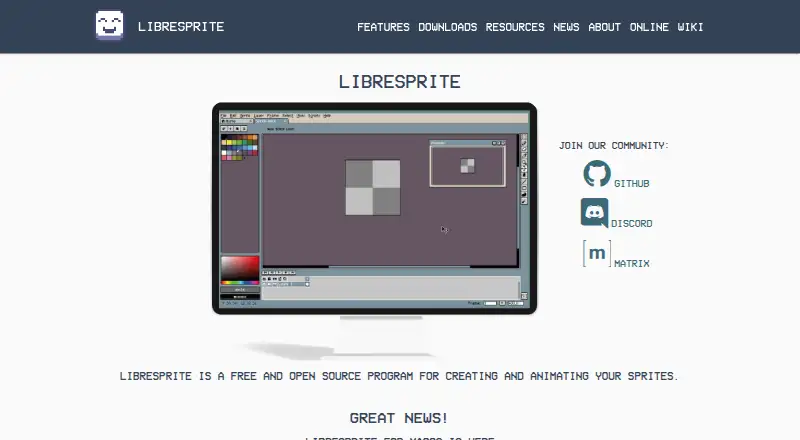
LibreSprite is a free, open-source program for creating and animating sprites.
What LibreSprite is
LibreSprite is a free, open-source program for creating and animating sprites. It includes real-time animation previews and onion skinning, with sprites organized into layers and frames. Users can edit multiple sprites at once, draw in tiled mode and work with pixel-focused tools such as filled contour, polygon and shading mode. Ready-made palettes are included, and users can also create their own. The program supports multiple sprite and animation file types, with exports including PNG, GIF, JPEG, BMP, PCX, TGA, ICO, FLI/FLC, WebP and ASE. Its scripting documentation describes loading palettes, cropping and resizing sprites, and saving sprites. LibreSprite is available for Windows, macOS, Linux and Android. The project began as a fork of an Aseprite commit covered by GPL version 2 and is developed independently of Aseprite. Version 1.0 is listed as supported, and the security page reports no published advisories. The project directs vulnerability reports to GitHub Issues and invites contributors to connect through Discord or Matrix.
Good
- Free and open source under GNU GPL version 2.
- Includes real-time previews and onion skinning.
- Supports layers, frames and editing multiple sprites.
- Exports to PNG, GIF, WebP and other formats.
- Available for Windows, macOS, Linux and Android.
Watch out
- The project lists version 1.0 as supported.
- Vulnerability reports are directed to GitHub Issues.
Who it suits
LibreSprite suits people making 2D sprites and animations who want layer, frame, palette and pixel-drawing tools. It runs on Windows, macOS, Linux and Android.
Verdict
LibreSprite combines sprite drawing and animation tools with palette editing, multiple formats and scripting documentation. Its supported version is listed as 1.0, so check the project's stated support details if that matters to your choice.
Plans and prices
From LibreSprite's own pricing page, checked 15 Oct 2026.
| Plan | Price | What it gives you |
|---|---|---|
| Free | Free | free and open source program |
| LibreSprite | Free | Free and open source · GNU General Public License Version 2 |
The facts
Each one read from LibreSprite's own pages, with the date it was checked.
Where it runs
- Android build
- Android compilation requires first making a native build and then placing ls-android-deps in the repository before opening the Android project in Android Studio.checked 15 Oct 2026
- Browser version
- The release notes state that LibreSprite can be used in a web browser through LibreSprite Online.checked 15 Oct 2026
- Independent Linux limitation
- The AppImage page warns that AppImages are usually not independently verified and recommends using them only when the developer is trusted.checked 15 Oct 2026
- Limit: Android distribution
- A project discussion says Android builds were available as release previews rather than through a conventional app-store port.checked 15 Oct 2026
What it does
- Animation
- It includes real-time animation previews and onion skinning.checked 4 Oct 2026
- Build requirements
- Source builds require CMake 3.4 or newer, Ninja and MSYS2 on Windows.checked 15 Oct 2026
- Community support
- The project directs contributors and users to Discord, Matrix and GitHub resources.checked 15 Oct 2026
- Drawing tools
- It provides tiled drawing mode and pixel-precise tools such as filled contour, polygon, and shading mode.checked 4 Oct 2026
- File support
- The software supports several file types for sprites and animations.checked 15 Oct 2026
- Headless mode
- The documented application API exposes an isHeadless flag for batch or shell execution.checked 15 Oct 2026
- Independent description
- SourceForge describes LibreSprite as an animated sprite editor and pixel-art tool and identifies its GitHub repository as the exact mirrored project.checked 15 Oct 2026
- Independent installation format
- AppImage distributes LibreSprite as a single executable file that does not require a package manager or alter system libraries and preferences.checked 15 Oct 2026
- Independent project metadata
- SourceForge lists Linux and Windows operating systems and C++ as the programming language.checked 15 Oct 2026
- Independent review availability
- SourceForge shows no user reviews for the mirrored LibreSprite project.checked 15 Oct 2026
- Latest release
- The v1.3 release is dated 2 October and includes fixes for zip-slip, shell injection, codec memory safety and script sandbox escapes.checked 15 Oct 2026
- Layers and frames
- Sprites are organized using layers and animation frames.checked 15 Oct 2026
- Licence
- LibreSprite is distributed under the GNU General Public License version 2.checked 15 Oct 2026
- Limit: batch processing
- The hands-on review questions whether LibreSprite can process multiple images in bulk and lists this as a limitation.checked 15 Oct 2026
- Limit: canvas settings
- The hands-on review reports that LibreSprite lacks Aseprite's advanced canvas settings.checked 15 Oct 2026
- Limit: import and export
- The hands-on review reports an inability to import images and limitations when exporting tagged frames.checked 15 Oct 2026
- Limit: Japanese support
- The hands-on review reports that Japanese is not supported.checked 15 Oct 2026
- Limit: scripting documentation
- A project issue records a maintainer saying the scripting API was experimental, very limited and undocumented at the time, with examples in the data/scripts folder.checked 15 Oct 2026
- Limit: timeline layout
- The hands-on review reports that users cannot change the timeline bar position.checked 15 Oct 2026
- Multiple-sprite editing
- Users can edit multiple sprites at the same time.checked 15 Oct 2026
The full review of LibreSprite
LibreSprite is a free, open-source editor for making and animating 2D sprites. It is best suited to pixel artists and game creators who need frame-based animation and precise drawing without a paid plan. Choose it for focused sprite work; look elsewhere if you need a tool tied to Aseprite’s development.
Overview
LibreSprite brings drawing, animation and palette work into one editor. Its timeline, layers and support for editing multiple sprites at once make it more than a single-image pixel editor, while tiled drawing mode caters to tile-based assets. The project began as a fork of an Aseprite commit covered by GPL version 2, but is developed independently of Aseprite.
Key features
For animation, the timeline, real-time previews and onion skinning help artists inspect how frames change in sequence. Layer-based sprites and simultaneous editing of multiple sprites can suit a project with several assets, though the available features do not establish a broader production or collaboration workflow.
Pixel-focused tools include filled contour, polygon and shading modes, alongside tiled drawing for repeated patterns. Indexed-color tools, ready-to-use palettes and the ability to create custom palettes support deliberate color control. Sprite-sheet export and formats including PNG, GIF, JPEG, BMP, PCX, TGA, ICO, FLI/FLC, WebP and ASE give creators several ways to move sprite and animation files into other workflows.
The scripting documentation covers loading palettes, cropping and resizing sprites, and saving them. That makes these specific tasks candidates for automation, without implying a general-purpose scripting system. LibreSprite’s security policy identifies version 1.0 as supported and directs vulnerability reports to GitHub Issues with a description and system details; the project reports no published security advisories. Contributors can connect through Discord or Matrix and consult the contribution guide.
Pricing
LibreSprite costs nothing. The free and open-source plan is licensed under GNU General Public License Version 2, so there is no paid tier to weigh against the core sprite-editing tools.
Platforms
LibreSprite supports Windows, macOS, Linux and Android. That range suits creators choosing between desktop and Android use, though no iOS version is included.
Who it's for
Pick LibreSprite if you want a no-cost tool centered on pixel-precise sprite drawing, palette control and 2D frame animation, with several export formats and sprite-sheet output. It is less compelling if your choice depends on continuity with Aseprite: LibreSprite is an independent project, not an Aseprite release.
Pros and cons
- Pro: Timeline animation, real-time previews and onion skinning bring frame review into the same tool as sprite drawing.
- Pro: Tiled drawing, indexed-color tools and custom palettes address practical pixel-art needs.
- Pro: The free GPLv2 plan and support for Windows, macOS, Linux and Android make it broadly accessible without a subscription.
- Con: Its independent development means users should not treat its Aseprite-fork history as a promise of shared development or direction.
- Con: The supported-version policy names version 1.0, a consideration for anyone whose software choice depends on the project’s stated support status.
Alternatives
For other approaches to animation and pixel art, browse Game Animation Software, 2D Game Animation Software and Pixel Art Software.
- Rive is worth considering for a free editor focused on designing, animating and coding, with a free plan capped at three collaborative files and one project.
- Pixelorama is another free, open-source option for creators who want its stated availability across Windows, Linux, macOS and Android, with web also listed as a platform.
- Cascadeur is a different choice for animation and rigging: its free plan is forever but non-commercial and exports only to .casc.
- Live2D Cubism offers a freemium alternative with a flexible month-by-month PRO plan for indie users at $13.26 a month.
- Pro Motion NG may suit users who want a free edition permitting commercial use, or a full version at $19 a month.
- SkelForm is a free and open-source 2D skeletal animator for a different animation approach.
- TexturePacker is an alternative to consider for texture packing; its free Essential plan is limited to non-commercial use.
- akeytsu offers a 30-day full-feature trial for non-commercial use, for users weighing a time-limited trial instead.
Verdict
LibreSprite is a strong fit for pixel artists and game creators who want free, focused sprite drawing and frame animation across desktop and Android platforms. Its best reason to choose it is the combination of precise pixel tools, palette editing, animation review and broad file export at no cost. Its main reason to look elsewhere is that it is developed independently of Aseprite, so buyers seeking that product’s continuity should choose another route.
Alternatives to LibreSprite
- 1
Pixelc
Free planOpen sourceAndroidWebLinuxmacOS7.8Free plan - 2

PixelWall
Free planWebAPILinuxmacOS7.6$15 one-time - 3
Avidemux
Free planOpen sourceWebLinuxmacOSWindows7.3Free plan - 4
Hexcalibur
Free planWebLinuxmacOSWindows7.2Free plan - 5
PixelAoi
Free planAPIWindows7.2$17 one-time - 6
Pixilart
Free planAndroidiOSWeb7.2From $4.99 a month