
LeadLens
LeadLens captures trade show contacts by scanning badges and enriching the resulting lead details.
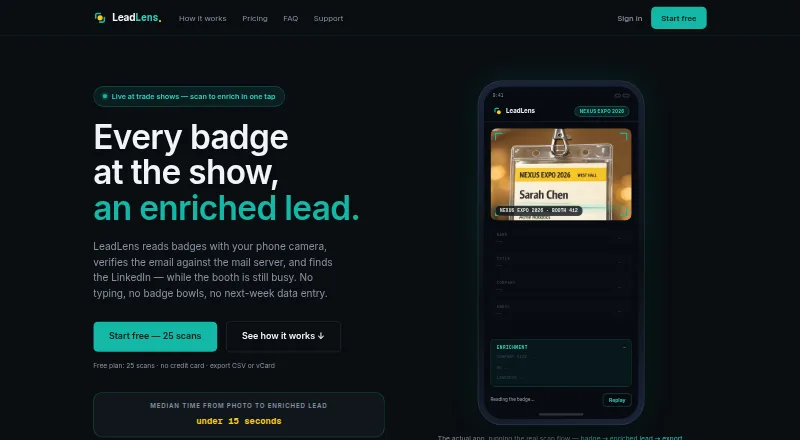
What LeadLens is
LeadLens captures trade show contacts by scanning badges and enriching the resulting lead details. Its vision-model OCR reads names, titles, and companies from printed or handwritten badges, and provides a confidence score for each field. The service can derive email addresses from company email conventions, find LinkedIn profiles, and check email domains against MX records. Users can import email signatures or CSV files and export leads as CSV, XLSX, or vCard. Scans captured offline are queued on the device and synced when connectivity returns. LeadLens runs in a phone browser and can be installed as a PWA; paid plans also list a native iOS app. The free plan includes 25 lifetime scans, one show workspace, and basic enrichment. The maker says badge images are not kept after extraction and deletion requests remove account data within seven days. It also states that its SOC 2 audit is not complete.
Good
- OCR reads printed and handwritten badge details.
- Each extracted field receives a confidence score.
- Offline scans sync when connectivity returns.
- Exports include CSV, XLSX, and vCard.
- Paid plans include a native iOS app.
Watch out
- Free plan allows 25 lifetime scans.
- Free plan includes only one show workspace.
- SOC 2 audit is not complete.
Who it suits
LeadLens suits representatives and event marketers who collect contacts at trade shows, as well as teams that need shared booth lead capture. Its free plan is limited to 25 lifetime scans and one show workspace.
Verdict
LeadLens focuses on turning badge scans into enriched trade show leads, with offline capture and multiple export formats. Check the scan allowance and plan features against your event needs; the free option is capped at 25 lifetime scans.
Plans and prices
From LeadLens's own pricing page, checked 29 Sep 2026.
| Plan | Price | What it gives you |
|---|---|---|
| Free | Free | 25 lifetime scans · 1 show workspace · basic enrichment · $0/forever |
| Starter | $29 a month | 200 scans/mo · unlimited shows · full AI enrichment · $29/mo or $279/yr |
| Pro | $99 a month | 750 scans/mo · unlimited shows · HubSpot sync · analytics · $99/mo or $948/yr |
| Team | $149 a month | 5 seats · 500 pooled scans/mo · shared contact database · team dashboard · $149/mo |
| Unlimited | $179 a month | Unlimited scans · unlimited shows · HubSpot sync · Slack alerts · analytics · $179/mo or $143.25/mo billed annually |
| Team Pro | $249 a month | 10 seats · 1,000 pooled scans/mo · shared contact database · HubSpot sync · $249/mo |
| Team Max | $449 a month | 20 seats · unlimited pooled scans · shared contact database · HubSpot sync · $449/mo |
| Volume plan | Priced on request | Flat volume plan · Quoted for 20+ seats, 5,000+ monthly scans, multi-show rollouts, or procurement-heavy teams |
The facts
Each one read from LeadLens's own pages, with the date it was checked.
What it does
- Compliance
- The maker states its SOC 2 audit is not yet complete and says it does not claim certifications it does not hold.checked 29 Sep 2026
- Data storage
- Support says data is stored in Supabase in US-East, in PostgreSQL with row-level security.checked 29 Sep 2026
- Deletion
- The homepage says account deletion requests result in data removal within 7 days.checked 29 Sep 2026
- Enrichment
- The service derives email addresses from company email conventions, finds LinkedIn profiles, and checks email domains against MX records.checked 29 Sep 2026
- Imports and exports
- Users can import email signatures or CSVs and export leads as CSV or vCard.checked 29 Sep 2026
- Integrations
- The pricing page lists HubSpot, Slack, Google Sheets, and webhook paths on supported tiers; support also names Zapier, Make, and n8n presets for other CRMs.checked 29 Sep 2026
- Intended users
- The pricing page describes Starter for solo reps, Pro for event marketers and reps running 5–10 shows a year, and team plans for shared booth lead capture.checked 29 Sep 2026
- OCR
- Its vision-model OCR reads names, titles, and companies from printed or handwritten badges and gives per-field confidence scores.checked 29 Sep 2026
- Offline use
- Scans captured offline are queued on-device and sync when connectivity returns.checked 29 Sep 2026
- Privacy
- The maker says it does not sell scan data and that badge images are not retained after extraction completes.checked 29 Sep 2026
- Purpose
- LeadLens captures trade show leads by scanning badges and enriching contact details.checked 29 Sep 2026
- Support
- Support says it responds to email inquiries within one business day.checked 29 Sep 2026
The company
- Headquarters
- Texas, United Stateschecked 23 Sep 2026
Where it runs
- Platform details
- LeadLens runs in a browser on phones and can be installed as a PWA; the pricing page also lists a native iOS app on paid plans.checked 29 Sep 2026
The full review of LeadLens
LeadLens turns trade-show badge scans into enriched, exportable contact records, and suits solo reps and event teams that need to keep capturing leads offline. Its flexible capture and plan range make it a practical option, but the free tier’s 25 lifetime scans are only a small-scale trial.
Overview
The core proposition is focused: scan a printed or handwritten badge, review field-level confidence scores, and build a contact record with email and LinkedIn enrichment. That workflow can reduce manual entry at a booth, while the confidence scores give reps a reason to check uncertain names or titles before follow-up. Derived email addresses and profile matches are useful starting points, not a guarantee that every detail is correct.
Offline capture is a meaningful advantage at crowded venues: scans wait on the device and sync when connectivity returns. Imports from email signatures or CSVs and exports in CSV, XLSX, or vCard give teams ways to move records into other workflows. Connections include HubSpot, Slack, Google Sheets, and webhooks on supported tiers; support also names Zapier, Make, and n8n presets for other CRMs.
LeadLens stores data in US-East using Supabase PostgreSQL with row-level security. The maker says scan data is not sold and badge images are removed after extraction; account deletion requests result in data removal within seven days. Its SOC 2 audit is not complete, so it is not the choice for organizations requiring that certification. Email support responds within one business day.
Key features
- Badge OCR: Vision-model OCR reads names, titles, and companies, including from handwritten badges. Per-field confidence scores help users prioritize corrections rather than treating every capture as equally reliable.
- Contact enrichment: LeadLens derives email addresses from company conventions, finds LinkedIn profiles, and checks email domains against MX records. This can speed prospect research, but the inferred details still warrant review.
- Offline capture and exports: On-device queuing protects capture when a venue connection drops, with syncing once service returns. CSV, XLSX, and vCard exports suit different handoffs, while signature and CSV imports help bring existing contact data in.
- Integrations: HubSpot sync appears on Pro and higher plans, while Slack alerts are included with Unlimited. Google Sheets, webhooks, and named automation presets broaden the connection options, but access depends on supported tiers and workflows.
Pricing
The free plan costs nothing and is billed $0/forever. It includes 25 lifetime scans, one show workspace, and basic enrichment. That is enough to assess the capture approach, not to support recurring event use.
Starter costs $29 a month, billed $29/mo or $279/yr, for 200 scans/mo, unlimited shows, and full AI enrichment. It fits solo reps who need more than a one-off trial but do not need the listed HubSpot sync or analytics. Pro costs $99 a month, billed $99/mo or $948/yr, and raises the allowance to 750 scans/mo while adding HubSpot sync and analytics; it is aimed at event marketers and reps running 5–10 shows a year.
For shared booth capture, Team costs $149 a month, billed $149/mo, and provides five seats, 500 pooled scans/mo, a shared contact database, and a team dashboard. Team Pro costs $249 a month, billed $249/mo, with ten seats, 1,000 pooled scans/mo, a shared database, and HubSpot sync. Team Max costs $449 a month, billed $449/mo, for 20 seats and unlimited pooled scans, plus a shared database and HubSpot sync. These plans trade individual scan allowances for shared capacity and coordination features.
Unlimited costs $179 a month, billed $179/mo or $143.25/mo billed annually. It includes unlimited scans and shows, HubSpot sync, Slack alerts, and analytics, making it the clearest fit for a high-volume individual or operation that does not need the team-seat structure. The Volume plan has custom pricing for 20+ seats, 5,000+ monthly scans, multi-show rollouts, or procurement-heavy teams.
Platforms
LeadLens runs in a phone browser and can be installed as a PWA. A native iOS app is listed on paid plans.
Who it's for
Choose LeadLens if badge scanning, offline resilience, and enriched records are central to your trade-show follow-up, and its scan quotas match your volume. Solo reps can start with Starter; recurring event marketers may benefit from Pro’s HubSpot sync and analytics; teams should compare pooled quotas and seats before committing. It is a weaker fit for buyers who need completed SOC 2 certification or Android support.
Pros and cons
- Pro: Offline scans queue and sync later, reducing the risk of missed captures in poor-connection venues.
- Pro: Confidence-scored OCR and enrichment can cut manual data entry while flagging fields that need review.
- Pro: Plans span solo use through 20-seat teams, with pooled scans and shared records on team tiers.
- Con: The free allowance is just 25 lifetime scans, so it cannot serve as an ongoing event plan.
- Con: Team quotas are finite on Team and Team Pro; teams with heavier volume must pay for Team Max or seek custom pricing.
- Con: The SOC 2 audit is unfinished, ruling it out for organizations that require an attained certification.
Alternatives
Event Lead Capture Software is the broader category guide for readers comparing tools beyond LeadLens.
Pick LeadSuccess if an included marketing-package option with ticket QR capture and Excel export is a better match; its Basic plan includes five app licenses.
BoothIQ is an alternative for readers seeking an individual free plan with unlimited leads, offline mode, AI summaries, and follow-up drafts.
Consider Meetopio if a free seat with limited monthly scans and voice captures, plus AI follow-up drafts, better suits a smaller capture workload.
ExpoPlatform is another event-platform option, with a free plan for up to 30 participants.
Choose eventkrowd Lead Retrieval if a one-time activation priced at $350, paid once suits your purchase preference.
Grip Onsite is another paid option for onsite event use.
Consider Cvent if you want a broader event platform whose registration product can be tried for free.
BagEvent is an alternative with a free trial and a Pro plan for up to five events per month.
Verdict
LeadLens is best for solo reps and event teams that want badge capture to keep working offline and need enriched leads in standard export formats. Its range from a modest Starter allowance to pooled team plans makes it adaptable, but scan caps and the unfinished SOC 2 audit are real constraints. Choose it when those capture and workflow strengths matter more than certification; look elsewhere if SOC 2 is mandatory or your team needs a platform not listed for LeadLens.
Getting started
- Visit https://leadlens.neural-forge.io/.
- Open LeadLens in a phone browser or install it as a PWA; paid plans also list a native iOS app.
- Choose the free plan or a paid plan.
- Scan printed or handwritten badges, or import email signatures or CSV files.
- Export leads as CSV, XLSX, or vCard, or use integrations available on supported tiers.
Limits worth knowing
The free plan stops at 25 lifetime scans, one show workspace, and basic enrichment. Starter includes 200 scans per month; other plans have their own scan, seat, and feature limits.
Questions
Is there a free plan?
Yes. The Free plan is billed at $0/forever and includes 25 lifetime scans, one show workspace, and basic enrichment.
How much does LeadLens cost?
Starter is $29 a month, billed at $29/mo or $279/yr. Other listed plans include Pro at $99 a month and Team at $149 a month.
Which platforms can I use?
LeadLens runs in a phone browser and can be installed as a PWA. A native iOS app is listed on paid plans.
Can I use it without an internet connection?
Yes. Offline scans are queued on-device and sync when connectivity returns.
What integrations are available?
The pricing page lists HubSpot, Slack, Google Sheets, and webhook paths on supported tiers. Support also names Zapier, Make, and n8n presets for other CRMs.
What does the maker say about data and certification?
The maker says it does not sell scan data and badge images are not retained after extraction. It says its SOC 2 audit is not yet complete.
Alternatives to LeadLens
- 1
ExpoPlatform
Free planAndroidiOSWebAPI8.1Free plan - 2
xh
Free planOpen sourceAndroidLinuxmacOSWindows7.6Free plan - 3

Bizzabo
AndroidiOSWebAPI7.5From $499 a month - 4
Capture Show Leads
AndroidiOSWeb7.4$99 one-time - 5

eventkrowd Lead Retrieval
AndroidiOSWebAPI7.3$350 one-time - 6

LeadSuccess
Free planAndroidiOSWebAPI7.3€204 one-time