xh
xh is a free, open-source command-line client for sending HTTP requests, designed around a friendly request style and improved performance.
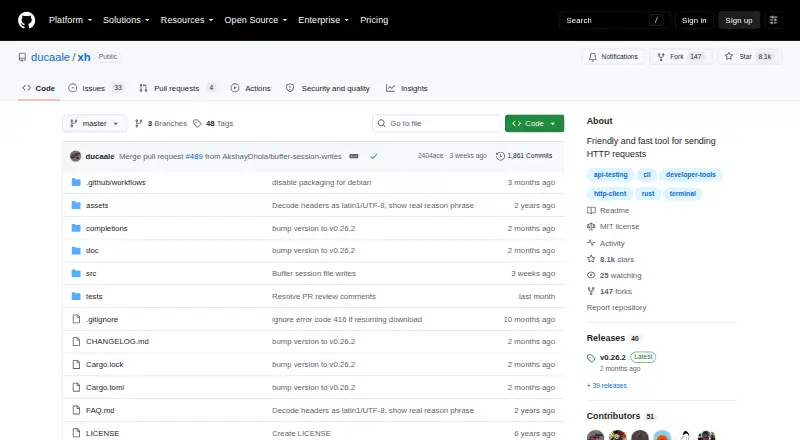
What xh is
xh is a free, open-source command-line client for sending HTTP requests, designed around a friendly request style and improved performance. Its syntax follows HTTPie request items, letting users set headers, request bodies, and query strings in commands. It accepts JSON, form data, multipart content, and raw bodies, including input read from standard input or a file. Responses can be pretty-printed, limited to headers or the body, and saved or downloaded to a file. Authentication options include basic, bearer, and digest methods. The README lists HTTP/2 support, while the current Cargo manifest includes an optional HTTP/3 feature. Security-related controls cover TLS version selection, certificate-verification configuration, and client-side certificates. With the --curl option, a request can be translated into a curl command. xh offers HTTPie compatibility mode when run as http or https, or when XH_HTTPIE_COMPAT_MODE is set. Prebuilt binaries are available for Linux, macOS, and Windows, with package-manager instructions for those systems and Android. The project uses the MIT License.
Good
- Free MIT-licensed open-source client
- HTTPie-style request-item syntax
- Supports JSON, forms, multipart, and raw bodies
- Basic, bearer, and digest authentication
- Pretty-printing and selective response output
- TLS and client-certificate controls
Watch out
- Not all HTTPie features are implemented
- No plugin system
- Documentation is worse than HTTPie's
- HTTP/3 is only an optional feature
Who it suits
xh suits developers and technical users who send HTTP requests from a terminal and want HTTPie-style syntax with performance-focused behavior. It is useful when requests need varied body formats, authentication, response filtering, or curl conversion across supported platforms.
Verdict
Pick xh for a free terminal HTTP client with HTTPie-compatible commands, multiple body formats, authentication controls, and curl translation. Consider another tool if complete HTTPie feature coverage, plugins, or stronger documentation are priorities.
Plans and prices
From xh's own pricing page, checked 7 Oct 2026.
| Plan | Price | What it gives you |
|---|---|---|
| xh | Free | Open-source command-line HTTP client |
The facts
Each one read from xh's own pages, with the date it was checked.
What it does
- API and SDKs
- xh is a standalone command-line API client; the project documents no language SDK or embeddable public API.checked 15 Oct 2026
- Authentication
- Basic, bearer and digest authentication are supported, along with .netrc credentials.checked 15 Oct 2026
- Build requirement
- Building from Cargo requires Rust 1.85 or later.checked 15 Oct 2026
- Compatibility
- xh can run in HTTPie compatibility mode when invoked as http or https, or when XH_HTTPIE_COMPAT_MODE is set.checked 7 Oct 2026
- Curl conversion
- The --curl option prints an equivalent curl command instead of sending the request.checked 15 Oct 2026
- Debian availability
- Debian trixie carries xh 0.24.0-1 in its utils section and describes it as an ergonomic HTTPie-inspired frontend focused on performance.checked 15 Oct 2026
- Documentation
- Documentation consists of a README, FAQ, generated/manual pages, examples and a changelog, and the project itself describes its documentation as worse than HTTPie’s.checked 15 Oct 2026
- Downloads
- The client can save response bodies to files and resume interrupted downloads.checked 15 Oct 2026
- Extensibility
- The README states that xh has no plugin system.checked 15 Oct 2026
- Form and multipart data
- xh can submit URL-encoded form fields or force multipart/form-data requests, including file uploads.checked 15 Oct 2026
- HTTPie compatibility
- The tool accepts HTTPie-style request-item syntax for headers, query parameters, JSON fields, forms and file uploads.checked 15 Oct 2026
- HTTP versions
- The command supports HTTP/1.0, HTTP/1.1, HTTP/2, HTTP/2 prior knowledge and experimental HTTP/3 modes.checked 15 Oct 2026
- Independent package availability
- Homebrew provides xh 0.26.2 bottles for Apple Silicon, Intel macOS and Linux ARM64 or x86_64.checked 15 Oct 2026
- Independent package metadata
- Arch Linux packages xh 0.26.2-1 for x86_64 under the MIT license, with a 3.1 MB package and 9.6 MB installed size.checked 15 Oct 2026
- Installation
- The project provides prebuilt binaries for Linux, macOS, and Windows, plus package-manager installation instructions for those and Android.checked 7 Oct 2026
- Integrations
- xh can translate a request into a curl command with its --curl flag.checked 7 Oct 2026
- JSON requests
- Command-line data defaults to a JSON object, with literal JSON values supported through the := syntax.checked 15 Oct 2026
- Licence
- The software is released under the MIT License with permission to use, modify, distribute and sell copies.checked 15 Oct 2026
- License
- The project is distributed under the MIT License.checked 7 Oct 2026
- Limitations
- The README says not all HTTPie features are implemented, xh has no plugin system, and its documentation is worse than HTTPie's.checked 7 Oct 2026
- Limit: header encoding
- The FAQ explains that non-ASCII HTTP header values may display as ISO-8859-1 text with an additional UTF-8 interpretation, and servers may receive the mangled form.checked 15 Oct 2026
- Limit: incomplete parity
- The project says that not all HTTPie features are implemented.checked 15 Oct 2026
Money
- Free plan
- Yeschecked 20 Sep 2026
Where it runs
- Installation platforms
- Official installation instructions cover Linux, macOS, Windows, Android through Termux or root managers, FreeBSD, NetBSD and multiple package managers.checked 15 Oct 2026
The full review of xh
xh is a fast, terminal-based HTTP client for developers and support staff who prefer composing requests as shell commands. It is particularly well suited to HTTPie users and anyone working across desktop operating systems who wants a free, open-source utility for routine API work. Its focused feature set is practical, but users dependent on HTTPie’s full ecosystem should be cautious.
Overview
xh combines performance-oriented design with HTTPie-compatible request-item syntax. Headers, query strings and request bodies can be expressed in a compact command style, reducing the friction of repeated API calls and making commands convenient to keep in scripts or share with colleagues. Compatibility mode can be enabled by invoking the program as http or https, or by setting XH_HTTPIE_COMPAT_MODE, which gives existing HTTPie workflows a useful migration path.
The project is free and distributed under the MIT License. Prebuilt binaries and package-manager instructions cover Linux, macOS, Windows and Android, so it is a realistic choice for mixed-device teams rather than a tool tied to one development environment.
Key features
Request construction is the strongest part of xh. It accepts JSON, form data, multipart and raw bodies, and can read body content from standard input or a file. That covers interactive API exploration as well as pipeline-based jobs, uploads and repeatable requests assembled from generated files.
Output controls let you pretty-print a response, show only headers, show only the body, or save and download the result to a file. These choices matter when a response must be inspected quickly, passed to another command, or retained as an artifact instead of scrolling past in a terminal.
Authentication options include basic, bearer and digest schemes. TLS settings allow version selection, certificate-verification configuration and client-side certificates, giving operators control for endpoints with stricter security requirements. The README lists HTTP/2 support, while the Cargo manifest exposes HTTP/3 as an optional feature. The --curl flag translates a request into a curl command, which is useful when handing a request to environments where curl is the established standard.
xh is not a complete HTTPie replacement. Its own README acknowledges that some HTTPie features remain unimplemented; there is no plugin system, and its documentation is less comprehensive than HTTPie’s. Those constraints are material for teams that rely on extensions, advanced compatibility or extensive guidance rather than core request-and-response operations.
Pricing
The xh plan costs nothing and is an open-source command-line HTTP client. There are no paid tiers, seat charges, usage quotas or renewal terms attached to this plan. That makes it suitable for individual developers, classroom use and teams that can adopt a shared open-source utility without procurement overhead. The trade-off is not a cheaper feature tier but the narrower implementation and documentation compared with HTTPie.
Platforms
xh supports Android, Linux, macOS and Windows. Prebuilt binaries are provided for Linux, macOS and Windows, with package-manager installation instructions for those systems and Android. This breadth helps teams keep the same command-line approach when switching between workstation platforms, although command conventions and package-manager details may still vary by operating system.
Who it's for
Choose xh for common API calls, request debugging and scripted terminal workflows where HTTPie-style syntax is desirable and a zero-cost license matters. It is a good fit for developers who need multiple body formats, authentication controls, TLS options and selectable response output without adopting a graphical client. Support engineers can also benefit from the curl translation when a request needs to be reproduced in another environment.
Look elsewhere if your workflow depends on complete HTTPie feature coverage, a plugin architecture or more extensive documentation. xh’s compatibility mode helps with familiar commands, but it does not remove the limitations of an incomplete feature set.
Pros and cons
Pros
- HTTPie-style request items: Headers, query strings and bodies can be expressed compactly in terminal commands.
- Broad body handling: JSON, forms, multipart, raw data, files and standard input support both ad hoc and scripted requests.
- Useful response controls: Pretty-printing, header-only or body-only output, and file saving keep inspection focused.
- Practical security options: Basic, bearer and digest authentication plus TLS and client-certificate controls cover common secured endpoints.
- Free and portable: MIT licensing and support for four platforms reduce adoption and distribution friction.
Cons
- Incomplete HTTPie coverage: Users migrating advanced HTTPie workflows may encounter missing capabilities.
- No plugins: The client cannot be extended through a plugin system.
- Weaker documentation: HTTPie offers a more complete reference for users who need extensive guidance.
Alternatives
For a wider survey of API tools, see the API clients list. The other linked products target learning-record-store management rather than terminal HTTP requests:
- Veracity Learning suits organizations wanting a freemium LRS with a free Lite plan supporting five LRSs and paid hosted tiers.
- SQL LRS is the better choice for a free, Apache 2.0, self-hosted LRS where implementation and support are quoted separately.
- Cluelabs LRS fits teams seeking a freemium LRS available on Android, iOS and the web.
- Mosra is an option for free launch-period lesson management across macOS, Windows, web and self-hosted deployments.
- GrassBlade LRS is for buyers needing a paid LRS with 25,000 statements per month on its Essential plan.
- ADL Open Source LRS is intended for proof-of-concept deployments serving a small number of users.
- Ralph suits developers wanting an MIT-licensed Python package and Docker image for an LRS.
- Sereni LRS fits users wanting a free plan with up to 100,000 xAPI statements or events and 1 GB of storage.
Verdict
Pick xh when you want a free, MIT-licensed terminal HTTP client with HTTPie-style commands, broad request-body support, useful authentication and TLS controls, and easy curl translation across major platforms. Choose another tool when complete HTTPie compatibility, plugins or stronger documentation are more important than xh’s focused, performance-minded command-line experience.
Getting started
- Open the xh GitHub project
- Install a prebuilt binary for Linux, macOS, or Windows, or follow package-manager instructions
- Use the Android package-manager installation route if needed
- Run xh with HTTPie request-item syntax to define the request
- Use --curl when a curl version of the request is needed
- Enable HTTPie compatibility mode by invoking xh as http or https, or setting XH_HTTPIE_COMPAT_MODE
Limits worth knowing
xh does not implement every HTTPie feature and has no plugin system. HTTP/3 support is optional in the current Cargo manifest.
Questions
Is xh free?
Yes. The xh plan is listed as free, and the project is distributed under the MIT License.
Which platforms are supported?
xh is listed for Android, Linux, macOS, and Windows. Prebuilt binaries are provided for Linux, macOS, and Windows, with package-manager instructions for those platforms and Android.
What request bodies can xh send?
It supports JSON, form data, multipart requests, raw data, and bodies read from standard input or a file.
Which authentication methods are available?
Command-line options include basic, bearer, and digest authentication.
Can xh create curl commands?
Yes. The --curl flag translates an xh request into a curl command.
Does xh support HTTP/2 and HTTP/3?
The README lists HTTP/2 support. The current Cargo manifest has an optional HTTP/3 feature.
Alternatives to xh
- 1
SQL LRS
Free planOpen sourceWebAPILinuxmacOS7.5Free plan - 2
Cluelabs LRS
Free planAndroidiOSWebAPI7.2From $19.95 a month - 3
Veracity Learning
Free planWebAPILinuxmacOS7.1From $100 a month - 4
Mosra
Free planWebmacOSSelf-hostedWindows7.0Free plan - 5
GrassBlade LRS
AndroidiOSWebAPI6.7 - 6

itslearning
AndroidiOSWebAPI6.4