Mosra
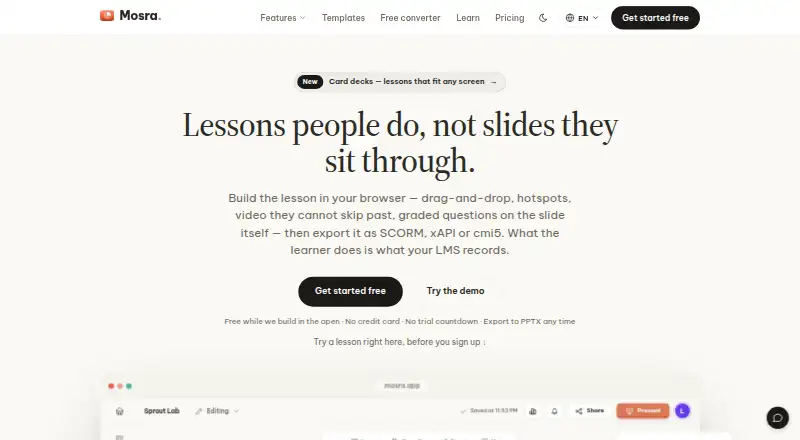
Mosra is a free authoring tool for building lessons that can be tracked by a learning management system.
What Mosra is
Mosra is a free authoring tool for building lessons that can be tracked by a learning management system. You can add graded questions, object states, triggers and variables without writing code. Question formats include multiple choice, multiple response, true/false, dropdown, short answer, essay, hotspot and drag-and-drop. Lessons can be exported as SCORM 1.2 or 2004, xAPI, cmi5, PPTX, PDF, HTML5, PNG, SVG or video. A built-in Learning Record Store reports views, completions, scores and individual answers without requiring an external LMS. Teams can edit together in real time, comment on slides, use @mentions and set viewer, commenter or editor roles for links. The Windows and macOS desktop app supports offline projects and local video export. Organizations can deploy the editor and record store on their own infrastructure, though they must manage backups, TLS, upgrades and uptime, and the deployment assumes Linux server familiarity. The launch-period plan is free, with unlimited lessons and listed features and exports; presentations and exports carry a “Made with Mosra” line.
Good
- Build questions and lesson interactions without code.
- Built-in Learning Record Store reports learner activity.
- Real-time co-editing, comments and role-based links.
- Exports include SCORM, xAPI, cmi5 and video.
- Desktop apps support offline projects and local video export.
Watch out
- Self-hosting requires Linux server familiarity.
- Self-hosted customers manage backups, TLS, upgrades and uptime.
- Exports and presentations include a “Made with Mosra” line.
- Paid plans are planned but not yet live.
Who it suits
Mosra suits teams creating trackable, interactive lessons, especially those needing built-in reporting or collaborative editing. Organizations that want content and learner records on their own network can self-host if they can manage a Linux server deployment.
Verdict
Mosra combines lesson authoring, LMS exports and learner reporting, with collaboration and offline desktop projects. Its free launch plan includes the listed features, while self-hosting shifts infrastructure upkeep to the customer.
Plans and prices
From Mosra's own pricing page, checked 15 Oct 2026.
| Plan | Price | What it gives you |
|---|---|---|
| Free during launch | Free | Unlimited lessons · full editor · collaboration · all listed exports · “Made with Mosra” watermark · No credit card or trial countdown |
| Launch period | Free | Unlimited lessons · all listed features and exports · “Made with Mosra” line on presentations and exports · Free during launch; paid plans are planned but not yet live. |
| Team workspace | Priced on request | Shared workspace owned by department or school · shared branding · team-owned lessons · VAT invoice available · Per seat per year, minimum 3 seats |
The facts
Each one read from Mosra's own pages, with the date it was checked.
What it does
- AI data handling
- Using AI features sends relevant content to an external model provider; the policy identifies Google Gemini as the current default provider.checked 3 Oct 2026
- Animations
- The product includes sixteen slide transitions, morph transitions and click-by-click object builds.checked 15 Oct 2026
- Automatic scoring
- Questions are scored automatically and scores can be reported to an LMS.checked 15 Oct 2026
- Built-in LRS
- A Learning Record Store is included for xAPI and cmi5 data, with reports available in Mosra.checked 15 Oct 2026
- Card decks
- Card decks use responsive blocks and provide more than 70 layouts and 21 templates for different screen sizes.checked 15 Oct 2026
- Collaboration
- Multiple people can edit a deck simultaneously, comment on slides and use viewer, commenter or editor link roles.checked 15 Oct 2026
- Compatibility limitation
- Mosra does not certify packages against a specific LMS and advises testing exports in the customer’s own LMS.checked 15 Oct 2026
- Data roles
- For student data, the school or teacher is the controller and Mosra acts as processor.checked 15 Oct 2026
- Documentation
- Documentation consists of feature pages, LMS-specific guidance, standards explanations, FAQ material and a public changelog.checked 15 Oct 2026
- Editor
- The editor provides a drag-and-drop canvas with layers, guides, snapping, animations, transitions and reusable layouts.checked 15 Oct 2026
- Exports
- Exports include SCORM 1.2, SCORM 2004, xAPI, cmi5, PPTX, PDF, HTML5, PNG, SVG and video.checked 3 Oct 2026
- Integrations
- The documented interoperability targets are SCORM-compatible LMSs, xAPI-compatible LRSs and cmi5-compatible LMSs, with Moodle, Canvas and Blackboard discussed.checked 15 Oct 2026
- Interaction logic
- Triggers, object states and variables allow branching and other interactions without writing code.checked 15 Oct 2026
- Interactive lessons
- Lessons can include graded questions, object states, triggers and variables without code.checked 3 Oct 2026
- Learning exports
- Mosra exports SCORM 1.2, SCORM 2004, xAPI and cmi5 packages.checked 15 Oct 2026
- License
- Mosra is proprietary software; its terms say the software, interface, brand, designs and templates belong to Mosra or its licensors.checked 15 Oct 2026
- LMS tracking
- A built-in Learning Record Store supports reports on views, completions, scores and individual answers without an external LMS.checked 3 Oct 2026
- Missing features
- Standalone quizzes, phone-based live sessions, AI-assisted drafting and some editor tools are described as not yet built.checked 15 Oct 2026
- Notable release
- The public changelog lists a September 29, 2026 release adding video, audio and embeds to card decks.checked 15 Oct 2026
- Other exports
- Export formats include PPTX, vector PDF, standalone HTML5, PNG, SVG, MP4 and WebM video.checked 15 Oct 2026
- PowerPoint
- Users can import .pptx files, edit them in Mosra and export editable PowerPoint files again.checked 15 Oct 2026
The company
- Company status
- Mosra says it is one person’s project, not an incorporated company, with no legal entity, office or headcount.checked 15 Oct 2026
- Headquarters
- Hanoi, Vietnamchecked 28 Sep 2026
Where it runs
- Desktop app
- The Windows and macOS desktop app supports offline projects and local video export.checked 3 Oct 2026
The full review of Mosra
Mosra is a lesson-authoring platform that combines interactive course creation with learner-record tracking. It is best suited to training teams that need varied assessments, LMS packages and reporting in one workflow. The launch-period free plan makes it an unusually accessible option, provided its export branding and deployment responsibilities fit your operation.
Overview
Mosra pairs a visual lesson editor with a built-in Learning Record Store (LRS). That means a team can publish trackable learning and review views, completions, scores and individual answers without adding a separate record-store product. Standard LMS packages remain available when content must run in an existing learning platform.
The hosted editor and self-hosted Docker Compose deployment cover different priorities. Self-hosting keeps content and learner records on the organization’s network, but the customer must handle backups, TLS, upgrades and uptime and should be comfortable administering a Linux server. Mosra says connections use HTTPS, passwords are hashed, production access is restricted and logged, and backups are regularly tested. It also says it does not sell personal data, use content to train AI models, or currently run analytics and advertising trackers. AI functions send relevant content to an external provider, with Google Gemini identified as the current default.
Key features
Interactive authoring
Authors can build lessons with graded questions, object states, triggers and variables without code. Supported question types include multiple choice, multiple response, true/false, dropdown, short answer, essay, hotspot and drag-and-drop. That range lets instructional teams vary assessment instead of relying on one quiz pattern.
Exports and tracking
Exports cover SCORM 1.2, SCORM 2004, xAPI, cmi5, PPTX, PDF, HTML5, PNG, SVG and video. Moodle, Canvas and Blackboard are named as compatible with SCORM 1.2, while the other formats support presentation, document, web and media delivery. The built-in LRS is valuable when reporting is needed without an external LMS, although organizations that only need an LRS may find a dedicated service more focused.
Collaboration and desktop work
Teams can co-edit in real time, comment on slides, use @mentions and assign viewer, commenter or editor permissions to links. Windows and macOS desktop apps support offline projects and local video export, giving authors a route to work away from a browser connection.
Pricing
Launch period — free (billed Free during launch; paid plans are planned but not yet live). It includes unlimited lessons, all listed features and exports. The trade-off is a “Made with Mosra” line on presentations and exports. There is no free trial because the plan itself is free, and no paid tier is currently available for teams that want to remove that attribution or buy a different allowance.
This is a strong fit for teams evaluating a complete authoring-and-reporting workflow or producing a large library without a current software budget. Organizations needing contractual paid-plan terms, a published renewal structure or unbranded output should wait for paid plans or compare alternatives.
Platforms
Mosra runs on the web and has desktop apps for Windows and macOS. It also supports self-hosted deployment through Docker Compose, with both hosted and self-managed approaches available.
Who it's for
Mosra suits instructional designers and training teams that need interactive, assessable lessons plus learner records. It is especially relevant where SCORM, xAPI or cmi5 delivery must coexist with standalone exports and collaborative editing. Self-hosting is for organizations prepared to operate Linux infrastructure and retain their data on-network; teams wanting a managed service should use the hosted route instead.
Pros and cons
Pros
- Broad launch plan: unlimited lessons and every listed feature and export are included at no charge.
- Authoring and LRS together: reporting on views, completions, scores and answers does not require an external LMS.
- Wide delivery coverage: SCORM, xAPI, cmi5, office, image, web and video exports cover varied distribution needs.
- Real-time teamwork: co-editing, slide comments, mentions and link roles support distributed production.
- Offline desktop projects: Windows and macOS apps can work offline and export video locally.
Cons
- Export attribution: the free plan adds “Made with Mosra” to presentations and exports.
- Self-hosting workload: customers own backups, TLS, upgrades and uptime and need Linux-server familiarity.
- AI leaves your environment: AI use sends relevant content to an external model provider.
- Paid plans are not live: teams needing published paid terms or unbranded tiers have no current upgrade path.
Alternatives
Veracity Learning is the better fit when you want a freemium LRS with a five-LRS free tier and infrastructure-based deployment, plus a published $100-per-month Starter plan. Choose SQL LRS for an Apache 2.0 open-source, self-hosted record store with implementation and support quoted separately. xh is an open-source command-line HTTP client, not a lesson-authoring suite. Cluelabs LRS suits readers seeking a freemium LRS from a New York-based custom-training provider. GrassBlade LRS is for buyers who prefer a paid service, with Essential at $66.00 per year for 25,000 statements per month, one instance and metered overage. ADL Open Source LRS targets proof-of-concept deployments for a small number of users. Ralph is a MIT-licensed Python package and Docker image for self-hosted LRS use. Sereni LRS offers a free plan with up to 100,000 xAPI statements or events, 1 GB of storage, unlimited LRSs and unlimited reporting.
For a broader comparison, see Learning Record Store Software.
Verdict
Choose Mosra if you want one free launch-period product for interactive lesson authoring, collaborative production, multi-format exports and built-in learner reporting. Look elsewhere if removing product branding, buying a live paid tier or avoiding infrastructure and external AI-provider considerations is more important than having that combined workflow.
Alternatives to Mosra
- 1
xh
Free planOpen sourceAndroidLinuxmacOSWindows7.6Free plan - 2
SQL LRS
Free planOpen sourceWebAPILinuxmacOS7.5Free plan - 3
Cluelabs LRS
Free planAndroidiOSWebAPI7.2From $19.95 a month - 4
Veracity Learning
Free planWebAPILinuxmacOS7.1From $100 a month - 5
GrassBlade LRS
AndroidiOSWebAPI6.7 - 6

itslearning
AndroidiOSWebAPI6.4