KBPublisher
KBPublisher is knowledge base and knowledge management software for organizations, offered as web, API, and self-hosted options.
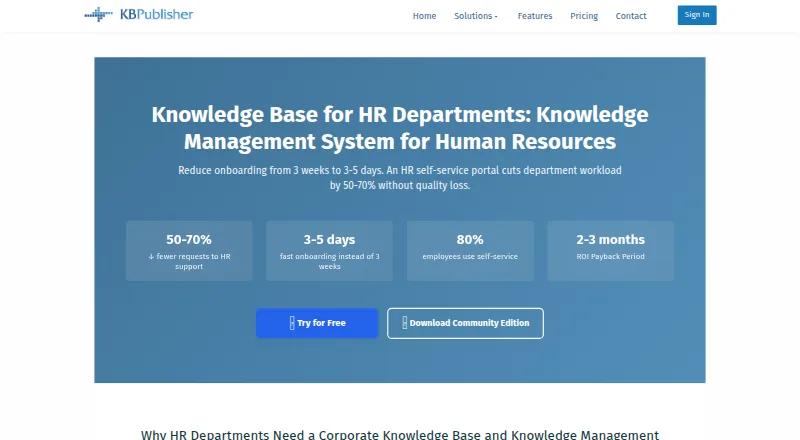
What KBPublisher is
KBPublisher is knowledge base and knowledge management software for organizations, offered as web, API, and self-hosted options. Teams can create and format articles, attach files, and revise published articles as drafts. Approval workflows support review before publication. Search includes full-text matching, spell checking, word variation, partial-word recognition, and Sphinx. Security groups and user roles help control access, while LDAP, SAML integration, and remote authentication for single sign-on are listed options. The product supports multilingual content, custom branding, and content analytics. Its HR solution covers employee onboarding programs, versioned personnel documents, and an employee self-service portal. The licensed download is installed on one web server, while the Community Edition is on-premise only and has no support or maintenance. Cloud fees include technical support, upgrades, and automatic content backups; data export is available without charge. Community Edition provides unlimited staff users, end users, articles, and files.
Good
- Approval workflows support article review.
- Search includes spell checking and partial-word recognition.
- HR tools include onboarding and employee self-service.
- Cloud fees include backups and upgrades.
Watch out
- Community Edition has no cloud version.
- Community Edition includes no support or maintenance.
- The licensed download installs on one web server.
Who it suits
KBPublisher may suit organizations managing shared knowledge, approvals, and controlled access, including HR teams handling onboarding and personnel documents. The Community Edition is for organizations able to use an on-premise version without support or maintenance.
Verdict
KBPublisher combines searchable knowledge content with approval, access, and HR capabilities. Choose between the on-premise Community Edition and cloud service with included operational support and backups.
Plans and prices
From KBPublisher's own pricing page, checked 29 Sep 2026.
| Plan | Price | What it gives you |
|---|---|---|
| Community Edition | Free | Unlimited staff users · unlimited end users · unlimited articles and files · on-premise only · no support and maintenance · 100% free; open source |
| Essential | — | Up to 5 staff users · unlimited end users and articles · 5 GB SSD storage · 99% Uptime SLA · Monthly rate shown for annual or monthly billing |
| Team | — | Up to 10 staff users · unlimited end users and articles · export plugin · reports · 10 GB SSD storage · 99% Uptime SLA · Monthly rate shown for annual or monthly billing |
| 5 License Pack | $498, paid once | 5 staff users · unlimited end users · single web server · Perpetual license; one year of free support and upgrades |
| 10 License Pack | $898, paid once | 10 staff users · unlimited end users · single web server · Perpetual license; one year of free support and upgrades |
| 20 License Pack | $1,498, paid once | 20 staff users · unlimited end users · single web server · Perpetual license; one year of free support and upgrades |
| 30 License Pack | $1,998, paid once | 30 staff users · unlimited end users · single web server · Perpetual license; one year of free support and upgrades |
| Unlimited Site License | $2,998, paid once | Unlimited staff users · unlimited end users · single web server · Perpetual license; one year of free support and upgrades |
| Enterprise | — | Unlimited staff users · unlimited end users and articles · export plugin · reports · automations · approval workflows · 40 GB SSD storage · 99% Uptime SLA · Monthly rate shown for annual or monthly billing |
| Professional | — | Up to 30 staff users · unlimited end users and articles · export plugin · reports · automations · approval workflows · 20 GB SSD storage · 99% Uptime SLA · Monthly rate shown for annual or monthly billing |
The facts
Each one read from KBPublisher's own pages, with the date it was checked.
What it does
- Authentication
- The feature page lists LDAP authentication, SAML integration, and remote authentication for single sign-on.checked 29 Sep 2026
- Cloud data and operations
- Cloud fees include technical support, upgrades, automatic content backups, and data export is available without charge.checked 29 Sep 2026
- Cloud security
- The maker says its cloud service uses SSL-encrypted connections and bank-level security practices.checked 29 Sep 2026
- Content analytics
- Yeschecked 20 Sep 2026
- Content tools
- Users can edit and format content, attach files, and revise published articles in drafts.checked 29 Sep 2026
- Deployment
- The licensed download is installed on one web server, and the Community Edition is available on-premise.checked 29 Sep 2026
- HR use
- The HR solution page describes employee onboarding programs, personnel document versioning, and an employee self-service portal.checked 29 Sep 2026
- Paid from
- 33checked 20 Sep 2026
- Purpose
- KBPublisher is knowledge base and knowledge management software for organizations.checked 29 Sep 2026
- Search
- Its search supports full-text search, spell check, word variation, partial-word recognition, and Sphinx.checked 29 Sep 2026
- Security controls
- The product supports security groups, user roles, and end-user portals.checked 29 Sep 2026
- Workflow
- Workflow approvals support reviewing, approving, and publishing articles.checked 29 Sep 2026
The company
- Company
- The maker says it is privately owned, has 10 people, and has over 10 years of experience developing knowledge base software.checked 29 Sep 2026
Money
- Free edition limits
- Community Edition has no cloud version and includes no support or maintenance.checked 29 Sep 2026
- Free plan
- Yeschecked 20 Sep 2026
The full review of KBPublisher
KBPublisher is knowledge base and knowledge management software for organizations, with a dedicated HR solution for onboarding and employee self-service. It best suits teams that need controlled publishing and searchable internal content, especially those choosing between self-hosting and a managed cloud service.
Its broad search, approvals, and access controls make it more than a shared document repository, but the free on-premise edition trades away support and maintenance, while cloud plan pricing is not published.
Overview
KBPublisher combines article editing, file attachments, drafts, and content analytics with controls for who can review and publish. Its full-text search also supports spell checking, word variations, partial-word recognition, and Sphinx, which should help employees find content despite imperfect queries.
Organizations can deploy the licensed download on one web server or use the on-premise Community Edition; cloud service is another option. For HR teams, the product's described uses include onboarding programs, versioned personnel documents, and an employee self-service portal. Custom branding, multilingual content, security groups, and user roles broaden its fit for organizations serving distinct audiences.
Key features
Publishing and discovery
Staff can format articles, attach files, and revise published material through drafts. Approval workflows let teams review and approve articles before publication, a useful safeguard for policies and other content that should not change without oversight. Content analytics provide another way to follow knowledge-base activity.
Identity and access
LDAP authentication, SAML integration, and remote authentication for single sign-on support integration with organizational identity systems. Security groups, user roles, and end-user portals provide ways to separate staff permissions from the access experience for readers.
Cloud operations
The maker says its cloud service uses SSL-encrypted connections and bank-level security practices. Cloud fees include technical support, upgrades, and automatic content backups, and data export is available without charge. That makes cloud a more supported operating choice than the free Community Edition, though the cloud plans' prices are custom pricing.
Pricing
KBPublisher has a free Community Edition and paid offerings. The headline paid-from figure is $33/mo (annual), but the named plan details also include perpetual licenses and cloud plans without published prices; buyers should compare the applicable offer and billing terms rather than treating the headline as a universal rate.
- Community Edition: free, billed 100% free. It is open source, with unlimited staff users, end users, articles, and files, but is on-premise only and includes no support or maintenance. It suits organizations able to host and maintain the software themselves.
- 5 License Pack: $498 a month, billed as a perpetual license, for 5 staff users and unlimited end users. Annual support and maintenance is optional after the first year.
- 10 License Pack: $898 a month, billed as a perpetual license, for 10 staff users and unlimited end users. Annual support and maintenance is optional after the first year.
- 20 License Pack: $1,498 a month, billed as a perpetual license, for 20 staff users and unlimited end users. Annual support and maintenance is optional after the first year.
- 30 License Pack: $1,998 a month, billed as a perpetual license, for 30 staff users and unlimited end users. Annual support and maintenance is optional after the first year.
- Unlimited Site License: custom pricing, with unlimited staff users and unlimited end users.
- Essential: custom pricing, with up to 5 staff users, unlimited end users and articles, 5 GB SSD storage, and a 99% Uptime SLA. Monthly rates are shown for annual or monthly billing.
- Team: custom pricing, with up to 10 staff users, unlimited end users and articles, an export plugin, reports, 10 GB SSD storage, and a 99% Uptime SLA. Monthly rates are shown for annual or monthly billing.
The license packs impose staff-seat caps but do not cap end users; Community is the only named offer with unlimited articles and files. Essential and Team keep articles and end users unlimited but cap staff seats and storage.
Platforms
KBPublisher supports API access, self-hosted deployment, and the web. The licensed download is installed on one web server, and the Community Edition is limited to on-premise use; cloud service is also offered.
Who it's for
KBPublisher is a strong fit for organizations that need a governed knowledge base, with approvals, identity integration, and separate end-user access. HR teams can use its described onboarding, personnel document versioning, and self-service capabilities. The Community Edition is appealing when unlimited content and users matter more than hosted service or included support; teams that need managed operations should look at cloud plans and confirm custom pricing.
It is a weaker fit for small teams that need transparent cloud pricing or included support without committing to a paid plan. The free edition requires on-premise operation and has no support or maintenance, while the license packs have fixed staff-user limits.
Pros and cons
- Pros: Search covers spelling errors, word variations, and partial words, reducing dependence on exact article titles.
- Pros: Approval workflows and drafts support controlled changes to published knowledge.
- Pros: Community Edition allows unlimited staff, end users, articles, and files at no charge, for organizations prepared to self-host.
- Pros: Cloud fees include support, upgrades, and automatic backups, with free data export.
- Cons: Community Edition is on-premise only and lacks support and maintenance, so the free option leaves operations to the organization.
- Cons: License packs cap staff users at 5, 10, 20, or 30, and their stated monthly prices are attached to perpetual licenses.
- Cons: Essential and Team have custom pricing and storage caps of 5 GB and 10 GB respectively, making cost comparison harder before contacting the provider.
Alternatives
For broader HR-category browsing, see HR Knowledge Base Software; for a wider comparison of knowledge repositories, see Knowledge base software.
- CompassDocs is worth considering for teams seeking a freemium knowledge tool with a self-hosted Community plan at no cost, unlimited users and documents, and community support on GitHub.
- Wiki.js is an alternative for teams that want free, AGPL-licensed self-hosted software.
- Dovetail HR Knowledge Management is another paid HR knowledge-management option.
- ChangeEngine HR Knowledge Agent may suit employee communications focused on branded emails and automated journeys; its Entry plan is $350 a month for 200 employees and includes engagement analytics.
- ServiceNow HR Service Delivery is an alternative with an HR Foundation plan that includes search across 25K indexed HR documents and unlimited Virtual Agent conversations.
- Guru is another paid, web-based alternative.
- Bloomfire is a paid web-based option whose Team plan includes AI-powered search and discovery, authoring, indexing, and collaboration.
- Blissbook offers a paid annual plan at $249 a month for 301-400 employees, with add-ons available.
Verdict
Choose KBPublisher if your organization needs searchable, governed knowledge content and values a choice between self-hosting and cloud operations. Its strongest case is the combination of flexible search, approval controls, and HR-oriented self-service; look elsewhere if transparent hosted pricing or a free edition with included support is essential.
Alternatives to KBPublisher
- 1

CompassDocs
Free planOpen sourceWebAPILinuxmacOS8.3From $8 a month - 2
Happy HR
Free planAndroidiOSWeb7.9From $4 a month - 3

Zendesk Guide
AndroidiOSWebAPI7.9From $19 a month - 4
Go-EMP Policy Management
AndroidiOSWebmacOS7.7From ₹49 a month - 5
Vivantio
Free planWebAPISelf-hosted7.6Free plan - 6

Slite
AndroidiOSWebAPI7.5From $120 a year