Jupiter
Jupiter combines a Learning Management System and Student Information System for public K–12 schools, from small charter schools to large districts.
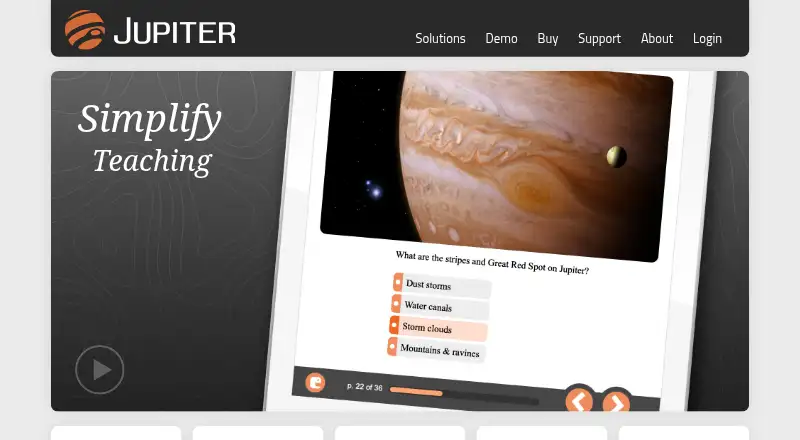
What Jupiter is
Jupiter combines a Learning Management System and Student Information System for public K–12 schools, from small charter schools to large districts. Teachers can manage homework, tests, and essays in the gradebook, with entry methods for points, percentages, letter grades, rubrics, and assignments or students. The system supports online file submission and grading, Google Drive and Dropbox imports, and tools including Paste Blocker and Lockdown. Gradebook integrations include Google Classroom LTI, Clever, and hundreds of learning apps. Jupiter can also synchronize students, staff, courses, sections, and rosters nightly with third-party SIS platforms. Access is available through Android, iPhone, and iPad apps, as well as browsers on Chromebook, Mac, and Windows without plug-ins. Jupiter states that it is FERPA compliant, encrypts data in transit and at rest, and offers two-factor authentication and role-based restrictions. Pricing is available on request. There is no free plan, but a free trial is offered; Scheduler, Enrollment, Payments, and State Reporting are optional upgrades.
Good
- Gradebook supports rubrics and multiple entry methods.
- Imports files from Google Drive and Dropbox.
- Nightly SIS synchronization covers rosters and staff.
- Mobile apps and browser access are available.
- Free trial is offered.
Watch out
- No free plan.
- Pricing is available on request.
- Scheduler, Enrollment, Payments, and State Reporting are optional upgrades.
Who it suits
Jupiter is aimed at public K–12 schools needing gradebook and student-information tools, from small charter schools to large districts. Its mobile and browser access supports school communities using a range of devices.
Verdict
Jupiter brings gradebook and student-information functions into one school system, with integrations and mobile access. Schools should request pricing and assess whether optional modules are needed.
Plans and prices
From Jupiter's own pricing page, checked 15 Oct 2026.
| Plan | Price | What it gives you |
|---|---|---|
| NYC school subscription | $16 a year | volume discounts available · training included · per student |
| Jupiter subscription listing | $500 a year | free trial and free version shown by directory · starting price |
| Jupiter iO historical pricing | $3,550 a year | SIS · LMS · gradebook · analytics · per teacher, depending on volume |
| Jupiter | Priced on request | Gradebook, Communications, Administration included · Scheduler, Enrollment, Payments, State Reporting optional upgrades |
The facts
Each one read from Jupiter's own pages, with the date it was checked.
What it does
- Account protection
- The service logs and cross-references logins, supports two-factor authentication and role-based restrictions, and backs up servers nightly off-site.checked 1 Oct 2026
- Anti-cheating
- The platform includes paste blocking, lockdown controls, edit logging and optional webcam monitoring for assessments.checked 15 Oct 2026
- API evidence
- Jupiter's status log identifies an API import from New York City Department of Education servers, but no public API or SDK documentation page was found.checked 15 Oct 2026
- Assessment tools
- Jupiter provides online tests, quizzes, interactive lessons, equation editing, graphing questions and text-to-speech in 35 languages.checked 15 Oct 2026
- Assignments and cheating controls
- Jupiter supports online file submission and grading, Google Drive and Dropbox imports, Paste Blocker, Lockdown, and writing on PDFs and images.checked 1 Oct 2026
- Attendance and behavior
- The system handles attendance, behavior referrals, special-needs information, seating charts and substitute-teacher workflows.checked 15 Oct 2026
- Changelog
- The October 2026 changelog added automatic Google Classroom score detection and customizable percentages for letter grades.checked 15 Oct 2026
- Communications
- Schools can send email, text messages, announcements and automatic alerts for low grades, missing work, absences and behavior.checked 15 Oct 2026
- Compliance status
- Jupiter's status page states that its security is SOC 2 and Google CASA verified.checked 1 Oct 2026
- Documentation
- Support resources include searchable help topics, quick-start guidance, free two-to-nine-minute videos and paid professional development.checked 15 Oct 2026
- Founder and CEO
- LinkedIn identifies David Hundsness, a former Silicon Valley middle and high school teacher, as founder and CEO.checked 15 Oct 2026
- Gradebook
- Teachers can manage homework, tests, and essays without switching apps.checked 1 Oct 2026
- Grade entry
- Teachers can enter points, percentages, letter grades or rubrics by grid, assignment, student or seating chart.checked 15 Oct 2026
- Grading
- Grade entry supports points, percentages, letter grades, rubrics, grid entry, assignment entry, student entry, and seating-chart entry.checked 1 Oct 2026
- Integrations
- The gradebook lists Google Drive, Dropbox, Google Classroom LTI, Clever, hundreds of learning apps, Single Sign-On, and automated SFTP imports and exports.checked 1 Oct 2026
- Limit: individual accounts
- A Capterra reviewer reports that individual teacher accounts lost automatic parent notifications, text-to-speech and other features while retaining email-only support.checked 15 Oct 2026
Money
- Billing
- The payments module supports credit, debit and ACH payments, convenience fees, nightly direct deposit, refunds, invoices and donations.checked 15 Oct 2026
- Free trial
- Jupiter invites prospective customers to contact the company to try Jupiter for free.checked 1 Oct 2026
Where it runs
- Browser support
- Jupiter lists Chrome, Firefox, Safari and Edge access on Windows, macOS, Chromebook, Android, iPhone and iPad without plug-ins.checked 15 Oct 2026
- Limit: legacy Android app
- The archived Android app was removed from Google Play in 2017, last updated in 2017, and user comments report white-screen and scrolling problems.checked 15 Oct 2026
The company
- Company founding
- LinkedIn lists Jupiter Ed as founded in 2004.checked 15 Oct 2026
- Company headquarters
- LinkedIn lists Philadelphia, Pennsylvania as the headquarters.checked 15 Oct 2026
- Company identity
- The legal footer identifies the maker as Jupiter Ed, Inc.checked 15 Oct 2026
- Company size
- LinkedIn lists the company size as 11–50 employees.checked 15 Oct 2026
The full review of Jupiter
Jupiter is a combined learning-management and student-information system built for public K–12 schools, from small charter schools to very large districts. It suits schools that want teachers’ grading workflows connected to student and roster administration; its breadth is compelling, but custom pricing and optional modules make scope and cost important to settle up front.
Overview
Jupiter brings gradebook, communications, and administration together rather than asking schools to assemble separate tools. Teachers can manage homework, tests, and essays in one gradebook, while the broader system supports a parent and student portal, progress reports, and standards-based grading. That school-wide reach is its chief advantage over a standalone gradebook, though schools seeking only a simple classroom tracker may not need a system at this scale.
The product is designed to scale from small charter schools to districts with hundreds of thousands of students. Its homepage says it serves 4.5 million students and supports deployments beyond 100,000 students, an indication of its intended reach rather than a substitute for checking whether its setup fits a particular school.
Key features
Flexible grading and assignment workflows
Teachers can enter grades as points, percentages, or letter grades, and use rubrics, grid entry, assignment entry, student entry, or seating-chart entry. That range accommodates different grading habits without forcing every teacher into one workflow. Online file submission and grading, plus writing directly on PDFs and images, keep assignment review within the system.
Google Drive and Dropbox imports can reduce friction when collecting work from those services. Paste Blocker and Lockdown add controls aimed at limiting copying or restricting activity during work; schools should decide whether those controls fit their own academic policies and classroom needs.
Integrations and school records
The gradebook connects with Google Drive, Dropbox, Google Classroom LTI, Clever, hundreds of learning apps, and Single Sign-On. Automated SFTP imports and exports provide another route for moving data. Jupiter also integrates with third-party SIS platforms and synchronizes students, staff, courses, sections, and rosters nightly. This makes it a stronger candidate for schools that need the gradebook tied to existing records, though the nightly schedule is worth considering where same-day synchronization is important.
Security, support, and optional modules
Jupiter says it is FERPA compliant, encrypts data in transit and at rest, and does not share data with third parties. It logs and cross-references logins, supports two-factor authentication and role-based restrictions, and backs up servers nightly off-site; its status page says its security is SOC 2 and Google CASA verified. These safeguards address important school concerns, but districts should still review the service against their own security requirements.
Jupiter says it answers most support email within one hour. Phone support is for school accounts, while free video tutorials and a searchable help guide offer self-service options. Scheduler, Enrollment, Payments, and State Reporting are optional upgrades, so schools should confirm which functions are included in their intended configuration.
Pricing
Jupiter is paid software with custom pricing; there is no free plan, but a free trial is available. Its Jupiter plan includes Gradebook, Communications, and Administration, with Scheduler, Enrollment, Payments, and State Reporting offered as optional upgrades. Without a published price or seat terms, a school should request a quote that spells out the core plan, any modules it needs, and the terms of the trial before comparing total cost.
The paid, school-wide scope is best suited to institutions that will use its connected gradebook and administration functions. Schools that only need a small number of classroom grading tools may find a free or lower-cost alternative easier to evaluate and budget for.
Platforms
Jupiter supports Android, iOS, macOS, web, and Windows, and offers an API. Its mobile app works on Android, iPhone, and iPad; browser access is available on Chromebook, Mac, and Windows without plug-ins. That mix can serve staff and families using different devices, rather than tying access to one desktop platform.
Who it's for
Jupiter makes the most sense for public K–12 schools and districts that want grading and student-information functions in one system, need roster synchronization, or expect to use several integrations. Its grading modes also suit schools where teachers need varied ways to enter marks and assess assignments.
It is less clearly suited to an individual teacher who needs only a lightweight gradebook, or to a school unwilling to assess custom pricing and optional modules before committing. Those buyers may prefer a simpler tool with a defined free tier or per-teacher price.
Pros and cons
- Broad school workflow: Gradebook, Communications, and Administration come together, reducing the need to split core tasks across separate systems.
- Flexible grading: Multiple grade formats and entry methods, plus rubrics and standards-based grading, accommodate different classroom practices.
- Useful data connections: Third-party SIS synchronization and integrations with common classroom services can reduce duplicate roster work.
- Pricing needs clarification: Custom pricing and optional upgrades make it harder to gauge the full cost before requesting a quote.
- May exceed a teacher’s needs: Its district-scale scope is a drawback if all that is needed is a basic class gradebook.
Alternatives
For a classroom-focused option with a free tier, consider SimpleGradebook, which is freemium and supports Android, iOS, and web. Gradebox is another freemium web option: its free teacher plan covers one classroom and 120 single-page assignment submissions or grades per month, while Pro costs $11.99 a month.
Schools comparing paid gradebook options can consider TeacherEase, which has a published yearly price of 104.06 USD for the 500–999 teacher tier, based on active employees. Additio App may suit teachers seeking an individual plan: Teachers Standard costs €13.99 a year and includes unlimited students, groups, evaluations, and rubrics.
Other options include GradingPal, iVake Gradebook, Gradekeeper, and NavEd Free Gradebook. Browse Gradebook Software for more options.
Verdict
Jupiter is a strong fit for K–12 schools that want grading, communications, and administration connected, with a wide range of grading workflows and integrations. Its main reason to choose it is that school-wide breadth; its main reason to look elsewhere is the need to request custom pricing and determine the cost of optional modules. Schools should weigh the full configuration against their needs, while teachers seeking only a basic gradebook should start with a simpler alternative.
Alternatives to Jupiter
- 1

ThinkWave
Free planAndroidiOSWebLinux8.2Free plan - 2
Smart Teacher
Free planAndroidiOSWeb7.9From £29.99 a year - 3
Vidyapeeth360 Digital Gradebook
Free planAndroidiOSWebAPI7.9From ₹99 a year - 4
Gradebook.ng
Free planWeb7.2From 15,000 NGN a year - 5

SimpleGradebook
Free planAndroidiOSWeb7.2$3 one-time - 6

iVake Gradebook
AndroidiOSWebAPI7.1From ₹5 a month