HubEngage
HubEngage is an AI-powered employee experience and engagement platform that brings communications, recognition, social engagement, surveys, intranet resource…
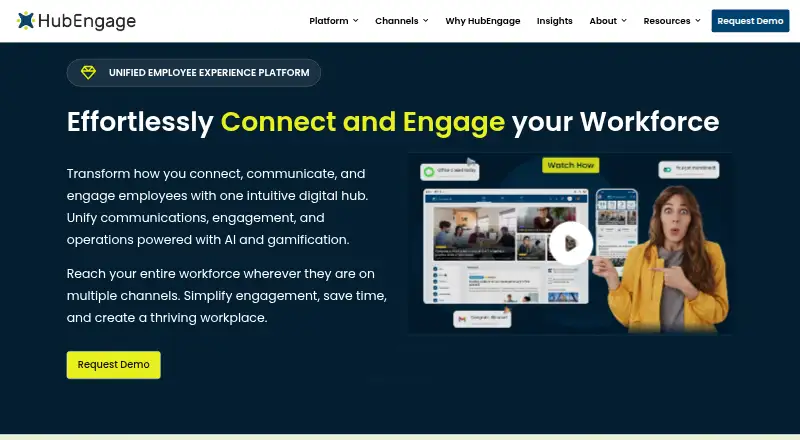
What HubEngage is
HubEngage is an AI-powered employee experience and engagement platform that brings communications, recognition, social engagement, surveys, intranet resources, and workforce tools together. Organizations can choose Communications, Recognition, Social Engagement, Surveys, Instant Messaging, and AI Assistant hubs, then add capabilities as needed. Employees can access it through mobile, web, email, SMS, Microsoft Teams, Slack, and digital signage. Gamification uses points, badges, and leaderboard rankings. APIs and custom communications integrations support data exchange, with listed connections including SharePoint, Microsoft Teams, ADP, UKG, Workday, SSO, HRIS, and payroll systems. HubEngage states compliance with ISO 27001, SOC 2, HIPAA, and GDPR. Messaging is encrypted in transit and at rest, but not end-to-end. The employee app can include employees and external groups such as vendors, partners, suppliers, and prospective or former employees, with segmentation controlling content access. Starter is free for up to 200 users. Pro is listed at $1 a month and includes increased limits, scheduling, targeting, analytics, email campaigns, SMS, and digital signage; Enterprise pricing is not listed.
Good
- Multiple communication channels, including SMS and email
- Organizations can add hubs as needs grow
- Includes points, badges, and leaderboard rankings
- Listed integrations include HRIS and payroll systems
- Free Starter plan supports up to 200 users
Watch out
- Messaging does not offer end-to-end encryption
- Enterprise pricing is not listed
- Pro plan costs $1 a month
Who it suits
HubEngage suits organizations seeking employee communications and engagement tools across several channels. Its audience options can also include vendors, partners, suppliers, and current or former prospective employees.
Verdict
HubEngage combines employee communications, engagement modules, and workforce tools in one platform. Review its encryption limitation and the plan details for the capabilities and user limits you need.
Plans and prices
From HubEngage's own pricing page, checked 1 Oct 2026.
| Plan | Price | What it gives you |
|---|---|---|
| Starter | Free | up to 200 users · Communications, Social, Recognitions, Surveys and Instant Messaging |
| Pro | $1 a month | increased limits · scheduling · content calendars · dynamic user targeting · unlimited admins · advanced analytics · Email Campaigns · SMS Text Messaging · Digital Signage |
| Custom proposal | Priced on request | Employee-count-based proposal · Optional hubs and channels · SMS and digital signage may cost extra · Monthly, annual and multi-year contracts are offered; longer commitments receive discounts. |
| Enterprise | Priced on request | all Pro features · Single Sign On · SLA · security compliance · integrations · dedicated account manager |
The facts
Each one read from HubEngage's own pages, with the date it was checked.
What it does
- AI and gamification
- The platform includes AI-assisted search, content creation, translation and analytics plus points, badges, leaderboards and rewards.checked 14 Oct 2026
- API extensibility
- HubEngage says it can consume data from APIs, export data through APIs and scope custom integrations with its development team.checked 14 Oct 2026
- Audience
- The employee app can include employees as well as vendors, partners, suppliers and prospective or former employees, with segmentation controlling relevant content access.checked 1 Oct 2026
- Channels
- The platform is accessible through mobile, web, email, SMS, Microsoft Teams, Slack and digital signage.checked 1 Oct 2026
- Communications Hub
- The Communications Hub distributes updates, announcements and policies to keep employees informed.checked 14 Oct 2026
- Compliance
- The platform states compliance with ISO 27001, SOC 2, HIPAA and GDPR.checked 1 Oct 2026
- Connectivity requirement
- The FAQ says some content may be cached offline, but full access requires an internet connection.checked 14 Oct 2026
- Deployment
- The messaging app can be branded, configured and deployed in 2–3 days; fully branded App Store and Google Play apps may take 5–7 business days.checked 1 Oct 2026
- Deployment timing
- HubEngage says a branded messaging deployment can take 2–3 days, or 5–7 business days when a fully branded app-store application is required.checked 14 Oct 2026
- Documentation and support
- The user FAQ covers login, SSO, surveys, recognition, documents, notifications, security and support contact procedures.checked 14 Oct 2026
- Encryption
- Messages are encrypted in transit and at rest, but HubEngage says it does not provide end-to-end message encryption.checked 14 Oct 2026
- Enterprise systems
- Listed integrations include SharePoint, Microsoft Teams, ADP, UKG (Ultipro), Workday, SSO, HRIS and payroll systems.checked 1 Oct 2026
- Gamification
- HubEngage applies gamification across the employee experience, with points, badges and leaderboard rankings.checked 1 Oct 2026
- Independent pricing criticism
- iTechGuides reports proposal-based pricing with no public plan table, making direct budget comparison harder.checked 14 Oct 2026
- Independent review assessment
- iTechGuides describes HubEngage as strong for broad channel coverage and publishing controls, while saying its breadth may be excessive for teams needing only simple announcements.checked 14 Oct 2026
- Integrations
- Named integrations include Jive, WordPress, SharePoint, UltiPro, Microsoft Teams, Workday, ADP, Oracle Marketing Cloud, Microsoft Active Directory and Google Workspace.checked 14 Oct 2026
- Limit: setup complexity
- G2 review summaries repeatedly mention a learning curve, difficult setup and complex navigation, especially for advanced settings.checked 14 Oct 2026
- Messaging encryption
- Messaging is encrypted in transit and at rest, but HubEngage does not offer end-to-end message encryption.checked 1 Oct 2026
- Messaging Hub
- The Messaging Hub provides individual and group real-time messaging.checked 14 Oct 2026
The company
- Company size
- LinkedIn lists HubEngage as a privately held software-development company with 11–50 employees.checked 14 Oct 2026
- Founded
- LinkedIn lists 2015 as the founding year.checked 14 Oct 2026
- Headquarters
- HubEngage identifies 1035 Cambridge Street, Suite 1, Cambridge, Massachusetts 02141 as its global headquarters.checked 14 Oct 2026
Where it runs
- Limit: Android attachments
- A Google Play reviewer reported that attachments in notices, including PDFs, sometimes would not open.checked 14 Oct 2026
- Messaging platforms
- Messaging is available through iOS and Android apps, Windows, Mac and Linux desktop apps, and a responsive website.checked 1 Oct 2026
The full review of HubEngage
Overview
HubEngage is an employee experience platform for organizations that need to reach staff and other workplace audiences across multiple channels. Its modular approach suits teams that want communications, engagement and workforce tools together, while its lack of end-to-end message encryption may rule it out for sensitive conversations.
Organizations can select from Communications, Recognition, Social Engagement, Surveys, Instant Messaging and AI Assistant hubs, and expand their setup as needs change. Employees can be joined by vendors, partners, suppliers, prospective employees and former employees, with audience segmentation controlling who sees which content.
Key features
Channels and targeting
HubEngage reaches people through mobile, web, email, SMS, Microsoft Teams, Slack and digital signage. Email publishing, audience targeting and content approvals give communications teams ways to direct messages and manage publishing; full frontline channels make the platform relevant to organizations whose workforce is not desk-bound.
Engagement and workforce tools
Recognition, social engagement and surveys sit alongside communications and intranet resources. Points, badges and leaderboards apply gamification across the employee experience, which can support participation without forcing every organization to adopt every hub.
Messaging, integrations and security
Messaging works through iOS and Android apps, Windows, Mac and Linux desktop apps, and a responsive website. The messaging app can be branded, configured and deployed in 2–3 days; fully branded apps published to the App Store and Google Play may take 5–7 business days. That is a relatively quick path to a tailored employee app, though the additional app-store timeline matters for a full branded launch.
APIs support data consumption and export, and the platform supports custom employee communications integrations. Listed enterprise connections include SharePoint, Microsoft Teams, ADP, UKG (Ultipro), Workday, SSO, HRIS and payroll systems. HubEngage states compliance with ISO 27001, SOC 2, HIPAA and GDPR. Messages are encrypted in transit and at rest, but not end-to-end; organizations requiring end-to-end protection for messaging should look elsewhere.
Pricing
Starter: free, for up to 200 users. It includes Communications, Social, Recognitions, Surveys and Instant Messaging. This gives smaller organizations a meaningful set of core modules, but the 200-user ceiling limits its fit as adoption grows.
Pro: $1 a month. It adds increased limits, scheduling, content calendars, dynamic user targeting, unlimited admins, advanced analytics, Email Campaigns, SMS Text Messaging and Digital Signage. These additions suit teams coordinating more complex or multi-channel communications. The listed monthly price does not state a billing basis, so confirm the commercial terms and applicable limits before budgeting.
Enterprise: custom pricing. It includes all Pro features plus Single Sign On, SLA, security compliance, integrations and a dedicated account manager. This is the tier for organizations that need enterprise identity, service commitments or integration support; custom pricing means the cost must be established with HubEngage.
HubEngage has a free plan and a free trial. Its experts support customers from setup through rollout and provide ongoing service and support.
Platforms
HubEngage supports Android, iOS, Linux, macOS, web, Windows and API access. That breadth, alongside email, SMS, Teams, Slack and signage, helps organizations reach employees across device types and work settings.
Who it's for
HubEngage is best suited to organizations seeking one configurable platform for employee communications, engagement and workforce resources, especially those with frontline audiences or a need to include external workplace groups. Teams that need a single communication function, or require end-to-end encrypted messaging, should consider a narrower or more security-specific fit.
Pros and cons
- Pros: Multiple selectable hubs let organizations grow beyond basic communications without adopting every capability at once.
- Pros: Mobile, desktop, web and frontline channels support reaching varied employee groups, with targeting and approvals for controlled publishing.
- Pros: APIs and named HR, payroll and collaboration integrations can connect employee communications with enterprise systems.
- Cons: Messaging lacks end-to-end encryption, which is a material limitation for sensitive conversations.
- Cons: Starter is capped at 200 users, while Enterprise is custom priced, so larger organizations may need to move beyond the free tier and seek a quote.
Alternatives
For a narrower directory search, compare Employee Communication Software or Intranet Software.
Appspace Workplace may suit teams wanting a freemium workplace platform with a free tier capped at 2 Premium Users, 1 Appspace Device ID, 5GB storage and bandwidth per month, and 2 admins.
Cerkl Broadcast is worth considering for teams focused on email sends: its free Foundations plan includes 5,000 sends per month, with additional sends at $.09 each and communicator seats priced at $75/mo per additional seat.
Netpresenter offers a 14-day free trial and may be preferable for readers comparing a paid platform with a defined trial period.
theEMPLOYEEapp is another option for organizations with fewer than 50 employees on its Starter plan, or those considering its Pro plan with minimum pricing of $7,500/year.
Blink may appeal to teams seeking a defined per-user price: its Core plan is $4.50 a month, billed per user per month, and includes custom company branding, internal communications, real-time collaboration and a knowledge hub.
DeskAlerts is another paid employee communications option.
SnapComms offers a paid Inform plan with customer-selected employee count, unlimited usage and content creators, plus desktop alerts, video alerts and tickers.
Talkfreely provides a 60-day free trial and a Business plan priced at £1 a month per user.
Verdict
Choose HubEngage if you want a configurable employee platform that spans communications, engagement modules and frontline channels, with integrations and rollout support for a broader deployment. Its main trade-offs are the 200-user Starter cap and messaging without end-to-end encryption; organizations that need unrestricted free adoption or stronger message confidentiality should look elsewhere.
Getting started
- Visit the HubEngage website.
- Choose the Starter plan or request pricing for paid options.
- Select the hubs and capabilities that fit the organization's needs.
- Choose the messaging app for mobile, desktop, or responsive website access.
- Configure and deploy the messaging app; HubEngage says this can take 2–3 days, or 5–7 business days for fully branded app store apps.
Limits worth knowing
Starter is limited to up to 200 users and includes Communications, Social, Recognitions, Surveys, and Instant Messaging. Pro is listed at $1 a month; Enterprise pricing is on request.
Questions
Is there a free plan?
Yes. Starter costs nothing for up to 200 users and includes Communications, Social, Recognitions, Surveys, and Instant Messaging.
How much does Pro cost?
Pro is listed at $1 a month. It adds increased limits, scheduling, content calendars, dynamic user targeting, unlimited admins, advanced analytics, email campaigns, SMS text messaging, and digital signage.
What platforms and channels are available?
The listed platforms include Android, API, iOS, Linux, macOS, web, and Windows. Channels include mobile, web, email, SMS, Microsoft Teams, Slack, and digital signage.
Which integrations are listed?
Listed integrations include SharePoint, Microsoft Teams, ADP, UKG (Ultipro), Workday, SSO, HRIS, and payroll systems. HubEngage also supports API data exchange and custom employee communications integrations.
Does HubEngage offer end-to-end message encryption?
No. Messaging is encrypted in transit and at rest, but the platform does not offer end-to-end message encryption.
What does Enterprise include?
Enterprise includes Pro features, Single Sign On, SLA, security compliance, integrations, and a dedicated account manager. Its price is on request.
Alternatives to HubEngage
- 1

Netframe
Free planOpen sourceAndroidiOSWebLinux8.3From €3 a month - 2
Noodle
Free planAndroidiOSWebAPI8.0From $4 a month - 3

MangoApps
AndroidiOSWebAPI7.9From $9 a month - 4

Appspace Intranet
Free planAndroidiOSWebAPI7.4Free plan - 5

Silverpeas
Free planAndroidiOSWebAPI7.3From €2 a month - 6
Axero
AndroidiOSWebAPI7.2From $500 a month