Netpresenter
Netpresenter is a visual platform for employee and emergency communications that distributes content across organizational screens.
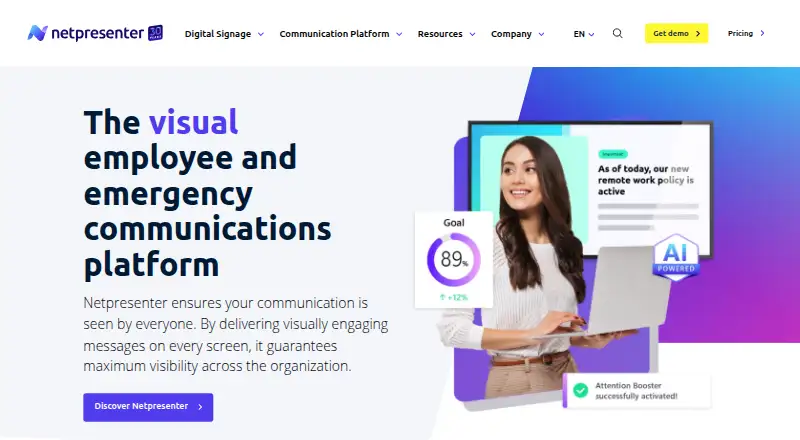
What Netpresenter is
Netpresenter is a visual platform for employee and emergency communications that distributes content across organizational screens. Its channels include a corporate screensaver, employee app, desktop alerts, digital signage, lock screen, wallpaper, desktop ticker, and employee SMS. Publishers can target specific people or devices using criteria such as department or location. Employees can respond through polls, comments, and reactions. An AI Assistant can generate and refine communication content, while Smart Campaigns provide AI-powered employee training. Netpresenter Alerts are designed to reach employees during events such as cyberattacks, system outages, and severe weather. Listed integrations include SharePoint, Microsoft Teams, Power BI, Outlook Calendar, Excel, Entra ID, Workspace 365, social media, RSS, Canva, and YouTube. The maker says data is hosted in Germany by default, with US hosting available, and guarantees 99.9% uptime for cloud services. It states the platform is ISO 27001:2022 and NIS2 Supply Chain certified. Licenses include onboarding, training, technical support, customer success, and continuous updates. Paid pricing is quote-based and depends on selected tools and number of employees or devices; a 14-day trial is listed.
Good
- Targets audiences by department or location
- Offers multiple screen and employee communication channels
- Includes polls, comments, and reactions
- Licenses include onboarding, training, and technical support
Watch out
- Paid pricing is quote-based
- No strict minimum user or device count is stated, but quotes vary by selection
Who it suits
Netpresenter suits organizations that need to distribute employee communications across screens, apps, and desktop channels. Its targeting, alerts, and engagement features are relevant to teams communicating with different employee groups.
Verdict
Netpresenter brings multiple employee communication channels together with targeting, feedback, and emergency alerts. Organizations should request a quote based on the tools and audience they need.
Plans and prices
From Netpresenter's own pricing page, checked 29 Sep 2026.
| Plan | Price | What it gives you |
|---|---|---|
| Free trial | Free | 14 days |
| Desktop Ticker | Priced on request | Quote-based; pricing depends on selected tools and number of employees or devices |
| Digital Signage | Priced on request | Quote-based; pricing depends on selected tools and number of employees or devices |
| Employee App | Priced on request | Quote-based; pricing depends on selected tools and number of employees or devices |
| Employee SMS | Priced on request | Quote-based; pricing depends on selected tools and number of employees or devices |
| Lock Screen | Priced on request | Quote-based; pricing depends on selected tools and number of employees or devices |
| Screensaver | Priced on request | Quote-based; pricing depends on selected tools and number of employees or devices |
| Desktop Alerts | Priced on request | Quote-based; pricing depends on selected tools and number of employees or devices |
| Wallpaper | Priced on request | Quote-based; pricing depends on selected tools and number of employees or devices |
The facts
Each one read from Netpresenter's own pages, with the date it was checked.
What it does
- AI and campaigns
- Its AI Assistant can generate and refine communication content, and Smart Campaigns deliver AI-powered employee training.checked 29 Sep 2026
- Communication tools
- The platform includes a corporate screensaver, employee app, desktop alerts, digital signage, lock screen, wallpaper, desktop ticker, and employee SMS.checked 29 Sep 2026
- Emergency alerts
- Netpresenter Alerts are designed to reach employees during emergencies such as cyberattacks, system outages, and severe weather.checked 29 Sep 2026
- Engagement
- The platform supports employee polls, comments, and reactions to gather feedback and encourage interaction.checked 29 Sep 2026
- Hosting and uptime
- The maker says data is hosted in Germany by default, offers US hosting, and guarantees 99.9% uptime for cloud services.checked 29 Sep 2026
- Integrations
- Listed integrations include SharePoint, Microsoft Teams, Power BI, Outlook Calendar, Excel, Entra ID, Workspace 365, social media, RSS, Canva, and YouTube.checked 29 Sep 2026
- Pricing limit
- The maker says there is no strict minimum number of users or devices, and optional premium add-ons can be included in a quote.checked 29 Sep 2026
- Product
- Netpresenter is a visual platform for employee and emergency communications that distributes content across organizational screens.checked 29 Sep 2026
- Security certification
- Netpresenter states that it is ISO 27001:2022 certified and NIS2 Supply Chain certified.checked 29 Sep 2026
- Security controls
- The Trust Center lists SSO, two-factor authentication, role-based access control, data encryption at rest and in transit, and a secure API.checked 29 Sep 2026
- Support and onboarding
- The pricing page says licenses include onboarding, training, technical support, customer success, and continuous updates.checked 29 Sep 2026
- Supported systems
- The employee app supports Windows, macOS, Linux, iOS, and Android, with OS version requirements specified in its helpdesk FAQ.checked 29 Sep 2026
- Targeting
- Publishers can target person- or device-specific audiences using criteria such as department or location.checked 29 Sep 2026
The company
- Company history
- Netpresenter says it was founded in 1995 and identifies Frank Hoen as its founder and CEO.checked 29 Sep 2026
- Founded
- 1995checked 28 Sep 2026
- Headquarters
- Beek, Limburg, Netherlandschecked 28 Sep 2026
Money
- Free plan
- Nochecked 21 Sep 2026
Where it runs
- Mobile app
- Yeschecked 21 Sep 2026
The full review of Netpresenter
Netpresenter is an employee communications and emergency alert platform that sends messages through workplace screens, employee devices and SMS. It is best suited to organizations that need targeted communication across several channels, not buyers looking for a free, self-service tool. Its breadth and rollout support are compelling, but custom pricing makes a quote necessary to judge cost.
Overview
Netpresenter combines a corporate screensaver, digital signage, lock screen, wallpaper, desktop ticker and alerts with an employee app and SMS. Publishers can target people or devices by department or location, which helps keep messages relevant across different teams and sites. Polls, comments and reactions support employee feedback, while content approvals suit organizations that need a managed publishing process. Email publishing is not supported, so teams that require email within the same communications workflow will need another solution.
AI Assistant can generate and refine communications, and Smart Campaigns deliver AI-powered employee training. Netpresenter Alerts are designed for events including cyberattacks, system outages and severe weather, adding an emergency channel alongside routine updates. The company was founded in 1995 and is headquartered in Beek, Limburg, Netherlands.
Key features
The strongest case for Netpresenter is its range of distribution channels: organizations can pair persistent screen content with alerts and mobile messaging rather than relying on a single feed. Audience targeting and approvals add useful control for larger or distributed teams. The engagement tools provide ways to collect reactions and feedback, though organizations seeking email-based publishing will have to maintain that separately.
Integrations include SharePoint, Microsoft Teams, Power BI, Outlook Calendar, Excel, Entra ID, Workspace 365, social media, RSS, Canva and YouTube. This breadth can connect communications to common workplace tools and content sources. Security controls listed by the Trust Center include SSO, two-factor authentication, role-based access control, encryption at rest and in transit, and a secure API. Netpresenter states that it is ISO 27001:2022 and NIS2 Supply Chain certified. Cloud services carry a 99.9% uptime guarantee; data is hosted in Germany by default, with US hosting also offered.
Pricing
Netpresenter has no free plan. Its Free trial costs nothing for 14 days, giving buyers a short evaluation window before committing. The paid offerings—Desktop Alerts, Wallpaper, Employee SMS, Digital Signage, Employee App, Lock Screen, Desktop Ticker and Screensaver—each use custom pricing based on selected tools and the number of employees or devices. There is no strict minimum user or device count, and optional premium add-ons can be included in a quote.
Because each channel is quote-based, buyers should identify their required tools and audience before comparing proposals; there is no published entry price to anchor a budget. Licenses include onboarding, training, technical support, customer success and continuous updates, which may suit organizations that value guided rollout, but leaves no free ongoing tier for smaller teams to grow into.
Platforms
Netpresenter supports Android, iOS, Linux, macOS, web and Windows, as well as an API. The employee app supports Windows, macOS, Linux, iOS and Android; operating-system version requirements vary. The mobile app is available, giving organizations a channel beyond workplace screens.
Who it's for
Netpresenter is a strong fit for organizations that communicate with employees across locations or device types and want routine messages, feedback and emergency alerts in one platform. Its targeting, approvals, integrations and included onboarding support a coordinated internal communications program. It is less suitable for teams that need email publishing, a free plan or transparent per-user pricing before speaking with a vendor.
Pros and cons
- Broad channel mix: screens, desktop alerts, app and SMS give organizations several ways to reach employees.
- Useful audience controls: targeting by department or location helps tailor messages, while approvals support controlled publishing.
- Emergency communications: dedicated alerts address incidents such as outages, cyberattacks and severe weather.
- Quote-only pricing: buyers must request a tailored price, complicating early budget comparisons.
- No free plan or email publishing: organizations needing a no-cost starting point or an integrated email channel should look elsewhere.
Alternatives
Employee Communication Software and Digital Signage Software are useful category lists for comparing tools by their primary use.
Choose HubEngage if a free tier for up to 200 users matters: its Starter plan is free and includes communications, social, recognitions, surveys and instant messaging. Appspace Workplace is another option for buyers who want a free plan, with 2 Premium Users, 1 Appspace Device ID, 5GB storage and bandwidth per month, and 2 Admins. For a communications product centered on email, consider Cerkl Broadcast, whose Foundations plan includes 5,000 email sends per month, 3 communicator seats and 1 instance; additional sends cost $.09 each and additional seats $75/mo.
Talkspirit, Blink, DeskAlerts, Frontlyne and SnapComms are other alternatives to compare.
Verdict
Choose Netpresenter if your organization needs targeted employee communications across screens and devices, with emergency alerts and onboarding support under one roof. Its channel range and audience controls are the main reasons to consider it; custom pricing and the absence of email publishing or a free plan are the clearest reasons to look elsewhere.
Alternatives to Netpresenter
- 1

OptiSigns
Free planAndroidiOSWebAPI8.8From $9 a month - 2
Viewix
Free planAndroidiOSWebAPI8.6From $49 a month - 3

EasySignage
Free planAndroidWebAPILinux8.4From $7 a month - 4

Yodeck
Free planAndroidWebAPI8.3From $8 a month - 5

ScreenCloud
AndroidiOSWebAPI8.2From $20 a month - 6
Layarva
Free planAndroidWebAPILinux8.0From $1 a month